


Best gaming setup accessories for beginners in 2026
Best overall first upgrade: M801 Wireless RGB Gaming Mouse. Best for small desks: K617 Fizz keyboard. Best display upgrade: the 25-inch 165Hz monitor. These are the best gaming setup accessories for beginners in 2026 when you buy for a specific problem rather than fill your desk with extras.
- The best gaming setup accessories for beginners fix control, desk space, display, or charging problems first.
- Gaming and More's M801 Wireless RGB Gaming Mouse is the default first upgrade for beginners replacing an unsuitable mouse.
- Choose the K617 Fizz for a compact keyboard layout, not for extra dedicated keys.
- Choose the Xbox Controller Charger only after confirming compatibility with your exact controller.
What makes the best beginner gaming accessories?
- Useful improvement: Fix something you notice while playing.
- Compatibility: Check connections, supported devices, and physical fit.
- Comfort: Match your grip, reach, and desk arrangement.
- Simple upkeep: Account for charging and cleaning.
- Clear trade-offs: Know what you lose, not just what you gain.
Why this matters
Gaming and More's M801 Wireless RGB Gaming Mouse is the best first gaming accessory here for beginners replacing an unsuitable mouse. Keep accessories that already work; replace the part that interrupts play.
Beginner gaming accessories at a glance
| Rank and accessory | Best for | Standout feature | Key limitation |
|---|---|---|---|
| 1. M801 Wireless RGB Gaming Mouse | Replacing an unsuitable everyday mouse | Adjustable DPI and rechargeable wireless design | Requires charging; hand fit still matters |
| 2. K617 Fizz compact gaming keyboard | Freeing desk space | 60% layout with RGB lighting | Fewer dedicated keys than a full-size keyboard |
| 3. 25-inch 165Hz gaming monitor | Building a desktop display setup | Listed 165Hz refresh rate and AMD FreeSync | Your computer and connection must support the intended output |
| 4. Xbox Controller Charger | Managing compatible controller batteries | Dual 2550mAh rechargeable battery packs | Controller and battery-compartment compatibility need checking |
1. M801: best beginner gaming mouse for a first control upgrade
The M801 Wireless RGB Gaming Mouse combines wireless operation, adjustable DPI, and a rechargeable design. Choose it when your current mouse feels awkward, its cable gets in the way, or you want to adjust pointer sensitivity without replacing your whole setup.
Best for: Beginners replacing an unsuitable everyday mouse while keeping an otherwise usable keyboard and screen.
DPI describes mouse sensitivity, not aiming skill. A higher setting moves the pointer farther for the same physical movement, but that does not make it the right setting for your game. Start with a setting that lets you select small targets without repeatedly correcting your movement.
M801 pros:
- Wireless operation removes a mouse cable from your movement area.
- Adjustable DPI gives you a way to change pointer sensitivity.
- Rechargeability makes charging part of your routine rather than relying on disposable batteries.
M801 cons:
- You need to keep track of charging.
- Adjustable sensitivity cannot compensate for a shape that does not suit your hand.
Before choosing the M801, check its connection requirements and compare its shape with a mouse you already find comfortable. Do not assume that wireless means Bluetooth, and do not choose it purely for the RGB lighting.
For your first sessions, leave sensitivity alone long enough to judge it. Changing settings after every missed shot makes it harder to identify whether the problem is sensitivity, grip, or practice.
Verdict: Buy the M801 if your current mouse is the weak point; hold if your existing mouse already fits and works well.
2. K617 Fizz: best beginner gaming keyboard for a small desk
The K617 Fizz is a 60% compact gaming keyboard with RGB lighting. Its smaller layout is the reason to consider it: a shorter keyboard leaves more desk width available for your mouse and other essentials.
Best for: Beginners who want more mouse room and do not depend on a full-size keyboard layout.
A 60% keyboard does not mean the keys themselves are 60% of normal size. The layout removes dedicated sections found on larger keyboards, so some commands require function combinations. Check the exact layout against the controls you use in games and everyday work.
K617 Fizz pros:
- A compact layout reduces the keyboard's claim on desk space.
- More available desk width gives you flexibility when positioning your mouse.
- RGB lighting suits a setup where you want illuminated keys.
K617 Fizz cons:
- Fewer dedicated keys mean learning additional key combinations.
- Frequent number entry and shortcut-heavy work can make a larger layout more practical.
For a beginner setup in 2026, compact is useful only when the saved space solves a real problem. Keep a full-size keyboard if you regularly use its number pad or dedicated navigation keys.
Before switching, write down the keys you use outside games. Include screenshots, volume controls, arrow keys, and any shortcuts you use for school or work. Compare that list with the K617 layout rather than assuming that every familiar command has a dedicated key.
Verdict: Buy the K617 Fizz for mouse space; skip a compact layout if dedicated keys matter more.


3. The 25-inch 165Hz monitor: best for building a desktop display setup
The 25-inch Gaming Monitor lists a 165Hz refresh rate, a 1ms response-time claim, and AMD FreeSync. It belongs on your shortlist when you need a desktop screen or want to replace a display that limits your intended setup.
Best for: Beginners building a dedicated desk setup around a computer that supports the desired display output.
Refresh rate measures how often a screen refreshes; it does not tell you how many frames your computer will render. Buying a 165Hz monitor does not make a game run at 165 frames per second. Your computer, game settings, connection, and display configuration all matter.
25-inch monitor pros:
- The listed 165Hz refresh rate supports a high-refresh display setup.
- AMD FreeSync provides an adaptive-sync option with compatible equipment.
- The 25-inch size gives you a specific screen dimension to plan around.
25-inch monitor cons:
- The monitor cannot fix low game frame rates caused by the computer.
- The listed 1ms figure alone does not establish overall motion clarity or input lag.
For a 2026 purchase, check the monitor's supported inputs and refresh-rate requirements before choosing a cable. Then confirm the intended refresh rate in your operating system and game settings after connecting it.
Measure your usable desk depth as well as width. A screen that fits across the desk still needs room for its stand, your keyboard, and a viewing position that does not force you to lean forward.
Verdict: Buy the 25-inch 165Hz monitor when you need a display upgrade; hold if your existing screen already meets your needs.
4. Xbox Controller Charger: best for rechargeable controller upkeep
The Xbox Controller Charger includes dual 2550mAh rechargeable battery packs. Its role is practical: give compatible controller batteries a regular charging routine rather than leave power management until you want to play.
Best for: Xbox controller users who want rechargeable battery packs and a dedicated charging arrangement.
Compatibility comes before capacity. Check the exact controller model, battery-compartment fit, and any required battery covers before choosing the charger. The Xbox name alone is not enough to establish that every controller or battery arrangement will work.
Xbox Controller Charger pros:
- Includes two rechargeable battery packs.
- Gives controller charging a dedicated place in your setup.
- Suits players who prefer rechargeable packs over disposable batteries.
Xbox Controller Charger cons:
- Adds another accessory that needs space and a power connection.
- A 2550mAh capacity figure does not establish a guaranteed playtime.
If you already have a dependable rechargeable arrangement, a second charger is unnecessary. If you mostly play with a keyboard and mouse, this belongs below your everyday input devices on the shopping list.
Gift shoppers should ask which controller the recipient uses before buying. A useful surprise is still useful only when it fits; match the hardware first and the desk aesthetic second.
Verdict: Buy the Xbox Controller Charger for a confirmed compatible controller; skip it if your current charging routine already works.
How to choose your first upgrade in 2026
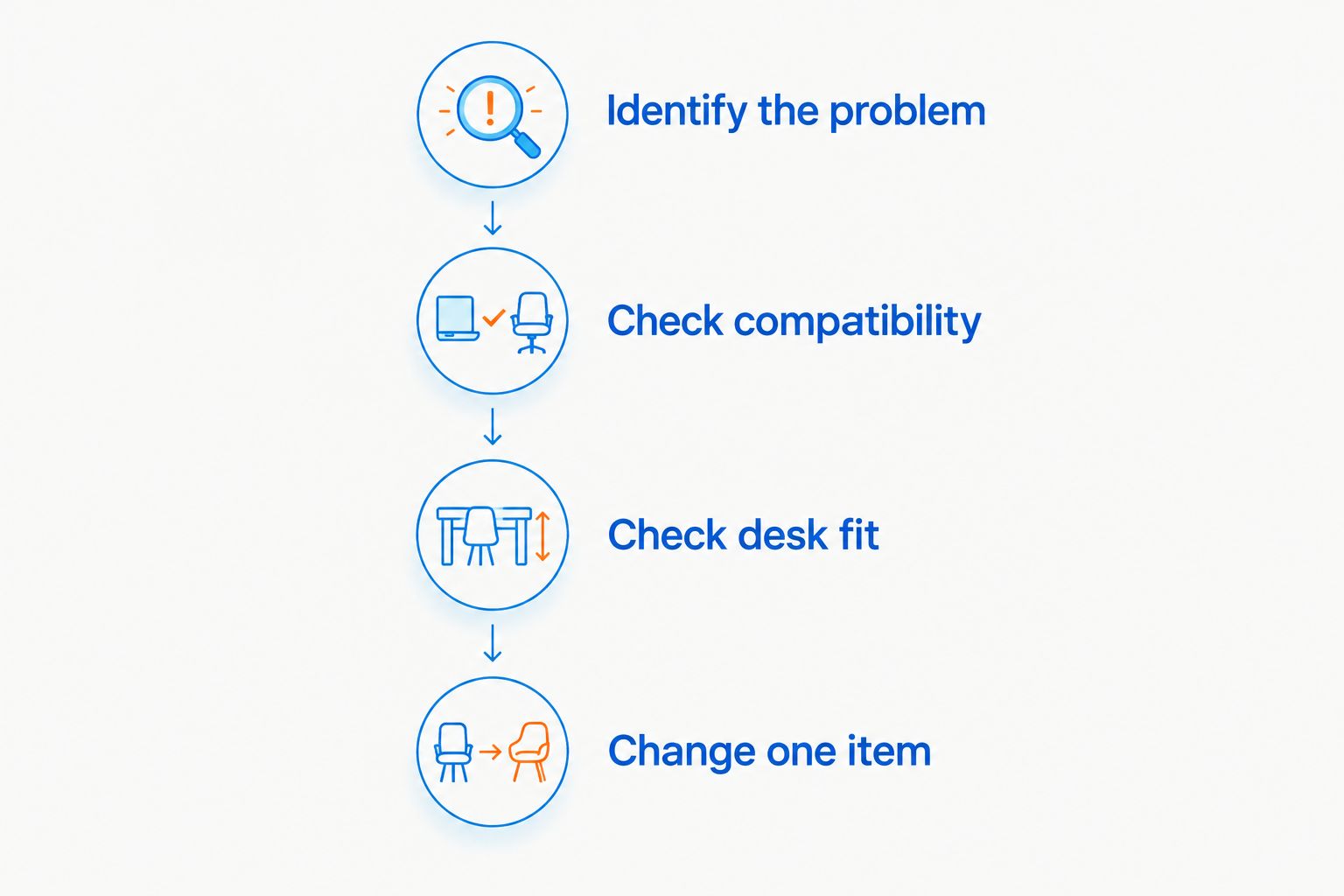
Use this order before adding anything to your cart. The goal is to identify a missing function, not assemble every accessory in this guide.
Identify the problem
Finish this sentence: my current setup makes it difficult to do what? Examples include moving the mouse freely, reaching controls, seeing the game comfortably, or keeping a controller charged.
Choose the accessory that addresses that problem directly. If you cannot name the problem, keep using what you have until a clear need appears.
Check compatibility
Read the connection and compatibility details for the exact item. Look for the computer's available ports, the controller model, or the monitor connection requirements rather than relying on the word gaming.
Do not assume two products work together because both use wireless connections. Wireless describes a connection category, not a universal pairing method.
Check desk fit
Arrange your existing keyboard, mouse, and screen before deciding what to replace. Leave room for your normal mouse movement and keep frequently used controls within a comfortable reach.
A compact keyboard helps when width is the problem. It does not solve a desk that lacks enough depth for comfortable screen placement.
Change one item
Use the new accessory in the games you actually play. Keep the rest of your setup familiar so you can judge whether the change helped.
For 2026 beginners, this is a better shopping rule than buying matching lights or a complete replacement set. Keep the working parts and build around them.
What should you keep instead of replacing?
Keep any accessory that is comfortable, compatible, and doing its job. A basic keyboard can remain useful even when you replace the mouse, and a dependable screen does not need replacing just because a higher refresh rate exists.
Keep working audio equipment, too. Test whether you can hear the game clearly and whether friends can understand your microphone before deciding you need another headset. A headset purchase should solve an audio or communication problem, not complete a matching collection.
For gifts, avoid replacing a strongly preferred mouse or keyboard without asking. Hand fit and layout preferences are personal. Confirm the recipient's platform, current gear, and actual complaint before choosing a replacement.
How these accessories are ranked
This Gaming and More beginner gaming accessories ranking prioritizes a useful first improvement, compatibility, comfort, upkeep, and clear limitations. The mouse comes first for someone replacing an unsuitable pointing device; the keyboard, monitor, and controller charger each serve a different need.
The order is not a claim that every beginner needs all four. It is a buying decision guide based on the listed product features and their practical trade-offs, not a measured performance comparison.
Which beginner gaming accessories should you choose?
Choose the M801 first if your mouse is uncomfortable or gets in your way. Choose the K617 Fizz if keyboard width is your problem, the 25-inch monitor if your display needs replacing, or the Xbox Controller Charger if compatible controller charging is the missing piece.
Your 2026 setup does not need a full rebuild. It needs the next useful change, followed by enough time to decide whether another change is necessary.
FAQ
What's the best gaming setup accessory for a beginner?
The M801 Wireless RGB Gaming Mouse is the default first pick here for beginners replacing an unsuitable mouse. Choose a different accessory first if your real problem is desk space, the display, or controller charging.
Do I need to buy all my gaming accessories at once?
No. Keep accessories that already work and replace the item causing a specific problem. Changing one item at a time also makes the result easier to judge.
Is a 60% keyboard good for beginner gamers?
A 60% keyboard is a good choice when saving desk width matters more than dedicated keys. Check the layout and function combinations before choosing the K617 Fizz, especially if you also use the keyboard for work or school.
Will a 165Hz monitor make my computer run games faster?
No. A 165Hz monitor changes the display's refresh capability, not the computer's rendering performance. Your computer, game settings, and connection determine whether you can make use of that refresh rate.
Does a higher mouse DPI mean better aim?
No. Higher DPI changes pointer movement for a given physical movement; it does not establish better accuracy. Choose a setting you can control consistently.
Will the Xbox Controller Charger work with any Xbox controller?
Do not assume universal compatibility. Confirm the exact controller model, battery-pack fit, and any required covers before choosing the Xbox Controller Charger.
What gaming accessory should I buy as a gift?
Buy an accessory that solves a problem the recipient has identified. Confirm their platform and current equipment first, particularly for controllers, keyboards, and mice.
One last thing
A smaller keyboard does not automatically create a better setup; the useful gain is the space you actually reclaim. Before replacing anything, move your current keyboard and mouse into a comfortable position and test your normal movements.
If that solves the problem, keep your gear. Gaming and More's beginner gaming accessories should fill a gap, not create a reason to replace something that already works.


