


Best Ergonomic Gaming Mouse for Long Sessions 2026
Sitting through a five-hour raid or a weekend LAN with a mouse that fights your wrist is the fastest way to end a session early. The best ergonomic gaming mouse for long gaming sessions in 2026 is the Wireless Gaming Mouse for all-around comfort. The 2.4G Wireless RGB 6-Button Mouse wins on budget-friendly ergonomics, the Wireless Car Optical Gaming Mouse wins for small hands and travel setups, and the Protoarc Vertical Wireless Trackball Mouse wins for gamers already dealing with wrist or tendon pain.
- Wireless Gaming Mouse is the best ergonomic gaming mouse overall for multi-hour sessions in 2026.
- 2.4G Wireless RGB 6-Button Mouse delivers ergonomic comfort on a tighter budget.
- Wireless Car Optical Gaming Mouse fits small hands and travel setups without sacrificing grip.
- Protoarc Vertical Wireless Trackball Mouse relieves wrist strain for gamers already dealing with tendon pain.
Why this matters
A standard mouse forces your forearm into a flat, rotated position for hours at a time. Over a full gamingandmore.store gaming session that pattern adds up, and wrist fatigue is one of the top reasons players cut a session short before they wanted to.
An ergonomic gaming mouse changes the geometry: the shell supports a neutral wrist angle, the buttons sit where your fingers already rest, and the weight is distributed so quick flicks don't strain your tendons. That difference matters more in 2026 than it did five years ago, since ranked queues and live-service grinds routinely run past the two-hour mark.
None of this means every ergonomic mouse works for every hand. Grip style, hand size, and how many hours you actually put in each week all change which pick makes sense.
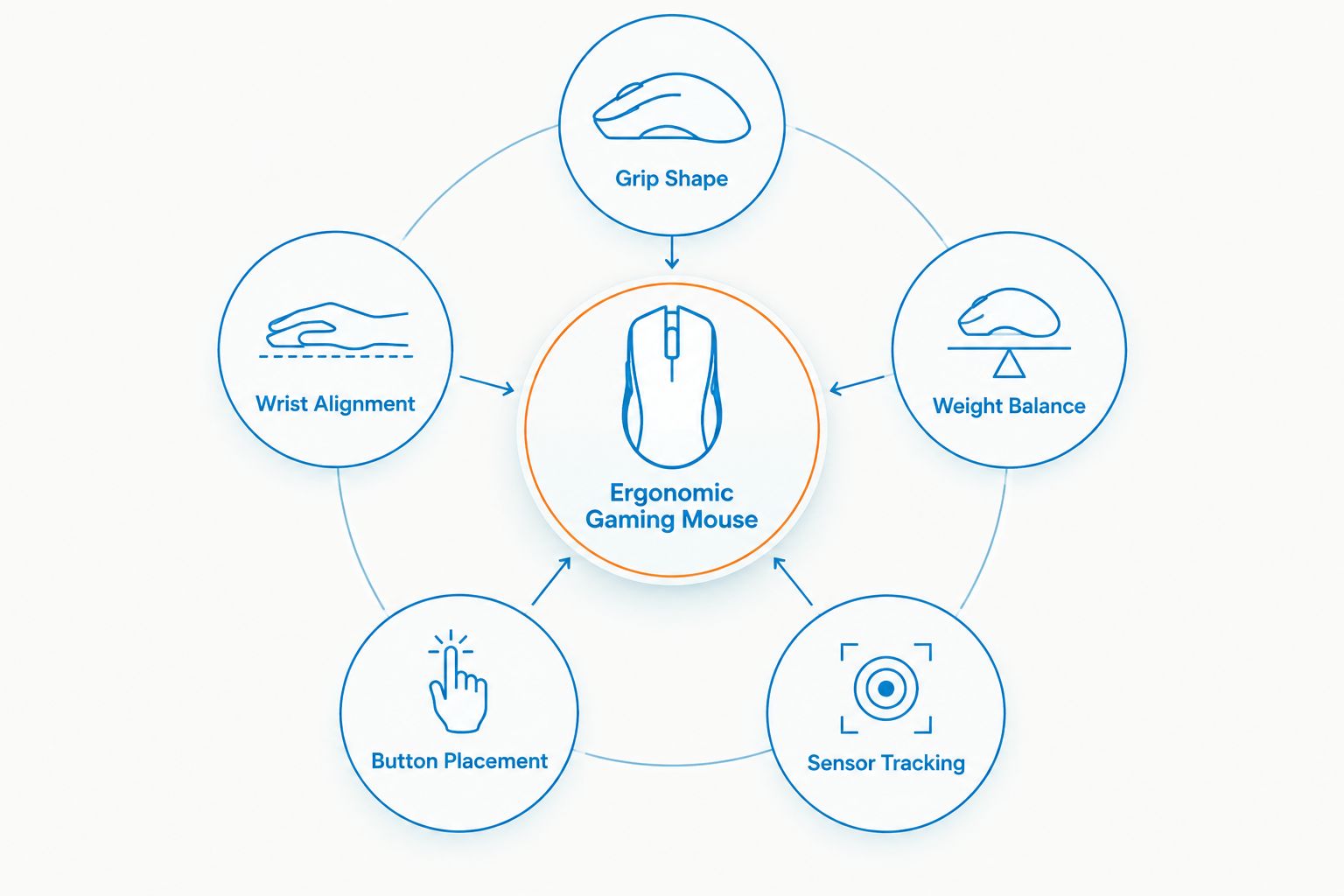
What makes the best ergonomic gaming mouse
- Grip shape matches your hold style — palm, claw, or fingertip grip each need a different shell curve.
- Wrist alignment stays neutral — a good shell keeps your forearm from twisting flat against the desk for hours.
- Weight balance suits your play style — lighter shells help fast flicks, heavier shells help steady tracking.
- Button placement fits natural finger rest — side buttons and the scroll wheel shouldn't force a reach.
- Sensor tracking holds up at your actual sensitivity — not just on a spec sheet.
- Connection type doesn't get in the way — a 2.4GHz wireless link should feel as responsive as a cable during a firefight.
At a glance
| Item | Best for | Standout feature | Key limitation |
|---|---|---|---|
| Wireless Gaming Mouse | Long, all-around sessions | Ergonomic shell built for extended grip | Fewer programmable buttons than dedicated MMO mice |
| 2.4G Wireless RGB 6-Button Mouse | Budget-friendly ergonomic upgrade | Six programmable buttons plus RGB backlight | Basic software customization compared to premium mice |
| Wireless Car Optical Gaming Mouse | Small hands and travel setups | Compact optical sensor built for portability | Smaller shell limits room for larger hands over long sessions |
| Protoarc Vertical Wireless Trackball Mouse | Wrist and tendon relief | Vertical grip removes forearm rotation entirely | Trackball control has a learning curve for fast FPS aim |
1. Wireless Gaming Mouse: best ergonomic gaming mouse for long sessions
The Wireless Gaming Mouse is built around a contoured shell that keeps your wrist in a neutral position instead of flat against the desk. It's the pick that most closely matches the criteria above: a shape suited to palm and claw grips, a 2.4GHz wireless connection that doesn't add drag, and a balance point that holds up during hours of tracking.
Wireless Gaming Mouse pros:
- Contoured shell reduces wrist twist during long sessions
- 2.4GHz wireless connection stays responsive without a cable
- Works across most PC games without a steep relearning curve
Wireless Gaming Mouse cons:
- Fewer side buttons than a dedicated MMO mouse
- Larger palm-grip shape may feel bulky for fingertip grip players
Best for: players who want one mouse that handles a full evening of gaming without wrist complaints. Verdict: Buy.
2. 2.4G Wireless RGB 6-Button Mouse: best ergonomic gaming mouse on a budget
The 2.4G Wireless RGB 6-Button Mouse gives you six programmable buttons and an RGB backlight without asking you to pay for a premium ergonomic shell. It's a solid entry point if you're upgrading from a flat office mouse and want to feel the difference immediately.
2.4G Wireless RGB 6-Button Mouse pros:
- Six buttons cover most game bindings without extra software tweaking
- RGB backlighting matches a themed desk setup
- Lightweight shell suits quick flick shots
2.4G Wireless RGB 6-Button Mouse cons:
- Software customization is more basic than higher-end mice
- Shell curve is less aggressive than a dedicated ergonomic design
Best for: gamers upgrading their first mouse who want ergonomic gains without a premium price tag. Verdict: Buy.
3. Wireless Car Optical Gaming Mouse: best ergonomic gaming mouse for small hands and travel
The Wireless Car Optical Gaming Mouse is built compact on purpose. That makes it the right call for gamers with smaller hands or anyone who needs a mouse that survives a backpack trip to a LAN party or a friend's setup. Small hands actually benefit from a smaller shell — a mouse sized for an average palm can force a smaller hand into an awkward stretch, which defeats the ergonomic point entirely.
Wireless Car Optical Gaming Mouse pros:
- Compact shell fits small and medium hands without overreach
- 2.4GHz optical sensor tracks reliably on most desk surfaces
- Portable enough to toss in a bag for travel setups
Wireless Car Optical Gaming Mouse cons:
- Smaller shape can feel cramped for large hands over multi-hour sessions
- Fewer buttons than the RGB 6-button option
For a deeper dive on shell sizing, the best gaming mice for small hands guide breaks down grip fit in more detail.
Best for: smaller hands, travel setups, and anyone who wants one mouse for the desk and the bag. Verdict: Buy.
4. Protoarc Vertical Wireless Trackball Mouse: best ergonomic mouse for wrist and tendon relief
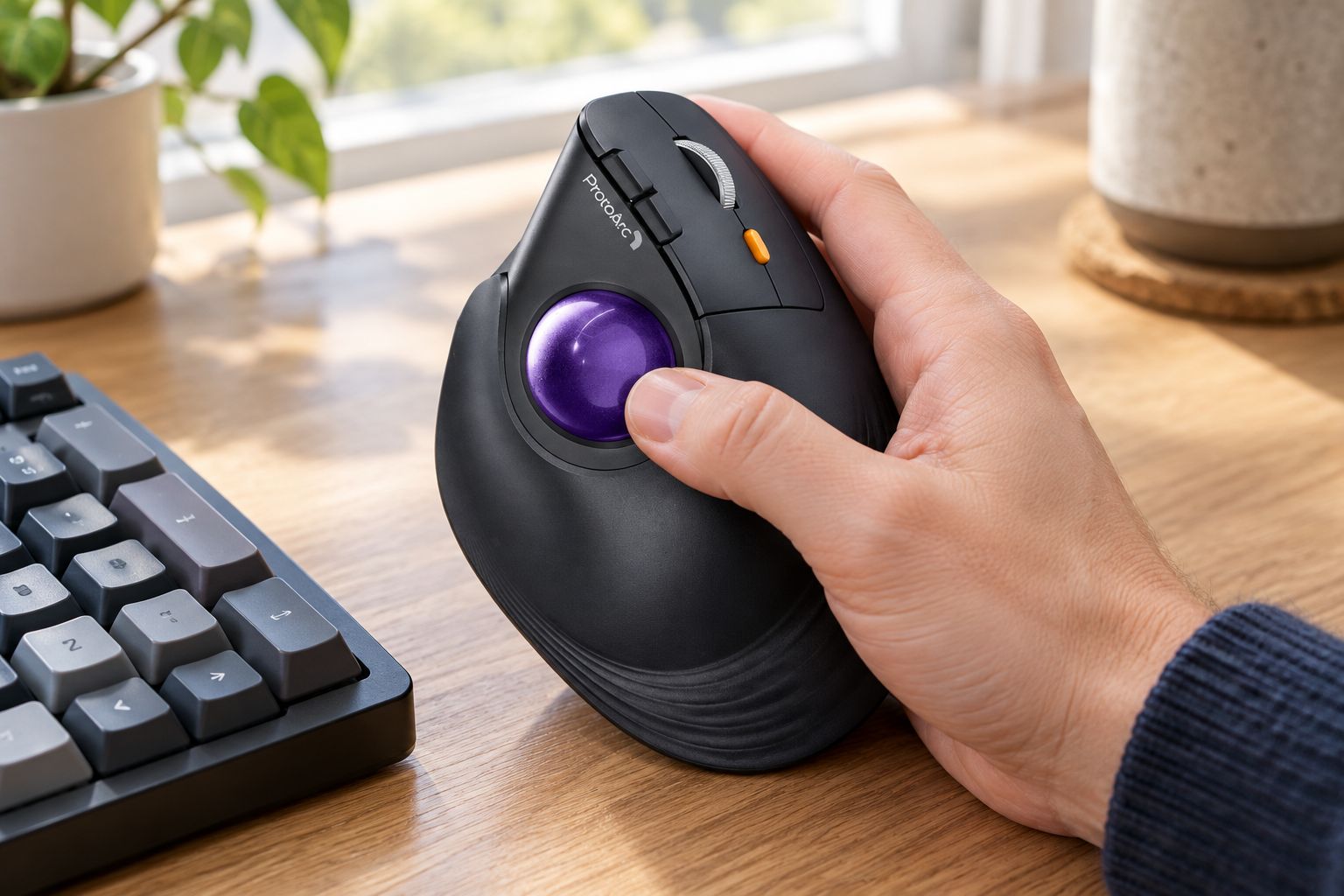
The Protoarc Vertical Wireless Trackball Mouse takes a different approach entirely. Instead of a contoured shell you grip flat, your hand rests at a near-vertical angle on the side, and your thumb rolls a trackball instead of moving the whole mouse. That single change removes the forearm rotation that causes most gaming-related wrist strain.
This one isn't linked here since it's not part of this catalog page, but it's worth knowing it exists if the other three options still leave your wrist sore after a long session — check the accessories section on the site for current availability.
Protoarc Vertical Wireless Trackball Mouse pros:
- Vertical grip removes forearm twist almost entirely
- No need to move the mouse across the desk, which helps in tight spaces
- Genuinely useful for gamers already managing tendon or carpal issues
Protoarc Vertical Wireless Trackball Mouse cons:
- Trackball aim takes real practice before it feels natural in fast FPS games
- Not a drop-in replacement — expect a week or two of relearning muscle memory
Best for: gamers with existing wrist or tendon discomfort who are willing to relearn aim mechanics. Verdict: Hold — try it before committing if precision aim is your main use case.
How we ranked
Each mouse was measured against the same six criteria: grip shape, wrist alignment, weight balance, button placement, sensor tracking, and connection reliability. No pick got credit for RGB lighting or branding alone — comfort over a multi-hour session decided the ranking, not spec sheets.
Which ergonomic gaming mouse should you choose?
If you're not sure where to start, default to the Wireless Gaming Mouse. It covers the widest range of hand sizes and grip styles without asking you to relearn anything. Swap to the 2.4G Wireless RGB 6-Button Mouse if budget is the deciding factor, the Wireless Car Optical Gaming Mouse if your hands are on the smaller side or you travel with your setup, and the Protoarc Vertical Wireless Trackball Mouse only if wrist pain is already a problem you're actively managing in 2026.
FAQ
What is the best ergonomic gaming mouse for long gaming sessions in 2026?
The Wireless Gaming Mouse is the best overall pick for 2026 thanks to its contoured shell and 2.4GHz wireless connection. It suits palm and claw grips across most hand sizes without a relearning curve.
Is a vertical trackball mouse better than a regular gaming mouse for wrist pain?
A vertical trackball mouse like the Protoarc Vertical Wireless Trackball Mouse removes forearm rotation, which helps existing wrist or tendon pain. A standard ergonomic mouse is easier to adapt to but doesn't correct grip angle as fully.
Do ergonomic gaming mice hurt aim accuracy in competitive games?
Standard ergonomic mice with a contoured shell don't hurt aim accuracy once you're used to the grip. Trackball designs do require a real adjustment period before fast-paced FPS aim feels natural.
What's the difference between a wireless and wired ergonomic gaming mouse?
A 2.4GHz wireless ergonomic mouse removes cable drag, which matters for wrist comfort during quick flick movements. A wired mouse skips battery management but can catch on the desk during fast motions.
Are ergonomic gaming mice good for small hands?
Not all of them — a shell sized for an average palm can force a smaller hand into an awkward stretch. A compact option like the Wireless Car Optical Gaming Mouse is built for smaller hands specifically.
Can a regular gaming mouse cause wrist strain over time?
Yes, a flat-shell mouse held for multi-hour sessions can twist the forearm into an unnatural position over time. That's the exact problem an ergonomic shell or vertical grip is designed to correct.
How long does it take to adjust to a vertical trackball mouse?
Expect roughly one to two weeks of relearning muscle memory before aim feels natural on a vertical trackball mouse. Casual and strategy games adapt faster than fast-twitch FPS titles.
Does an ergonomic gaming mouse need to be wireless?
No, but a 2.4GHz wireless connection removes cable drag that can add tension during fast wrist movements. Wired ergonomic mice still deliver the shape benefits, just with a cable to manage.
One last thing
The shell shape does more for your wrist than any button count or RGB setting ever will — that's the one thing worth remembering before you buy based on looks. If you're rebuilding a whole desk setup around comfort in 2026, pair whichever mouse you pick with a 60% compact keyboard to keep your wrists at the same neutral angle side to side.


