


Can a mini gaming PC replace a desktop tower?
Yes, a mini gaming PC can replace a desktop tower when its graphics hardware, cooling, ports, and storage meet your actual needs. The trade-off is that a smaller case can limit component upgrades and cooling options; fitting your games today does not guarantee room for tomorrow’s graphics card. In 2026, choose by the exact configuration and your game requirements—not by the word gaming on the listing.
- Can a mini gaming PC replace a desktop tower? Yes, when its hardware meets your games and display requirements.
- Gaming and More suits shoppers comparing compact PCs with gaming desktops; compare exact configurations before choosing.
- Mini PCs save space, but graphics upgrades and cooling depend on the chassis.
- A desktop tower remains the better fit when replaceable graphics cards and internal expansion are priorities.
Can a mini gaming PC replace a desktop tower?
A mini gaming PC replaces a tower successfully when you can keep the same games, peripherals, and everyday workflow without accepting compromises you dislike. Start with the hardware inside. A compact computer with integrated graphics and a compact desktop with a dedicated graphics card are different buying decisions.
For a space-first setup, the mini gaming PCs for small spaces guide provides a relevant next comparison.
| Computer type | Best for | Main advantage | Main limitation |
|---|---|---|---|
| Mini PC with integrated graphics | Everyday computing and games that fit its graphics capabilities | Small footprint without a separate internal graphics card | Gaming depends on the integrated GPU and shared system memory |
| Compact desktop with dedicated graphics | Gamers who want a smaller case without relying on integrated graphics | Dedicated graphics in a smaller desktop format | Card clearance, power supply, and cooling constrain upgrades |
| Desktop tower | Gamers who prioritize expansion and component replacement | More physical room for compatible components | Takes more space and is less convenient to move |
Replace the tower only after checking the mini PC against the jobs the tower currently performs. Browsing, streaming video, and running office applications do not establish whether it can handle your favorite game at your preferred settings.
Why this matters
A smaller computer solves a space problem. It does not automatically solve a performance problem. If your current tower feels slow because its graphics card cannot handle your games, moving to a mini PC without checking graphics performance can leave the original problem untouched.
The useful question in 2026 is whether the smaller machine preserves what you enjoy about your setup. That includes the monitor connection, headset, controller, keyboard, mouse, and any external drives—not just whether the computer boots your game.
For gift shoppers, ask what the recipient plays and whether they want future upgrades. A compact computer makes sense for someone who values a tidy desk. It is a poor surprise for someone expecting to swap graphics cards later.
Mini PC with integrated graphics: best for space-first computing
An integrated GPU is built into the processor package rather than supplied by a separate graphics card. It uses system memory for graphics work. Its capabilities depend on the exact processor, memory configuration, power settings, and cooling.
The benefit is straightforward: you get a compact computer without needing room for a separate internal GPU. That suits everyday tasks and games whose requirements the machine meets. It also avoids treating a full tower as the default for every desk.
The drawback is equally important. Adding more RAM or a larger SSD does not turn integrated graphics into a dedicated gaming GPU. Those upgrades address memory capacity and storage, not the entire graphics subsystem.
Choose an integrated-graphics mini PC for its verified capabilities, not its product category. Before buying, find results for the exact processor and graphics configuration in the games you play. A demonstration of an unrelated game is not evidence for your library.
Compact desktop with dedicated graphics: best for smaller gaming setups
A compact desktop with a dedicated GPU offers another route: reduce the case size while retaining a separate graphics processor. This is closer to a conventional gaming tower in component layout, but the enclosure still determines what fits.
The upside is that you can assess the dedicated GPU directly against your game requirements. The downside is packaging. A future replacement card must fit the case, work with the power supply, and leave enough room for cooling and cables.
Do not assume every compact desktop accepts standard replacement parts. Check the motherboard format, power supply format, graphics-card clearance, and access to the components you expect to change.
Choose a compact dedicated-GPU desktop when smaller size matters and its expansion limits are acceptable. If the machine only works for you with a future graphics upgrade, verify that upgrade path before treating it as a tower replacement.
Desktop tower: best for expansion and repair access
A tower gives compatible components more physical room. That makes it the practical choice when your plans include a larger graphics card, additional internal storage, or changes to the cooling system.
The trade-off is space. A tower needs a suitable location, cable access, and unobstructed ventilation. It is also less convenient to relocate than a smaller computer.
Size alone still does not guarantee upgrade freedom. A prebuilt tower can use proprietary parts, and its power supply or motherboard can restrict replacements. Read the component details instead of assuming a large case accepts anything.
Keep or choose a tower when expansion is part of your plan, not merely a distant possibility. A machine you can maintain and modify is useful only if its actual parts support the changes you want.
Why mini-PC replacement results vary
The same small case can serve very different workloads. These factors determine whether the replacement feels like a genuine improvement or a compromise:
- Graphics hardware: The exact GPU matters more than the label on the case. Integrated graphics and dedicated graphics require different expectations.
- Cooling and power: Gaming performance depends on sustained operation, not just a short burst. Check reviews that discuss temperatures, fan noise, and performance during longer sessions.
- Memory configuration: Integrated graphics share system memory. Capacity, supported memory speed, and channel configuration matter; verify the exact setup rather than assuming all configurations perform alike.
- Expansion access: Replaceable RAM, accessible storage, and a usable graphics-card slot are separate features. Confirm each one you need.
- Connections: Display outputs, USB ports, networking, and audio connections must support your existing equipment. A connector’s shape does not establish every feature it supports.
The buying rule for 2026 is simple: compare complete systems under the same workload. A processor name alone leaves out graphics, cooling, memory, and power behavior.
How to check whether a mini PC can replace your tower
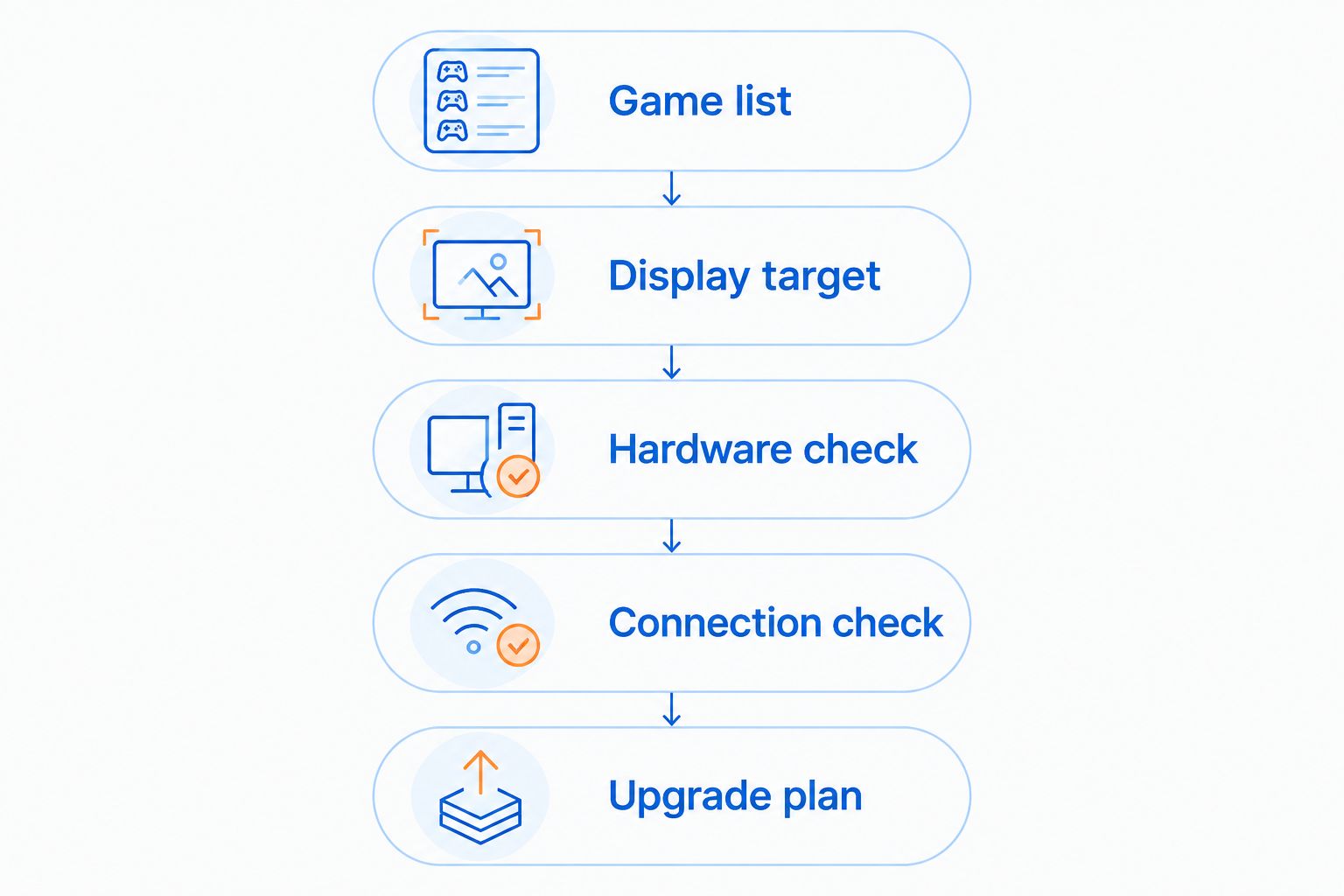
Use this sequence before moving your setup. It keeps the decision tied to your needs rather than a spec-sheet contest.
- Game list: Write down the games and applications you actually use. Include demanding games, mods, streaming software, and any creative work that matters to you.
- Display target: Record your monitor’s resolution and refresh rate, then decide what settings and frame-rate target you want. Distinguish running a display from rendering a game smoothly on it.
- Hardware check: Compare the exact CPU, GPU, and memory configuration with your software requirements. Look for independent testing of the same configuration, not merely the same product family.
- Connection check: List every device you connect. Verify the display outputs and enough usable ports for your peripherals, storage, and networking needs.
- Upgrade plan: Check what you can replace and how you access it. If an essential component is not replaceable, decide whether that limitation fits your ownership plans.
Finish with a practical migration check. Back up your files, confirm how you will move your game library, and check whether your software licenses transfer. Keep the old computer intact until the replacement works with your normal equipment.
What the supplied product specifications tell you
Gaming and More’s gaming PC listings illustrate why the component details matter more than size. The following examples show different configurations, not tested performance equivalents. Neither listing alone establishes frame rates, fan noise, or upgrade compatibility.
| Product | Best for | Confirmed detail | Benefit and limitation |
|---|---|---|---|
| Intel N150 Mini PC — 32GB RAM, 1TB SSD, Triple 4K Display | Shoppers comparing a compact everyday computer | Listed with 32GB RAM, a 1TB SSD, and triple 4K display support | Compact format and stated memory capacity; display support does not prove 4K gaming performance |
| Element Pro Gaming PC - AMD Ryzen 7 and RTX 5070 | Shoppers seeking a desktop with dedicated graphics | Listed with AMD Ryzen 7 and RTX 5070 | A named dedicated GPU makes graphics comparisons more specific; exact gaming results and expansion details still need verification |
The Intel N150 Mini PC’s listed 32GB RAM and 1TB SSD describe memory capacity and storage capacity. They do not establish how demanding games perform. Its triple 4K display claim concerns display support, not a promise to render games at that resolution and your desired settings.
The Element Pro Gaming PC names an RTX 5070, giving you a specific graphics component to investigate. That is useful for comparison, but it does not replace testing of the complete system or checking the games you play.
For a 2026 purchase, treat these as configuration starting points. Neither computer earns a gaming recommendation solely from its title.


Can a mini PC run the same games as a desktop tower?
A mini PC can run the same games when its operating system and hardware meet those games’ requirements. Meeting minimum requirements does not establish the same settings, smoothness, or performance as your existing tower.
For multiplayer games, check the game’s current requirements and any anti-cheat restrictions. For modded games, consider the modified workload rather than relying only on the base game’s requirements.
Does 4K display support mean a mini PC is good for 4K gaming?
4K display support does not mean a mini PC delivers the 4K gaming performance you want. Sending a desktop image to a display and rendering a demanding game are different workloads.
Check game benchmarks at the intended resolution and settings. Also check the display output’s supported refresh rate; a resolution claim alone does not describe the complete connection.
Can you upgrade a mini gaming PC like a tower?
You can upgrade only the components the specific mini PC makes replaceable. Some models provide access to RAM and storage, while graphics hardware or other components remain fixed.
Check the service documentation before buying. External graphics also require explicit connection support; the presence of a USB-C port alone is not enough.
FAQ
Can a mini gaming PC completely replace my desktop tower?
A mini gaming PC can completely replace your tower if it meets your gaming, software, display, and peripheral requirements. Verify its upgrade limits before retiring a tower you still plan to modify.
Is a mini gaming PC better than a tower for a small desk?
A mini gaming PC is better for reducing the computer’s footprint on a small desk. Include its power adapter, cables, and required ventilation space when planning the setup.
Will a mini PC run games at the same settings as my tower?
A mini PC runs games at the same settings only when its complete configuration delivers the performance those settings require. Compare the exact CPU, GPU, memory setup, and sustained gaming results.
Does 32GB RAM make the Intel N150 Mini PC a powerful gaming computer?
32GB RAM describes memory capacity, not overall gaming performance. The Intel N150 Mini PC still needs game-specific graphics and processor evaluation before you treat it as a gaming-tower replacement.
Can I connect my existing monitor and gaming accessories to a mini PC?
You can connect existing equipment when the mini PC provides compatible outputs and enough suitable ports. Check display resolution and refresh-rate support alongside keyboard, mouse, headset, and storage connections.
Can I add a desktop graphics card to any mini PC?
You cannot add a desktop graphics card to every mini PC. Internal installation requires compatible space, connections, power, and cooling; external installation requires explicitly supported hardware.
Should I buy a mini PC or a tower as a gaming gift?
Choose a mini PC when the recipient values compactness and its verified hardware suits their games. Choose a tower when component replacement and internal expansion are priorities, then verify the particular tower supports those plans.
One last thing
A tiny computer does not make the whole setup tiny. The monitor, keyboard, mouse, power adapter, and cable routes still need space, and blocking ventilation defeats the point of a tidy installation.
Before replacing your tower in 2026, mark out where the computer and its connections will sit. Choose the smallest machine that meets your needs—not the smallest machine you can find. When comparing Gaming and More configurations, keep your game list beside the specifications so storage and memory do not distract from the graphics decision.


