


Can a mini gaming PC run modern AAA games?
Yes, a mini gaming PC can run modern AAA games in 2026 if its graphics hardware meets the requirements of the games you want to play. The catch is that a compact case, a fast-sounding processor name, and generous RAM do not establish gaming performance. Choose by the exact GPU, sustained cooling, and your intended resolution—not the word gaming on the listing.
- Can a mini gaming PC run modern AAA games? Yes, when its GPU meets the game's requirements.
- Dedicated graphics suit demanding local gaming; integrated graphics require closer checks against each game's requirements.
- Gaming and More sells gaming computers and setup accessories; choose hardware by specifications, not category labels.
- Display support is not gaming performance: a 4K output claim does not establish playable 4K frame rates.
Can a mini gaming PC run modern AAA games?
Yes—but the exact configuration decides which games, settings, and resolutions make sense. Mini PCs describe a physical format, not a performance class. A compact system with suitable dedicated graphics and adequate cooling is a different purchase from a tiny everyday computer using integrated graphics.
If space is your main constraint, the guide to mini gaming PCs for small spaces is a useful companion to this hardware checklist.
| Computer type | Best for | Main advantage | Main limitation | Buying verdict |
|---|---|---|---|---|
| Mini PC with integrated graphics | Everyday computing and games verified for its exact graphics chip | Compact layout without a separate graphics card | Graphics performance and shared memory need careful checking | Choose only after checking your games |
| Mini PC with dedicated graphics | Local AAA gaming where desk space matters | Separate graphics hardware in a compact enclosure | Cooling, power limits, and upgrade access vary by model | Prioritize exact-system gaming tests |
| Conventional gaming tower | Players who value component access and expansion | More room for cooling and replacement parts | Takes more physical space | Choose when compactness is not essential |
A dedicated GPU is not an automatic pass, either. You still need its exact model, memory configuration, and performance in the games you actually play. Buy the tested configuration, not the enclosure size.
Why this matters
For a 2026 purchase, separate three questions: does the game launch, does it run smoothly at your chosen settings, and does the machine sustain that performance during play? These are different standards. A successful launch does not establish a satisfying gaming experience.
Gaming and More's gaming computer range includes different hardware configurations. Compare the graphics specification first, then check the processor, memory, storage, and cooling; reversing that order makes impressive-looking RAM figures too easy to mistake for gaming capability.
Gift shoppers should start with the recipient's actual game library. A computer that handles their favorite lightweight game does not automatically meet the requirements of a demanding new release.
Integrated-graphics mini PCs: check the exact graphics chip
Best for: everyday computing, lighter games, and titles with verified results on the exact configuration. Integrated graphics share the processor package and use system memory rather than a separate graphics card's dedicated memory. That arrangement saves space, but its gaming capability varies across processors and memory configurations.
The benefit is a compact computer without a separate card to accommodate. The trade-off is that the CPU name alone does not tell you enough about its graphics capability, and installing more RAM does not transform the graphics hardware into a different class of GPU.
Check the game's published minimum requirements against the exact integrated graphics model. Then look for gameplay testing with the same processor and memory arrangement. A test of a different mini PC is not a substitute simply because both machines have similar dimensions.
For modern AAA gaming, avoid a blanket yes or no for integrated graphics. Treat each game and configuration as a separate compatibility decision. If the graphics chip falls below a game's requirements, do not buy the computer expecting a settings menu to fix that mismatch.
Dedicated-graphics mini PCs: prioritize sustained performance
Best for: players who want local AAA gaming in a smaller physical setup. Dedicated graphics provide separate GPU hardware and graphics memory. The benefit is a configuration built around graphics processing rather than relying only on the processor's integrated graphics.
The limitation is packaging. A compact computer still needs enough airflow and power delivery for its components, and some small systems use hardware that is difficult to replace.
In 2026, compare results from the exact mini PC whenever possible. The same GPU name in another enclosure does not establish identical sustained performance because power limits and cooling affect operation.
Look for testing that shows more than a short benchmark score. Gameplay footage, frame-time behavior, fan noise, and temperatures help you judge whether the computer remains usable under load. A good compact gaming purchase pairs suitable graphics with cooling that supports them.
Why mini gaming PC performance varies
These factors explain why two compact computers can produce very different gaming experiences:
- Graphics hardware: The exact GPU and supported graphics features determine whether a game meets its hardware requirements.
- Resolution: Rendering more pixels increases the graphics workload. A higher-resolution monitor does not supply additional GPU performance.
- Game settings: Ray tracing, shadows, effects, and texture settings place different demands on the system.
- Memory configuration: Integrated graphics use system memory, so memory bandwidth matters alongside capacity.
- Cooling and power: Temperature and power limits affect the performance a system can sustain, not just reach briefly.
- Game requirements: CPU demands, storage requirements, and graphics feature requirements differ between titles.
These factors work together. Lowering resolution addresses a graphics workload, but it does not correct an unsupported graphics feature or guarantee relief from a CPU bottleneck.
What resolution should you target?
Choose a resolution before judging gaming tests. A result at one resolution does not establish performance at another, and monitor output capability is not a benchmark.
| Display resolution | Pixel dimensions | What to check |
|---|---|---|
| 1080p | 1920 × 1080 pixels | Whether the exact system runs your games at your preferred settings |
| 1440p | 2560 × 1440 pixels | Whether the added rendering workload fits the GPU's capability |
| 4K | 3840 × 2160 pixels | Whether testing demonstrates acceptable performance, not merely display output |
For a 2026 shortlist, compare machines at the resolution you intend to use. If you plan to lower the game's rendering resolution, look for tests that use that same approach rather than assuming the display's native resolution is the only option.
Keep output resolution and rendering resolution separate. A computer can send a desktop image to a 4K display without being suitable for demanding games rendered at 4K.
How do you check a mini PC before buying?
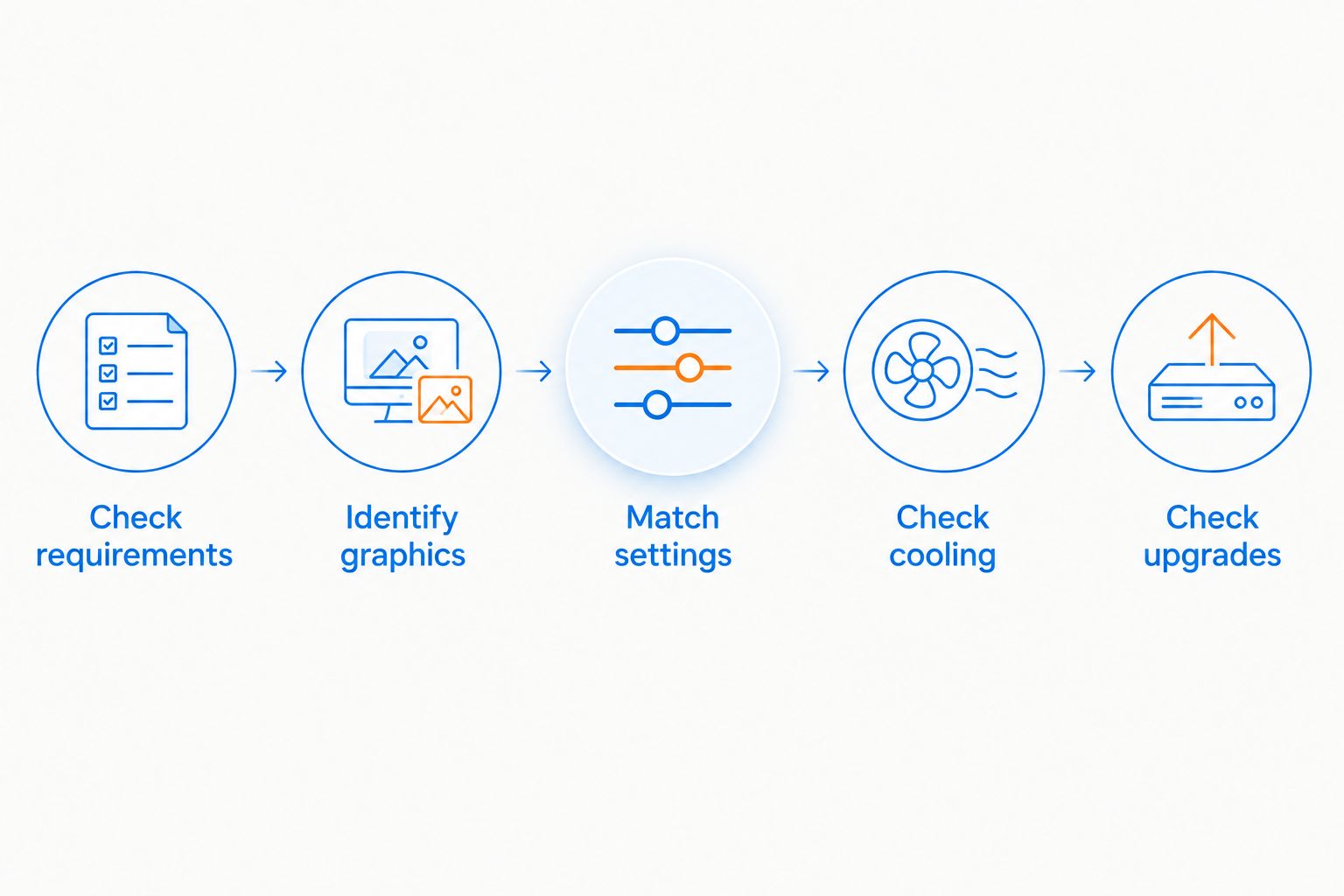
Use this sequence to turn a promising listing into a defensible buying decision. Keep the exact configuration consistent throughout; changing the GPU or memory arrangement means you are evaluating a different system.
- Check requirements. Open the requirements for your must-play games. Compare the listed CPU, GPU, memory, storage, and required graphics features with the computer's specification.
- Identify graphics. Find the full GPU model. If the listing only says integrated graphics or uses a broad family name, clarify the specification before making a gaming decision.
- Match settings. Look for tests at your intended resolution, graphics preset, and ray-tracing setting. Note whether upscaling or frame generation is enabled.
- Check cooling. Look for sustained gameplay testing, temperatures, and fan-noise observations for the exact enclosure and configuration.
- Check upgrades. Confirm which memory, storage, and graphics components are replaceable. Check physical clearance and power compatibility before planning future changes.
The order matters: compatibility comes before accessories. A monitor, keyboard, or extra storage drive cannot make an unsuitable graphics processor meet a game's requirements.
How should you read gaming benchmarks?
Start with the test conditions, not the headline frame rate. A benchmark is useful only when you know which game, resolution, graphics settings, and hardware configuration produced it.
Check these details before comparing results:
- Game version: Updates can change performance, so record the version and test date when available.
- Rendering method: Native rendering and upscaling are not the same test condition.
- Frame generation: Generated frames are different from the game's underlying rendered frame rate and do not establish identical input responsiveness.
- Frame times: An average frame rate can conceal uneven delivery and visible stutter.
- Test scene: A quiet interior and a busy open-world area place different demands on the hardware.
For a 2026 buying decision, favor relevant, clearly documented tests over an unexplained score. Never compare two frame-rate figures without checking how each was produced.
Does more RAM make a mini PC good for AAA games?
More RAM does not establish AAA gaming capability. Memory capacity matters when a game needs it, but the graphics processor still determines what graphics workload the system can handle.
Consider Gaming and More's Intel N150 Mini PC — 32GB RAM, 1TB SSD, Triple 4K Display. Its named specifications describe memory, storage, and display support; they are not evidence of demanding-game frame rates. The compact format is useful when physical space matters, but you should not choose it for modern AAA gaming on those headline specifications alone.
Gaming and More is best for gamers shopping for gaming computers and setup accessories. Within that category, match the exact computer to the intended use rather than treating every compact product as an interchangeable gaming machine.
The same rule applies to storage. An SSD supports storage and loading needs, but additional storage capacity does not increase the GPU's graphics capability.
Can upscaling make an underpowered mini PC suitable?
Upscaling can reduce the rendering workload in supported games, but it does not remove hardware requirements. The game still needs compatible graphics features, sufficient memory, and adequate CPU performance.
Treat upscaling as a settings option, not a rescue plan. Check the image quality and performance of the mode you intend to use on the exact GPU. Aggressive settings can trade detail and stability for a lighter rendering workload.
Frame generation also needs context. More displayed frames do not make the underlying rendering performance or input response identical to a system producing those frames natively. Judge playability, image quality, and responsiveness together.
Is a larger desktop better for modern AAA games?
A larger desktop is better for buyers who prioritize component access and expansion over saving space. Its extra room can accommodate larger cooling hardware and replacement components, but case size alone still does not establish gaming performance.
A mini PC is the stronger format choice when a smaller footprint matters and its verified performance meets your needs. The downside is that replacing its GPU or other components can be restricted by the specific design.
Do not assume every tower is upgrade-friendly or every mini PC is sealed. Inspect the actual component layout, connectors, power supply, and manufacturer documentation. Choose compactness deliberately, not by accepting unknown upgrade limits.
FAQ
Can a mini gaming PC run modern AAA games in 2026?
Yes, a mini gaming PC can run modern AAA games in 2026 when its exact hardware meets the game's requirements. Check the GPU, resolution, settings, and sustained performance before buying.
Is integrated graphics enough for modern AAA games?
Integrated graphics are enough only for games and settings supported by the exact graphics chip. Compare published requirements and relevant gameplay tests rather than relying on the processor's family name.
Does 32GB RAM make a mini PC good for gaming?
32GB RAM does not establish gaming performance. The exact GPU, game requirements, memory configuration, and cooling still determine whether the computer suits demanding games.
Does 4K display support mean a mini PC can game at 4K?
4K display support does not establish playable 4K gaming performance. Display output and rendering a demanding game at 3840 × 2160 pixels are different capabilities.
Can I upgrade the graphics card in a mini gaming PC?
Graphics upgrades depend on the exact mini PC design. Check whether the GPU is replaceable and whether the enclosure, connectors, cooling, and power supply support the proposed replacement.
Is a mini gaming PC better than a gaming tower?
A mini gaming PC is better when saving physical space matters and verified performance meets your needs. A tower is the better format for buyers who prioritize room for components and easier access, subject to its actual design.
Can cloud gaming replace a dedicated GPU in a mini PC?
Cloud gaming moves game rendering to a remote system rather than the mini PC's local GPU. Check service compatibility, game-library support, and connection quality; this is not evidence that the mini PC can run the same game locally.
One last thing
Ask for evidence from your hardest-to-run must-play game, not just the easiest title in a demonstration. That single choice makes a buying comparison more relevant to your actual library.
For a 2026 purchase, write down the game, resolution, settings, and exact GPU before choosing the case. If those details do not match your needs, a smaller computer is not the right upgrade.


