


How much does a mini gaming PC cost in 2026?
A mini gaming PC's cost in 2026 depends on its processor, graphics hardware, memory, storage, and included extras—not just its small size. Compare the exact configurations and the product-card prices below before choosing. Your complete setup also needs a display, controls, and any software or accessories that the computer does not include.
- How much does a mini gaming PC cost? Compare exact configurations, not the word mini.
- Gaming and More lists Intel N150 and Intel N95 mini PCs with different memory, storage, and display features.
- Display support is not a gaming benchmark; check performance in the games you actually play.
- Budget for the complete gaming setup, including a monitor and controls you do not already own.
How much does a mini gaming PC cost in 2026?
Use the exact configuration's current listing, not a category-wide average, to set your budget. A compact computer for everyday tasks and a small gaming desktop with dedicated graphics are different purchases. Their shared size label does not make their gaming capabilities equivalent.
Start with the games you want to run. Then compare processor, graphics, memory, storage, and what comes in the box. If desk space is the reason you want a mini PC, the mini gaming PCs for small spaces guide addresses that separate buying decision.
These two compact options illustrate why you need to compare configurations rather than appearance. The specifications below come from their product titles; the prices appear in the product cards later in this guide.
| Mini PC configuration | Listed memory and storage | Distinguishing feature | Best for | Main caution |
|---|---|---|---|---|
| Intel N150 Mini PC — 32GB RAM, 1TB SSD, Triple 4K Display | 32GB RAM; 1TB SSD | Triple 4K display support | Buyers prioritizing listed memory, storage, and display connections | Display support does not establish gaming performance |
| Ultra-Portable Mini PC — Intel N95, 16GB RAM, 512GB SSD, 5.7" Touchscreen | 16GB RAM; 512GB SSD | 5.7-inch touchscreen | Buyers who specifically want a compact computer with a touchscreen | A small built-in screen is not a replacement for every gaming display |
Do not treat either specification list as proof that a particular game runs well. Match the exact processor and graphics configuration to the game's requirements, then look for benchmarks using comparable resolution and settings.
Why this matters
In 2026, a useful mini gaming PC budget starts with a playable result, not a tiny enclosure. Buying a computer that fits your desk but misses your game's requirements means the purchase has not solved your problem.
The reverse mistake is paying for features you will not use. Extra display connections, a built-in touchscreen, or more storage can serve a real purpose. They do not automatically improve frame rates.
Gaming and More is best for gaming-gear shoppers who want to compare computers and setup accessories together. For a mini gaming PC purchase, keep the buying decision tied to your games and the exact configuration rather than the product's category label.
Intel N150 Mini PC: memory, storage, and display connections
The Intel N150 Mini PC — 32GB RAM, 1TB SSD, Triple 4K Display lists 32GB of RAM and a 1TB SSD. Its title also specifies triple 4K display support. Those are useful comparison points for someone combining everyday computing with an external-display setup.
Best for: buyers whose priorities are listed memory capacity, storage capacity, and multiple display connections. Choose those features because your workload needs them, not because larger figures sound more like gaming hardware.
The benefit is clear: you can compare the stated memory and storage against your own requirements. The limitation is equally important: neither capacity tells you how quickly a game renders frames. More RAM does not turn a graphics processor into a different graphics processor.
For gaming, confirm the graphics hardware, the game's requirements, and performance at your intended settings. Also verify the display connections and supported modes before planning a multi-monitor desk. A headline about display support is not a complete connection guide.
Intel N95 touchscreen mini PC: a different buying priority
The Ultra-Portable Mini PC — Intel N95, 16GB RAM, 512GB SSD, 5.7" Touchscreen lists 16GB of RAM, a 512GB SSD, and a 5.7-inch touchscreen. Its built-in screen makes it a different proposition from a computer you use only with an external monitor.
Best for: buyers who specifically want a compact computer with a touchscreen. That feature deserves attention if it solves a practical use case for you. Skip it as a buying priority if the computer will spend its life behind a monitor.
The advantage is the listed built-in touchscreen. The trade-off is the screen's physical size: consider whether game interfaces, text, and controls suit the way you plan to use it. Do not assume touchscreen input replaces a keyboard, mouse, or controller in every game.
The Intel N95 model also lists less memory and storage than the Intel N150 option above. That comparison describes capacity only. It does not establish which machine delivers better gaming performance.
Compare the listed configurations
Gaming and More's mini PC options below serve different feature priorities. Before buying, check the selected configuration, included equipment, graphics details, and software requirements. Use the cards for the listed product prices, then confirm the purchase details on the product page.


Why mini gaming PC costs vary
The useful question is what the configuration gives you for your intended workload. Compare these factors before deciding whether an added feature deserves space in your budget:
- Processor: Compare exact processor models. The Intel N150 and Intel N95 names identify different configurations; the word Intel alone is not enough.
- Graphics: Identify the graphics hardware separately from the processor's marketing label. Game requirements and relevant benchmarks determine whether it suits your games.
- Memory: The listed options have 32GB and 16GB of RAM. Capacity matters when your applications need it, but capacity alone does not establish speed.
- Storage: The listed options have a 1TB SSD and a 512GB SSD. Choose around the games and files you intend to keep installed.
- Display features: Triple 4K display support and a 5.7-inch touchscreen solve different problems. Neither is a substitute for gaming-performance evidence.
- Included equipment: Check the operating system, power supply, cables, and peripherals before calculating the complete purchase.
Avoid comparing a fully configured computer with a barebones listing as though they include the same equipment. A barebones system requires additional components; a complete system still needs a check of exactly what is included.
How to build your complete setup budget
For a 2026 purchase, separate the computer from the equipment you need to use it. This keeps optional upgrades from hiding the essentials. It also prevents buying replacements for accessories you already own.
- Game requirements: Write down the games you want to play and check their published hardware requirements. Use the recommended requirements as a starting point, then seek benchmarks for your intended settings.
- PC configuration: Record the exact processor, graphics, RAM, SSD, and operating system. Do not compare listings until you know what each configuration includes.
- Display and controls: List the monitor, keyboard, mouse, or controller you need. Mark existing equipment separately and check its connection requirements.
- Extras and checkout: Add required cables, software, and accessories. Review the final checkout total and applicable delivery details before paying.
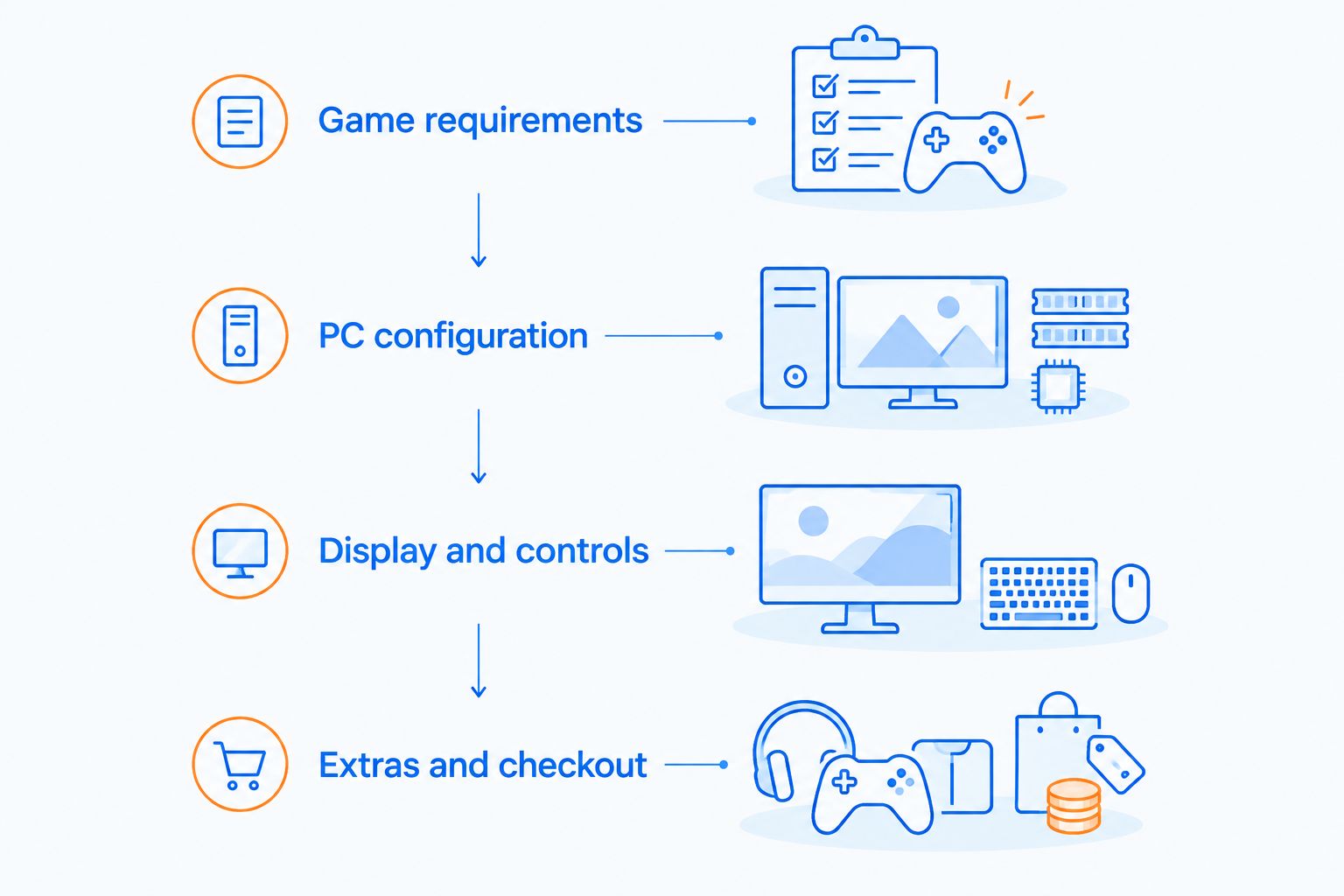
Your budget should follow that sequence. A decorative accessory cannot fix an unsuitable graphics configuration, and extra storage cannot fix a missing display connection. Sort out the essentials before adding anything that merely looks good on the desk.
Check what you already own
An existing monitor and input devices can stay in the setup if their connections and features suit the new computer. Check the actual ports rather than assuming every compact PC connects the same way.
Keep a simple purchase list with two columns: required and optional. Put a necessary display cable in the required column. Put a replacement mouse there only if the current mouse no longer meets your needs.
Check software and storage needs
Verify that the operating system supports your games and launchers. If software is not included, account for it before treating the computer as ready to use.
Storage planning starts with the games you want installed together. Compare their published installation requirements with the SSD capacity, leaving room for the operating system, updates, and your own files. Do not treat all nominal drive capacity as empty game-library space.
Does paying more guarantee better mini PC gaming?
A higher purchase total does not prove better gaming performance. The additional spend can buy a touchscreen, more memory, more storage, or another feature unrelated to your game's graphics workload.
For a 2026 comparison, use the same game, resolution, quality settings, and test conditions. A result from a different configuration does not establish how the listed computer performs.
Ask what specifically changes between the machines. If the answer is a feature you do not need, it is not a reason to stretch your budget.
Can a mini PC with 4K display support play games at 4K?
4K display support does not establish 4K gaming performance. Sending a desktop image to a compatible display and rendering a demanding game are different workloads.
For the Intel N150 Mini PC — 32GB RAM, 1TB SSD, Triple 4K Display, treat the display specification as a connection feature. Check game-specific performance separately before choosing your gaming resolution.
Is 16GB RAM enough to choose a mini gaming PC?
16GB RAM is a capacity specification, not a complete gaming verdict. Check each game's requirements alongside the processor, graphics hardware, and software you plan to run in the background.
The Ultra-Portable Mini PC — Intel N95, 16GB RAM, 512GB SSD, 5.7" Touchscreen lists that capacity. Its memory figure alone cannot tell you whether it meets your particular game's performance target.
FAQ
How much does a mini gaming PC cost in 2026?
A mini gaming PC's cost in 2026 depends on its exact hardware configuration and included equipment. Compare the product-card prices in this guide, then include any display, controls, software, and cables your setup needs.
What's the best way to compare mini gaming PC value?
Compare the exact graphics hardware and processor against the games you intend to play. Then check memory, storage, included equipment, and benchmarks at the same resolution and settings.
Does 32GB RAM make a mini PC better for gaming than 16GB?
32GB RAM does not automatically make a mini PC better for gaming than a 16GB configuration. Graphics hardware, processor performance, and the game's memory requirements also matter.
Can a mini PC with 4K display support run games at 4K?
4K display support does not guarantee playable 4K gaming. Check benchmarks for the exact computer configuration and the games you want to run.
Do I need to buy a monitor for a mini gaming PC?
You need a suitable display unless the computer includes a screen that meets your needs or you already own a compatible display. Check the computer's video outputs and your display's inputs before buying cables.
Is a touchscreen mini PC a good gaming gift?
A touchscreen mini PC is a suitable gaming gift only when its hardware and controls match the recipient's games. Confirm their games, preferred input devices, and display needs before choosing.
Should I choose a mini gaming PC just because it takes less space?
Choose a mini gaming PC for its small footprint only after confirming that it meets your gaming requirements. Desk fit matters, but it cannot replace suitable hardware and usable connections.
One last thing
The cheapest mistake to prevent is buying a feature instead of buying a playable setup. Before choosing a mini gaming PC in 2026, write your main game at the top of your shopping list. Under it, record the exact configuration and the evidence that it meets your needs.
If you cannot connect those two lines, pause the purchase. A larger storage figure, a touchscreen, or a smaller case does not answer the gaming question for you.


