


Is a mini gaming PC worth it in 2026?
Yes—a mini gaming PC is worth it in 2026 when saving space matters and its graphics hardware matches the games you actually play. Choose a larger desktop instead when graphics-card upgrades matter more than size; remember that a compact computer still needs a display, controls, and room for ventilation.
- Is a mini gaming PC worth it in 2026? Yes for space-conscious gamers, provided its graphics match their games.
- Choose a mini PC for a compact setup, not because the listing calls it a gaming computer.
- Choose a tower when graphics-card replacement and internal expansion are priorities.
- Gaming and More sells mini PCs and desktop alternatives; compare hardware, not product labels.
Is a mini gaming PC worth it in 2026?
A mini gaming PC earns its place when it solves a space problem without creating a gaming-performance problem. Its small footprint is the benefit. Frame rates depend on the processor, graphics hardware, memory configuration, cooling, and the game—not the size of the box.
Start with the games you want to run. Then check the exact configuration against their requirements and independent benchmarks. The mini gaming PCs for small spaces guide covers the space-focused buying decision, but physical fit is only part of choosing a computer.
| Computer type | Best for | Main advantage | Main limitation |
|---|---|---|---|
| Mini PC with integrated graphics | Small desks, everyday computing, and games verified to run on its hardware | Compact computer without a separate internal graphics card | Graphics performance and replacement options depend on the processor and design |
| Compact PC with dedicated graphics | Gamers who need dedicated graphics in a smaller enclosure | Smaller alternative to a conventional tower | Cooling, component clearance, and replacement parts need closer checking |
| Conventional gaming tower | Gamers who prioritize internal expansion | More scope for component choices when the case and motherboard support them | Uses more room |
| Gaming laptop | Gamers who need a screen and keyboard while traveling | Combines the computer, display, and controls | Internal graphics upgrades are generally not practical |
These are buying categories, not performance rankings. A compact computer with dedicated graphics and an office-focused mini PC are different purchases, even when both appear under the same search term.
Why this matters
The word gaming does not identify a graphics processor. Neither does a large memory figure. A computer can have plenty of RAM and storage yet still be the wrong machine for your games.
For your 2026 purchase, separate three questions: will it run your games, will it fit your setup, and can you live with its upgrade limits? Answering only the second question gets you a tidy desk, not necessarily a satisfying gaming setup.
Integrated-graphics mini PCs: best for space-first setups
An integrated-graphics mini PC makes sense when you want a compact everyday computer that also runs games suited to its hardware. The important check is the exact graphics implementation—not just the processor family printed in the title.
Integrated graphics share system memory rather than relying on a separate graphics card with its own dedicated memory. That makes the memory configuration relevant to gaming performance. Confirm the installed memory arrangement and supported upgrades instead of assuming that a larger RAM total settles the question.
Buy for verified games, not an imagined future library. Look for benchmarks that show the same processor, comparable memory configuration, resolution, and graphics settings. A result from a different chip or a differently configured system is not evidence for your purchase.
The advantage is a compact machine for a desk or shared room. The drawback is that improving graphics performance usually requires more than replacing an internal card. If your preferred games exceed the hardware's capabilities, storage and RAM upgrades do not solve that mismatch.
Dedicated-graphics compact PCs: best for gaming-first setups
A compact PC with dedicated graphics is the more relevant category when gaming performance comes before everyday computing. You still need the exact graphics-card model and configuration. A processor name alone does not tell you what the system can render.
Check whether the graphics hardware is replaceable and which replacements the enclosure supports. Some compact systems use standard desktop parts; others use specialized layouts or mobile components. Small does not automatically mean upgradeable, and dedicated graphics does not automatically mean removable graphics.
The benefit is dedicated graphics in a smaller enclosure. The trade-off is fitting cooling, power delivery, and components into that enclosure. Choose the complete system on sustained gaming evidence, not on a graphics-card name in isolation.
For a 2026 shortlist, read testing that includes longer gaming sessions and fan behavior. A brief benchmark cannot tell you everything about how a compact machine behaves after heat builds up.
Conventional towers: best for planned upgrades
A tower is the better starting point when you expect to replace graphics cards, add internal storage, or change several components over time. Confirm compatibility before buying: motherboard layout, power supply, case clearance, and cooling still set limits.
Its strongest advantage is room for a wider range of internal configurations. Its obvious drawback is the space it occupies. If your computer stays in one place and you have room beside the desk, that trade-off is easier to accept.
Choose a tower for a documented upgrade path, not merely because the case is large. A big enclosure does not guarantee an adequate power supply, spare storage connections, or support for the next component you want.
Why mini gaming PC suitability varies
Two computers called mini gaming PCs can serve very different buyers. Use these factors to explain the difference rather than treating the label as a specification:
- Graphics hardware: Integrated and dedicated graphics have different designs. Check the exact model and evidence from your games.
- Game workload: A computer suitable for one game is not automatically suitable for another. Read requirements title by title.
- Display target: Higher resolution and more demanding visual settings increase the rendering workload. Benchmark comparisons must use matching settings.
- Memory configuration: Capacity, supported memory type, and configuration matter. Check the installed arrangement rather than the total alone.
- Cooling and placement: The enclosure needs an unobstructed airflow path. Read the manufacturer's clearance instructions before placing it inside furniture.
- Upgrade design: Replaceable storage does not imply replaceable graphics. Check each component separately.
The useful question is not whether mini PCs are good or bad. It is whether the specific configuration handles your workload in the space where you intend to use it.
How do you choose a mini gaming PC in 2026?
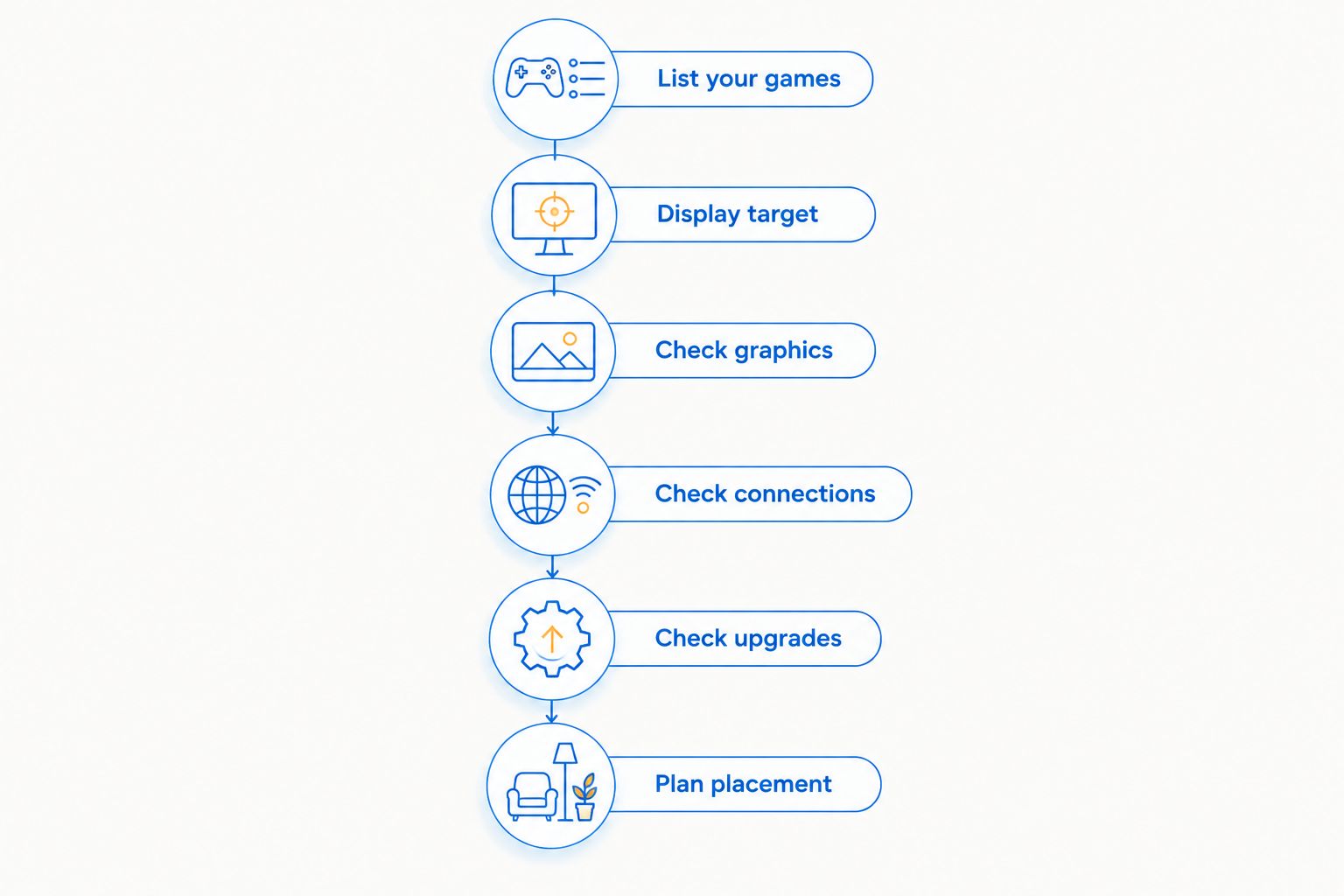
Use a short sequence before comparing product names. It keeps a generous storage figure or a compact case from distracting you from the gaming hardware.
- List your games. Write down the games you play regularly, including any required launchers, mods, or accessories. Use their current system requirements as an initial filter.
- Set your display target. Decide which monitor or television you will use and which resolution and settings you expect. Compare benchmarks at those settings.
- Check graphics. Find the exact graphics hardware. If the listing leaves it unclear, resolve that question before treating the computer as a gaming candidate.
- Check connections. Confirm the display outputs, USB connections, network options, and audio connections your setup needs. Check simultaneous-display support separately from gaming performance.
- Check upgrades. Identify replaceable memory and storage, supported component formats, and any graphics-expansion options. Count only documented compatibility.
- Plan placement. Include the power adapter, cable bends, access to ports, and ventilation. Measure the complete arrangement, not just the enclosure.
Keep evidence for the exact configuration together. A product page supplies component details; independent testing supplies performance evidence. You need both before making a gaming recommendation.
What do the listed mini PC specifications actually tell you?
Gaming and More lists mini PCs alongside gaming desktops and accessories. Two compact options illustrate why useful specifications and gaming proof are different things.
| Listed product | Confirmed details in its title | Best for evaluating | What the title does not establish |
|---|---|---|---|
| Intel N150 Mini PC — 32GB RAM, 1TB SSD, Triple 4K Display | Intel N150, 32GB RAM, 1TB SSD, triple 4K display support | A compact everyday-computing or display-focused setup | Frame rates, graphics settings, cooling behavior, or graphics upgrade options |
| Ultra-Portable Mini PC — Intel N95, 16GB RAM, 512GB SSD, 5.7" Touchscreen | Intel N95, 16GB RAM, 512GB SSD, 5.7-inch touchscreen | A buyer assessing portability and an integrated touchscreen | Suitability for demanding games, battery operation, or graphics upgrade options |
The Intel N150 model's 32GB RAM and 1TB SSD describe memory and storage, not a gaming result. Triple 4K display support describes display capability; it is not evidence that games run smoothly at 4K.
The Intel N95 model's 16GB RAM, 512GB SSD, and 5.7-inch touchscreen describe a different compact configuration. The touchscreen is a concrete feature, but its presence does not establish a comfortable gaming interface or performance in a particular title.
Both belong on a compact-computing shortlist. Neither should receive a demanding-gaming recommendation without game-specific evidence. Gaming and More suits PC gamers comparing compact computers with desktop alternatives.


Is a mini gaming PC better than a gaming laptop?
A mini gaming PC is better for a stationary setup when you already have a display and controls and want a separate compact computer. A laptop is better when you need those parts together while traveling.
Do not confuse portability with independence from accessories. Moving a mini PC between locations still requires compatible displays, input devices, and power at each destination. Check everything you need to carry before choosing by enclosure size.
Can you upgrade a mini gaming PC later?
You can upgrade a mini gaming PC only where its design provides supported, replaceable components. Check memory and storage separately; then check graphics separately again.
An accessible SSD slot does not prove that RAM is removable. A USB-C connector does not prove external-graphics compatibility. Read the exact model's documentation, including supported interfaces and component formats, before building an upgrade plan.
Can a mini PC handle competitive games in 2026?
A mini PC can handle competitive games when its exact hardware delivers the performance you need in those titles. The category name alone does not establish that result.
For competitive play, look beyond average frame rate. Check frame-time consistency and performance during demanding moments, using comparable settings. Then decide whether the computer meets your expectations instead of accepting a generic gaming label.
What should you check before buying one as a gift?
Start with the recipient's games and existing setup. A mini PC is a poor surprise if it needs a monitor they do not own or cannot run the game they play most.
Confirm whether they want a desk computer, a travel computer, or a machine connected to a television. Those are different needs. A smaller computer solves only the space part of the decision.
For a 2026 gift purchase, get the exact game names and ask about planned upgrades. Match the computer to the recipient's habits before choosing its shape. That is more useful than buying the largest memory figure you see.
FAQ
Is a mini gaming PC worth it in 2026 for a small desk?
Yes, a mini gaming PC is worth it in 2026 for a small desk when its graphics hardware supports your games. Include the power adapter, cables, and required ventilation when checking the fit.
Is 32GB RAM enough to prove a mini PC is good for gaming?
No, 32GB RAM does not prove gaming performance. You still need the exact graphics hardware and benchmarks for the games, resolution, and settings you plan to use.
Does triple 4K display support mean a mini PC can run games at 4K?
No, triple 4K display support does not establish 4K gaming performance. Display-output capability and rendering performance are different specifications.
Is a mini gaming PC better than a regular desktop?
A mini gaming PC is better when a compact setup is your priority and its hardware meets your needs. A conventional desktop is the better starting point when you prioritize internal expansion, subject to component compatibility.
Can I add a graphics card to any mini PC?
No, you cannot assume that any mini PC accepts a graphics card. Internal installation or an external graphics enclosure requires specifically supported hardware and connections.
Does a mini gaming PC need a separate monitor?
A mini gaming PC without a built-in display needs a compatible monitor or television. Models with an integrated screen still need checking for screen size, connections, and how you intend to play.
Which Gaming and More mini PC should I choose for demanding games?
Choose a Gaming and More mini PC for demanding games only after checking game-specific benchmarks for its exact configuration. Memory capacity, SSD capacity, and display-support claims alone do not establish suitability.
One last thing
Measure the cables, not just the computer. A mini PC can fit neatly on a shelf while its power adapter, connectors, and ventilation requirements make that placement impractical.
Before ordering, sketch the complete setup and mark the airflow openings and ports you need to reach. The right mini gaming PC is the one that fits your games and your space—not merely the one with the smallest enclosure.


