


How much does a gaming laptop cost in 2026?
Your gaming laptop cost in 2026 depends on the exact graphics hardware, processor, memory, and storage you choose; use the product cards below to compare listed purchase amounts rather than treating unlike laptops as one average. Your full budget also needs to cover any accessories, software, and checkout charges that apply. Buy for the games you want to play, not the word “gaming” in a product title.
- Gaming laptop cost depends on configuration; compare graphics hardware before RAM or storage capacity.
- Gaming and More lists Lenovo LOQ and Intel N95 laptops with substantially different specifications.
- The Lenovo LOQ listing names RTX 5050 graphics; the N95 listing does not identify a dedicated GPU.
- Keep accessories separate from your laptop budget, and check the selected configuration before paying.
Why this matters
A laptop bundles your computer, display, keyboard, and pointing device into one purchase. That makes the headline amount useful, but it does not tell you whether the machine fits your games or your daily routine.
You can compare computers and setup accessories at Gaming and More, but start with the computer's actual configuration. A large SSD gives you storage space; it does not establish graphics performance.
For a 2026 purchase, separate what the listing confirms from what you still need to check. That distinction keeps an attractive processor name or memory capacity from becoming the entire buying decision.
How much does a gaming laptop cost in 2026?
The useful comparison is between specific configurations, not every laptop carrying a gaming label. The Gaming and More listings below illustrate why: one explicitly names dedicated graphics, while the other emphasizes an Intel N95 processor, memory, storage, and a display.
| Laptop configuration | Best for | Confirmed specifications | Advantage | Limitation |
|---|---|---|---|---|
| Lenovo LOQ 15 gaming laptop | Buyers prioritizing explicitly listed dedicated graphics | 13th Gen Intel Core i5, RTX 5050, 64GB RAM, 4TB SSD | Names the graphics hardware alongside memory and storage | The listed capacity does not establish frame rates, battery life, or cooling performance |
| Intel N95 laptop | Work-and-study buyers checking compatibility with their games | Intel N95 up to 3.4GHz, 16GB RAM, 512GB SSD, 15.6-inch 2K display | Lists core everyday-computing specifications | The supplied listing does not identify a dedicated graphics card or game benchmarks |
The Lenovo LOQ 15 is the clearer starting point when your requirement is explicitly listed dedicated graphics. That is a specification-based distinction, not a promise about performance in a particular game.
The Intel N95 laptop needs a different buying test. Confirm that its exact graphics hardware meets your games' requirements before treating it as a gaming purchase. Neither a 2K display nor 16GB RAM answers that question on its own.
What belongs in your total budget?
Separate the purchase into a laptop subtotal and everything else you actually need. This makes comparisons useful even when one option replaces more of your existing setup than another.
- Laptop: The selected processor, graphics hardware, RAM, SSD, and display configuration.
- Controls: A mouse or controller if your games require something beyond the built-in keyboard and touchpad.
- Audio: A headset if you need voice chat or private listening and do not already own a suitable one.
- Transport: A correctly sized bag or case if you carry the laptop regularly.
- Software and checkout: Games, subscriptions, optional protection, and any applicable charges shown before payment.
Do not automatically add an external keyboard or monitor. A laptop already includes both functions, and you should identify a real need before expanding the purchase.
Lenovo LOQ 15: 64GB RAM and 4TB SSD
Best for: buyers who want a laptop listing that explicitly names dedicated graphics. The Lenovo LOQ configuration combines a 13th Gen Intel Core i5 processor with RTX 5050 graphics, 64GB RAM, and a 4TB SSD.
Its advantage is the clarity of those headline components. You can compare the named processor and graphics hardware against a game's published requirements instead of trying to infer capability from a broad product category.
The trade-off is that headline specifications leave important questions unanswered. You still need the exact display specification, graphics power configuration, cooling behavior, and battery information to judge the complete machine. Check reviews or benchmarks that identify the same configuration, not just the same laptop family.
For a 2026 shortlist, ask whether you will use the listed memory and storage. Do not treat 64GB RAM as proof of better game performance than another laptop with different graphics hardware. Capacity and frame rate answer different questions.
Choose the Lenovo LOQ configuration for its confirmed components only after checking your intended games. Hold the purchase if the seller's configuration details and the selected variant do not match.
Intel N95 laptop: 16GB RAM and 512GB SSD
Best for: work-and-study buyers willing to verify game compatibility before purchase. This listing specifies an Intel N95 processor up to 3.4GHz, 16GB RAM, a 512GB SSD, and a 15.6-inch 2K display.
The useful part is the explicit memory, storage, and screen information. You can assess whether those capacities suit your documents, applications, and planned installations without guessing what the listing includes.
The limitation matters more for this article: the supplied details do not identify a dedicated graphics card. A product title containing “gaming” is not a substitute for that information, and a processor clock speed does not establish game performance.
If gaming is the main reason you are buying, check the exact graphics specification first. Then compare it with each game's requirements and look for evidence from the same hardware configuration.
Do not buy the Intel N95 laptop for an unverified gaming target. Consider it only when its confirmed specifications and demonstrated compatibility match what you actually plan to do.
Compare the listed purchase amounts
Use these product cards to inspect the configurations discussed above. Confirm the selected variant and final checkout total before committing; the laptop name alone does not establish that every option on a product page has identical components.


Why gaming laptop cost varies
Laptop configurations bundle several components together. To understand what separates the options, compare each of these factors individually rather than assuming the larger number always identifies the better purchase.
- Graphics hardware: The Lenovo LOQ listing names RTX 5050 graphics. The N95 listing requires further graphics verification before you can make an equivalent gaming comparison.
- Processor: A 13th Gen Intel Core i5 and an Intel N95 are different processor configurations. Compare exact models against your intended applications rather than comparing isolated clock speeds.
- Memory: The listed laptops have 64GB RAM and 16GB RAM respectively. Decide whether your games and other applications require the additional capacity.
- Storage: A 4TB SSD and a 512GB SSD provide different installation capacity. Compare your planned game library with the selected storage configuration.
- Display: The N95 listing specifies a 15.6-inch 2K display. Check resolution, refresh rate, and panel details for every candidate rather than assuming the other laptop matches it.
For your 2026 budget, prioritize requirements you can name. “Runs my chosen game at my intended settings” is a useful target; “has impressive specifications” is not.
How do you choose a gaming laptop without overspending?
Start with your games, then work toward the hardware. Reversing that order makes it easy to buy extra capacity while leaving the performance question unanswered.
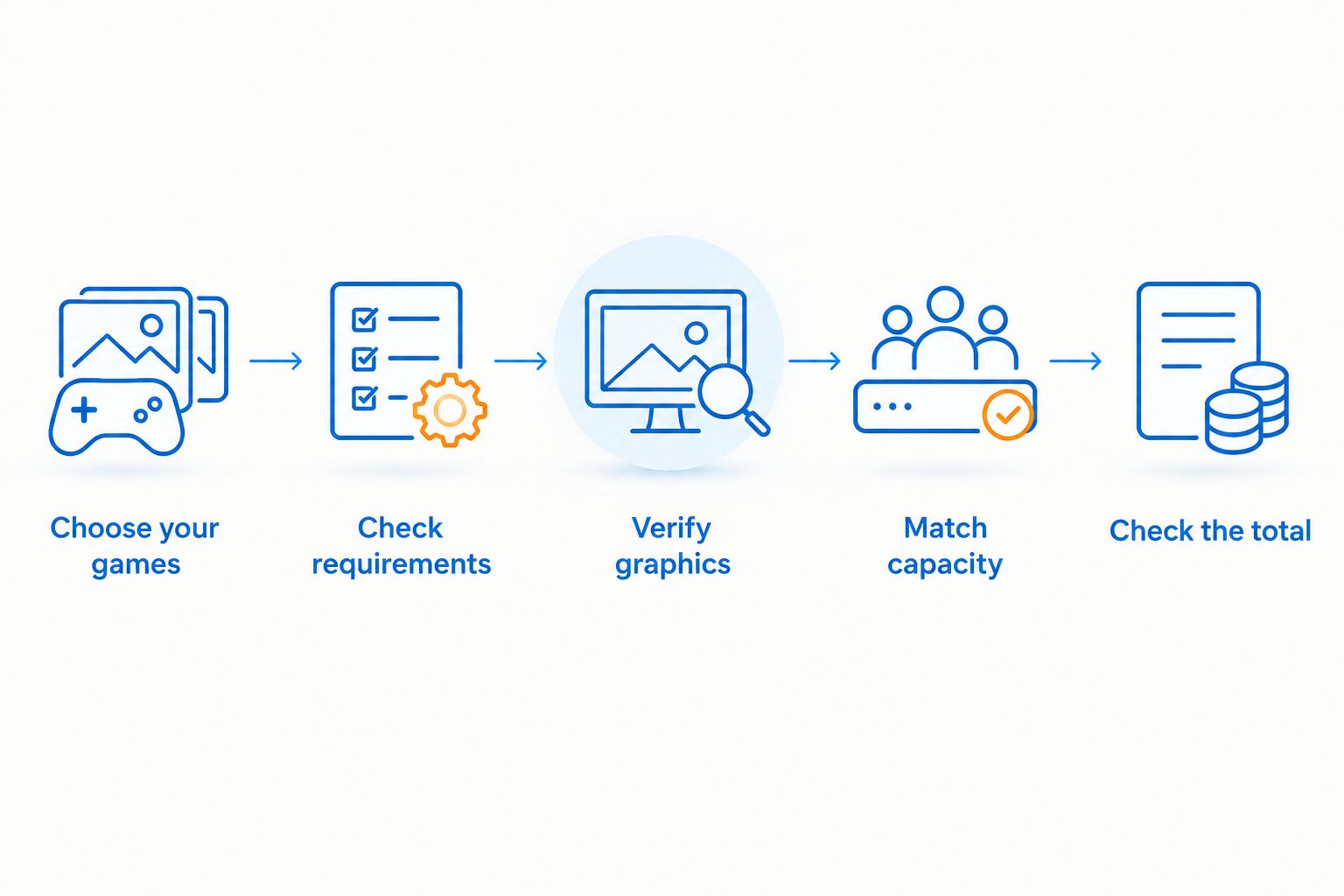
- Choose your games. Write down the titles you actually intend to install, including the games you play with friends.
- Check requirements. Read each game's current minimum and recommended hardware requirements, including graphics and storage.
- Verify graphics. Identify the exact GPU in the selected laptop configuration. Stop if that information is unclear.
- Match capacity. Compare RAM and SSD space with your games, applications, and files rather than choosing capacity for its own sake.
- Check the total. Review the laptop variant, necessary accessories, and final checkout amount together.
Keep a short comparison note for each candidate. Record the processor, GPU, RAM, SSD, display, and unresolved questions in the same order so that differences remain obvious.
If a listing leaves a purchase-critical specification unanswered, resolve it before paying. Your budget should buy a known configuration, not an assumption about what the laptop probably contains.
Does more RAM make a gaming laptop worth buying?
64GB RAM provides more memory capacity than 16GB RAM, but that difference does not establish which laptop runs your games better. Graphics hardware, processor performance, game requirements, and the complete configuration still matter.
Treat extra RAM as useful when your workload calls for it. Do not use it to excuse an unidentified GPU or missing performance evidence.
Is a larger SSD worth choosing for gaming?
A 4TB SSD provides more storage capacity than a 512GB SSD, which matters when you want more games and files installed together. It does not, by itself, prove higher frame rates.
Check the installation requirements for your planned library and leave space for your other files. Also verify whether the exact laptop supports future storage changes before relying on an upgrade plan.
Should you buy a laptop or a desktop for gaming?
Choose a laptop when carrying the computer and using its built-in display are requirements. Compare a desktop when the machine will stay at your desk, but include the display and controls you need in that comparison.
For a 2026 decision, compare complete setups serving the same games and settings. A laptop subtotal and an incomplete desktop subtotal are not equivalent purchases.
FAQ
How do I work out my full gaming laptop cost?
Add the selected laptop configuration to the accessories, software, and applicable checkout charges you actually need. Keep optional desk upgrades separate so you can compare the computers fairly.
What's the best way to compare gaming laptop value in 2026?
Compare exact configurations against the same games and intended settings. Identify graphics hardware first, then check the processor, memory, storage, display, and final purchase total.
Is 16GB RAM enough to choose a gaming laptop?
16GB RAM alone does not establish whether a laptop suits your games. Check each game's requirements and verify the laptop's processor and graphics hardware before deciding.
Does a 4TB SSD make a laptop faster at gaming?
A 4TB SSD specifies storage capacity, not a guaranteed frame rate. Assess gaming performance separately using the exact processor, graphics hardware, and relevant benchmarks.
Is the Intel N95 laptop a confirmed choice for my games?
The Intel N95 listing alone does not confirm compatibility with your particular games. Verify its exact graphics hardware and compare the complete configuration with each game's requirements.
What specifications are listed for the Lenovo LOQ 15?
The Lenovo LOQ 15 listing specifies a 13th Gen Intel Core i5, RTX 5050 graphics, 64GB RAM, and a 4TB SSD. Confirm that the variant you select matches those specifications.
Do I need an external monitor and keyboard with a gaming laptop?
You do not need to add an external monitor and keyboard simply to complete a laptop setup. Buy them only when they address a specific display, control, or desk-use requirement.
One last thing
A laptop can have more RAM and storage than you need while still leaving your main gaming question unanswered. Before paying, name your most demanding intended game and verify the exact laptop configuration against it.
Gaming and More is best for shoppers comparing gaming laptops with setup accessories. Use that selection to solve a specific need, not to turn every optional accessory into part of the laptop purchase.


