


Best Gaming Laptop for Students 2026: LOQ vs Essential
Picking the best gaming laptop for students in 2026 comes down to one question: how much dedicated graphics power do you actually need? Best for installed PC games: the Lenovo LOQ 15 with RTX 5050, with 64GB RAM and a 4TB SSD; check availability. Best for lighter games and coursework: the Intel N95 laptop with 16GB RAM and a 512GB SSD; check availability. Best for classes first: the Lenovo Essential 15.6-inch FHD with 4GB RAM and a 128GB storage option, or the refurbished HP ENVY touchscreen. Neither class-first pick is a substitute for a dedicated-graphics gaming laptop.
- The Lenovo LOQ 15 has RTX 5050 graphics, 64GB RAM and a 4TB SSD; check current availability before buying.
- The Intel N95 laptop has 16GB RAM and 512GB SSD but is suited to light gaming, not demanding games; check availability.
- The Lenovo Essential 15.6-inch FHD is a class-first laptop with 4GB RAM and a 128GB storage option, not a dedicated gaming model.
- The refurbished HP ENVY has a touchscreen and 1TB hard drive, but no dedicated graphics are stated on its listing.
- Compare current availability and case dimensions before buying accessories for any student laptop.
Why this matters
A laptop bought for freshman year usually has to survive four years of coursework, group projects, and whatever game your roommate is obsessed with that semester. Buy too little graphics power and you're stuck watching gameplay instead of playing it. Buy too much and you've paid for horsepower that sits idle during a semester of essay writing.
The honest split in 2026 is: laptops with a dedicated GPU (like the RTX 5050) run current games at real settings, and laptops without one are built for coursework first, gaming second. Neither is wrong — they're for different students. Gaming and More lists both laptop categories, and this guide ranks them by who each one actually fits.
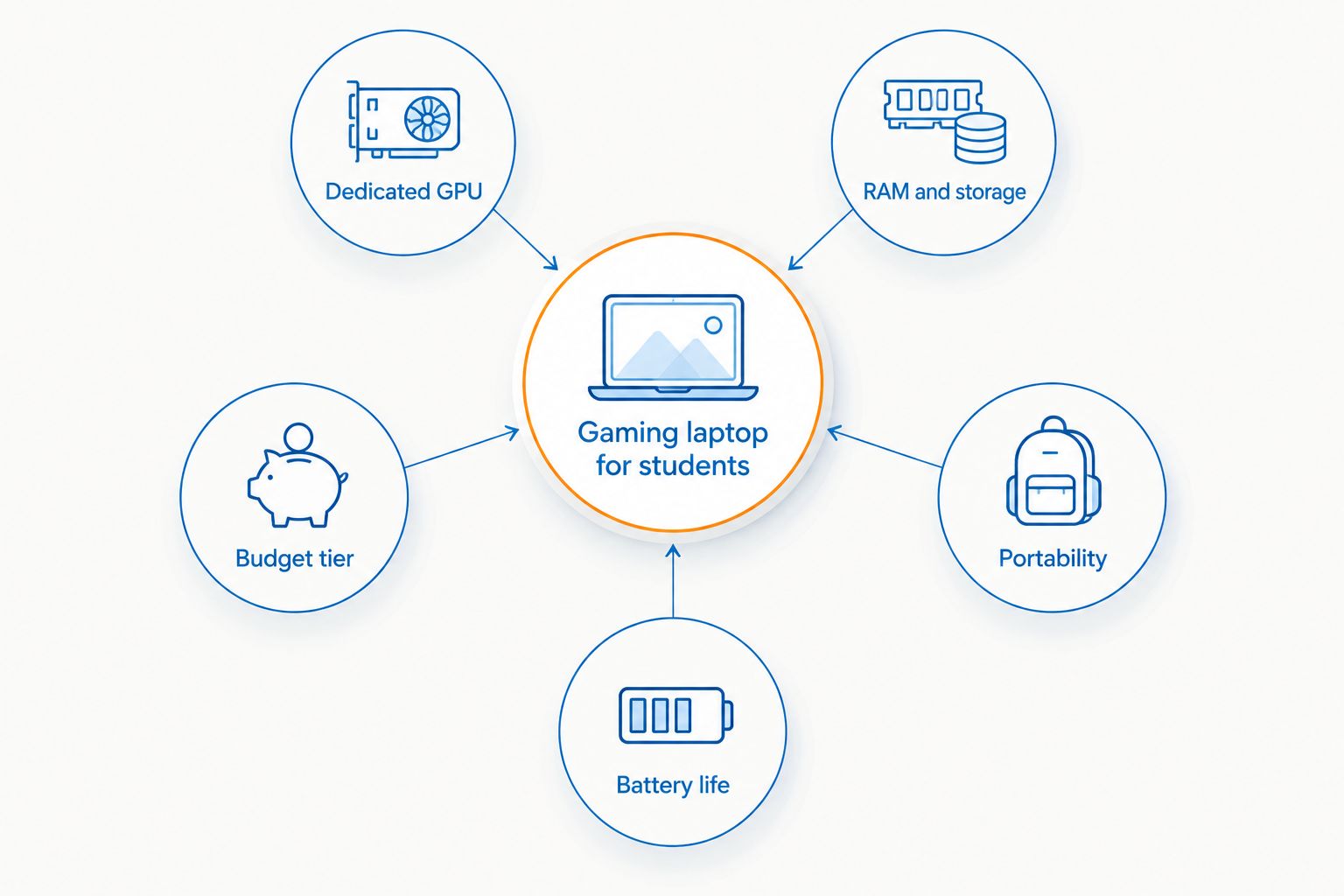
What makes the best gaming laptop for students
- Dedicated GPU vs. integrated graphics — the LOQ lists a dedicated RTX 5050 for PC games; the N95 and N100 listings do not state a dedicated GPU, so check your games' requirements before buying them.
- RAM and storage headroom — compare the LOQ's listed 64GB RAM and 4TB SSD with the Essential's 4GB RAM and 128GB storage option; they serve very different needs.
- Weight and protection for a backpack routine — compare listed weight and case dimensions before choosing a way to carry it.
- Battery life for a full class day — nobody wants to hunt for an outlet mid-lecture.
- Budget tier that matches actual use — a dedicated GPU costs more to build around; decide if you need it before you commit to it.
Best gaming laptops for students in 2026, at a glance
| Laptop | Best for | Standout feature | Key limitation |
|---|---|---|---|
| Lenovo LOQ 15 (RTX 5050) | Installed PC games; check availability | RTX 5050, 64GB RAM, 4TB SSD | Confirm current availability on its listing |
| Intel N95 laptop | Coursework and light gaming; check availability | 16GB RAM, 512GB SSD | No dedicated GPU listed; confirm current availability |
| Lenovo Essential 15.6-inch FHD | Classes and everyday tasks | Intel N100, 4GB RAM, 128GB storage option | Not a dedicated gaming laptop; Windows 11 in S mode |
| HP ENVY 15.6-inch Touchscreen Refurbished | Refurbished class-first option | Touchscreen + 1TB HDD storage | Refurbished unit; no dedicated GPU specified |
| Ultra-Lightweight Business Laptop | Portability; check availability | 512GB SSD, Windows 11 Pro, about 2.7 lb | No dedicated GPU listed; confirm current availability |
1. LOQ 15 gaming laptop: best gaming laptop for students who play current titles
The Lenovo LOQ 15 listing pairs an Intel Core i5-13450HX with dedicated RTX 5050 graphics, 64GB RAM, a 4TB SSD and a 15.6-inch 144Hz FHD screen. That is the gaming-focused specification on this list, but check current availability on its product page before planning a purchase.
LOQ 15 gaming laptop pros:
- Dedicated RTX 5050 GPU is designed for modern PC games
- Intel Core i5-13450HX has enough cores for gaming and heavier coursework like video editing
- Listed 64GB RAM and 4TB SSD leave room for coursework files and a large game library
LOQ 15 gaming laptop cons:
- Listed at about 5.19 lb; check the case's internal dimensions before buying one for this 15.6-inch laptop
- A dedicated GPU draws more battery than an integrated-graphics laptop, so plan for shorter unplugged stretches
Best for: students who need dedicated graphics for installed games. Verdict: Wait and check current availability; this is a specs comparison, not an order recommendation.
2. Intel N95 laptop: best for coursework and light gaming
This Intel N95 laptop lists a 16GB RAM, 512GB SSD configuration for schoolwork and light gaming. The product description does not list a dedicated graphics card; check the games you want to run and current availability before buying.
Gaming laptop N95 pros:
- Listed 16GB RAM and 512GB SSD give room for school apps and some installed games
- Cloud gaming may be an option if your service, connection and school network support it
- Listed at about 3.5 lb, lighter than the LOQ's listed 5.19 lb
Gaming laptop N95 cons:
- No dedicated GPU is listed — skip this pick if you need reliable performance in demanding games
- No frame-rate or battery-life figures are given for your specific games
Best for: coursework and lighter games. Verdict: Hold until you confirm current availability and your games' requirements.
3. Lenovo Essential 15.6-inch FHD: best for students who mostly need it for class
The Lenovo Essential 15.6-inch FHD listing has an Intel N100, 4GB RAM and a 128GB storage option, with Windows 11 Home in S mode. It is a class-first computer rather than a gaming laptop; check whether the S mode software restrictions suit your course apps.
Lenovo Essential pros:
- Slim FHD display that's easy to read through back-to-back lectures
- Product listing positions it for browsing, documents and streaming
- Listed at approximately 3.42 lb for comparison with the other options
Lenovo Essential cons:
- 4GB RAM is tight — expect to close tabs before opening anything demanding
- 128GB storage option is limiting for a large installed game library; no dedicated GPU is listed
Best for: students who need a laptop for documents, browsing and classes first. Verdict: Buy for study only if 4GB RAM, 128GB storage and Windows 11 in S mode fit your needs.
4. HP ENVY 15.6-inch Touchscreen Refurbished: best refurbished pick for tight budgets
A refurbished HP ENVY with an Intel Core i5 processor, a 1TB HDD, and a touchscreen display, aimed at everyday use rather than gaming.
HP ENVY pros:
- 1TB HDD gives more raw storage than most budget SSD-only laptops
- Touchscreen adds flexibility for note-taking apps
- Refurbished condition may vary; the listing says the unit has been tested for functionality
HP ENVY cons:
- The listing does not state a dedicated GPU; check its exact configuration before choosing it for games
- HDD storage loads games and large files slower than an SSD
Best for: students who want a refurbished touchscreen for classwork. Verdict: Buy for study, but review the unit's condition and specifications before ordering.
5. Ultra-Lightweight Business Laptop: best for portability between classes
This 512GB SSD laptop runs Windows 11 Pro and is built for people who need something light enough to carry between meetings or classes all day.
Ultra-Lightweight Business Laptop pros:
- 512GB SSD keeps load times fast for apps and note-taking software
- Listed at approximately 2.7 lb, lighter than the other laptops with stated weights here
- Windows 11 Pro is listed for work and study tasks
Ultra-Lightweight Business Laptop cons:
- The listing does not give gaming performance measurements
- No dedicated GPU is listed, so don't assume it runs demanding games well
Best for: students who prioritize a lighter bag over gaming performance. Verdict: Hold and check current availability.


How Gaming and More ranked these
Each pick is measured against the five criteria above: dedicated GPU versus integrated graphics, RAM and storage headroom, weight for daily carry, battery life, and whether the budget tier matches the actual use case. The LOQ 15 has the only dedicated GPU listed here, but availability must be checked before buying. The Essential and refurbished ENVY are class-first options, not gaming replacements.
Which gaming laptop should you choose?
If you need a dedicated graphics card for installed games, compare the Lenovo LOQ 15's RTX 5050, 64GB RAM and 4TB SSD and check its current availability. For coursework and lighter games, compare the Intel N95's 16GB RAM and 512GB SSD, but check availability and game requirements. The Lenovo Essential's 4GB RAM and 128GB storage option make it a class-first option, while the refurbished HP ENVY is a touchscreen class-first alternative. Neither should be sold as a replacement for a dedicated-graphics gaming laptop.
FAQ
What's the best gaming laptop for students in 2026?
The Lenovo LOQ 15 is the only listed pick here with a dedicated RTX 5050 GPU; it also lists 64GB RAM and a 4TB SSD. Check its current availability before buying; the Lenovo Essential is a separate class-first model with 4GB RAM and a 128GB storage option.
Do I need a dedicated GPU for college gaming?
Only if you play graphics-heavy titles at real settings. For lighter games or cloud services, check the game's requirements and your connection rather than assuming an N95 or N100 model will run it.
Is a refurbished gaming laptop a good idea for students?
The refurbished HP ENVY 15.6-inch Touchscreen listing describes an Intel Core i5, 1TB HDD and touchscreen but does not specify a dedicated GPU. Review its condition and exact configuration before buying it for coursework or gaming.
How much RAM does a student gaming laptop need?
16GB of RAM is the practical floor for a laptop that handles coursework tabs and installed games at the same time. Laptops with 4GB, like the Lenovo Essential, are fine for browser-based work but get tight fast under gaming loads.
Can I game on an Intel N95 or N100 laptop?
Check each game's minimum requirements before buying an Intel N95 or N100 laptop. These product listings do not specify a dedicated GPU, so neither is a safe substitute for the Lenovo LOQ 15 if you need one.
What's the difference between a gaming laptop and a regular student laptop?
A gaming laptop has a dedicated GPU, like the RTX 5050 in the LOQ 15, built to render current games at real settings. The Lenovo Essential listing is geared toward coursework, browsing and streaming, with 4GB RAM and a 128GB storage option.
Should I buy a laptop case for a gaming laptop?
Check a case's internal dimensions against the laptop's measurements before buying. The listed ASUS TUF A17 case has not been verified as compatible with the Lenovo LOQ 15.
Is 512GB SSD enough for a student gaming laptop?
The Intel N95 laptop lists a 512GB SSD, but available space after the operating system and coursework depends on your games. Check the installation sizes of the games you actually play.
One last thing
The gap between the LOQ 15's dedicated RTX 5050 and the integrated graphics on the N95 or N100 picks is the entire decision — everything else on this list is a variation on portability and budget. If you're not sure which side you're on, ask what you actually installed on your last laptop: if it was Steam and a game library, compare dedicated-GPU models and check availability. If it was a browser and a note-taking app, save the money and buy for weight and battery instead. Do not assume the Essential or another lighter laptop can be upgraded later; confirm memory compatibility with the manufacturer before purchase.


