


Gaming Mouse for Left-Handed Gamers: Fit First in 2026
Left-handed gamers' mouse selection is the process of finding a shell and button layout your left hand can control comfortably during play. A gaming mouse for left-handed gamers needs reachable controls as well as a usable grip; a wireless label alone confirms neither.
- For a gaming mouse for left-handed gamers, check shell symmetry and button reach before sensor claims.
- Gaming and More has wireless mouse listings, but their supplied titles do not confirm left-hand compatibility.
- A 6-button label tells you the button count, not whether your left thumb can reach those buttons.
- In 2026, choose by the hand you actually use and test the grip in your normal games.
Why this matters for left-handed gamers
A mouse can track well and still be the wrong purchase if its shell pushes your left hand into an awkward position. Side buttons are the other trap: a mouse described as ambidextrous can have a symmetric body but put its thumb buttons on only one side. You need to check both details separately.
The wireless gaming mouse at Gaming and More is a listing to inspect, not a confirmed left-handed recommendation. Its supplied name does not establish shell shape or button placement. In 2026, that distinction matters more than a broad gaming label: you can assess the physical fit before comparing optional features.
Gaming and More is best for left-handed shoppers prepared to verify mouse shape and button access before ordering, not buyers seeking a confirmed left-handed model from the supplied listing titles.
Your existing setup matters too. Someone who already mouses with their right hand has a different adjustment to make than someone moving a left-handed mouse to a new desk. Start with the hand and grip you actually use, then check what the candidate mouse lets that hand do.
How to choose a gaming mouse for left-handed gamers
Use the checks below in order. A button specification cannot rescue an uncomfortable shell, and a comfortable shell cannot make unreachable controls useful. In 2026, treat product photos, a button-layout diagram, and configurable settings as separate pieces of evidence rather than assuming one proves the others.
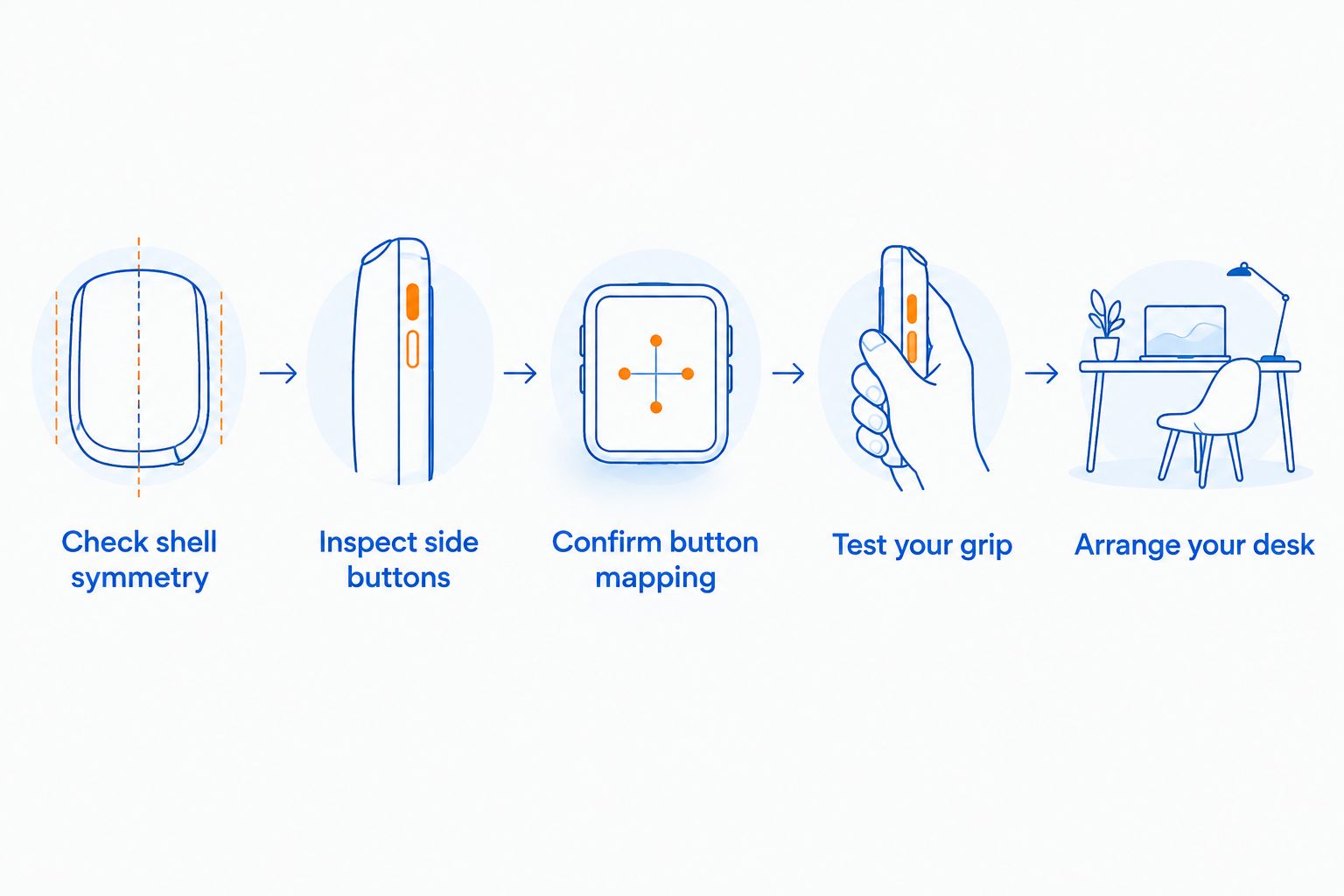
Check shell symmetry
Look at the mouse from above and from both sides. A shell with matching left and right edges gives each hand the same basic place to rest. A pronounced thumb rest or finger groove on one side calls for a closer look: you need to know which hand the contour serves. Do not treat a centered scroll wheel as proof that the whole shell is symmetric.
Product photos are a free first check, but a photo can hide the opposite side. If the listing shows only a flattering angle, find a top view and a view of each side before making a decision. For a gift, this is more useful than guessing the recipient's preferred lighting or color.
- Compare the left and right edges in a top-down image.
- Look for a fixed thumb rest on either side.
- Check whether both sides offer similar room for the ring and little fingers.
- Ask for another view if the supplied photos hide one side.
Inspect side buttons
Count the buttons, then locate them. Those are different tasks. A left-handed grip puts your thumb on the mouse's right side; buttons intended for a right thumb are generally on the opposite side. If side buttons matter to your games, confirm that your left thumb can press the available controls without changing your grip.
A listing with 6 buttons tells you how many inputs the mouse has, not where they sit. Gaming and More also lists a wireless 6-button option, but the supplied URL does not confirm a left-thumb button layout. Treat that detail as an open buying check, not an implied feature.
- Find a photo of the side your left thumb touches.
- Identify which buttons your thumb can reach without shifting your hand.
- Separate top buttons from side buttons when counting controls.
- If you rely on thumb shortcuts, reject a layout you cannot verify.
Confirm button mapping
Once the shell and physical controls pass, check what you can change in software. Your operating system's primary-button setting handles the basic click swap. Mouse-specific software, when available, can handle other assignments, but do not assume a particular listing includes it. Button remapping changes what a reachable button does; it cannot move an unreachable button to the other side of the shell.
Try the free settings already on your computer first. That shows whether the basic left-hand arrangement feels natural before you make product software part of the buying decision.
- Set the primary click for the hand you use.
- Write down the game actions you assign to side buttons.
- Check the candidate's stated remapping support before relying on it.
- Keep keyboard alternatives for actions a left thumb cannot reach.
Test your grip
Hold your current mouse the way you hold it during a real match, not the way a product photo suggests. A palm grip rests more of the hand on the shell; a claw grip arches the fingers; a fingertip grip places less of the palm on the mouse. None of those labels tells you which specific mouse will fit. They give you a consistent way to compare shapes.
If you can handle a candidate before buying, move it through the actions you repeat in-game. If you cannot, compare its visible shape with a mouse you already know. The aim is to remove a clear mismatch, not to declare comfort from a specification sheet.
- Notice where your palm, thumb and outer fingers rest.
- Check whether pressing a side button changes your grip.
- Repeat the broad and precise movements your games require.
- Prefer the shape you can control naturally over a feature you will not use.
Arrange your desk
A left-side mouse needs usable space on the left side of the keyboard. Check where your monitor stand, desk edge and other gear sit before choosing between a wired and wireless mouse. Wireless removes the cable from that movement path; it does not create more desk surface.
Keyboard size also changes what fits. Gaming and More lists a K617 Fizz 60% RGB Compact Gaming Keyboard; the 60% layout is a useful comparison point if your current keyboard takes up the space where you want to mouse. Measure your actual setup rather than assuming a compact label guarantees enough room.
- Clear the area where your left hand makes its normal movements.
- Place the keyboard and mouse pad where you will actually use them.
- Check cable routing if you prefer a wired mouse.
- Compare the space beside your current keyboard before changing it.
Compare connection and controls separately
Wireless, button count and left-handed fit answer different questions. The 6-button wireless mouse has a URL identifying 2.4G wireless connectivity and 6 buttons. Neither detail confirms a symmetric shell, reachable side buttons or remapping. Check those separately before treating it as an option for your left hand.
A simpler mouse can be the better gaming choice if every control you need is easy to reach. More buttons only help when their positions match your hand and your game assignments.
- Confirm the stated connection type meets your setup needs.
- Check the location, not just the total, of the buttons.
- Identify which controls you will use in your main game.
- Leave unverified left-hand compatibility off your shortlist.
Make the final check in your main game
A mouse that feels fine while browsing can expose awkward controls when you repeatedly use the same game action. Set your normal key bindings, use your usual mouse pad and pay attention to whether you adjust your hand to press a button. That is a practical test you can perform without treating a manufacturer's performance claim as a verdict.
For a gift, ask which hand the recipient uses for the mouse. Dominant writing hand is not a reliable substitute for that answer. If you cannot ask, prioritize a clearly documented symmetric shape and avoid assuming the word ergonomic means left-handed.
- Play the game you bought the mouse to use.
- Check repeated clicks and any thumb-button action.
- Notice whether your grip shifts to reach a control.
- For a gift, confirm the recipient's mousing hand first.
Compare left-handed mouse options in 2026
The right option depends on which features you can verify. The two Gaming and More mouse listings below establish that wireless mice are in the catalog; their supplied names and URLs do not establish a left-handed fit. Use the table to separate a promising category from a confirmed product feature.
| Option | Best for | What to verify | Key limitation |
|---|---|---|---|
| Symmetric gaming mouse with controls accessible from both sides | Left-handed players who use thumb shortcuts | Shell shape, both button locations and mapping | The description alone must confirm the actual layout |
| Symmetric mouse without needed thumb controls | Players who keep game actions on the keyboard | Shell shape and basic click settings | You give up those mouse-side shortcuts |
| Gaming and More wireless gaming mouse listing | Shoppers comparing a catalog candidate | Shell symmetry and button placement | Left-hand fit is not confirmed by the supplied title |
| Gaming and More 6-button wireless mouse listing | Shoppers who want to assess a 2.4G option | Which side holds the 6 buttons | Button count does not establish left-thumb access |
| Trackball mouse | Players considering a stationary pointer | Ball position and which hand the shell serves | A trackball label does not establish gaming suitability |
A trackball can be an alternative for someone whose desk space makes regular mouse movement difficult, but examine its layout just as carefully. For example, the Wireless Bluetooth Trackball Mouse — 2400 DPI, Rechargeable, 3-Device in the supplied catalog names a 2,400 DPI specification. That figure does not tell you which hand operates the ball comfortably or whether it suits your game. Choose the control layout first; compare specifications only among options that pass that check.
Common mistakes left-handed gamers make
Treating symmetric shape as proof of symmetric controls. A shell can appear even on both sides while its thumb buttons sit on only one. In 2026, inspect the button side in a product photo or diagram before calling the mouse ambidextrous for your needs.
Buying by button count alone. A 6-button description identifies a count, not six useful controls for your left hand. Map the actions you need, then check whether the buttons for those actions are reachable.
Assuming wireless means left-handed. Connection type tells you how the mouse communicates with your computer. It says nothing about thumb-rest position, shell shape or software controls.
Trying to fix the shell with settings. Swapping primary click can make basic clicking feel natural. It cannot reverse a fixed contour or relocate physical side buttons.
Buying a gift based on writing hand. Ask which hand the gamer uses on the mouse. Some players already use a right-hand setup regardless of their dominant hand, so a surprise change can miss the mark.
FAQ
What is the best gaming mouse for left-handed gamers in 2026?
The best choice has a shell your left hand can grip and controls your left fingers can reach. Confirm both details for a specific model; wireless connectivity or a gaming label does not establish left-hand fit.
Is an ambidextrous mouse always good for left-handed gaming?
No. An ambidextrous-looking shell can still place side buttons where a left thumb cannot reach them. Check the shell and button layout separately.
Can I make a right-handed gaming mouse left-handed in settings?
You can change the primary click setting, but software cannot reverse a physical contour or move side buttons. Check the shell before relying on remapping.
Does a 6-button gaming mouse work for left-handed players?
Button count alone does not answer that. Find out where the 6 buttons sit and which ones your left hand can press without changing grip.
Is a wireless mouse better for a left-handed desk setup?
Wireless removes a cable from the mouse's movement path, but it does not guarantee left-handed comfort. Check desk space, shell shape and controls as separate decisions.
Should left-handed gamers use a trackball mouse?
A trackball is an option if you want a stationary pointer, but its ball position and shell must suit your left hand. A DPI specification does not establish gaming suitability.
What should I check when buying a left-handed gaming mouse as a gift?
First ask which hand the recipient actually uses for the mouse. Then check the candidate's shell shape, button placement and stated settings rather than guessing from their writing hand.
One last thing
Before buying a gaming mouse for left-handed gamers in 2026, draw a small map of the controls your left hand needs: primary click, secondary click, wheel and any thumb actions. Compare that map with the product's actual button positions. It is a faster filter than sorting by button count, and it keeps an unverified listing from becoming a disappointing purchase.


