


How much does a wireless gaming headset cost in 2026?
A wireless gaming headset’s cost in 2026 depends on the exact model and your checkout total, so check the current listing for the headset you plan to buy. Include any separately sold adapter or replacement receiver you need; the right purchase is a headset that supports your gaming platform, microphone use, and preferred connection—not simply the lowest advertised total.
- How much does a wireless gaming headset cost? Check the exact model’s current listing and required accessories.
- For PS5, choose a headset with explicit PS5 wireless support; Bluetooth alone does not establish compatibility.
- For PC gaming, verify game audio and microphone support together, not just wireless pairing.
- Compare connection type, comfort, microphone behavior, and charging before choosing a wireless gaming headset.
Why this matters
A headset is only useful if you can hear the game and talk to your team on the device you actually use. A wireless label does not tell you whether a receiver works with your console, whether Bluetooth supports your chat setup, or whether the headset can play while charging.
Start with your platform, then choose the connection. The guide to choosing a gaming headset in 2026 covers the broader buying decision; this page focuses on the checks that keep a wireless purchase from becoming the wrong purchase.
How much does a wireless gaming headset cost in 2026?
Use the current total for an exact model, not a category estimate, as your buying number. Compare the headset, included receiver, and any required accessories as one purchase. Two listings are not equivalent if one includes the connection hardware you need and the other does not.
Before you compare checkout totals, establish that each candidate can do the same job. A phone-friendly Bluetooth headset and a console-compatible wireless gaming headset answer different needs, even when both promise wireless audio.
| Connection option | Best for | Main benefit | Main limitation | What to verify before buying |
|---|---|---|---|---|
| Dedicated wireless receiver | Desk gaming on an explicitly supported platform | A connection designed for the headset’s gaming audio and chat features | The receiver needs a compatible port and supported device | Exact console or PC support, microphone support, included receiver |
| Bluetooth | Phones and devices that explicitly support the required audio features | Connects without a dedicated receiver on compatible devices | Pairing does not guarantee the game-audio and microphone behavior you need | Host support, audio mode, microphone operation, delay |
| Multiple connection modes | Moving between a gaming device and another device | Gives you alternative ways to connect | Multiple modes do not necessarily mean simultaneous audio | Supported devices for each mode and how switching works |
| Wired fallback on a wireless headset | Players who want an alternative connection | Provides another way to use the headset when supported | The cable connection can behave differently from wireless mode | Audio, microphone, and powered-feature support over the cable |
Read the limitations column first. It exposes the mismatch that a feature list can hide. If the headset fails your platform or chat requirement, remove it from the shortlist before comparing anything else.
Dedicated wireless: best for a fixed gaming setup
Choose a dedicated-receiver headset when its documentation explicitly supports your PC or console and the connection suits your setup. A receiver-based headset commonly uses the 2.4 GHz band, but that frequency does not establish console compatibility or prove a particular delay figure.
Check the receiver itself. Its connector must fit an accessible port, and the manufacturer must identify your platform as supported. A receiver that plugs in physically is not automatically a working audio device on every console.
The benefit is a gaming-focused connection without a cable between your head and the gaming device. The trade-off is another piece of hardware to keep track of, plus dependence on the receiver’s supported platforms.
Best for: players who mainly use one supported gaming device and want a dedicated wireless connection. Before buying in 2026, confirm whether a lost receiver can be replaced and paired with that exact headset.
Bluetooth: best for compatible mobile use
Bluetooth makes sense when you want to connect to a phone or another device that supports the headset’s required features. It is a connection method, not a guarantee of suitability for competitive gaming or console voice chat.
On PC, microphone use can change the available audio mode, depending on the headset, Bluetooth implementation, and software. Test game audio and voice chat together rather than accepting successful pairing as proof that the setup works as intended.
The benefit is connecting to compatible devices without a dedicated headset receiver. The limitation is that audio delay, microphone behavior, and host-device support need separate checks.
Best for: casual listening and gaming on devices with confirmed Bluetooth support for your needs. Do not choose Bluetooth-only hardware for a console unless the console’s documentation confirms the connection and features you expect.
Multiple connection modes: best for switching devices
A headset with dedicated wireless and Bluetooth can suit a player who games at a desk and also listens on a phone. The useful question is not how many modes appear on the box. It is what each mode actually does.
Check whether you can switch between devices, hear both devices simultaneously, or only pair with them separately. Those are different capabilities. A product description that lists two connection methods does not establish simultaneous mixing.
The benefit is flexibility. The trade-off is more behavior to understand: which device receives the microphone, what happens during a call, and whether controls change between modes.
Best for: players who regularly move between a supported gaming device and a phone. Choose the feature you will use, not a connection count that sounds impressive.
Why wireless headset value varies
For a 2026 purchase, judge value by the job the headset performs. These checks explain the practical differences between candidates without assuming that a higher checkout total guarantees better results.
- Platform support: Confirm the exact device and connection mode. PC support does not establish Xbox support, and a console’s name in a listing deserves a closer compatibility check.
- Microphone behavior: Check how chat works in the mode you will use. A headset that plays audio correctly can still fail your microphone requirement.
- Comfort and fit: Headband adjustment, ear-cup shape, padding, and glasses clearance affect the wearing experience. A feature-rich headset is a poor choice if you cannot wear it comfortably.
- Charging behavior: Verify the charging connector and whether listening while charging is supported. A connected charging cable does not automatically become an audio cable.
- Repair and replacement: Look for documented support for replacement ear pads, cables, or receivers. Do not assume an accessory for a similar model will fit.
- Controls and software: Check which settings need an app and whether they work on your gaming platform. Software available on PC does not prove identical control on a console.
Buy for a requirement you can name. If you cannot explain when you will use a feature, keep it below compatibility, fit, and microphone performance on your checklist.
How do I compare wireless headsets before buying?
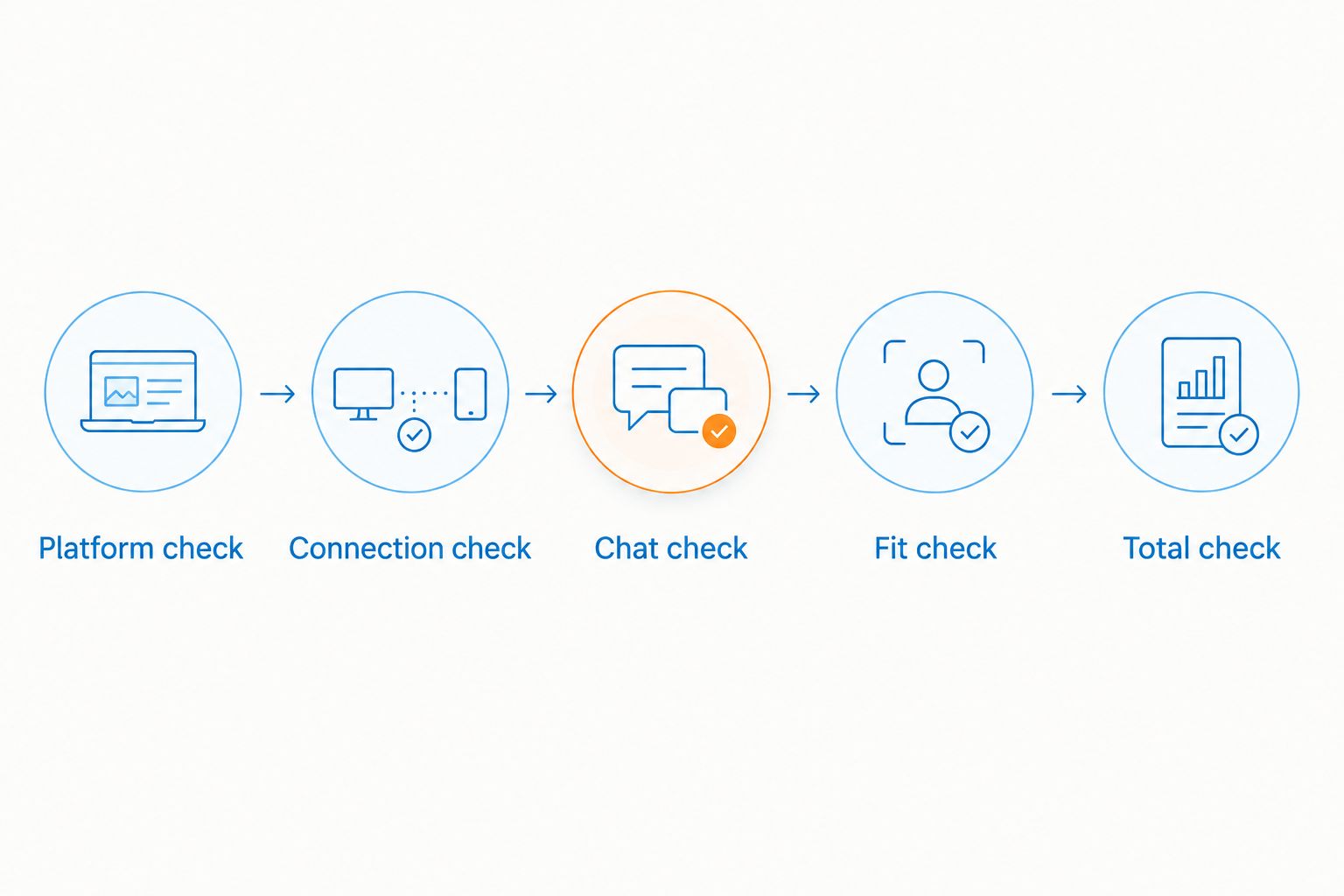
Use this sequence to narrow the choice. It works whether you are buying for yourself or choosing a gaming gift.
- Platform check: Write down the exact PC or console the headset must support. For a gift, ask the recipient rather than guessing from the games they play.
- Connection check: Identify the mode you will use and the required receiver or cable. Check the device’s ports and the headset’s supported connection path.
- Chat check: Confirm microphone operation in that same mode. Look for a microphone sample or a review that identifies its recording conditions.
- Fit check: Consider glasses, ear-cup clearance, headband adjustment, and access to replacement pads. Comfort is personal, so inspect the seller’s applicable return terms.
- Total check: Compare the current checkout totals only after each candidate meets the same requirements. Include any necessary accessories.
Keep a short note beside each candidate explaining why it remains on your list. For example, confirmed console support is a reason; wireless gaming branding is not. This makes the final choice easier and stops an attractive feature from covering up a missing requirement.
What should I check beyond the headset itself?
Inspect the included-accessories list before ordering. A receiver, charging cable, audio cable, and adapter serve different purposes; one does not automatically replace another.
A 3.5 mm connection can provide an alternative audio path on headsets that support it, but you still need to verify microphone support and connector compatibility. Likewise, USB-C describes a connector, not a promise that every cable carries headset audio.
Check your desk layout too. A receiver needs a suitable port, and a charging cable needs a practical route to where you store the headset. Keep the plan simple: a supported connection and a reachable charging point.
Gaming and More is best for gamers comparing gaming gear and setup upgrades. For a wireless headset purchase, keep the scope narrow: evaluate the headset against your current gaming device before adding unrelated upgrades. Gaming and More’s broader gaming gear offering does not replace model-specific compatibility checks.
Is a wireless gaming headset worth it over a wired headset?
Wireless is worth choosing when freedom from the cable solves a real problem in your setup. It lets you wear the headset without a tether to the audio source, within the connection’s working range. You still need to charge it and manage any receiver it requires.
Wired is the stronger fit when you want to avoid headset charging and do not mind a cable. A compatible analog connection also avoids wireless pairing, although microphone and connector support still need checking.
| Option | Best for | Practical advantage | Practical drawback |
|---|---|---|---|
| Wireless headset | Players who dislike a headset cable | Untethered use with a supported wireless connection | Charging and wireless connection management |
| Wired headset | Players comfortable with a cable | No wireless pairing on a compatible analog connection | Cable routing and movement restrictions |
Do not treat wireless as an automatic sound-quality upgrade. Connection type alone does not establish microphone quality, sound tuning, or comfort. Compare those separately, using evidence for the exact models.
Do I need Bluetooth and dedicated wireless together?
You need both only if you have a use for both connection modes. A dedicated gaming connection can cover your gaming device, while Bluetooth can cover a compatible phone. If you never connect the headset to a second device, the extra mode is not a buying requirement.
For a 2026 shortlist, distinguish device switching from simultaneous audio. Ask whether the headset can play the game and phone audio together, and which device gets microphone input. Those details matter more than a dual-wireless label.
Can I use one wireless headset across different consoles?
Use one headset across consoles only when its documentation explicitly supports each console and the required connection method. Similar ports do not establish shared compatibility. Check the exact headset variant, not just the product family name.
For multi-platform use, make a separate checklist for each device. Record the required receiver, connection mode, and microphone support. If switching needs additional hardware, include that hardware in your purchase decision.
FAQ
How much does a wireless gaming headset cost in 2026?
Check the exact model’s current listing and checkout total, including any required accessories. Compare totals only after confirming platform, microphone, and connection support.
Is a more expensive wireless gaming headset always better?
A higher checkout total does not establish better compatibility, comfort, or microphone performance. Choose the headset that meets your requirements, using evidence for the exact model.
Can I connect any Bluetooth gaming headset to a PS5?
No; Bluetooth support on a headset does not establish PS5 wireless compatibility. Choose a headset and connection method explicitly documented as supported by PS5.
Does a 2.4 GHz receiver work with every console?
No; 2.4 GHz identifies a wireless frequency band, not universal console support. Verify the receiver’s compatibility with your exact gaming device.
Can I use a wireless gaming headset while it charges?
Use while charging is model-specific, so check the headset’s documentation. A charging connection does not automatically support audio over the same cable.
Is Bluetooth enough for PC gaming and voice chat?
Bluetooth is enough only when the headset and PC support the audio and microphone behavior you need together. Test game audio with voice chat active, not just pairing or music playback.
What should I check when buying a wireless gaming headset as a gift?
Confirm the recipient’s exact gaming platform before choosing a headset. Then check connection support, microphone operation, comfort needs, and the seller’s applicable return terms.
One last thing
The charging port is not proof of a wired fallback. A headset can have a USB charging connection without supporting USB audio, and a supported cable mode can behave differently from wireless mode.
Before completing a 2026 purchase, ask one final question: what happens when the battery is empty? Choose a headset whose documented answer fits your routine. When comparing Gaming and More gaming gear or any other listing, keep that check beside platform support—not buried beneath cosmetic features.


