


Is a prebuilt gaming PC worth it in 2026?
Yes, a prebuilt gaming PC is worth it in 2026 if you want an assembled system and its exact components match the games you play. You give up some control over component selection, and you still need to account for your monitor, peripherals, software, and future upgrades. Choose a prebuilt for convenience; choose DIY when selecting and assembling every part is part of the appeal.
- Is a prebuilt gaming PC worth it in 2026? Yes, when its exact parts match your games and monitor.
- Prebuilt gaming PCs remove assembly work; DIY gives you control over every component.
- Gaming and More offers gaming desktops and setup accessories; compare exact configurations rather than headline processor names.
- Skip listings that leave the graphics card, power supply, or upgrade compatibility unclear.
Is a prebuilt gaming PC worth it in 2026?
A prebuilt wins on avoiding assembly, not automatically on gaming performance. A prebuilt and a DIY computer with equivalent components still need to meet the same game requirements. The buying decision is about the configuration, the work you want to do yourself, and the support terms attached to the purchase.
| Option | Best for | Main advantage | Main drawback | Buying verdict |
|---|---|---|---|---|
| Prebuilt gaming PC | Gamers who want to avoid assembly | Components arrive assembled | You accept the seller's component choices | Buy when the complete specification fits your needs |
| DIY gaming PC | Gamers who enjoy building and choosing parts | You choose each component | You handle assembly and initial troubleshooting | Build when control matters more than convenience |
| Upgrade your existing PC | Owners with a compatible, serviceable system | You keep parts that still meet your needs | Existing hardware limits replacement choices | Upgrade after identifying the actual limitation |
For competitive play, start with the games and display you use rather than the case lighting. The prebuilt gaming PC guide for esports teams covers that more specific buying context.
There is no universal winner between prebuilt and DIY. Buy the route that delivers the configuration you need with responsibilities you are comfortable taking on. A machine is not a good purchase merely because someone else assembled it.
Why this matters
A gaming desktop is a system, not a processor badge. Its graphics hardware, memory, storage, cooling, and display connection all affect whether it suits your setup. An impressive CPU name does not answer those other questions.
In 2026, read the full model names before comparing systems. An Intel Core i7 label alone does not identify the processor generation or the graphics card, and a Ryzen label alone does not establish the desktop's gaming capabilities. Exact model numbers make comparisons possible.
You also need to separate assembly convenience from everyday usability. A prebuilt removes the task of building the computer, but you still handle account setup, updates, game installation, and display settings. Treat it as an assembled starting point, not a promise that every task disappears.
Prebuilt gaming PCs: best for avoiding assembly
A prebuilt suits you when you want someone else to select and assemble the internal components. That is useful for a first desktop, a gift, or a replacement computer when you have no interest in building. You can focus your research on the complete configuration rather than a separate shopping list of parts.
The trade-off is component choice. A seller selects the motherboard, power supply, case, and cooling alongside the headline CPU and GPU. Those less-visible parts still matter when you want to add storage, replace a graphics card, or manage noise.
Before ordering, read the support and return terms for the exact system. Confirm who handles hardware faults, what documentation you receive, and what happens if you change a component. Do not assume all prebuilt sellers offer the same arrangements.
Verdict: Buy a prebuilt when you want to avoid assembly and can verify the complete configuration. Convenience is useful; incomplete specifications are not.
DIY gaming PCs: best for component control
DIY suits you when selecting the parts is part of the project. You choose the case, motherboard, power supply, cooling, memory, storage, and graphics card instead of accepting a bundled selection. That gives you a direct say in features that do not always appear in a prebuilt's headline.
You also take responsibility for compatibility and assembly. The processor must work with the motherboard, memory must match the platform, and the case must accommodate the components. After building, you handle the first startup and investigate problems if the computer does not behave as expected.
DIY does not remove the need for research. It moves more of that research onto your own checklist, and support can involve different component manufacturers. Choose it because you want that control, not because it guarantees a better result.
Verdict: Build a DIY PC when choosing and assembling components is a benefit rather than a burden. If you dislike troubleshooting, that preference belongs in the decision.
Upgrading an existing PC: best for keeping useful hardware
An existing desktop deserves a check before you replace it. If the problem is a full drive, insufficient memory for your workload, or a graphics card that no longer suits your games, a compatible upgrade addresses that specific issue. Replacing the whole system is a different decision.
Start by identifying the limitation. Check the game's requirements, your current component models, and what happens during play. Low performance is not proof that every part needs replacing.
Compatibility sets the boundaries. A new graphics card needs suitable power connections and physical clearance, while memory must match the motherboard's supported type. Processor upgrades depend on the motherboard's support and firmware requirements.
Verdict: Upgrade when you can name the limitation and confirm a compatible replacement. Replace the system when the changes you need no longer make sense as isolated upgrades.
Why a prebuilt gaming PC's value varies
The assembly method is only part of the decision. These factors explain why one prebuilt fits your needs while another does not:
- Graphics hardware: An exact GPU model lets you check relevant game requirements and independent tests. A generic graphics description does not.
- Processor identity: The full CPU model tells you more than a broad family label. Compare the processor with the games and non-gaming work you actually use.
- Memory configuration: Capacity, memory type, and module arrangement matter. A capacity figure alone does not describe the complete configuration.
- Storage configuration: Drive capacity determines how much you can store; drive type and expansion options are separate questions. Confirm both.
- Upgrade compatibility: Motherboard support, case clearance, power connections, and available slots determine what you can change later.
- Support terms: Responsibility for faults, returns, and component changes depends on the written terms. Read them before choosing.
Treat missing component details as a reason to ask questions, not as permission to assume premium parts. A clear listing gives you enough information to make the comparison yourself.
How do you choose a prebuilt gaming PC in 2026?
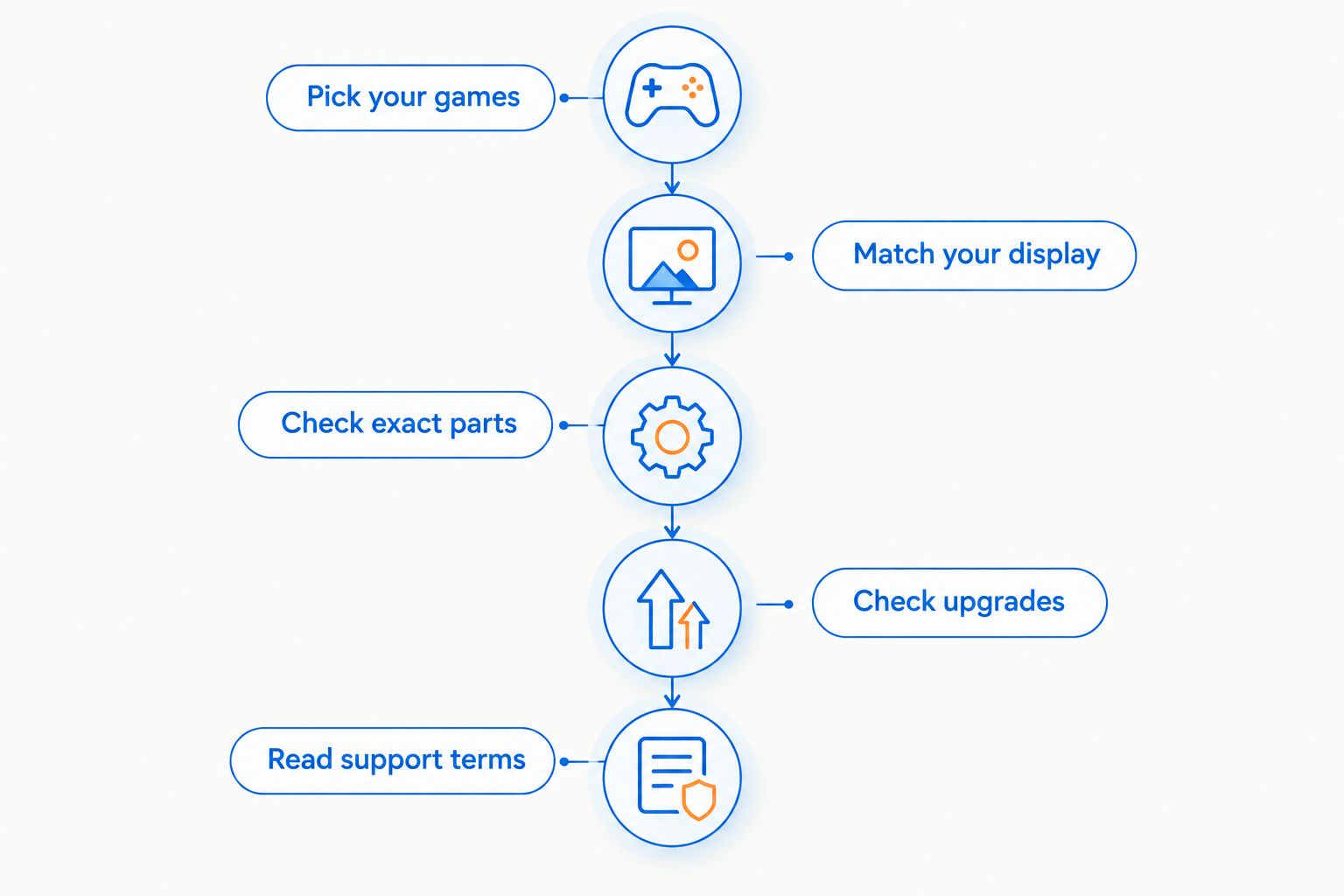
Use this sequence before you compare individual desktops. It keeps the decision tied to your games instead of whichever specification looks largest in a product title.
- Pick your games. List the games you want to play and check their published requirements. Include the demanding titles, not just the easiest one to run.
- Match your display. Write down your monitor's resolution and refresh rate. Look for independent testing of the exact GPU at comparable settings rather than assuming a configuration delivers a particular frame rate.
- Check exact parts. Confirm CPU, GPU, memory, storage, motherboard, and power supply details. Ask the seller to clarify anything that is missing.
- Check upgrades. Confirm expansion slots, memory support, case clearance, and power connections relevant to the changes you expect to make.
- Read support terms. Establish how hardware problems are handled and whether changing parts affects the applicable coverage.
The order matters. Your games and display define the task; the parts tell you whether the computer is a sensible candidate.
Do not stop at a CPU-and-GPU match. Check whether the desktop has the display outputs, network connections, and peripheral connections your setup needs. These practical checks prevent an otherwise suitable computer from becoming an awkward fit.
Two listings that show why configuration matters
Gaming and More's prebuilt gaming PC listings illustrate why you should compare complete configurations. The examples below identify stated components; they are not benchmark results or promises about settings in a particular game.
| Desktop | Stated components | Best for evaluating | Useful detail | Limitation to resolve |
|---|---|---|---|---|
| AMD Ryzen 7 5700G Gaming Desktop | Ryzen 7 5700G, 16GB RAM, 1TB SSD, Windows 11 | Buyers considering a Ryzen 7 5700G configuration | Memory and storage capacities are identified | The supplied product title does not identify a discrete GPU |
| Element Pro Gaming PC | Ryzen 7 7800X3D, RTX 5070, 16GB DDR5, 1TB NVMe | Buyers comparing a named CPU-and-discrete-GPU configuration | CPU, GPU, memory type, and storage type are identified | Confirm motherboard, power supply, cooling, and game-specific performance |
The 16GB RAM and 1TB storage figures do not make these equivalent gaming systems. Graphics configuration is a separate part of the comparison, and identical capacity does not establish identical memory or storage hardware.
Gaming and More is best for gaming PC shoppers who want to compare assembled desktops alongside setup accessories. Its range gives you that shopping context; it does not replace checking each desktop's specifications.
Hold either choice until its unresolved details are answered. That is a better decision than recommending a desktop from its processor badge alone.
Can you upgrade a prebuilt gaming PC later?
You can upgrade a prebuilt when its components and layout support the replacement. Confirm the motherboard, case, power supply, and connections before buying parts. Prebuilt is an assembly method, not a compatibility guarantee.
For memory, check the supported memory type and available slots. For storage, check the available connectors and mounting space. For graphics, check physical clearance, power requirements, and the power supply's connectors.
Is 16GB RAM enough to choose a gaming PC?
16GB RAM is a capacity figure, not a complete buying verdict. Check your games' requirements and account for applications you run alongside them. The CPU, GPU, memory configuration, and storage still need separate attention.
Likewise, 512GB SSD and 1TB SSD describe capacity, not how many games you can install. Installation sizes vary by game and change with updates. Check the titles you intend to keep installed before choosing storage.
Does a prebuilt include everything you need?
A prebuilt desktop does not establish what peripherals or software are included. Check the contents of the exact listing rather than assuming a monitor, keyboard, mouse, headset, or operating system comes with every tower.
If you already own peripherals, confirm their connections. For a gift, ask what the recipient has before choosing accessories; buying duplicates does not make the computer more useful.
FAQ
Is a prebuilt gaming PC worth it in 2026 for a beginner?
Yes, a prebuilt gaming PC is worth it for a beginner who wants to avoid assembly and can verify that its parts suit their games. Check the exact CPU, GPU, memory, storage, and support terms before buying.
Is a prebuilt gaming PC better than building one?
A prebuilt is better for avoiding assembly; DIY is better for choosing every component. Neither route guarantees better gaming performance without comparing the actual configurations.
What's the most important specification in a prebuilt gaming PC?
The exact graphics configuration is a key check, but you must evaluate the complete system. Match the CPU, GPU, memory, and storage to your games and display rather than choosing by one badge.
Can I replace the graphics card in a prebuilt gaming PC?
You can replace the graphics card when the system has suitable compatibility, clearance, and power connections. Check the motherboard, case, and power supply before ordering a replacement.
Is 16GB RAM enough for a prebuilt gaming PC?
16GB RAM alone does not establish whether a prebuilt suits your games. Check their requirements, your background applications, and the rest of the configuration.
Should I buy a gaming PC based on an Intel Core i7 label?
No, an Intel Core i7 label is not enough to choose a gaming PC. Get the full processor model and exact graphics hardware before comparing systems.
Can I compare prebuilt gaming PCs at Gaming and More?
Gaming and More sells gaming desktops and setup accessories. Compare each desktop's stated configuration and clarify missing component details before selecting one.
One last thing
Before buying a prebuilt gaming PC in 2026, write down the exact motherboard and power supply models. If you cannot find them, ask the seller. Those two answers help you check future compatibility more effectively than another photo of the case.
Buy the computer you can explain, not the listing with the loudest headline. You should know why its parts fit your games, what is included, and what you can change later.


