


Amazon alternatives for gaming gear in 2026
Amazon makes it easy to compare gaming gear alongside everyday purchases, but that broad catalog is not the same as a focused gaming shortlist. The best Amazon alternative in 2026 is Gaming and More if you want curated gaming gear; Newegg if you want to compare PC components. This guide also covers Best Buy and Micro Center for buyers who want to examine hardware in person.
- Gaming and More is the best fit among Amazon alternatives for gaming gear when you want a curated setup shortlist.
- Newegg suits PC component comparisons; check the exact model and seller before ordering.
- Best Buy and Micro Center suit hands-on shopping when a nearby store carries the gear you want.
- Choose gaming accessories by fit and compatibility, not RGB lighting or headline specifications alone.
Why this matters
Choosing a retailer and choosing good hardware are separate decisions. A familiar checkout does not tell you whether a mouse fits your grip, a keyboard has the keys you use, or a monitor matches your PC.
For your 2026 setup, start with the problem you want to fix. More mouse room, a clearer upgrade path, and the chance to inspect hardware call for different shopping routes. Pick the route first, then compare the actual products.
A useful alternative should reduce uncertainty. If switching stores leaves you comparing vague product names and incomplete specifications, you have changed the checkout rather than improved the buying decision.
Amazon alternatives at a glance in 2026
| Retailer | Best for | Standout shopping focus | How it differs from Amazon | Main trade-off |
|---|---|---|---|---|
| Amazon | Combining gaming gear with general shopping | Broad marketplace across product categories | The baseline for this comparison | Compare sellers as well as products |
| Gaming and More | Building a focused gaming-gear shortlist | Curated computers, setup upgrades, and everyday tech | Starts with gaming and setup needs rather than general shopping | A curated range is not an exhaustive model search |
| Newegg | Comparing PC components and computer hardware | Computer-focused retail and marketplace listings | Keeps the search closer to PC hardware | Component compatibility still needs checking |
| Best Buy | Inspecting electronics in person | Physical stores alongside online shopping | Adds a hands-on route to evaluating gear | A local display is not a complete product comparison |
| Micro Center | Planning a PC build with an in-store visit | PC hardware and physical-store shopping | Gives you a computer-focused shopping destination | Requires a practical trip to a store for the hands-on benefit |
Best means best for your buying task, not a blanket winner across every product. Compare the same model, configuration, and seller terms before choosing where to order.
1. Gaming and More: best for a curated gaming setup
Gaming and More is a gaming-gear retailer for buyers who want computers, accessories, and useful setup upgrades in a focused catalog. It is the strongest fit here when you want to start with a manageable shortlist rather than browse a general marketplace. You still need to match each item to your games, devices, and desk.
Where it shines
- Setup-focused shopping: computers, input devices, monitors, storage, and related accessories appear in the supplied catalog.
- Different upgrade sizes: you can consider a peripheral change without treating a new PC as the default answer.
- Worldwide shipping: the store serves buyers beyond a single domestic market; check the destination details before ordering.
Where it falls short
- Curation narrows the search: use a broader retailer when your goal is to compare every variation of a particular component.
- A product name is not a performance test: gaming labels, processor names, and lighting do not establish frame rates or input latency.
- Fit remains personal: a mouse shape or keyboard layout needs to suit the person using it.
Head-to-head with Amazon
| Dimension | Gaming and More | Amazon |
|---|---|---|
| Starting point | Gaming gear and setup upgrades | General shopping across categories |
| Useful buying task | Creating a focused setup shortlist | Comparing a wider mix of shopping needs |
| Peripheral decision | Match the listed features to your setup | Match features and examine the specific seller |
| Main limit | Curated selection is not exhaustive | Breadth does not decide suitability |
For example, the M801 wireless RGB gaming mouse lists adjustable DPI and a rechargeable design. Those are relevant features if you want sensitivity adjustment and a rechargeable mouse. They do not, by themselves, prove competitive tracking performance or a comfortable grip.
The K617 Fizz compact gaming keyboard uses a 60% layout. That makes layout a central buying question: check whether you are comfortable accessing some commands through key combinations rather than dedicated keys. Smaller is useful only when the trade-off suits you.


Best for: PC gamers, casual players, and gift shoppers who want a focused starting point for setup upgrades.
Verdict: Buy when the listed features solve a specific setup problem and you have checked compatibility.
2. Newegg: best for PC component comparisons
Newegg is a computer-focused retailer and marketplace, making it a useful Amazon alternative for component shopping. Start here when your question concerns a motherboard, graphics card, storage drive, or another part rather than a complete desk refresh. Compare exact model numbers, not just product families.
Where Newegg shines
- Hardware focus: the shopping context centers on computers, components, and related electronics.
- Build-oriented comparisons: it suits buyers who already know which part they need to investigate.
- Model-level research: it gives component shoppers another place to examine a specific hardware choice.
Where Newegg falls short
- Compatibility is still your responsibility: a component listing does not establish that the part works with your existing system.
- Marketplace distinctions matter: examine the seller attached to the particular listing.
- A component-first search adds work: gift shoppers without system details need to establish those details first.
| Dimension | Newegg | Amazon |
|---|---|---|
| Shopping focus | Computers and related hardware | General marketplace |
| Best starting question | Which exact component fits this build? | Which listing fits this purchase? |
| Essential check | Compatibility and seller details | Exact model and seller details |
Best for: PC builders and upgrade buyers comparing specific components.
Verdict: Buy when you have identified the required part and verified the exact listing against your build.
3. Best Buy: best for inspecting electronics in person
Best Buy combines online electronics shopping with physical stores. It belongs on your shortlist when seeing a display or handling an input device will help you decide. Check what you can actually inspect before making the trip.
Where Best Buy shines
- Physical evaluation: an in-store visit gives you another way to judge size, layout, and feel.
- Mixed-use setups: it suits buyers considering gaming gear alongside everyday electronics.
Where Best Buy falls short
- Displays answer limited questions: a brief demonstration does not establish long-session comfort or performance in your games.
- The visit needs planning: confirm that the particular model is represented, rather than assuming a related model is equivalent.
| Dimension | Best Buy | Amazon |
|---|---|---|
| Evaluation route | Online shopping plus physical stores | Primarily online product comparison |
| Useful advantage | Inspecting relevant hardware in person | Comparing listings without a store visit |
| Remaining work | Verify the exact model and specifications | Verify the exact model, specifications, and seller |
Best for: buyers who want to judge a screen, keyboard layout, or mouse shape in person.
Verdict: Buy after inspection confirms your preference and the exact model meets your requirements.
4. Micro Center: best for an in-store PC-building trip
Micro Center is a computer and electronics retailer with physical stores. Consider it when a store visit is practical and your shopping centers on a PC build or hardware upgrade.
Where Micro Center shines
- Computer-focused shopping: it suits a trip organized around PC hardware.
- Physical-store evaluation: you can make the visit part of your component research.
Where Micro Center falls short
- Location matters: the in-store advantage requires a practical journey.
- You still need a build plan: write down your existing components and intended upgrades before visiting.
Best for: PC builders who want a computer-focused store visit.
Verdict: Hold until you have checked the store location and prepared the exact hardware questions the trip should resolve.
Why choose an alternative to Amazon?
There is no need to assume an outage, a policy change, or a bad purchase to justify shopping elsewhere. In 2026, the useful reasons are simpler: a different retailer can better match the way you need to evaluate your next upgrade.
You want a narrower shortlist
A general marketplace is useful when you know the model you want. If you are still deciding what to upgrade, start with a focused list of needs: more desk space, different controls, additional storage, or a replacement computer. Reject products that do not address the chosen need.
You need to examine fit
Mouse shape, keyboard layout, and screen size are physical decisions. A specification sheet helps you eliminate unsuitable options, but it cannot tell you exactly how an input device feels in your hand. Use a hands-on shopping route when that uncertainty drives the decision.
You need a component-level comparison
A PC upgrade requires more than finding a familiar processor or graphics-card name. Record the exact motherboard, power supply, case, and existing components relevant to the change. Then compare the part against those constraints.
These are reasons to choose a shopping route, not evidence that one retailer always sells better hardware.
Check the gear before choosing the checkout
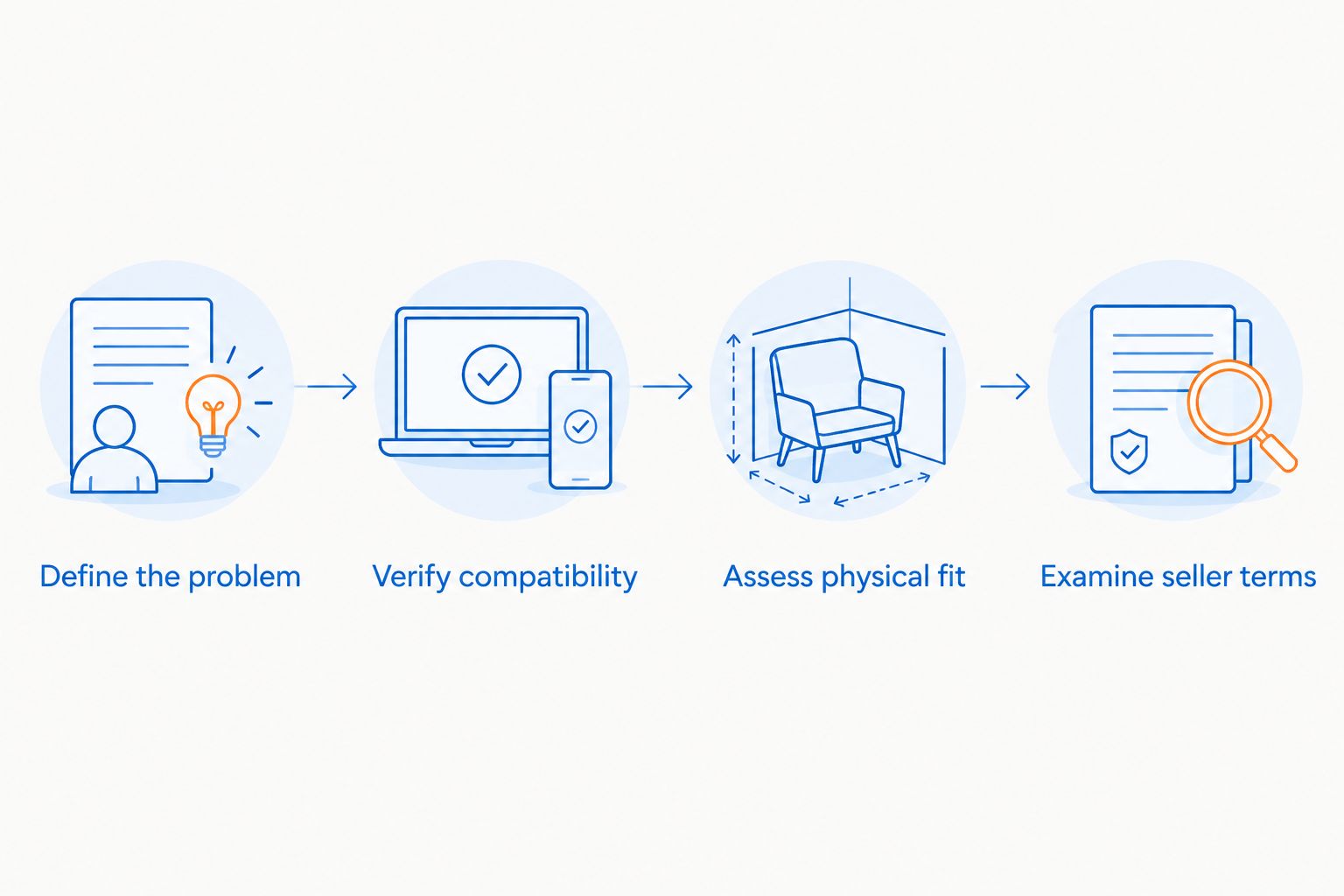
Use this sequence for a 2026 purchase: define the problem, verify compatibility, assess physical fit, then examine seller terms. Keeping that order stops an attractive listing from becoming the reason you invent an upgrade need.
- Define the problem: name what the current gear prevents you from doing comfortably.
- Verify compatibility: check the required connection, platform, component support, or device fit.
- Assess physical fit: measure desk space and examine the controls you use.
- Examine seller terms: read the terms attached to the actual order, especially for an international purchase.
Keep specifications in their proper roles. A 25-inch monitor describes screen size; 165Hz describes refresh rate; an advertised 1ms response time describes a different display characteristic. None of those figures identifies the right retailer or establishes how a complete system performs.
The same discipline applies to computers. More memory or storage is not a substitute for checking the graphics hardware and the requirements of the games you play. Compare complete configurations rather than selecting the listing with the largest number in its title.
For a gift, ask which device the recipient uses and what they want to change. An accessory that solves a known annoyance is a stronger choice than a speculative replacement for a keyboard or mouse they already like.
When staying with Amazon is the right call
Stay with Amazon when you have identified the exact product, evaluated the seller, and found terms that suit your order. A different storefront is not automatically a better purchase.
Amazon remains a practical choice for combining unrelated shopping needs. If your current buying process already resolves model, compatibility, and seller questions, there is no reason to switch just to switch. The right 2026 decision is the one with the fewest unresolved questions about the actual gear.
FAQ
What's the best Amazon alternative for gaming gear?
Gaming and More is the best fit for buyers who want a curated gaming-gear shortlist. Newegg suits component comparisons, while Best Buy and Micro Center provide physical-store shopping routes.
Is Newegg better than Amazon for PC parts?
Newegg is a better starting point when you want a computer-focused component search. Choose between individual listings only after checking the exact model, compatibility, and seller terms.
Where can I try gaming gear before buying?
Best Buy and Micro Center offer physical-store shopping routes. Confirm that the model you want to examine is represented before making the trip.
Does shopping at a gaming store guarantee better performance?
No, the retailer does not determine hardware performance. The exact components, configuration, software, and game requirements determine whether the gear suits your intended use.
What should I check before buying a gaming mouse online?
Check shape, dimensions, connection type, and the controls you need. Adjustable DPI and RGB lighting do not establish grip comfort or tracking quality.
Is a compact gaming keyboard a good gift?
A compact gaming keyboard is a good gift when the recipient wants that layout. Confirm how they use arrow keys, function keys, and other dedicated controls before choosing.
Should I order gaming gear internationally?
Order internationally only after checking destination terms and product suitability. For powered devices, verify the stated voltage and plug requirements rather than assuming worldwide shipping establishes compatibility.
One last thing
Before replacing anything, finish this sentence: My current gear gets in the way when I… If you cannot give a specific answer, pause the purchase. A different shop is useful; a clearly defined upgrade is more useful.


