


Best ambidextrous gaming mice in 2026
Best overall: Logitech G PRO Wireless. Best for wired competitive play: Razer Viper 8KHz. Best for a fuller shape: SteelSeries Sensei Ten. Best for shared-PC use: Corsair M55 RGB PRO. These are the best ambidextrous gaming mice to compare in 2026 when you need more than a symmetrical shell.
- Logitech G PRO Wireless is the best ambidextrous gaming mouse here for wireless play and configurable side buttons.
- Razer Viper 8KHz suits wired competitive players who want side buttons on both sides.
- SteelSeries Sensei Ten favors a fuller shape; Corsair M55 RGB PRO suits a shared gaming setup.
- Left-handed gamers should check button placement and remapping before choosing a symmetrical gaming mouse.
Why this matters
A symmetrical mouse is not automatically fully ambidextrous. The shell can fit either hand while the thumb buttons serve only right-handed players. That distinction matters more than RGB lighting or a headline sensitivity figure.
For Gaming and More readers choosing gaming gear in 2026, the starting point is simple: check which controls you can actually reach. Then decide whether the shape, cable and software fit your setup.
This list separates four different buying decisions rather than pretending every mouse suits every player. None wins because of a promised improvement in aim, and none gets a recommendation based on appearance alone.
What makes the best ambidextrous gaming mice?
Use these criteria before comparing sensor specifications:
- True hand flexibility: Look for a symmetrical shell and usable controls for either hand. Side buttons on both sides are especially useful for left-handed players.
- Button control: Check whether you can remove or disable buttons under your ring finger. Accidental presses defeat the point of extra controls.
- Shape fit: Match the mouse's length, width and rear hump to your grip. A fuller body and a low-profile body feel different even when both are symmetrical.
- Connection: Choose wireless for cable-free movement or wired for a setup without mouse charging. Neither choice fixes a poor fit.
- Software requirements: Confirm how you swap primary clicks, remap buttons and save settings. Shared computers need particular attention.
- Useful specifications: Weight and polling rate describe different things. Treat them as selection criteria, not evidence that a mouse will improve your results.
Best ambidextrous gaming mice at a glance
The order below reflects distinct use cases for this 2026 shortlist. It is not a measured performance leaderboard.
| Mouse | Best for | Standout feature | Key limitation |
|---|---|---|---|
| Logitech G PRO Wireless | Wireless flexibility | Removable side buttons on both sides | Requires charging |
| Razer Viper 8KHz | Wired competitive play | Up to 8,000 Hz polling | Cable remains part of the setup |
| SteelSeries Sensei Ten | Players wanting a fuller shape | Conventional symmetrical body with bilateral side buttons | Fixed side buttons require attention to accidental presses |
| Corsair M55 RGB PRO | Shared-PC use | Ambidextrous layout with configurable button assignments | Switching users still requires the correct settings |
Manufacturer specifications establish the button layouts and connection types described here. Fit recommendations are buying guidance, not hands-on test results or measured latency comparisons.
1. Logitech G PRO Wireless: best for wireless flexibility
The Logitech G PRO Wireless combines a symmetrical shape with removable side buttons on both sides. You can configure the thumb-button layout for your preferred hand instead of accepting a permanently right-handed arrangement.
Best for: Players who want wireless movement and configurable side controls. The Logitech G PRO Wireless is the best overall choice here for gamers who need genuine hand flexibility without a cable.
The removable buttons are the main reason to choose this model. Covering unused positions gives your opposite fingers fewer controls to press accidentally, which is useful when you grip the mouse firmly during a swipe.
Logitech G PRO Wireless pros:
- Removable side buttons support different left- and right-handed layouts.
- Wireless operation removes cable drag from the mousepad.
- Its symmetrical body supports use with either hand.
Logitech G PRO Wireless cons:
- You need to maintain a charging routine.
- The shell still needs to fit your hand; button flexibility does not guarantee comfort.
The manufacturer's listed weight is 80 g. Use that as a comparison point, not a claim that it is ideal for everyone: players have different preferences for movement resistance and control.
Check the full model name when comparing products in 2026. This recommendation concerns the G PRO Wireless, and its button layout should not be assumed to apply to every Logitech mouse carrying a PRO name.
Verdict: Buy the Logitech G PRO Wireless if removable side buttons and wireless movement are your priorities.
2. Razer Viper 8KHz: best for wired competitive play
The Razer Viper 8KHz is a wired, symmetrical gaming mouse with side buttons on both sides. Its defining specification is support for polling at up to 8,000 Hz, paired with a low-profile body.
Best for: Competitive players who want a wired ambidextrous mouse. Choose the Razer Viper 8KHz for its combination of bilateral controls and a cable-based connection, not because a polling figure guarantees better aim.
A high polling rate increases how frequently the mouse reports to the computer. The practical result depends on your system and game, so keep the setting that runs consistently rather than assuming the maximum is mandatory.
Razer Viper 8KHz pros:
- Side buttons on both sides serve either-handed use.
- Wired operation removes the need to recharge the mouse.
- Adjustable polling gives you a setting to match your system.
Razer Viper 8KHz cons:
- Cable routing affects how freely the mouse moves.
- Its low-profile shape is not the default choice for someone seeking a fuller palm feel.
Before choosing the Razer Viper 8KHz, check that its side buttons sit under your thumb without forcing you to change your grip. Also check whether the opposite buttons contact your ring finger during broad movements.
The exact model matters here too. This recommendation is for the Viper 8KHz, not a blanket statement about the button layouts of other Viper models.
Verdict: Buy the Razer Viper 8KHz if you want wired competitive play and buttons on both sides.
3. SteelSeries Sensei Ten: best for a fuller symmetrical shape
The SteelSeries Sensei Ten is a wired ambidextrous mouse with side buttons on both sides. Its conventional, rounded body makes it the shortlist option for players who prefer more contact with the mouse than a low-profile design provides.
Best for: Players who want a fuller body for a relaxed grip. Choose the SteelSeries Sensei Ten because its shape matches your hand, not because a symmetrical outline guarantees a particular grip style.
Its manufacturer's listed weight is 92 g. That makes it heavier than the Logitech G PRO Wireless on the listed specifications; whether that feels better is a preference to check, not a universal advantage or disadvantage.
SteelSeries Sensei Ten pros:
- Bilateral side buttons support left- and right-handed use.
- The fuller body gives you an alternative to low-profile shapes.
- A wired connection avoids mouse charging.
SteelSeries Sensei Ten cons:
- Fixed opposite-side buttons need checking for accidental presses.
- The listed weight is higher than the other weight examples in this guide.
For a palm-oriented grip, check where your fingers land when your hand rests naturally. If reaching a side button makes you stretch your thumb or squeeze the shell, the shape is not a good match.
A comfortable resting position should also survive normal gameplay. Test lifting, repositioning and clicking rather than judging the SteelSeries Sensei Ten only while your hand is still.
Verdict: Buy the SteelSeries Sensei Ten if a fuller symmetrical body fits your grip better than a low-profile mouse.
4. Corsair M55 RGB PRO: best for shared-PC use
The Corsair M55 RGB PRO is a wired ambidextrous mouse with side controls on both sides. Its configurable button assignments make it a practical candidate for a computer used by people with different preferred hands.
Best for: Shared gaming setups that need left- and right-handed control layouts. The Corsair M55 RGB PRO belongs on this list for hand flexibility, not an unsupported claim about being the cheapest option.
The manufacturer's listed weight is 86 g. That places it between the Logitech G PRO Wireless and SteelSeries Sensei Ten figures cited here, but the correct button profile matters more when users switch hands.
Corsair M55 RGB PRO pros:
- A symmetrical body accommodates either hand.
- Configurable button assignments support different control layouts.
- Wired USB operation avoids a shared charging routine.
Corsair M55 RGB PRO cons:
- Changing users still requires checking the active button settings.
- Fixed side buttons are less physically customizable than removable buttons.
Before sharing the Corsair M55 RGB PRO, agree on which buttons each person uses. Confirm the primary-click assignment and disable unwanted controls rather than leaving the next player to discover the wrong profile mid-game.
For a gift, ask which hand the recipient uses for the mouse. A person who writes left-handed does not necessarily use a mouse left-handed.
Verdict: Buy the Corsair M55 RGB PRO for a shared PC when both users can configure their preferred controls.
Check hand fit before you commit
For a 2026 purchase, run the decision in this order: Hand choice, Button reach, Grip fit, Connection. This keeps an impressive specification from distracting you from a control you cannot comfortably press.
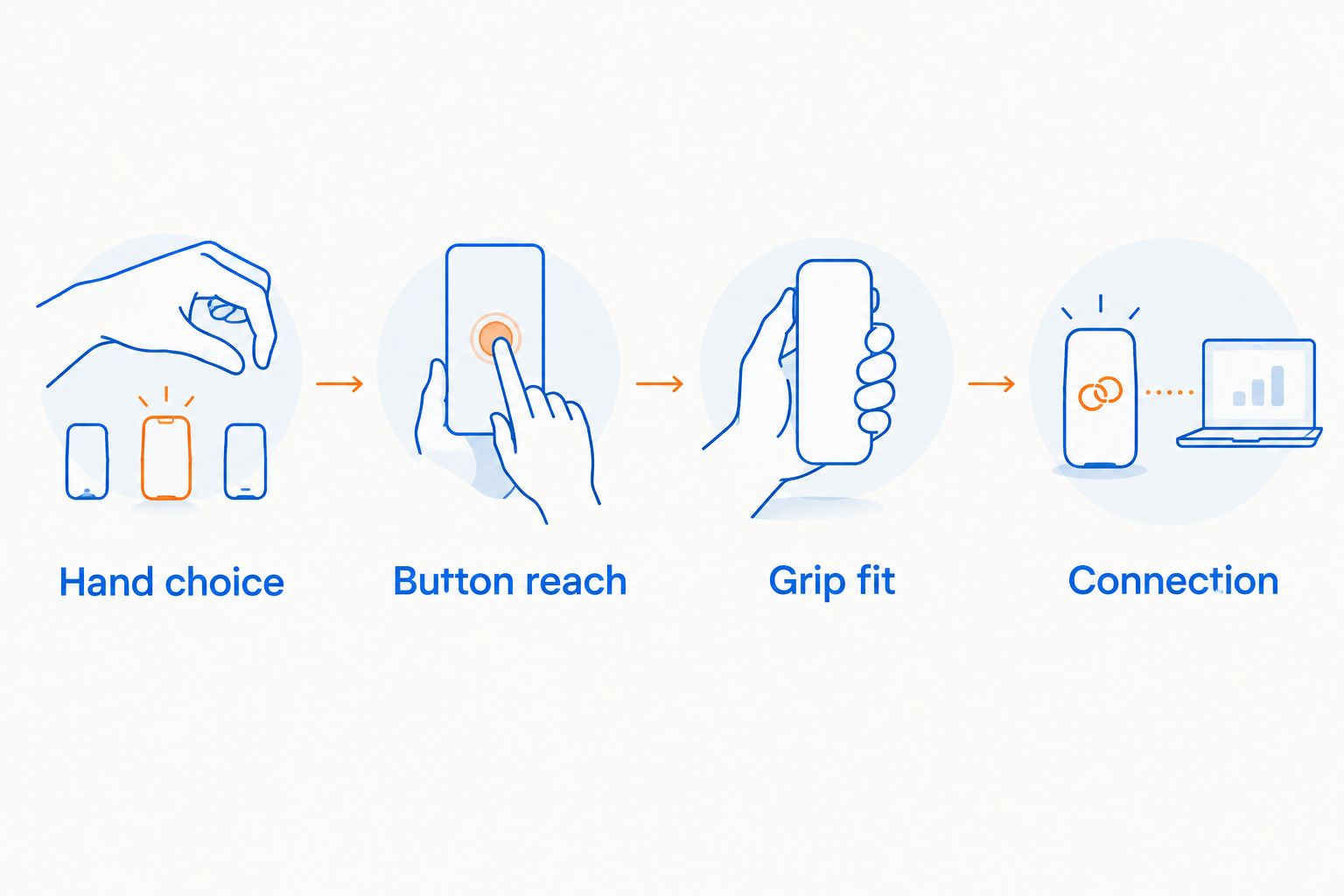
Start by placing your hand naturally on a mouse you already own. Note whether your palm rests on the rear, your fingers arch, or your fingertips do most of the steering. Use that observation to narrow shapes, rather than forcing yourself into a named grip.
Next, check the movements you repeat during play:
- Press your intended thumb buttons without shifting your whole hand.
- Lift and reposition the mouse without pressing opposite-side controls.
- Hold the main buttons without stretching your fingers.
- Make a broad swipe without gripping harder to keep control.
Finally, separate fit from performance expectations. Gaming and More's guide to whether a gaming mouse can improve your aim covers that next buying question.
How these mice are ranked
This 2026 ranking prioritizes usable ambidextrous controls, then distinct shape and connection needs. The Logitech G PRO Wireless takes the default position because removable bilateral buttons address both hand choice and unwanted opposite-side presses.
The other picks solve different problems: wired competitive play, a fuller shape and shared-PC configuration. No ranking here relies on invented test scores, user ratings or promises of better match results.
Which ambidextrous gaming mouse should you choose?
Choose the Logitech G PRO Wireless if you are undecided and want wireless operation with configurable side-button placement. It has the clearest default use case in this comparison.
Choose the Razer Viper 8KHz for wired play and a low-profile shape. Choose the SteelSeries Sensei Ten for a fuller body, or the Corsair M55 RGB PRO when switching control layouts between users is the priority.
Gaming and More's recommendation for ambidextrous gaming mice is straightforward: buy for the hand you actually use, then the shape you can control comfortably. Do not choose a mouse solely because its product photo looks symmetrical.
FAQ
What's the best ambidextrous gaming mouse in 2026?
The Logitech G PRO Wireless is the best overall choice in this guide for wireless play and removable side buttons on both sides. Choose a different pick when a wired connection or fuller shape matters more.
Is a symmetrical gaming mouse always ambidextrous?
No, a symmetrical shell does not guarantee equally usable controls for both hands. Check side-button placement and whether you can swap primary clicks or disable unwanted buttons.
Which mouse here is best for left-handed wireless gaming?
The Logitech G PRO Wireless is the wireless recommendation here for left-handed gaming. Its removable side buttons let you configure the controls for your preferred hand.
Is the Razer Viper 8KHz better than the SteelSeries Sensei Ten?
The Razer Viper 8KHz is the pick here for wired competitive play with a low-profile shape; the SteelSeries Sensei Ten suits players seeking a fuller body. Neither shape is best for every hand.
Do I need the highest polling rate for gaming?
No, the highest polling setting is not a requirement for choosing a comfortable gaming mouse. Use a setting that works consistently with your computer and games.
Can two people share an ambidextrous gaming mouse?
Yes, an ambidextrous mouse can serve users with different preferred hands. Each person should check primary-click assignment, side-button mapping and grip comfort before playing.
Should I buy an ambidextrous mouse as a gift?
Buy an ambidextrous mouse as a gift only after checking the recipient's mouse hand and shape preferences. Writing hand alone does not establish how someone uses a gaming mouse.
One last thing
Check the buttons under your ring finger, not just the ones under your thumb. A mouse that gives your preferred hand more controls also places controls against the opposite side of your grip. Remove or disable what you do not need before your first match.


