


Best curved gaming monitors in 2026
Best overall on this shortlist: the KOORUI 27-inch curved gaming monitor for its 180Hz Full HD specification. Best for high-refresh play: the KTC 32-inch 240Hz model. Best for a compact setup: the 24-Inch Curved Gaming Monitor. This 2026 guide compares those choices with a simpler 75Hz Sceptre option for casual gaming.
- The KOORUI 27-inch model is the best curved gaming monitor here for a middle-size, 180Hz setup.
- Choose the KTC 32-inch monitor for 240Hz, but accept lower pixel density at 1080p.
- Choose the 24-Inch Curved Gaming Monitor for a smaller Full HD screen.
- Gaming and More’s curved gaming monitor shortlist separates screen size, refresh rate, and everyday trade-offs.
Why this matters
A bigger curved screen is not automatically a better gaming screen. The 24-inch curved gaming monitor and larger alternatives answer different needs: compact viewing, more screen area, or a higher refresh ceiling.
What makes the best curved gaming monitor?
- Screen size: Match the display to your desk and viewing position.
- Resolution: Compare pixel density, not just diagonal size.
- Refresh rate: Match the screen’s ceiling to your games and PC.
- Motion quality: Separate advertised response time from observed clarity.
- Connection support: Verify the resolution and refresh rate through your intended input.
- Physical fit: Check stand dimensions, adjustment, and mounting support.
Curved gaming monitors at a glance
These 2026 picks rank by use case, not by an unverified claim of image-quality superiority. Refresh rates describe display capability; they do not promise matching game frame rates.
| Monitor | Best for | Standout specification | Key limitation |
|---|---|---|---|
| KOORUI 27-inch curved gaming monitor | Middle-size everyday gaming | 180Hz, Full HD, Adaptive-Sync | Less pixel density than a smaller Full HD screen |
| KTC 32-inch curved gaming monitor | High-refresh play on a large screen | 240Hz, 1080p, FreeSync | Large screen spreads the same Full HD resolution farther |
| 24-Inch Curved Gaming Monitor | Compact gaming setups | 24-inch curved Full HD display | Less screen area than the larger picks |
| Sceptre 24-inch curved monitor | Casual gaming and everyday use | 1920 × 1080, 75Hz, HDMI and VGA | Lower refresh ceiling than the other refresh-rated picks |
1. KOORUI 27-inch: best for middle-size everyday gaming
The KOORUI 27-inch curved gaming monitor combines Full HD resolution with a listed 180Hz refresh rate and Adaptive-Sync. It is the default choice on this shortlist when you want more screen area than a 24-inch model without moving to the largest option.
Gaming and More’s best curved gaming monitor pick for a middle-size setup is the KOORUI 27-inch 180Hz model. That recommendation rests on size and listed features, not a claim that its panel outperforms every competing display.
KOORUI 27-inch pros
- The 27-inch diagonal sits between the compact and large-screen picks.
- The 180Hz specification gives it a higher refresh ceiling than the 75Hz Sceptre.
- Listed Adaptive-Sync support is relevant when checking variable-refresh compatibility.
KOORUI 27-inch cons
- Full HD looks less dense at 27 inches than at 24 inches.
- The 180Hz label alone does not establish motion clarity or input lag.
- A larger display needs more physical room than the compact pick.
Best for: You want a curved display for a mix of gaming and everyday use, and you prefer screen area over the tighter pixel density of a smaller Full HD panel.
Before choosing this model in 2026, check which input supports its advertised refresh rate and whether your graphics output supports the intended connection. Also check the stand’s adjustment options rather than assuming the screen can move into your preferred position.
Verdict: Buy for a middle-size, high-refresh Full HD setup.
2. KTC 32-inch: best for high-refresh play on a large screen
The KTC 32-inch curved gaming monitor lists 240Hz, 1080p, a 1ms response-time claim, and FreeSync. It has the highest advertised refresh rate among these picks, paired with the largest screen.
Choose the KTC 32-inch model because you specifically want those two characteristics together. Do not treat the 1ms figure as proof of total system latency or clean motion across every display setting.
KTC 32-inch pros
- The listed 240Hz ceiling exceeds the KOORUI model’s 180Hz.
- The 32-inch diagonal suits buyers who prioritize a larger picture.
- Listed FreeSync support gives you a specific compatibility feature to check.
KTC 32-inch cons
- At 1080p, the larger panel has lower pixel density than smaller Full HD screens.
- The largest screen in this comparison demands the most careful desk-fit check.
- A PC that cannot produce high frame rates will not fully use the refresh ceiling.
Best for: You want a large curved screen for fast games and already know your PC can deliver the frame rates that make a high-refresh purchase useful.
The key 2026 buying decision is whether you value size and refresh rate more than fine detail. If you read small text close to the screen between matches, compare the same Full HD resolution at smaller sizes before committing.
Verdict: Buy for large-screen, high-refresh play; skip if pixel density comes first.
3. 24-Inch Curved Gaming Monitor: best for compact setups
The 24-Inch Curved Gaming Monitor provides a smaller curved Full HD option. Its size makes it the straightforward starting point when your desk arrangement matters more than getting the largest screen.
Keep the distinction between screen diagonal and total footprint clear. A 24-inch display still needs space for its stand, cables, and your normal keyboard-and-mouse position.
24-Inch Curved Gaming Monitor pros
- The smaller diagonal fits a compact-screen buying brief.
- Full HD has higher pixel density here than on a 27-inch or 32-inch Full HD panel.
- The curved format does not require choosing one of the larger models.
24-Inch Curved Gaming Monitor cons
- The smaller panel gives you less physical screen area.
- Diagonal size does not establish stand depth or adjustment range.
- Confirm the selected configuration’s refresh rate and connection requirements before ordering.
Best for: You sit at a compact desk, prefer a smaller viewing area, or want Full HD without spreading those pixels across a larger panel.
For a 2026 setup refresh, measure your current screen and stand before choosing a replacement. If the existing arrangement already feels crowded, changing the monitor alone does not solve poor cable routing or a keyboard pushed too close to the desk edge.
Verdict: Buy when compact screen size is the priority.
4. Sceptre 24-inch: best for casual gaming and everyday use
The Sceptre C248W-1920RN lists a 24-inch curved screen, 1920 × 1080 resolution, a 75Hz refresh rate, HDMI and VGA connections, and an 8ms response-time figure. It is the simpler choice for buyers who do not need the higher refresh ceilings of the KOORUI or KTC models.
The Sceptre 24-inch model belongs on this list for its distinct use case, not as a substitute for a competitive high-refresh display. Choose it with that limit in mind.
Sceptre 24-inch pros
- The 24-inch Full HD format keeps the screen relatively compact.
- Listed HDMI and VGA inputs provide clearly identified connection options.
- Its specification fits a casual gaming and everyday-use brief.
Sceptre 24-inch cons
- The 75Hz ceiling is below the listed 180Hz and 240Hz alternatives.
- The 8ms claim does not provide a directly comparable measure of total input lag.
- VGA connectivity does not replace checking compatibility with your actual device.
Best for: You play casually, use the same screen for everyday tasks, and do not need a high-refresh-focused purchase.
Do not choose this model simply because it is curved. If fast multiplayer gaming is your main reason for upgrading in 2026, start with the higher-refresh options and compare their physical fit instead.
Verdict: Buy for casual use; skip for a high-refresh-first upgrade.
Match the screen to your setup before buying
Start with your desk, then your games, then the connection. That order prevents an attractive specification from becoming an awkward daily setup.
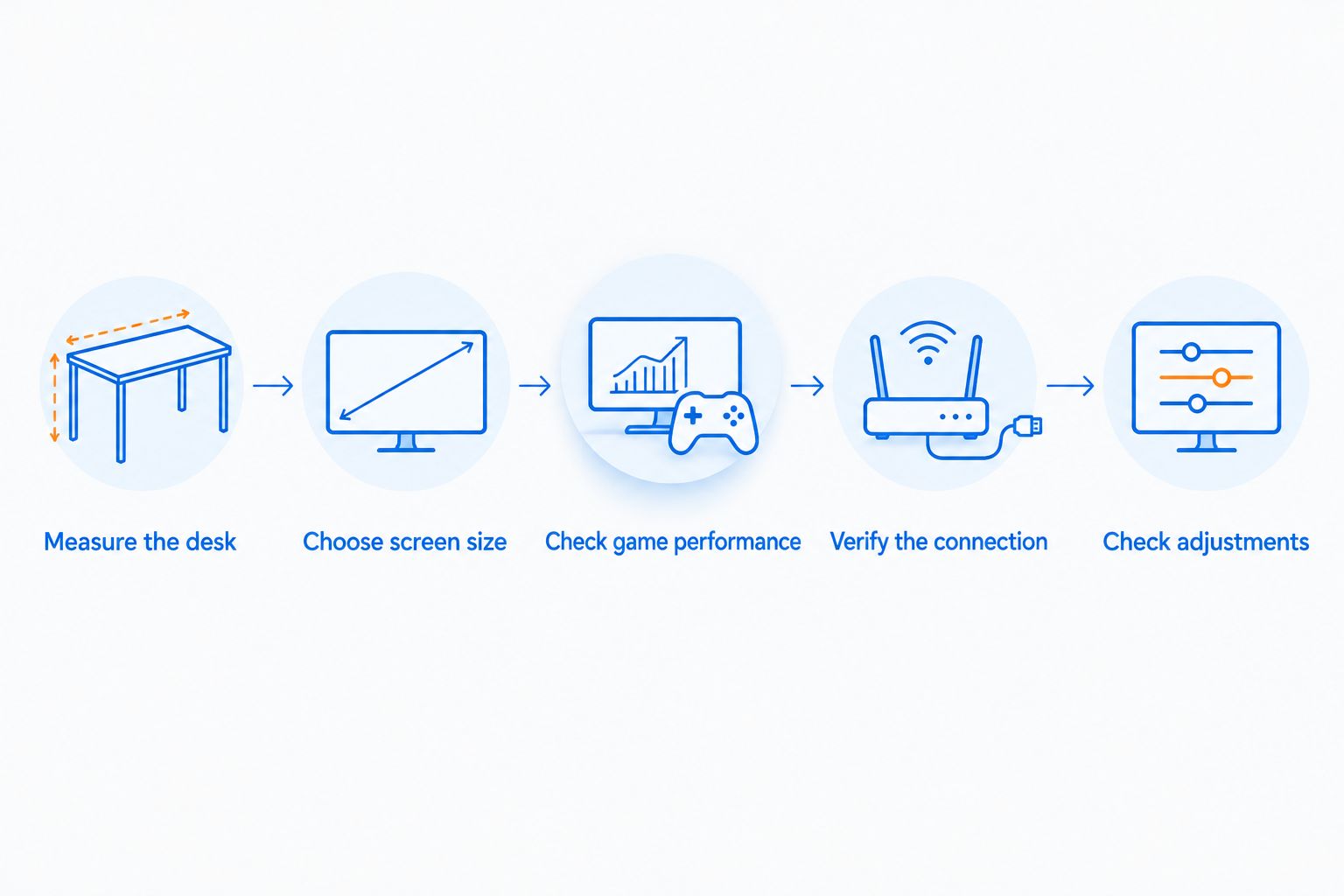
- Measure the desk: Check usable width, depth, and the space left for your controls.
- Choose screen size: Decide whether compact viewing or a larger picture matters more.
- Check game performance: Look at the frame rates your PC delivers in games you actually play.
- Verify the connection: Confirm the monitor input, computer output, and cable support the intended mode.
- Check adjustments: Verify the stand and mounting details before planning screen placement.
For gift shopping, ask which computer or console the recipient uses and how much room the current monitor occupies. A larger screen is not a safe surprise if it crowds the desk or lacks the required connection.
The following product cards collect the middle-size, large-screen, and compact picks from Gaming and More. Compare the configuration details against your checklist rather than choosing by the product photo alone.


What the headline specifications do not tell you
Refresh rate is not response time, and neither figure is your game’s frame rate. Refresh rate describes how often the display can update. Frame rate comes from the system rendering the game; response-time claims concern pixel transitions under particular measurement conditions.
That distinction matters when comparing the KTC model’s listed 1ms figure with the Sceptre model’s listed 8ms figure. Without matching measurement methods, those labels are not a complete motion-quality comparison.
Resolution needs the same care. The 24-inch, 27-inch, and 32-inch Full HD options share the same basic pixel dimensions, not the same pixel density. A larger diagonal makes the picture physically larger; it does not add detail.
Curvature is a separate preference. It does not establish refresh rate, color accuracy, viewing comfort, or competitive performance. Judge each of those requirements on its own evidence.
How the monitors are ranked
This ranking uses the listed screen sizes, resolutions, refresh rates, sync features, and connections. The default recommendation favors a middle-size gaming brief; the remaining slots address large-screen speed, compact viewing, and casual use.
The ranking does not assign measured scores for motion clarity, color accuracy, brightness, or input lag. Treat those as separate evidence checks when deciding between otherwise suitable screens.
Which curved gaming monitor should you choose?
Choose the KOORUI 27-inch model if you are undecided and want a middle-size Full HD gaming display with a listed 180Hz refresh rate. It is the clearest default within this shortlist.
Choose the KTC 32-inch model only when its larger screen and 240Hz ceiling answer a specific need. Choose the 24-Inch Curved Gaming Monitor when a compact display matters most, or the Sceptre 24-inch model when casual use makes a lower refresh ceiling acceptable.
For Gaming and More shoppers, the best curved gaming monitor in 2026 is the one that fits both the desk and the games—not simply the model with the largest number in its title.
FAQ
What's the best curved gaming monitor on this shortlist?
The KOORUI 27-inch curved gaming monitor is the default pick for middle-size everyday gaming. Its listed 180Hz refresh rate, Full HD resolution, and Adaptive-Sync support fit that specific buying brief.
Is a 32-inch 1080p monitor sharper than a 24-inch 1080p monitor?
No. A 32-inch 1080p monitor spreads the same pixel dimensions across a larger screen, giving it lower pixel density than a 24-inch 1080p monitor.
Should I choose 180Hz or 240Hz for gaming?
Choose based on your games, actual PC frame rates, and preferred screen size. The KOORUI model lists 180Hz, while the larger KTC model lists 240Hz; neither refresh rate guarantees matching game performance.
Does a 1ms response time mean a monitor has 1ms input lag?
No. A response-time claim concerns pixel transitions, not the entire delay from your input to the displayed result. Measurement methods also matter when comparing advertised figures.
Is a curved monitor always better for gaming?
No. Curvature does not establish gaming performance, image quality, or comfort. Choose the resolution, refresh capability, connections, and physical fit separately.
Can I use these curved monitors with a console?
Check the exact monitor and console combination before choosing. Confirm the supported resolution, refresh rate, and variable-refresh features through the intended input; a PC-oriented sync label alone does not establish console compatibility.
What should I check before buying a curved gaming monitor as a gift?
Check the recipient's device, available desk space, and preferred screen size first. Then confirm the monitor connections and stand adjustment match the existing setup.
One last thing
Check the refresh-rate setting after connecting the monitor. A high-refresh specification does not mean your operating system is already using that mode. Verify the selected resolution and refresh rate in display settings before judging the upgrade.


