


Best gaming mice for claw grip in 2026
Best overall for narrow, aggressive claw grip: Endgame Gear OP1 8k. Best for pronounced rear support: Pulsar X2H. Best for wireless FPS play: Razer Viper V3 Pro. This 2026 guide separates shape recommendations from feature checklists so you can choose a mouse that fits your hand, not just your desk.
- The best gaming mice for claw grip match your palm contact, finger curl, and preferred grip width.
- Endgame Gear OP1 8k is the default shortlist pick for narrow, aggressive claw grip if you accept a cable.
- Pulsar X2H suits players seeking pronounced rear support; Razer Viper V3 Pro suits wireless FPS players.
- Gaming and More’s M801 offers adjustable DPI and rechargeability; confirm its dimensions before choosing it for claw grip.
Why claw-grip shape matters
Claw grip combines curled clicking fingers with contact toward the back of your hand. Your fingertips handle small corrections while the shell gives your palm a reference point. The wrong shape makes you accommodate the mouse instead of controlling it naturally.
A tall rear hump, narrow waist, and low button height describe different parts of that fit. None guarantees better aim on its own. For the distinction between equipment and execution, read Can a Gaming Mouse Improve Your Aim?.
Choose the shell before the feature list. Adjustable sensitivity cannot fix a mouse that spreads your fingers awkwardly or presses into the wrong part of your palm.
What makes the best gaming mice for claw grip?
Use these five criteria to judge the shortlist. Your best option is the one that supports your normal grip without forcing extra tension.
- Rear support: The hump should meet your intended palm-contact area, not push your hand into a different position.
- Grip width: Your thumb and outer fingers should hold the sides without an exaggerated pinch or stretch.
- Finger freedom: The buttons and shell should leave room for your preferred finger curl and small adjustments.
- Connection: Choose between an attached cable and a wireless charging routine. Neither choice fixes poor fit.
- Control access: Reach the wheel and side buttons without rotating your hand or losing your normal grip.
Hand length alone is not enough. Two players with similar hands can prefer different shells because one anchors the base of the palm and the other uses lighter contact farther forward.
Claw-grip gaming mice at a glance
These 2026 recommendations occupy different use cases. The M801 is a conditional store option, not an established claw-shape winner.
| Mouse | Best for | Standout feature | Key limitation |
|---|---|---|---|
| Endgame Gear OP1 8k | Narrow, aggressive claw grip | Slim wired shape with room for curled fingers | Cable management remains part of your setup |
| Pulsar X2H | Players seeking pronounced rear support | High rear hump | Strong palm contact will not suit every claw style |
| Razer Viper V3 Pro | Wireless FPS play | Wireless design with a raised central profile | Its full-size shell needs a fit check for smaller hands |
| Logitech G Pro X Superlight 2 | Relaxed claw and mixed-grip use | Rounded, relatively neutral shell | Less specialized rear support than a claw-focused shape |
| M801 Wireless RGB Gaming Mouse | Shoppers prioritizing adjustable DPI and rechargeability | Those features are explicitly listed | Dimensions and weight need confirmation before a claw-fit decision |
1. Endgame Gear OP1 8k: best for narrow, aggressive claw grip
The Endgame Gear OP1 8k is a wired gaming mouse with a slim shell. It belongs first on your shortlist when you curl your fingers sharply and want a narrow grip rather than a broad, rounded body.
The buying decision is straightforward: prioritize shape, then decide whether you accept the cable. A wired connection removes charging from your routine, but your desk still needs a clear cable path.
Endgame Gear OP1 8k pros:
- Narrow shape gives players seeking a slim grip a clear starting point.
- Wired operation avoids a battery-charging routine.
- Its shape is a more specific match for aggressive claw than a general-purpose rounded shell.
Endgame Gear OP1 8k cons:
- A narrow body is the wrong direction if you want substantial width under your hand.
- The attached cable needs enough slack for your full mouse movement.
- Players seeking broad palm support should compare other shapes first.
Best for: Players who already know that narrow mice suit their aggressive claw grip.
Before choosing the OP1 8k, look at how you lift your current mouse. If you already squeeze a narrow shell excessively, another slim mouse does not resolve that habit. The point is comfortable control, not the most tightly curled fingers.
Verdict: Buy if narrow claw shapes suit you and a cable is acceptable; skip if you want a broad shell.
2. Pulsar X2H: best for pronounced rear support
The Pulsar X2H places a prominent hump toward the rear of the shell. That makes it a distinct option for claw players who want a clear support point against the back of the hand.
More support is not automatically more comfort. If you prefer your palm to float lightly above the mouse, a high rear profile works against that preference rather than improving it.
Pulsar X2H pros:
- Pronounced rear support gives anchored claw players a specific shape to consider.
- Wireless operation keeps an attached cable out of your movement path.
- The rear-focused profile offers a clear alternative to neutral, rounded shells.
Pulsar X2H cons:
- The hump is intrusive if you prefer minimal palm contact.
- Wireless use adds charging to your routine.
- Choosing by hand size alone misses the more important question of hump placement.
Best for: Claw players who deliberately anchor the rear of the hand against the mouse.
Keep the X2H name distinct from other Pulsar shapes when comparing listings in 2026. A similar model name does not mean an identical hump. Check the exact model and size rather than transferring a recommendation across the whole range.
Verdict: Buy for deliberate rear-palm support; skip if you want a flatter, less intrusive shell.
3. Razer Viper V3 Pro: best for wireless FPS play
The Razer Viper V3 Pro is a wireless gaming mouse with a full-size shell and a raised central profile. It belongs on your shortlist when you want wireless FPS control without choosing an especially narrow body.
Razer’s published dimensions are 127.1 mm long, 63.9 mm wide, and 39.9 mm high. Those measurements describe the overall shell, not the width where every player places their fingers. Compare them with a mouse you already know rather than treating them as a hand-size prescription.
Razer Viper V3 Pro pros:
- Wireless operation removes an attached cable from the desk.
- Published dimensions make a physical size comparison possible.
- The fuller shell gives players an alternative to the narrow OP1 shape.
Razer Viper V3 Pro cons:
- Its length deserves attention if you have smaller hands.
- Wireless use requires charging.
- A central profile is not the same support pattern as a pronounced rear hump.
Best for: FPS players who want wireless operation and know they are comfortable with a full-size mouse.
For a 2026 purchase, resist choosing the Viper V3 Pro solely because it appears on competitive-gaming shortlists. Your thumb position, outer-finger contact, and ability to reach the side buttons still decide whether the shell works.
Verdict: Buy for wireless FPS use after checking shell size; hold if you cannot compare its fit.
4. Logitech G Pro X Superlight 2: best for relaxed claw
The Logitech G Pro X Superlight 2 uses a rounded, relatively neutral shell. It is the alternative to consider when you play with a relaxed claw or shift between light palm contact and more curled fingers.
Neutral does not mean universal. A shape that avoids a pronounced rear anchor also gives less of that specific support to players who want their hand locked against a hump.
Logitech G Pro X Superlight 2 pros:
- Rounded shape offers a starting point for relaxed claw.
- Wireless operation avoids an attached cable.
- The less specialized profile suits consideration by players who change grip between tasks.
Logitech G Pro X Superlight 2 cons:
- It is less targeted at strong rear-palm anchoring than the X2H.
- Wireless use requires a charging routine.
- Players seeking narrow, flat-feeling sides should compare the OP1 instead.
Best for: Players whose claw grip relaxes during everyday use or changes between games.
Do not buy a specialist claw shape just because you occasionally curl your fingers. Watch your hand during ordinary play. If your palm contact changes frequently, a less prescriptive shell deserves a place on the shortlist.
Verdict: Buy for relaxed claw and mixed-grip use; skip if pronounced rear support is your main requirement.
5. M801: best for an adjustable-DPI, rechargeable shortlist
The M801 Wireless RGB Gaming Mouse lists adjustable DPI and rechargeability. Those are useful selection details, but they do not establish the shape, weight, or palm-contact pattern needed for a confident claw-grip recommendation.
Gaming and More’s M801 gaming mouse is best for shoppers who prioritize adjustable DPI and rechargeability and will confirm fit before buying. Treat it as a conditional option rather than assuming that its gaming label proves claw compatibility.
M801 pros:
- Adjustable DPI is explicitly listed.
- Rechargeability is explicitly listed.
- Wireless operation is identified in the product name.
M801 cons:
- Confirm shell dimensions before comparing its fit with the ranked shapes.
- Confirm weight rather than assuming a lightweight design.
- Verify connection details and software support against your own requirements.
Best for: Shoppers comparing the listed M801 features who are prepared to check the physical fit.
For Gaming and More gaming-mouse shoppers, the next step is a fit check, not a leap from RGB lighting to aiming performance. Ask for length, width, height, and weight, then compare those details with your current mouse. A product photo alone cannot settle the decision.
Verdict: Hold until the M801’s dimensions and grip fit match your needs.
Check claw-grip fit before choosing
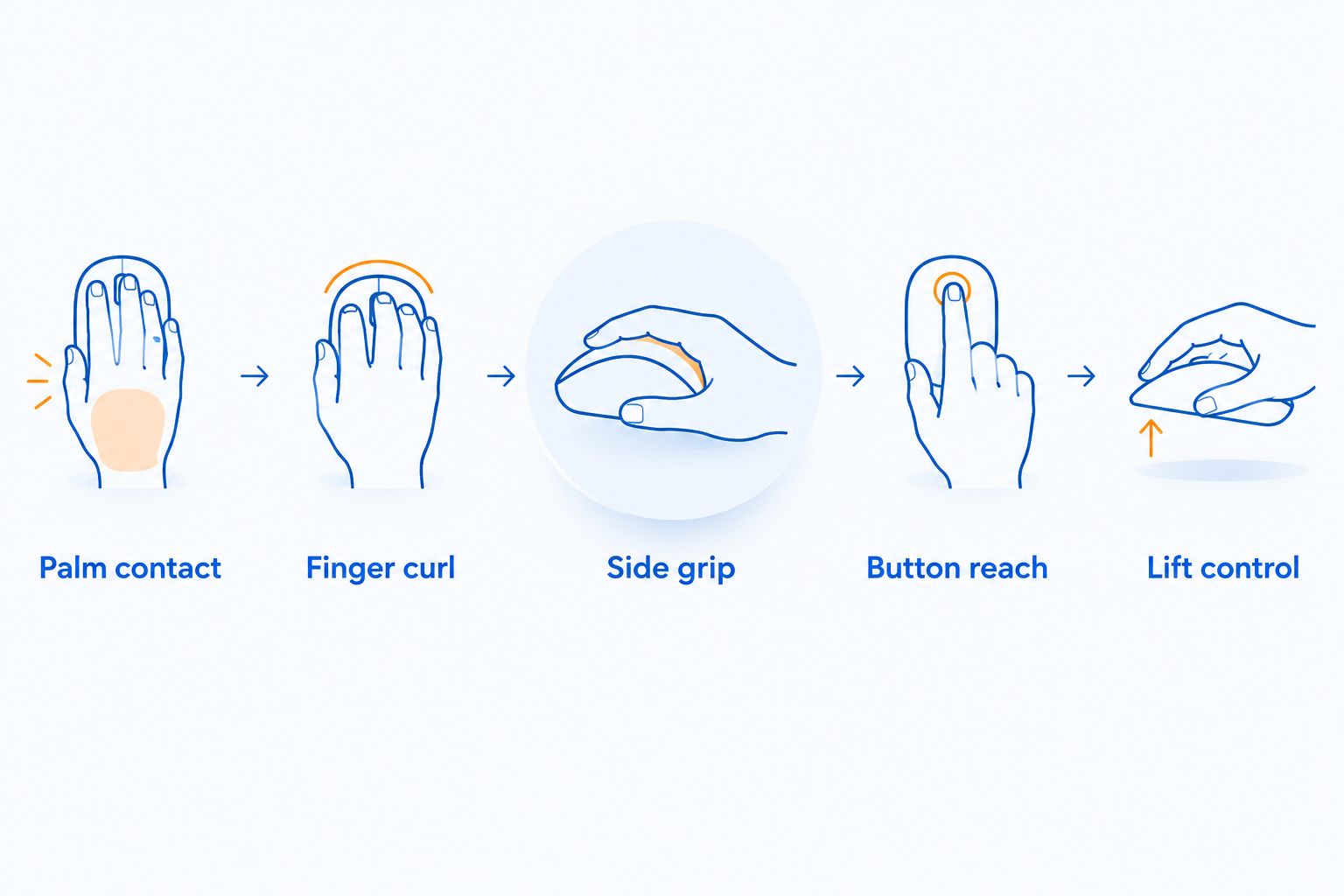
Use your current mouse as a reference. You do not need a universal hand-size chart to identify where a shell helps or obstructs your grip.
- Palm contact: Note exactly where the shell touches your palm during normal play. Decide whether you want more support there or less.
- Finger curl: Keep your clicking fingers in their natural position. Reject a shape that requires a forced arch just to reach the buttons.
- Side grip: Check whether your thumb and outer fingers hold the mouse without constant squeezing.
- Button reach: Use the wheel and side buttons without shifting your whole hand.
- Lift control: Lift and reposition the mouse as you normally would. Notice any slipping, twisting, or need to re-grip.
Change one variable at a time when comparing mice. Keep your usual sensitivity and game settings while judging the shell; otherwise, a settings change gets mixed into your impression of the shape.
How the ranking works
This 2026 ranking prioritizes grip shape, palm-contact pattern, connection preference, and the ability to check physical fit. Each recommendation serves a different use case rather than claiming one mouse fits every hand.
The ordering is not a measured latency leaderboard or a hands-on test score. The M801 remains conditional because its listed features do not establish claw suitability. No recommendation here promises a specific improvement in accuracy.
Which claw-grip gaming mouse should you choose?
Start with the Endgame Gear OP1 8k if you want narrow, aggressive claw grip and accept a cable. Choose the Pulsar X2H when rear support matters most, or the Razer Viper V3 Pro when wireless FPS play is the priority and its size fits.
Choose the Logitech G Pro X Superlight 2 for relaxed claw and mixed-grip use. Keep the M801 on hold until you can compare its dimensions. The default buying rule stays simple: eliminate shapes that fight your hand before comparing extra features.
FAQ
What are the best gaming mice for claw grip in 2026?
The Endgame Gear OP1 8k is the default shortlist pick for narrow, aggressive claw grip. The Pulsar X2H suits pronounced rear support, the Razer Viper V3 Pro suits wireless FPS use, and the Logitech G Pro X Superlight 2 suits relaxed claw.
Is claw grip better than palm grip for aiming?
Claw grip is not automatically better than palm grip for aiming. Choose the grip that lets you control the mouse without forced finger positions or unnecessary tension.
Is a high hump good for claw grip?
A high hump suits claw players who want noticeable palm support. Players who prefer lighter palm contact should compare less intrusive profiles instead.
Should I choose a wired or wireless mouse for claw grip?
Choose the shape first, then the connection. Wired mice need cable clearance; wireless mice need charging, and neither connection determines whether a shell fits your hand.
Is the M801 a good claw-grip gaming mouse?
The M801 needs a physical fit check before it earns a claw-grip recommendation. Adjustable DPI and rechargeability are listed, but you should confirm its dimensions and weight before choosing it for this grip.
Does higher DPI make a mouse better for claw grip?
Higher DPI does not make a shell better for claw grip. DPI changes pointer movement relative to physical movement; shell shape determines how the mouse meets your hand.
Can I buy a claw-grip mouse as a gift?
Yes, but match the recipient’s existing shape preferences before choosing. Ask which mouse they use and what they dislike about its fit rather than guessing from their favorite game.
One last thing
Look at where your fingers sit after a tense match, not just when you first place your hand on the mouse. If you repeatedly move away from the same part of the shell, that is a useful clue about the shape you should avoid next. Your natural grip is a better shopping reference than a staged pose.


