


Is DPI the same as sensitivity on a gaming mouse?
No—DPI and sensitivity are different settings that work together to control mouse movement. DPI determines how many movement counts your mouse reports per inch of travel; in-game sensitivity determines how strongly the game translates those counts into cursor movement or camera rotation, so changing either affects how your aim feels.
- Is DPI the same as sensitivity on a gaming mouse? No: DPI controls movement counts; sensitivity scales the response.
- Keep mouse DPI consistent, then adjust in-game sensitivity for each game.
- Compare eDPI within the same game; use physical turning distance when matching different games.
- Gaming And More gaming mouse shoppers should prioritize comfortable control over the highest advertised DPI.
Why this matters
If your crosshair flies past a target, buying a mouse with a higher DPI ceiling does not solve the problem. You need to identify which setting makes the response too fast, then change that setting without moving everything else at once.
This 2026 guide separates sensor settings from game settings so you can adjust your current setup before replacing hardware. For the broader equipment question, start with Can a Gaming Mouse Improve Your Aim?.
Tune the movement you actually use, not the biggest number on the box. A comfortable setting lets you make small corrections and reach the targets you need without repeatedly running out of mousepad.
Is DPI the same as sensitivity on a gaming mouse?
No. Mouse DPI and in-game sensitivity sit at different points in the input path, and their settings are not interchangeable.
Gaming mouse manufacturers commonly use DPI, meaning dots per inch, for the sensor's movement setting. Counts per inch, or CPI, describes mouse tracking more precisely: the sensor reports movement counts rather than drawing dots.
| Setting or measurement | What it describes | Best for | Limitation |
|---|---|---|---|
| Mouse DPI | Movement counts reported per inch of mouse travel | Setting a consistent hardware baseline | Does not describe the game's final turning speed |
| In-game sensitivity | How the game scales incoming mouse movement | Adjusting control within a particular game | The same slider value means different things across games |
| eDPI | Mouse DPI multiplied by in-game sensitivity | Comparing settings within the same game and input mode | Is not a universal cross-game measurement |
| cm/360 | Physical mouse travel needed for a full camera turn | Comparing physical turning distance between games | Does not fully describe perceived speed or scoped aiming |
Moving your mouse 1 inch—exactly 2.54 centimeters—produces movement counts according to its DPI setting. The game then interprets those counts using its own input rules and sensitivity settings.
That distinction explains why matching a friend's DPI does not necessarily match their aim speed. Their game sensitivity, aiming mode, and input processing also matter. Copying only the hardware setting leaves part of the calculation unchanged.
How DPI and sensitivity work together
Think of DPI as the movement information entering the game and sensitivity as the scale applied to that information. With other settings unchanged, increasing either makes a given physical movement produce more cursor travel or camera rotation.
The useful relationship is straightforward:
eDPI = mouse DPI × in-game sensitivity.
In a game with a linear sensitivity multiplier, doubling DPI while halving sensitivity preserves the nominal turning speed. That does not establish identical sensor behavior, latency, or feel; it only describes the scaling relationship.
A high DPI setting paired with low game sensitivity is therefore not automatically a fast setup. A lower DPI setting paired with high game sensitivity is not automatically slow, either. Look at the combination.
For a 2026 settings check, record both values together rather than saving a screenshot of only the game slider. Include separate scoped or aiming multipliers if you use them, because those settings change the response after you aim down sights.
Why eDPI works within a game
Within the same game, eDPI helps you compare combinations of hardware DPI and game sensitivity. It removes the confusion caused by looking at either setting alone.
The limitation is scope. Different games use different sensitivity scales and camera-rotation rules, so equal eDPI across unrelated games does not establish equal turning distance. Treat eDPI as a comparison tool, not a universal speed rating.
Why cm/360 helps between games
For a game with free camera rotation, cm/360 measures how far you move the mouse to turn 360 degrees. A longer distance means you need more physical travel for the same turn.
Matching that distance between games gives you a physical reference rather than an arbitrary slider value. However, different fields of view, zoom levels, and camera behavior still change the visual impression of speed. Matching turning distance is useful, but it is not a promise that every game will feel identical.
Why mouse sensitivity feels different
Your mouse does not operate in isolation. These input and display factors explain why the same hardware setting feels different across tasks:
- Game scaling: Each game determines how incoming counts translate into cursor travel or camera rotation. Identical slider values do not establish identical behavior.
- Input path: A game using raw mouse input can bypass the operating system's pointer-speed processing for aiming. Menus can use a different path.
- Acceleration: Mouse acceleration changes the relationship between physical movement and output according to movement speed, rather than distance alone.
- Aiming mode: Hip-fire, aiming down sights, and scoped views can have separate sensitivity multipliers and different fields of view.
- Display behavior: Desktop resolution affects how far a pointer travels relative to the screen. Field of view affects how camera rotation looks, even when physical turning distance stays the same.
- Physical control: Mouse shape, grip, pad space, and surface friction affect how comfortably you perform the movement. They do not change the mathematical DPI setting.
Diagnose the symptom before changing the setting. A pointer that feels slow on the desktop and a crosshair that feels slow while scoped are different problems, even when you use the same mouse.
How do you set DPI and sensitivity without guessing?
Start with a DPI setting that makes normal desktop use comfortable, then adjust sensitivity inside the game. Keep the test conditions consistent so each change tells you something useful.
Use this setup sequence in 2026 whether you are configuring a new mouse or fixing settings that no longer feel right.
Record settings
Write down your current mouse DPI, desktop pointer settings, game sensitivity, and any separate aiming multipliers. Note whether the game offers raw input or acceleration controls.
Keep this baseline before experimenting. If the result gets worse, you can return to a known configuration instead of trying to reconstruct it from memory.
Fix DPI
Choose a hardware DPI setting that works comfortably outside the game, then leave it unchanged during your first round of tuning. Avoid cycling through DPI stages while testing your aim.
This is a starting method, not a claim that a particular DPI value suits every player. Your goal is to isolate the game setting rather than chase a universal preset.
Tune sensitivity
Enter a practice area and check deliberate target-to-target movement, small corrections, and tracking. Reduce in-game sensitivity if you repeatedly overshoot; increase it if comfortable movements consistently stop short or leave you unable to turn far enough within your usable pad space.
Change only the relevant setting, then repeat the same tasks. A different map, weapon, or aiming mode adds another variable and makes the comparison harder to interpret.
Check aiming modes
Test hip-fire and scoped aiming separately. If ordinary camera movement feels right but aiming down sights feels wrong, inspect the aiming multiplier before changing your base DPI.
Zoom changes the visual context as well as, in some games, the sensitivity calculation. Do not assume a matching slider position guarantees matching perceived movement.
Save the profile
Save the configuration using the controls your mouse and game actually provide. Confirm that the intended settings remain active after restarting the game or switching applications.
A profile change can look like an aim problem. Check the active configuration before undoing a setup that previously worked.
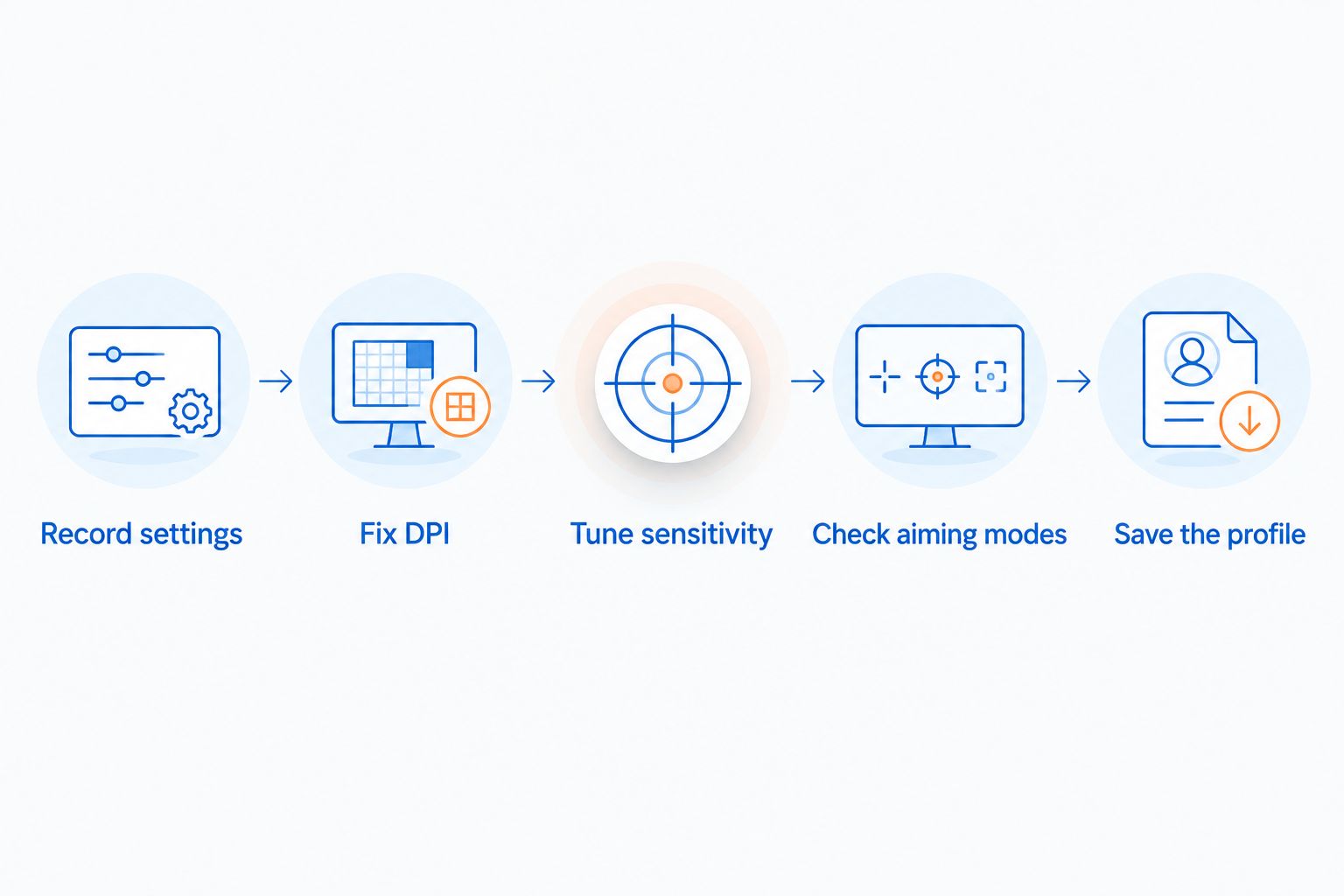
The sequence matters more than finding a fashionable preset. Once your baseline is stable, you can compare deliberate changes instead of reacting to every missed shot.
Should you use higher DPI or higher in-game sensitivity?
Neither setting wins by itself; choose the combination that gives you controllable movement. Raising DPI affects the mouse's reported movement across applications, while changing in-game sensitivity targets that game's response.
| Approach | Best for | Advantage | Trade-off |
|---|---|---|---|
| Keep DPI fixed; adjust game sensitivity | Players setting up several games | Preserves a familiar desktop baseline | Requires tuning each game separately |
| Change DPI; keep game sensitivity fixed | Players deliberately revising their hardware baseline | Changes movement at the mouse level | Also affects other applications and games |
| Change DPI and compensate in-game | Players comparing equivalent scaling combinations | Can preserve nominal turning speed | Requires careful recording and does not prove identical feel |
For most troubleshooting, keeping DPI fixed is the cleaner starting point because it isolates the game adjustment. That is a testing recommendation, not a performance claim about lower or higher DPI.
Do not select a mouse solely because its maximum DPI exceeds another model's. A maximum setting does not tell you whether the shape suits your grip, whether the controls are comfortable, or whether you can select the setting you want.
Does Windows pointer speed change gaming sensitivity?
Windows pointer speed affects desktop cursor movement, but its effect on game aiming depends on the game's input path. Games using raw input for camera movement can bypass that pointer-speed processing.
Check the game's own input settings rather than assuming every title behaves alike. A menu cursor and the gameplay camera can respond differently within the same application.
For your 2026 troubleshooting notes, separate desktop behavior from in-game behavior. If only the desktop feels wrong, do not immediately rebuild your game sensitivity; if only one game feels wrong, inspect that game's settings first.
Do you need a new gaming mouse to fix sensitivity?
Not necessarily. If your current mouse tracks reliably and feels comfortable, settings are the first thing to check. A replacement makes sense when the hardware itself does not meet your needs, not simply because another product advertises a larger DPI figure.
Gaming And More sells gaming gear for PC gamers and setup shoppers. If you are considering its M801 Wireless RGB Gaming Mouse, check the current product details for the DPI controls, adjustment method, and fit information you need before choosing it; the model name alone does not establish those capabilities.
Gaming And More gaming mouse shoppers are best served by comfortable control, not maximum DPI alone. The benefit of suitable replacement hardware is a better match for your practical requirements; the limitation is that new hardware still needs configuration and does not automatically correct overshooting or tracking mistakes.
For gift shopping in 2026, ask about the recipient's current mouse and grip preferences. A familiar-looking DPI number is not enough to identify a suitable replacement.
FAQ
Is DPI the same as sensitivity on a gaming mouse?
No. DPI controls how many movement counts a mouse reports per inch of travel, while in-game sensitivity scales how the game responds to those counts. Both affect the resulting movement.
Does increasing DPI make my mouse faster?
Increasing DPI makes the mouse report more movement counts for the same physical travel. With other settings unchanged, that produces more cursor movement or camera rotation.
What is the best DPI for gaming?
There is no single best DPI for every player and game. Choose a comfortable hardware baseline, then tune in-game sensitivity for controllable aiming and sufficient turning range.
Can I copy another player's sensitivity settings?
You can use another player's settings as a starting point, but copy the DPI and in-game sensitivity together. Separate aiming multipliers and input settings also affect the result.
Is eDPI the same across different games?
No. eDPI is useful within the same game and input mode because different games use different sensitivity scales. Physical turning distance provides a more useful cross-game reference.
Does higher DPI automatically improve aim?
No. A higher DPI setting changes movement reporting, not your ability to select targets or control the mouse. Comfortable hardware, suitable settings, and practice remain separate requirements.
Does changing screen resolution change mouse sensitivity?
Changing resolution affects desktop cursor travel relative to the screen, but it does not necessarily change a game's physical turning distance. Games using raw input can preserve camera rotation per mouse movement while the visual presentation changes.
One last thing
Before you blame inconsistent aim on sensitivity, check whether you accidentally pressed a DPI-switch button or activated a different profile. That changes the input before the game applies its sensitivity setting, so your saved game value can remain untouched while movement suddenly feels wrong.
Save your baseline somewhere outside the mouse software. A simple settings note gives you a reliable recovery point after a reset, reinstall, or hardware change.


