


Best laptop cases for gaming laptops in 2026
Best overall shortlist pick: Heavy Duty Laptop Case for its named EVA shell and nylon construction. Best for ASUS TUF Gaming A17 owners: ASUS TUF Gaming A17 Hard Case. Best alternative for a straightforward carrying case: Premium Hard Shell Laptop Bag. This 2026 guide compares the best laptop cases for gaming laptops by fit, construction, and what you need to check before buying.
- Heavy Duty Laptop Case leads this gaming laptop case shortlist for its named EVA shell and 1600D nylon construction.
- ASUS TUF Gaming A17 Hard Case is the model-specific option; confirm your laptop generation and dimensions before buying.
- Premium Hard Shell Laptop Bag is the straightforward carrying-case alternative; check fit and accessory storage first.
- The best laptop cases for gaming laptops fit the chassis, not just the advertised screen size.
Why this matters
A gaming laptop case has one job before everything else: fit your computer without squeezing it or letting it slide around. A familiar screen-size label does not settle that question. Rear cooling sections, chassis thickness, and feet all belong inside your measurements.
Gaming and More is best for gaming laptop case shoppers who want a short, fit-first comparison of these three options. The choice here is between a materials-led case, a model-specific case, and a general hard-shell carrying bag—not a ranking based on unverified drop tests.
For your 2026 purchase, start with the laptop you actually carry. Then decide whether the case travels inside another bag or serves as your main carrier.
What makes the best laptop cases for gaming laptops?
Use these criteria before comparing names or product photos:
- Chassis fit: Compare usable interior length, width, and depth with your closed laptop, including protrusions.
- Shell construction: Look for named materials, then distinguish construction details from tested protection claims.
- Interior contact: Check where padding touches the laptop and whether closures press against its edges.
- Accessory separation: Keep the charger, mouse, and cables from pressing directly against the lid.
- Carrying method: Confirm the handles, straps, or outer-bag arrangement you need rather than assuming they are included.
- Protection evidence: Treat waterproofing, crush resistance, and drop protection as separate claims requiring their own evidence.
A 17.3-inch screen label describes the display diagonal. It does not give you the laptop's external dimensions. The same rule applies when shopping for a computer with a 15.6-inch display: measure the chassis rather than choosing a case by the screen label alone.
Gaming laptop cases at a glance
The order below reflects distinct buying needs. It is not a measured impact-resistance leaderboard.
| Case | Best for | Standout detail | Key limitation |
|---|---|---|---|
| Heavy Duty Laptop Case | Buyers prioritizing named construction materials | EVA hard shell and 1600D nylon | Materials alone do not establish drop or water protection |
| ASUS TUF Gaming A17 Hard Case | Owners shopping specifically for an ASUS TUF Gaming A17 | Explicit model reference and 17.3-inch positioning | Confirm exact generation and chassis fit |
| Premium Hard Shell Laptop Bag | Buyers comparing a general hard-shell carrying case | Hard-shell laptop-bag format | Verify usable interior space and carrying features |
1. Heavy Duty Laptop Case: best for materials-first buyers
The Heavy Duty Laptop Case is the default starting point because its product name identifies both an EVA hard shell and 1600D nylon. Those are concrete construction details you can use when comparing cases. They do not establish a tested survival height or prove that the contents stay dry.
Best for: You want named shell and fabric materials before narrowing the choice by fit.
Heavy Duty Laptop Case pros
- EVA is explicitly identified as the hard-shell material.
- The nylon specification is stated as 1600D.
- Its general laptop-case positioning gives you an option to evaluate beyond the ASUS-specific listing.
Heavy Duty Laptop Case cons
- The general case name does not confirm compatibility with your particular gaming laptop.
- The shockproof wording is not a measurable drop rating by itself.
- The material specifications do not establish accessory capacity or carrying comfort.
The “D” in 1600D refers to denier, a measure of yarn linear density. It is not a whole-case protection score. Padding, seams, closures, and fit still need attention.
For a 2026 shortlist, this is the strongest starting point on construction specificity—not proven protection superiority. Check the interior dimensions first, then inspect how the laptop sits inside and where accessories go.
Verdict: Buy only after confirming chassis fit and the carrying features you need.
2. ASUS TUF Gaming A17 Hard Case: best for model-specific shopping
The ASUS TUF Gaming A17 Hard Case is the most directly targeted option for an A17 owner. Its listing points to a 17.3-inch ASUS TUF Gaming A17 rather than a general laptop category. That makes it a relevant starting point, not an automatic compatibility guarantee.
Best for: You own an ASUS TUF Gaming A17 and want to begin with a case explicitly associated with that model family.
ASUS TUF Gaming A17 Hard Case pros
- The product name directly identifies the ASUS TUF Gaming A17.
- The listing identifies the intended 17.3-inch laptop category.
- Its hard-case positioning matches buyers seeking that case format.
ASUS TUF Gaming A17 Hard Case cons
- The family name does not replace checking your exact model and generation.
- A screen diagonal cannot confirm clearance around rear vents, feet, or corners.
- Model-specific positioning does not prove water resistance or tested impact protection.
Find your laptop's exact model identifier before buying. Compare its closed dimensions with the case's usable interior, not the case's outside measurements. Pay particular attention to any rear section that extends beyond the display hinge.
If you are buying a gift, ask for the model identifier rather than relying on “it's an ASUS gaming laptop.” That small check is more useful than choosing a larger-looking case from a photo.
Verdict: Buy for a confirmed A17 fit; skip for unrelated laptops without explicit compatibility confirmation.
3. Premium Hard Shell Laptop Bag: best for a general carrying-case search
The Premium Hard Shell Laptop Bag is presented as a protective laptop carrying case. It belongs on your shortlist when you want to compare a general hard-shell bag against the materials-led and ASUS-specific options. The word “premium” is part of its name, not evidence of better protection.
Best for: You want a general hard-shell carrying-case option and will verify the practical details before ordering.
Premium Hard Shell Laptop Bag pros
- The product is explicitly described as a laptop carrying case.
- Its name identifies a hard-shell format.
- Its general positioning makes it relevant to a fit-led comparison across laptop models.
Premium Hard Shell Laptop Bag cons
- The name does not identify a specific compatible gaming laptop.
- “Premium” does not quantify padding, impact resistance, or construction quality.
- Carrying-case wording alone does not confirm a shoulder strap, charger compartment, or luggage attachment.
Choose this option because its confirmed dimensions and carrying arrangement suit your routine—not because the name sounds more protective. If you need one bag for both the computer and its charger, inspect the storage layout before committing.
For your 2026 comparison, keep this as the alternative when the first two options do not match your fit or carrying requirements. Do not assume general positioning means universal compatibility.
Verdict: Hold until interior fit, accessory separation, and carrying features are confirmed.
Check the product details before choosing
The three Gaming and More laptop cases below correspond to the ranked options. Compare their current product details against your measurements; a product photo cannot establish usable interior clearance.


How to check gaming laptop case fit
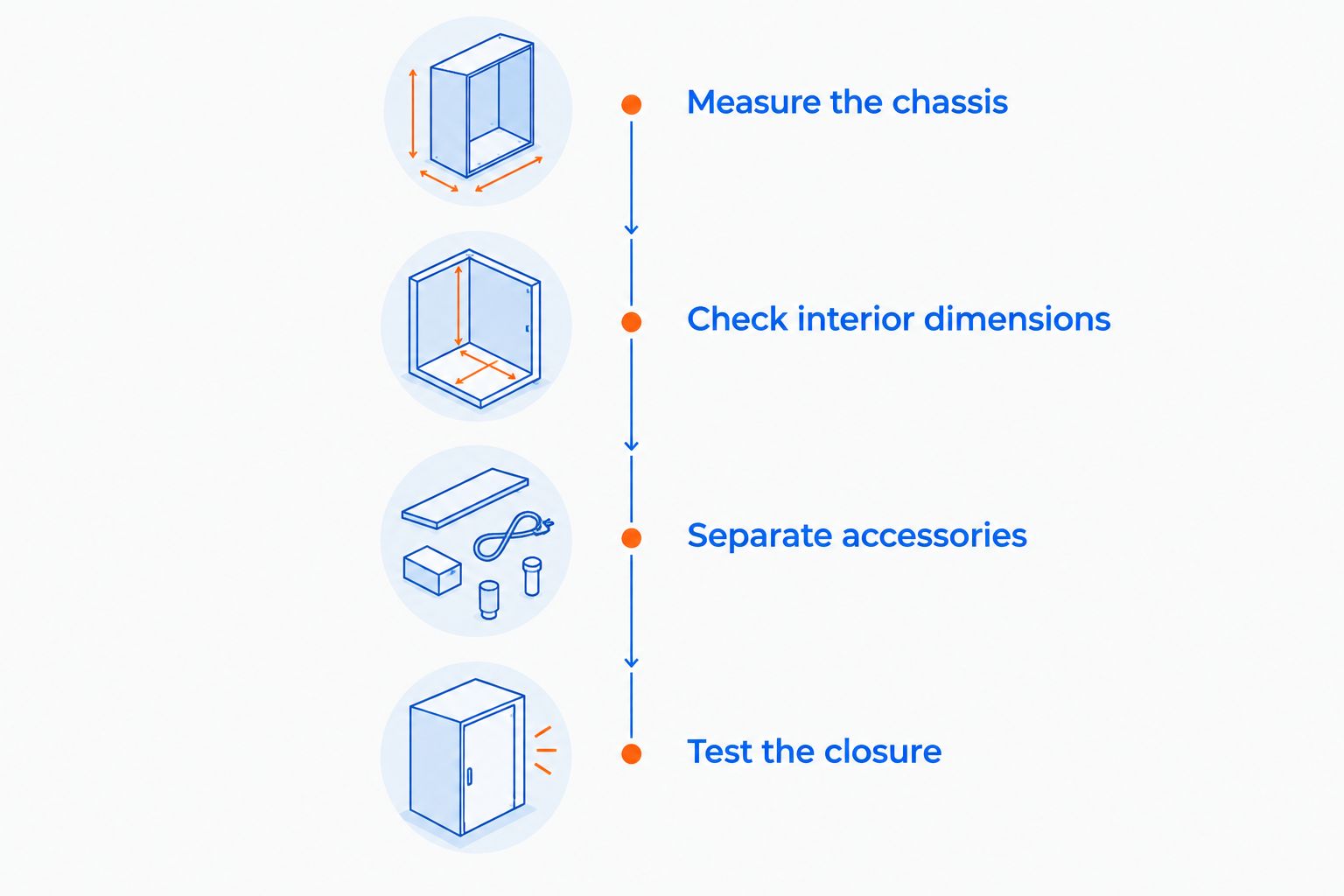
Follow this sequence before ordering any of the shortlisted cases. A close fit is useful only when the case closes without forcing the laptop against the shell or closure.
Measure the chassis
Shut the laptop down, disconnect accessories, and close the lid. Measure the full external length, width, and thickness, including feet and any rear extension. Record the units alongside each measurement so you do not compare inches with centimeters by mistake.
Check interior dimensions
Compare your measurements with the case's usable interior dimensions. Outside dimensions include the shell and padding, so they do not tell you how much room the laptop gets. Ask for clarification when a listing does not distinguish the two.
Separate accessories
Plan where the power brick, cable ends, and mouse will sit. Do not place a loose charger directly against the laptop lid. If the case cannot separate those items, carry them in another compartment or bag.
Test the closure
Place the laptop inside without accessories first. Close the case gently and check for pressure, caught fabric, or forced corners. Stop if you need to push down on the laptop to bring the closure together.
A larger case is not automatically the safer choice. Extra space lets the laptop move unless the interior holds it appropriately. Aim for a fit that avoids both compression and uncontrolled movement rather than deliberately sizing up.
Match the case to your carrying routine
For commuting inside a backpack: Check the complete arrangement. The laptop must fit the case, and the closed case must fit the backpack without bending or forcing it into the compartment. Include the case when assessing how the load sits against your back.
For carrying the case alone: Confirm the handle or strap arrangement and where the charger travels. A hard-shell format does not tell you whether the case is comfortable to carry or whether its accessory storage suits your kit.
For occasional travel: Keep the laptop accessible for inspection and avoid packing heavy objects against it. Follow the transport operator's current battery and baggage rules. A laptop case is not a substitute for checking those requirements.
For gift shopping: Ask for the exact laptop model and the recipient's preferred carrying setup. Someone who already uses a backpack needs a different fit check from someone replacing their main laptop bag.
How these cases are ranked
This 2026 ranking prioritizes fit relevance, named construction details, and a distinct buying purpose. Gaming and More's Heavy Duty Laptop Case leads on material specificity; the ASUS TUF Gaming A17 Hard Case serves model-specific shoppers; the Premium Hard Shell Laptop Bag provides the general carrying-case alternative.
The ranking does not assign impact scores or claim hands-on testing. Product names support a shortlist, while dimensions, interior layout, and protection evidence determine the final purchase.
Which gaming laptop case should you choose?
Start with the Heavy Duty Laptop Case if you are undecided. Its named construction gives you a concrete basis for comparison, provided the interior fits your computer.
Choose the ASUS TUF Gaming A17 Hard Case when your exact A17 model is confirmed to fit. Choose the Premium Hard Shell Laptop Bag when its verified carrying arrangement suits you better. For every option, reject a forced fit—even when the advertised screen size looks right.
FAQ
What's the best laptop case for a gaming laptop in 2026?
The Heavy Duty Laptop Case is the default shortlist pick here because it identifies an EVA hard shell and 1600D nylon. Confirm your laptop's external dimensions against the usable interior before buying; this is not a tested impact-resistance ranking.
Will a 17.3-inch laptop case fit every 17.3-inch gaming laptop?
No. The screen diagonal does not establish chassis length, width, or thickness. Compare the closed laptop's full dimensions, including feet and rear extensions, with the case's usable interior.
Is the ASUS TUF Gaming A17 Hard Case right for my ASUS laptop?
The ASUS TUF Gaming A17 Hard Case is the model-specific option in this shortlist. Confirm your exact A17 model and generation rather than assuming that every ASUS gaming laptop fits.
Does a hard-shell laptop case mean it's waterproof?
No. Hard-shell construction and waterproofing are separate properties. Look for an explicit water-protection claim and supporting details rather than inferring protection from the shell.
What does 1600D nylon mean on a laptop case?
1600D identifies the nylon yarn's denier, a measure of linear density. It is not a drop rating or a score for the complete case's protective performance.
Can I put my gaming laptop charger in the same case?
Use the same case only when its layout keeps the charger from pressing against the laptop. Confirm the compartment arrangement and close the packed case without forcing it.
Can I leave my gaming laptop running inside a closed case?
No. Shut the laptop down before enclosing it for transport, and use it on a suitable surface with its vents unobstructed. A carrying case is not a cooling stand.
One last thing
Fit-check the laptop alone, then fit-check the complete kit. A case that closes comfortably around the computer can become cramped after you add a charger and mouse. Make that second check part of your 2026 buying decision, and choose among Gaming and More's laptop cases only after both arrangements work without pressure.


