


How long does a gaming laptop battery last?
Gaming laptop battery life has no single reliable hours figure: demanding games drain a charge faster than browsing, and runtime depends on the exact laptop, settings, and battery condition. For a 2026 purchase, use a battery test of the exact configuration and workload—not a plugged-in performance review—to decide whether it lasts long enough for you.
- Gaming laptop battery life depends on workload; gaming runtime and browsing runtime are not interchangeable.
- Gaming and More shoppers should compare measured unplugged runtime, not processor names or the gaming label.
- Lower frame-rate limits and lighter graphics workloads help reduce battery drain, with a performance trade-off.
- Check battery health separately from runtime: an aging battery holds less energy than it did when new.
Why this matters
A laptop that travels easily does not necessarily game for long away from an outlet. You need separate answers for carrying it to class, browsing between meetings, and running a demanding game on the train.
Start with your unplugged workload, then compare hardware. The budget gaming laptop guide is a useful next step when you are weighing configurations, but battery testing belongs on your shortlist too.
Also separate battery runtime from battery lifespan. Runtime means how long one charge lasts; lifespan concerns the battery's usable condition as it ages. A short gaming session does not, by itself, prove that the battery needs replacing.
How long does a gaming laptop battery last?
A gaming laptop lasts until its usable battery energy is exhausted by its average power demand. Because both values differ between machines and workloads, there is no honest universal runtime to promise.
Battery capacity is expressed in watt-hours, or Wh. Power consumption is expressed in watts, or W. Dividing usable watt-hours by average watts gives a theoretical runtime in hours, but actual results depend on changing demand, battery condition, and system behavior.
Use this workload comparison to understand what a battery-life result actually measures:
| Unplugged workload | Best for | Battery-life advantage | Main limitation |
|---|---|---|---|
| Browsing and documents | Classes, email, everyday work | Usually lighter graphics demand than demanding local games | Video calls, background tasks, and active graphics hardware still consume energy |
| Local video playback | Watching downloaded entertainment | Hardware video decoding can reduce processing work | Brightness, video format, and playback software affect demand |
| Lightweight or frame-capped gaming | Playing away from an outlet | Lower rendering demand can reduce power use | Visual quality or responsiveness is reduced |
| Demanding local gaming | Playing graphically intensive titles | Runs the game locally without relying on streaming | High graphics demand drains energy faster and battery operation can limit performance |
| Game streaming | Playing games rendered elsewhere | Moves game rendering off the laptop | Requires a suitable connection and introduces network-dependent latency |
Do not compare a video-playback result with someone else's gaming result. They answer different questions. For a useful 2026 comparison, match the task, power mode, brightness, and graphics settings as closely as possible.
Browsing and schoolwork: judge the whole unplugged day
A gaming laptop can perform everyday work without running a demanding game, but that does not guarantee all-day battery life. Screen settings, background applications, and graphics switching still matter.
Best for: buyers who need a gaming machine that also handles portable work. The advantage is using one computer for both jobs; the drawback is that gaming hardware specifications alone do not tell you how long the work session lasts.
Look for a browsing or productivity battery test of the exact configuration. A review of a similarly named model is not enough if its display, battery, or graphics configuration differs.
Include your real routine. A quiet document-editing test does not represent a day filled with video meetings, downloads, and browser-based applications. Leave room for those differences when deciding whether the measured result meets your needs.
Gaming on battery: expect a performance trade-off
Demanding games ask the processor and graphics hardware to do sustained work. That increases energy demand, while the laptop's battery power limits can also reduce the performance you saw in plugged-in testing.
Best for: short sessions where you accept lower settings or a frame-rate cap. The advantage is playing without an outlet; the drawback is giving up either runtime, performance, or both compared with a lighter workload.
A 60 fps cap is a practical setting to test before allowing an unrestricted frame rate. If you prioritize runtime over motion smoothness, try 30 fps and decide whether the game still feels good to you. Neither setting guarantees a particular number of hours.
Keep the comparison fair. Use the same game, scene, resolution, and graphics preset when evaluating changes. A busy multiplayer match and an idle menu do not place the same demands on the system.
Why gaming laptop battery life varies
These factors explain why a single hours claim is a poor buying shortcut:
- Workload: rendering a demanding game, decoding video, and editing a document require different amounts of processing work.
- Graphics activity: a discrete graphics processor doing active work consumes energy; supported graphics-switching modes can use integrated graphics for lighter tasks.
- Display settings: brightness and refresh rate affect power demand. A 60 Hz desktop setting is worth testing when fast motion is unnecessary.
- Performance settings: power modes, frame-rate limits, and graphics presets change the work the system attempts to perform.
- Usable capacity: battery size and battery wear affect the energy available between charges.
- Background activity and accessories: updates, recording software, downloads, and laptop-powered USB devices add to the workload.
Change one factor at a time. If you lower brightness, change the power mode, and switch games together, you cannot tell which change improved runtime.
For a 2026 shopping comparison, insist on test conditions alongside the result. An hours figure without a workload is an incomplete specification.
How do you measure your own gaming laptop battery life?
Run a repeatable unplugged test using the task you actually care about. Your own result is more relevant than a generic estimate because it includes your software, settings, and current battery condition.
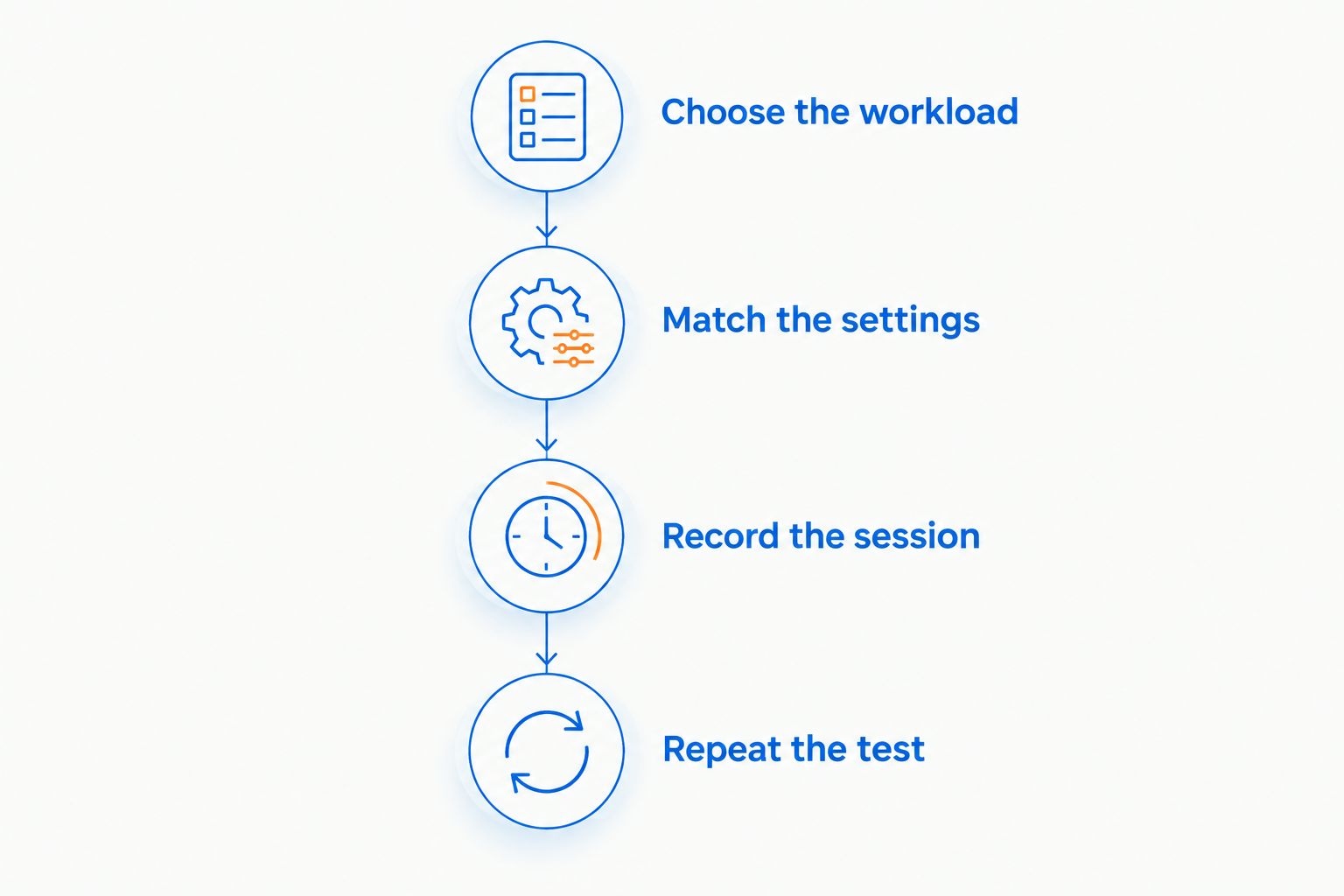
- Choose the workload. Pick browsing, video playback, or a repeatable section of a game. Test work and gaming separately.
- Match the settings. Record brightness, refresh rate, power mode, resolution, and any frame-rate cap. Use the same starting charge each time.
- Record the session. Note the start time and charge level, then the finish time and charge level. Save your work before the battery runs low.
- Repeat the test. Check that an update, download, or unusual background task did not distort the result. Compare sessions under matching conditions.
Treat a partial-charge test as a comparison tool, not a guaranteed full-charge prediction. Game demand changes, charge readings are estimates, and low-battery power behavior can differ from the beginning of a session.
Write the result as a sentence with its conditions: the task, settings, elapsed time, and charge consumed. That record makes a later test meaningful instead of leaving you with a vague impression that the battery feels worse.
How do you check battery health in Windows?
Windows includes a battery report that helps separate battery wear from a demanding workload. Open Command Prompt and run powercfg /batteryreport, then open the generated report at the location Windows provides.
Look for these fields:
- Design capacity: the battery's reported original design energy capacity.
- Full charge capacity: its reported current energy capacity when fully charged.
- Capacity history: changes in reported capacity over time, when available.
A lower full charge capacity means less stored energy, not necessarily a new software problem. However, one report is not a complete diagnosis: compare the capacity information with repeatable runtime tests and any manufacturer diagnostics.
Keep a dated baseline in 2026 so you can compare later results under the same conditions. If runtime suddenly falls while reported capacity remains similar, check background activity, graphics behavior, and power settings before assuming battery wear caused the change.
Battery swelling is different from ordinary wear. Stop using a laptop with a visibly swollen battery and arrange qualified service; do not press the case closed or puncture the battery.
What should you check before buying a gaming laptop?
Buy for the unplugged task you need, not just the performance you want at a desk. A strong plugged-in gaming configuration and long unplugged runtime are separate buying criteria.
For example, Gaming and More lists the Lenovo LOQ 15 Gaming Laptop with an Intel Core i5 processor, RTX 5050 graphics, 64GB RAM, and a 4TB SSD. Those specifications describe the configuration; they do not establish its hours of battery life.
Before choosing that configuration or another laptop, check:
- Battery capacity for the exact configuration.
- Independent runtime testing for your intended task.
- Whether the test used battery-saving or performance settings.
- Whether graphics switching is supported and how it was configured.
- Charging requirements and the manufacturer's supported charging options.
The benefit of a specification list is knowing what hardware you are comparing. Its limitation is that it cannot replace a workload-based battery test. Gaming and More gaming laptop shoppers should keep those two checks separate.
If you are buying a gift, ask whether the recipient needs unplugged gaming or simply a laptop they can move between powered desks. That distinction matters more than choosing the most impressive processor name.
Does leaving a gaming laptop plugged in ruin the battery?
Leaving a gaming laptop plugged in does not automatically ruin its battery. Charging management controls charging, while heat, battery age, and time spent at a high charge level affect lithium-ion battery aging.
For desk use, check whether the manufacturer provides a charge-limit or battery-conservation setting. Follow that model's instructions rather than applying a universal charge target.
Use the supported power adapter and keep ventilation clear. Do not repeatedly discharge the battery just to make it work; routine deep discharges are not a requirement for normal lithium-ion battery care.
Will a power bank extend gaming laptop battery life?
A compatible power bank can supply additional energy, but a USB-C connector alone does not establish compatibility. The laptop must support charging through that port, and the power bank and cable must meet its charging requirements.
Heavy gaming can demand more power than a particular charging setup supplies. Check the laptop manufacturer's requirements before buying, and distinguish supported charging from enough power to sustain your intended workload.
FAQ
How many hours should a gaming laptop battery last?
There is no universal hours figure for a gaming laptop battery. Use a test of the exact configuration under the workload you need, because browsing and demanding gaming produce different results.
Why does my gaming laptop battery drain fast when I play?
Gaming increases processor and graphics workload, which increases energy consumption. Screen settings, background software, and battery wear also affect how quickly the charge falls.
Is gaming on battery bad for my laptop?
Gaming on battery is a normal supported use, but performance and runtime depend on the laptop's battery power limits. Keep ventilation clear and follow the manufacturer's battery-care instructions.
Will lowering graphics settings improve battery life?
Lower graphics settings can reduce rendering work, but an unrestricted frame rate can use the freed capacity to render more frames. Test lower settings together with a frame-rate cap and compare the same game scene.
Does battery saver help while gaming?
Battery saver prioritizes lower energy use rather than maximum performance. Test whether its performance trade-off is acceptable in your game instead of assuming it will preserve the plugged-in experience.
How can I tell whether my battery is worn out?
Compare reported full charge capacity with design capacity and check repeatable runtime results. Sudden shutdowns or other faults need further diagnosis; a swollen battery requires stopping use and arranging service.
Should I compare battery reviews from different years?
Compare battery reviews by configuration, workload, settings, and battery condition rather than publication year alone. For a 2026 purchase, confirm that the tested configuration matches the laptop you intend to buy.
One last thing
A lower graphics preset does not automatically mean longer runtime. Without a frame-rate limit, the laptop can spend the saved rendering effort producing more frames instead.
Before replacing hardware, try a frame-rate cap and repeat your battery test. Keep the change only if the balance of smoothness and runtime works for you.


