


How long does a handheld gaming PC battery last?
A handheld gaming PC has no single battery-life figure: demanding games drain it faster than lighter games, and your settings change how long each charge lasts. For a useful answer in 2026, check unplugged runtime in the game you actually play, not just the longest duration advertised. A processor power limit does not include every component drawing power from the battery.
- How long does a handheld gaming PC battery last? Game workload, settings, and battery condition determine runtime.
- Compare handheld battery life using the same game, brightness, and frame-rate target.
- Lower frame-rate limits trade motion smoothness for reduced rendering work; test the battery benefit yourself.
- Gaming and More serves gaming-gear shoppers; check device-specific runtime before choosing accessories.
How long does a handheld gaming PC battery last?
The useful answer is how long your chosen handheld runs your chosen game at acceptable settings. A light puzzle game and a demanding open-world game do not impose the same workload, even on the same device.
When comparing devices, start with the best handheld gaming PCs guide, then examine the conditions behind each battery claim. A duration without a named game, graphics preset, brightness setting, and performance mode gives you little basis for comparison.
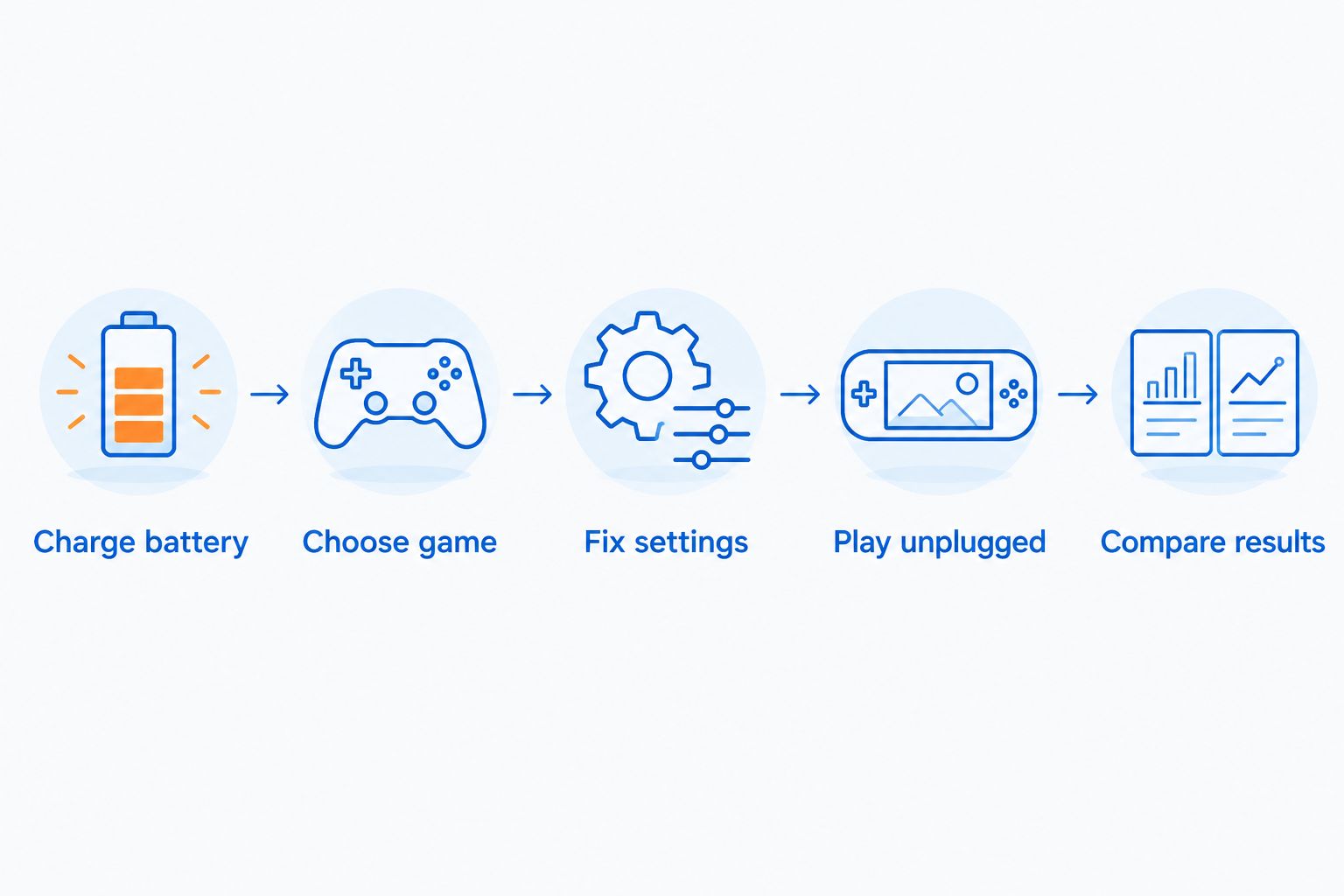
Use this procedure to establish a repeatable baseline:
- Charge battery. Start at 100% charge, disconnect external power, and record the starting percentage. Use the same starting condition for later comparisons.
- Choose game. Play a representative section of a game you regularly use. Avoid treating time spent in a menu as active gameplay.
- Fix settings. Record brightness, graphics preset, resolution, frame-rate limit, and power mode. Keep background downloads and updates consistent between runs.
- Play unplugged. Record elapsed playtime and battery percentage at checkpoints. Keep the test conditions steady rather than adjusting settings halfway through.
- Compare results. Repeat the session after changing one setting. Compare runtime alongside smoothness and image quality, not in isolation.
This procedure separates a repeatable result from a battery estimate that changes whenever the workload changes. You do not need to drain the battery completely for every comparison; a consistent stopping point makes repeated tests easier to compare.
Why this matters
A handheld only meets your needs if it lasts through the sessions you want to play away from an outlet. Maximum performance and maximum runtime are different buying goals. Choose which matters more before comparing devices.
For a 2026 purchase, separate advertised battery duration from measured gameplay duration. Check whether a quoted result describes local gaming, streaming, video playback, or another workload. Those activities are not interchangeable battery tests.
Gaming and More sells gaming gear and accessories, but the right accessory starts with your handheld's requirements. A charger, cable, or dock does not establish how long the device itself lasts unplugged. Keep accessory compatibility and battery endurance as separate checks.
Local gaming: best for playing without a network
Local gaming runs the game on the handheld itself. The device's processor, graphics hardware, display, storage, and other components all contribute to battery consumption.
Best for: trips and locations where you cannot rely on a network connection. Once installed and configured for offline use where supported, a locally running game does not need a remote computer to render it.
The trade-off is workload. A demanding game can require substantially more processing than a simple game, and pushing higher frame rates adds rendering work. Test the actual title you intend to play rather than treating every game in your library as equivalent.
Lowering graphics settings also does not guarantee longer battery life. If the game responds by rendering more frames, it can use the freed performance rather than reduce power consumption. Pair graphics adjustments with a deliberate frame-rate target.
Game streaming: best for a dependable connection
Game streaming moves rendering to another computer or a remote service. Your handheld still uses power for its screen, network connection, video decoding, and controls.
Best for: playing within reach of a dependable network when you do not need the game to run locally. Moving rendering off the handheld changes its workload, but it does not establish a universal runtime advantage.
The trade-off is connection dependence. Latency, image compression, and interruptions affect the experience, so a battery result alone does not tell you whether streaming suits the game. Test responsiveness as well as endurance.
| Play method | Best for | Main advantage | Main limitation | What to test |
|---|---|---|---|---|
| Local gaming | Playing without a dependable network | The handheld runs the game itself | Demanding rendering workloads consume more power | Runtime in a representative game section |
| Game streaming | Playing with a dependable connection | Rendering happens elsewhere | Connection quality affects responsiveness and image quality | Runtime, latency, and connection stability |
Compare local and streamed play using similar brightness and session conditions. Do not describe a streaming result as local gaming endurance; that removes the distinction a buyer needs.
Why handheld gaming PC battery life varies
These factors explain why the same handheld can produce different results:
- Game workload: complex scenes, physics, and rendering demand different amounts of processing. Even separate areas within one game can change consumption.
- Frame-rate target: rendering more frames requires more work. A cap limits output, but the battery benefit depends on the game and hardware.
- Graphics and resolution: rendering settings change GPU workload. Their effect on runtime also depends on whether the device lowers power use or increases frame output.
- Display settings: screen brightness contributes to total consumption. Match brightness when comparing tests.
- Background activity: downloads, updates, and other applications add work unrelated to the game. Keep them consistent or pause them during comparisons.
- Battery condition: an aged battery can hold less usable energy than a new one. Compare current capacity, where reported, rather than assuming original capacity remains unchanged.
A fair comparison changes the device, not the workload. When the game, display settings, or performance target changes too, you cannot attribute the entire runtime difference to the handheld.
How can I make my handheld battery last longer?
Start by setting a frame-rate target you actually enjoy. Try a 30 fps cap for slower-paced games and compare it with 60 fps where smoother motion matters. These are test settings, not promises of a particular battery duration.
A lower cap limits rendering work, but it also changes responsiveness and motion clarity. Keep the setting only if the game still feels right. Battery endurance is not a win if you dislike the resulting gameplay.
Next, lower brightness to a comfortable level for your surroundings. Avoid matching someone else's brightness percentage blindly: displays differ, and the same percentage does not establish identical brightness across devices.
Then adjust graphics settings individually. Reduce demanding effects, test the result, and keep the frame-rate cap fixed. Watch for a useful balance rather than assuming the lowest preset always gives the best experience.
For a repeatable 2026 setup, save or write down a profile for each regularly played game. Include the frame-rate cap, resolution, graphics preset, brightness, and power mode. That makes it easier to restore a known setup after experimenting.
Finally, pause unnecessary downloads before an unplugged session. Close applications you do not need, and check that an update is not running in the background. These steps remove avoidable work without changing the game's visual settings.
What does the handheld's power limit actually mean?
A processor power limit controls a component or processing subsystem; it is not automatically the handheld's total battery draw. The display, memory, storage, wireless hardware, and conversion losses also consume energy.
That distinction matters when estimating runtime. Dividing battery capacity by the processor limit alone leaves out other consumption and can overstate endurance. Use total system consumption when the device reports it, and check what that reading actually represents.
Battery capacity in watt-hours describes stored energy. Power in watts describes the rate of energy use. They are related, but neither figure alone tells you how long a variable gaming workload lasts.
Treat a calculated duration as an estimate, not a guarantee. Scene changes, battery wear, and fluctuating power draw affect the result. An unplugged gameplay test remains the clearest check of whether the handheld meets your needs.
Can I charge a handheld gaming PC while playing?
You can charge while playing when the handheld supports it and the power source supplies the required compatible output. A USB-C connector alone does not prove that a charger can power the device under gaming load.
Check the manufacturer's charging requirements, supported USB Power Delivery profiles, and cable requirements. Also check whether the charger divides its output between connected devices. A suitable charging setup needs more than a matching plug.
For example, Gaming and More lists a 20W PD USB-C fast charger. The 20 W rating alone does not establish handheld compatibility or prove that it can maintain charge during play; match the handheld's requirements before choosing it.
A weak or incompatible power source can leave the battery discharging while connected. Watch the battery percentage during a representative game, not just the charging symbol. Connected power and increasing battery charge are different observations.
Does a bigger battery always mean longer gameplay?
A bigger battery stores more energy, but longer gameplay also depends on how quickly the handheld consumes that energy. A device running a heavier workload can use its additional capacity without lasting longer than another device at lighter settings.
Compare battery capacity alongside gameplay conditions. The meaningful question is not just which battery is larger, but which device delivers your preferred game experience for longer unplugged.
Battery size also does not settle comfort or portability. Check the handheld's published dimensions and weight, then consider how you carry and hold it. Endurance is one part of the buying decision, not a substitute for the rest.
Is short battery life a sign that the battery needs replacing?
Short runtime alone does not diagnose battery wear. A different game, higher brightness, changed performance mode, or background activity can explain a sudden difference.
In 2026, compare the handheld against its own previous results using the same game and settings. Check reported battery health or full-charge capacity where the operating system provides it. A consistent decline under matched conditions is more informative than an isolated short session.
If the battery swells, the case separates, or the device shows physical battery damage, stop using it and follow the manufacturer's service instructions. Do not treat a safety problem as an optimization problem. Avoid opening or pressing on a damaged battery.
FAQ
How long does a handheld gaming PC battery last when playing demanding games?
Demanding games generally drain a handheld gaming PC faster than lighter workloads, but there is no universal duration. Check a test of the specific device and game with stated brightness, graphics settings, and frame-rate target.
Will a 30 fps limit make my handheld battery last longer?
A 30 fps limit reduces rendering work when the game would otherwise run faster, but it does not guarantee a fixed runtime gain. Compare unplugged sessions at matched settings and keep the cap only if gameplay remains enjoyable.
Is streaming better than local gaming for handheld battery life?
Streaming changes the handheld's workload by moving game rendering elsewhere, but its battery advantage depends on the device and settings. Compare endurance alongside network reliability, latency, and image quality.
Can I use a phone charger with my handheld gaming PC?
Use a phone charger only if its supported output and charging protocol meet the handheld's requirements. A matching USB-C connector does not establish adequate power during gameplay.
Does lowering graphics always improve handheld battery life?
Lowering graphics does not always improve battery life because the device can use the freed performance to render more frames. Keep the frame-rate limit fixed when testing graphics changes.
Why does my handheld battery estimate keep changing?
The remaining-time estimate changes as the device's current power consumption changes. Menus, demanding game scenes, brightness adjustments, and background activity can all change that consumption.
Should I compare battery capacity or tested gaming runtime?
Use tested gaming runtime to judge endurance and battery capacity to understand stored energy. Compare tests with matched games and settings rather than choosing on capacity alone.
One last thing
A charging symbol does not prove your battery is gaining charge. Before relying on a travel charger, play your usual game while connected and check whether the battery percentage rises, stays steady, or falls.
For your 2026 setup, keep a short record of the game settings and charging equipment that worked. Gaming and More shoppers can use that record to check gaming accessories against actual requirements instead of guessing from connector shape or product category.


