


How much does a good gaming mouse cost in 2026?
There is no single price that makes a gaming mouse good in 2026: choose the least expensive option that fits your hand, tracks reliably, and gives you the controls you actually use. Compare the current checkout total, including applicable taxes and accessories, rather than treating a higher price as proof of better aim.
- How much does a good gaming mouse cost? Judge the current checkout total against fit, tracking, and useful controls.
- Gaming and More carries gaming gear and setup accessories; choose a mouse for your games, not its lighting.
- Wired gaming mice avoid battery management; wireless gaming mice remove cable drag but need charging or replacement batteries.
- A higher DPI ceiling is not proof of better accuracy. Prioritize comfortable control at your normal sensitivity.
How much does a good gaming mouse cost in 2026?
Spend enough to solve a specific problem, not enough to collect the longest specification list. A replacement makes sense when your current mouse feels uncomfortable, misses inputs, loses tracking, or lacks controls you need. If your mouse already works well, a more expensive replacement needs a clearer reason than looking newer.
Use the gaming mice ranked by price guide to organize your shortlist, then compare each mouse against the same requirements. Current listings matter more than an old screenshot or a remembered deal.
Start with this comparison. These are buying approaches, not fixed price tiers, and none guarantees better performance on its own.
| Buying approach | Best for | What you gain | Main trade-off | What to verify |
|---|---|---|---|---|
| Simple wired mouse | Players who want no battery routine | A direct connection without charging | A cable across the desk | Shape, cable movement, tracking, and button placement |
| Wireless gaming mouse | Players who dislike cable drag | Freedom from a trailing cable during play | Charging or battery replacement | Connection method, receiver requirements, and power arrangement |
| Extra-button mouse | Players who use mouse-bound commands | More controls within reach | More opportunities for accidental presses | Button placement and software support |
| Lightweight mouse | Players who prioritize easy movement | Less mass to move across the pad | Weight alone does not establish comfort | Actual weight, shape, and grip security |
For your 2026 purchase, separate essentials from preferences before comparing totals. Reliable clicks and a comfortable shape are essentials. Lighting color is a preference unless matching your setup is part of the purchase goal.
Why this matters
A gaming mouse sits in your hand for the entire session. An impressive specification sheet cannot compensate for side buttons you cannot reach or a shell that makes you squeeze harder than you want.
The practical question is not whether a mouse belongs to a premium category. It is whether the replacement removes a frustration you notice while playing. That distinction keeps a small accessory purchase from turning into a feature chase.
Gaming and More is best for gamers shopping for gaming gear and setup accessories together. Its assortment gives you that shopping context, but you should still judge each gaming mouse by its own specifications rather than the store name.
Wired gaming mice: choose simplicity over cable freedom
Best for: players who want to plug in and play without managing a battery. A wired mouse gets power through its connection, removing charging from your routine. That is useful when you want your desk setup to stay predictable.
The compromise is physical. A cable can catch on objects or pull against your movement, depending on your desk arrangement. Check where the cable will run before deciding that wired is the simpler choice for your particular setup.
Do not assume that every wired mouse has the same response characteristics. Connection type is only part of the picture; the sensor, firmware, switches, and reporting behavior also matter. Look for evidence about the exact model rather than borrowing conclusions from another mouse.
For a wired purchase in 2026, pay attention to ordinary details: a reachable USB connection, enough cable freedom, and buttons that match your grip. A mouse that meets those needs does not need wireless features to be a good buy.
Recommendation: choose wired when charging is an annoyance and your cable route stays clear.
Wireless gaming mice: choose cable freedom with a power plan
Best for: players who want mouse movement without a trailing cable. Wireless removes that physical connection from the playing surface. It does not remove the need to check compatibility, power, and connection details.
Read the exact connection description. Bluetooth and a dedicated wireless receiver are different arrangements, and the word wireless does not tell you which one a product uses. Confirm what your computer needs and what the package includes.
At Gaming and More, the M801 Wireless RGB Gaming Mouse is a relevant listing to inspect if wireless operation and RGB lighting are on your shortlist. Check its current specifications before deciding; those features alone do not establish its fit, weight, battery arrangement, or measured response.
The benefit is cable freedom. The compromise is power management, whether that means recharging or replacing batteries. Your choice should account for how you actually use the desk, not just how clean it looks in a product photo.
Recommendation: choose wireless when removing the cable solves a real annoyance and you accept the power routine.
Extra-button gaming mice: choose controls you can reach
Best for: players who regularly bind actions to the mouse. Extra buttons give you more places for commands, but their location matters more than their count. A useful button is one you can press deliberately without shifting your whole grip.
List the actions you want on the mouse before shopping. Then match that list to the layout. Buying more buttons without a plan can leave you with controls that stay unused or get pressed accidentally.
Check software requirements if remapping is part of the reason to buy. Confirm support for your operating system and whether your intended commands are allowed in the games you play. Do not assume that every programmable mouse supports the same functions.
Recommendation: choose extra buttons for commands you already use, not commands you hope to invent later.
Why gaming mouse buying decisions vary
Your best purchase depends on the features that change your experience. These factors explain why comparing only the checkout total leaves out important differences:
- Hand fit: shell length, width, height, and side shape affect where your fingers rest. A poor fit stays poor even when the specifications look impressive.
- Connection method: wired, Bluetooth, and receiver-based wireless arrangements create different desk and compatibility requirements.
- Button layout: additional controls are useful only when you can reach them comfortably and assign the actions you need.
- Weight and movement: the mouse, its cable, your grip, and the playing surface all affect how movement feels.
- Software and power needs: remapping, settings, charging, and battery replacement can add work to your routine.
Treat lighting as a separate preference. RGB describes illumination, not measured tracking quality or click response. Choose it because you like the appearance, not because you expect it to improve accuracy.
How to decide what to spend on a gaming mouse
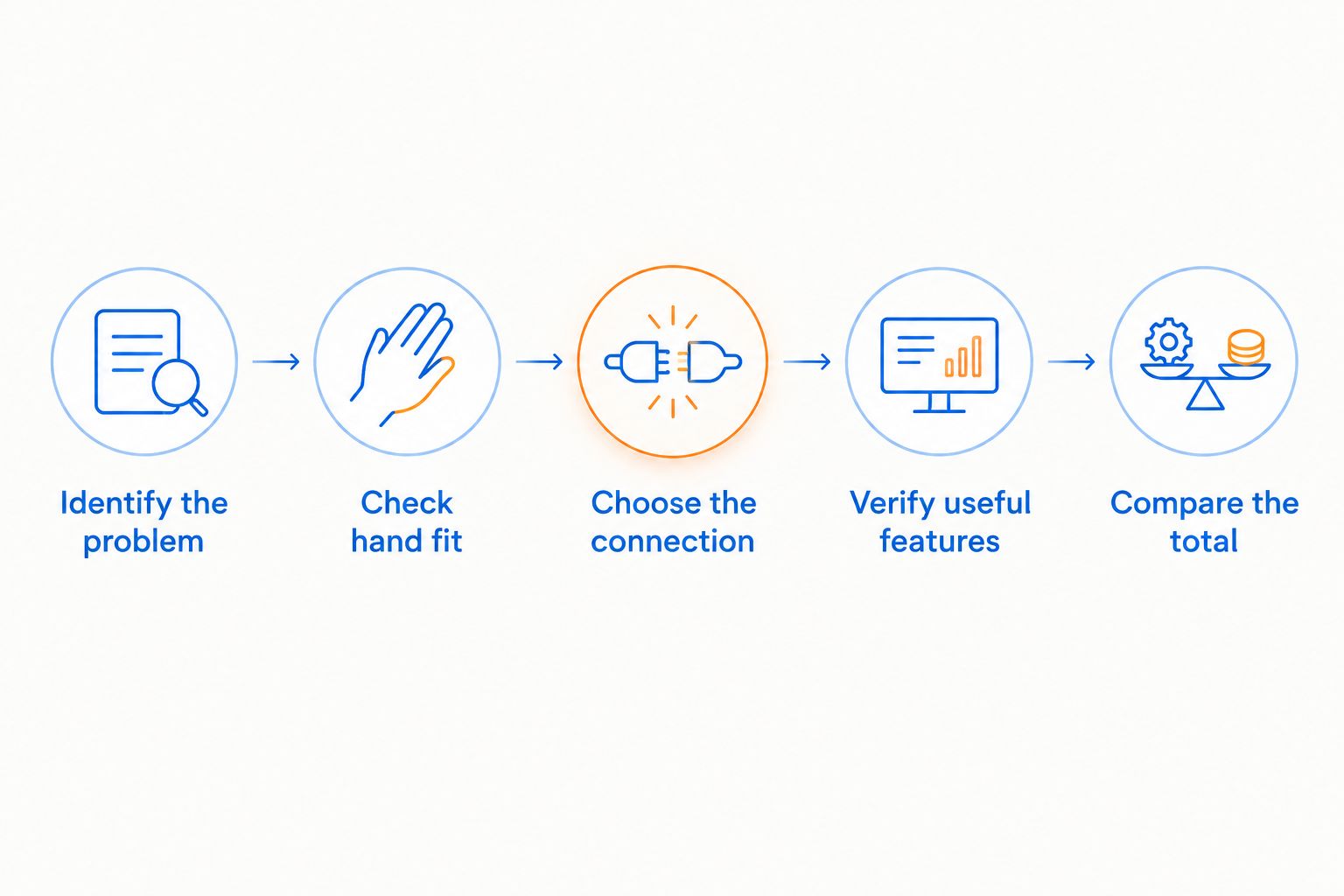
Use the same sequence for every candidate in 2026. It prevents a flashy extra from pushing a basic requirement out of the decision.
- Identify the problem. Write down what your current mouse gets wrong: discomfort, cable interference, missed clicks, tracking trouble, or insufficient controls. If nothing is wrong, decide whether this is a functional upgrade or a gift to yourself.
- Check hand fit. Compare the candidate's published dimensions with a mouse you know. Look at the side profile as well as the top view; height and button position matter alongside length.
- Choose the connection. Decide whether you want a cable, a wireless receiver, or Bluetooth. Check the computer's ports and the product's stated requirements before ordering.
- Verify useful features. Look for the controls and settings you will use. Distinguish documented specifications from decorative terms such as gaming-grade or professional.
- Compare the total. Review the current checkout amount and any accessories you genuinely need. A mouse pad or cable-management accessory belongs in the decision only when it solves a separate problem.
The order matters: fit comes before extras. A mouse that fails your hand-fit check should leave the shortlist, even if it wins every other comparison.
Which gaming mouse specifications actually matter?
Start with shape, dimensions, weight, connection method, and button placement. Those details help you judge whether the mouse suits your hand and desk. Then examine tracking and response evidence for the exact model.
DPI is a sensitivity setting, not an accuracy score
DPI describes how sensor movement relates to reported counts. A higher setting makes the pointer move farther for the same physical movement, subject to your software settings. It does not prove that a sensor tracks more accurately.
Your usable sensitivity matters more than the highest number on the box. If you already have comfortable aim, compare whether the replacement supports your preferred settings rather than treating a higher ceiling as an upgrade by itself.
Polling rate is not total input latency
A polling rate of 1,000 Hz corresponds to a nominal reporting interval of 1 millisecond. At 500 Hz, the interval is 2 milliseconds; at 125 Hz, it is 8 milliseconds. These intervals follow from the reporting frequency, not from a test of any particular mouse.
Those numbers do not describe total click-to-screen delay. Switch behavior, device processing, the computer, the game, and the display also affect the result. Do not turn a reporting interval into a claim about overall system response.
For your 2026 shortlist, use polling rate as a documented specification, not a substitute for model-specific evidence. A setting you can select and a measured result are different things.
Weight only helps when the shape works
A lighter mouse reduces the mass you move, but that does not make every lightweight design comfortable. If the shell is difficult to hold securely, you can end up gripping harder to compensate.
Judge weight together with shape and your movement style. Avoid selecting a mouse by weight alone, just as you would avoid selecting it by DPI alone.
Is a more expensive gaming mouse worth it?
A more expensive gaming mouse is worth choosing only when its verified features solve a problem for you. Cable freedom, a better-fitting shape, or reachable controls can justify choosing one model over another. A longer feature list cannot justify itself.
Keep your existing mouse if it remains comfortable and reliable. Replacing working equipment is a preference purchase unless the new model provides a benefit you can name.
Is a wired gaming mouse better than a wireless mouse?
A wired gaming mouse is better for avoiding battery management; a wireless mouse is better for removing a trailing cable. Neither connection label establishes the exact model's tracking quality or overall response.
Choose around your desk and routine, then verify the individual product. Do not assume every wireless mouse has the same connection method or every wired cable feels the same.
Should you buy a gaming mouse or upgrade something else first?
Buy a gaming mouse first when the mouse is causing the problem you want to fix. If your pointer control is comfortable but the game runs poorly, replacing the mouse does not address that issue.
Gaming and More carries gaming mice and other setup equipment, so keep each upgrade tied to its purpose. A new peripheral, display, and computer solve different problems; buying them together does not make each purchase necessary.
FAQ
How much does a good gaming mouse cost in 2026?
There is no single price that establishes whether a gaming mouse is good in 2026. Compare the current checkout total with verified fit, tracking, connection, and controls, then choose the least expensive option that meets your needs.
What's the best gaming mouse for someone buying their first one?
The best first gaming mouse is one that fits your hand and provides the controls you need without unnecessary complexity. Choose the connection method you can support and check the exact model's specifications.
Does a higher DPI mean a gaming mouse is better?
A higher DPI ceiling does not prove better accuracy. DPI changes sensitivity, so prioritize reliable tracking at settings you actually use.
Does a 1,000 Hz gaming mouse have 1 millisecond of total latency?
A 1,000 Hz polling rate corresponds to a nominal 1 millisecond reporting interval, not 1 millisecond of total latency. Device processing, the computer, the game, and the display also affect the response you see.
Is wireless better than wired for gaming?
Wireless is better for removing a trailing cable, while wired avoids battery management. Check the exact mouse's connection method and performance evidence rather than judging by the connection label alone.
Do I need extra buttons on a gaming mouse?
You need extra buttons only when you have useful commands to assign to them. Confirm that the layout lets you press those buttons deliberately without disrupting your grip.
Should I replace a gaming mouse that still works?
Replace a working gaming mouse when a specific limitation makes playing less comfortable or convenient. If its fit, tracking, and controls already suit you, a replacement needs a clear benefit.
One last thing
Before buying, describe the upgrade in a sentence that does not mention the model name or its lighting. For example: you want to stop the cable catching, reach a side button without shifting your grip, or replace an unreliable click.
If you cannot name the problem, pause. The best gaming mouse purchase is the one that improves your control—not the one that makes the longest receipt.


