


How much does a prebuilt gaming PC cost in 2026?
A prebuilt gaming PC’s cost in 2026 depends on the exact graphics card, processor, memory, storage, and what comes with the system—not simply the words “gaming PC.” Check the current listing for your chosen configuration, then budget separately for any monitor, controls, audio gear, and checkout charges that aren’t included. Compare complete setups, not just towers, before you decide what you can afford.
- For how much does a prebuilt gaming PC cost, compare exact configurations and check current checkout totals.
- Gaming and More lists prebuilt gaming PCs with different processors, graphics cards, memory, and storage.
- A processor badge alone cannot tell you whether a prebuilt gaming PC suits your games.
- Budget for your gaming setup separately when a monitor, keyboard, mouse, or headset isn’t included.
Why this matters
The wrong comparison makes a budget look better than it is. A tower-only listing and a complete desk setup don’t cover the same purchase, even when both are described as ready for gaming.
Start with your games and the equipment you already own. That keeps the decision focused on what you need rather than case lighting or a familiar processor badge.
How much does a prebuilt gaming PC cost in 2026?
The useful answer is the current total for a specific configuration. These Gaming and More prebuilt gaming PCs show why the category doesn’t have one interchangeable specification or one buying decision.
| Prebuilt configuration | Listed hardware | Best for | Main advantage | Main limitation |
|---|---|---|---|---|
| AIGAMEPC Intel Core i7 Gaming PC | i7-4790, GTX 1660 Super, 16GB RAM, 512GB SSD | Buyers comparing a named dedicated graphics card against their games’ requirements | Names both the processor and graphics card | 512GB SSD capacity needs checking against your intended game library |
| AMD Ryzen 7 5700G Gaming Desktop | Ryzen 7 5700G, 16GB RAM, 1TB SSD, Windows 11 | Buyers who prioritize listed storage capacity and will verify graphics suitability | Lists 1TB storage and an operating system | The supplied product title does not identify a separate graphics card |
| Element Pro Gaming PC | Ryzen 7 7800X3D, RTX 5070, 16GB DDR5, 1TB NVMe | Buyers specifically seeking the named Ryzen and RTX combination | Identifies the processor, graphics card, memory type, and storage type | Those specifications alone don’t establish game-specific performance or upgrade compatibility |
Treat these as configurations to investigate, not a performance ranking. A named graphics card is useful evidence, but it isn’t a promise that every game will run at your preferred settings.
For your 2026 purchase, compare the same scope on every listing: tower contents, included accessories, operating system, delivery terms, and final checkout total. Keep optional upgrades separate so they don’t obscure the cost of getting started.
Build your total before choosing a tower
Use a simple purchase worksheet. Put each item in either an “already owned,” “included,” or “still needed” column; nothing belongs in more than one.
- Computer: Record the exact configuration, not just the product family.
- Display: Confirm whether your existing monitor connects to the computer’s available outputs.
- Controls: Check whether a keyboard and mouse are included or separate purchases.
- Audio: Decide whether you’ll reuse headphones, speakers, or a headset.
- Connections: Check the cables and network connection your setup needs.
- Checkout: Review taxes, delivery terms, and any other charges before paying.
This worksheet also helps gift shoppers. A computer is not a complete gift setup if the recipient still needs a display and controls to use it.
AIGAMEPC Intel Core i7 Gaming PC: inspect the whole configuration
The AIGAMEPC Intel Core i7 Gaming PC lists an i7-4790 processor, GTX 1660 Super graphics card, 16GB RAM, and a 512GB SSD. Best for: buyers checking a clearly named dedicated-GPU configuration against specific game requirements.
The useful detail is the full processor model. “Core i7” by itself is not enough information to compare this computer with another desktop carrying the same family badge.
The listing also gives you a concrete storage checkpoint. Compare the 512GB SSD with the installation requirements of the games and applications you intend to keep; formatted capacity and installed software reduce the space available for your files.
The limitation is that these headline specifications don’t settle every buying question. Confirm the operating system, component condition, motherboard, power supply, and included accessories before deciding whether the complete package fits your needs.
Recommendation: keep the AIGAMEPC Intel Core i7 Gaming PC on your shortlist only after checking the named hardware against your games. Don’t substitute the processor badge for that check.
AMD Ryzen 7 5700G Gaming Desktop: verify the graphics arrangement
The AMD Ryzen 7 5700G Gaming Desktop lists 16GB RAM, a 1TB SSD, and Windows 11. Best for: buyers who want the stated storage capacity and are prepared to verify the graphics configuration.
Its title makes storage and the operating system clear. That helps you compare practical requirements without treating every detail as an unanswered question.
The important distinction is graphics. The supplied title names the Ryzen 7 5700G processor but not a separate graphics card, so don’t assume a dedicated GPU is included.
Ask whether the computer uses integrated graphics, includes a separate card, or offers different configurations. Then check evidence for that exact arrangement in the games you play.
Recommendation: choose the AMD Ryzen 7 5700G Gaming Desktop only when its confirmed graphics configuration matches your requirements. The 1TB SSD is a storage feature, not evidence of gaming speed.
Element Pro Gaming PC: buy for a defined target
The Element Pro Gaming PC’s listed configuration identifies a Ryzen 7 7800X3D, RTX 5070, 16GB DDR5, and 1TB NVMe storage. Best for: buyers specifically seeking that processor-and-graphics-card combination.
The advantage is configuration clarity. You can compare the named components with game requirements and relevant independent tests instead of comparing vague descriptions such as “powerful gaming desktop.”
The trade-off is that more detailed headline specifications still leave practical questions. Check memory expansion, storage connections, cooling, power supply information, and the equipment included with the tower.
For a 2026 purchase, write down the resolution, games, and settings you actually want before choosing this configuration. Recommendation: shortlist the Element Pro Gaming PC when evidence for the named hardware supports your target—not because the product name sounds premium.
Why prebuilt gaming PC costs vary
The configurations above differ in ways that affect what you’re comparing. Use these factors to understand a listing before deciding whether its current total makes sense for you.
- Graphics card: A GTX 1660 Super and an RTX 5070 are different components. Compare evidence for the exact GPU rather than assuming all dedicated graphics are equivalent.
- Processor model: The i7-4790, Ryzen 7 5700G, and Ryzen 7 7800X3D identify different processors. Family names alone hide those distinctions.
- Memory specification: Capacity and memory type are separate details. The Element Pro configuration specifies 16GB DDR5; verify memory type where another listing does not state it.
- Storage specification: The compared configurations list either 512GB or 1TB. Check capacity and drive type separately rather than treating “SSD” as a complete specification.
- Included software: The Ryzen 7 5700G desktop title explicitly includes Windows 11. Confirm the operating system on every other configuration you compare.
- Package contents: A tower, monitor, controls, and audio equipment are separate parts of a usable setup unless the listing explicitly includes them together.
These factors explain why you need like-for-like comparisons; they don’t establish a fixed surcharge for any component. Judge the whole configuration against your needs, then check its current total.
How to choose a prebuilt gaming PC without overspending
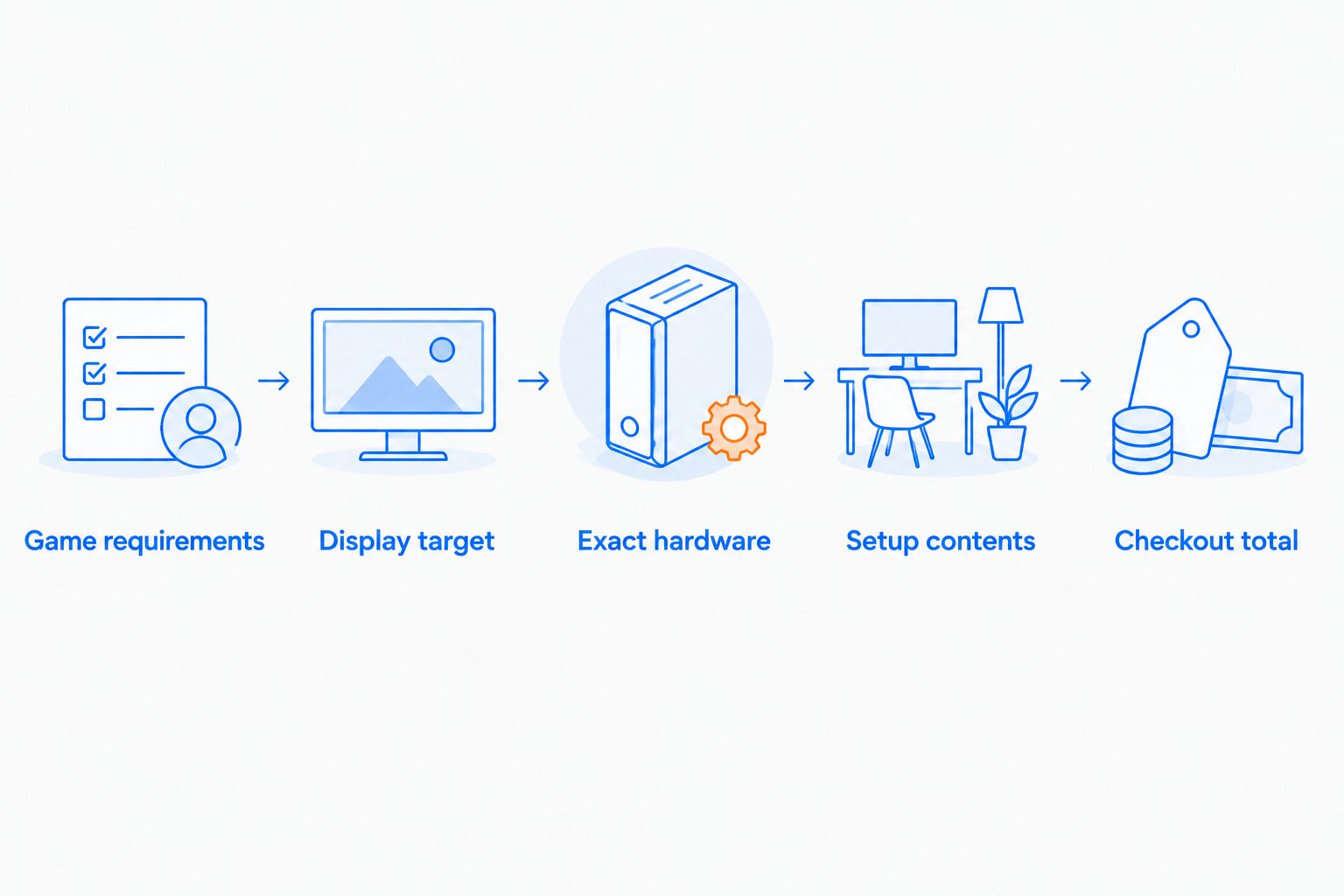
Use this sequence for your 2026 shortlist. It works for a first gaming PC, a replacement desktop, or a gift because it starts with the intended use rather than the product label.
- Game requirements: List the games you want to play and read their published requirements. Include any applications you need for school, work, or content creation.
- Display target: Record your monitor’s resolution and refresh rate. Your display target gives performance comparisons a meaningful context.
- Exact hardware: Match the full CPU and GPU names to relevant evidence. Check RAM and storage separately.
- Setup contents: Identify what you already own and what the purchase must include. Confirm connections before reusing a monitor or other equipment.
- Checkout total: Review the chosen configuration and final charges. Compare another system using the same setup requirements.
The order matters. Choosing a tower first and deciding what you want to play afterward turns a buying decision into a compatibility exercise.
Gaming and More is best for gaming shoppers who want to compare prebuilt PCs alongside setup accessories. Its catalog includes both, but you still need to check each computer’s exact configuration and each accessory’s compatibility.
These cards show current listing information for the configurations discussed above. Recheck the selected configuration and checkout total before ordering; a card is not a substitute for confirming what comes in the box.


Is 16GB RAM enough for a prebuilt gaming PC?
16GB RAM is the listed capacity in all three compared configurations, not a guarantee for every workload. Check your games’ requirements and account for applications you intend to run at the same time. If expansion matters, confirm memory slots and supported upgrades before purchasing.
Is a 512GB SSD enough for gaming?
512GB SSD capacity needs checking against your planned installations. Add the published storage requirements of your games and leave room for the operating system, applications, updates, and personal files. Choose storage around the library you want installed, not around the number of games you own.
Does a 1TB SSD make a gaming PC faster?
1TB describes storage capacity, not a gaming performance result. Drive technology and workload affect storage behavior, while the processor and graphics configuration remain separate checks. Don’t use a larger capacity as a substitute for comparing those components.
FAQ
How much does a prebuilt gaming PC cost in 2026?
A prebuilt gaming PC’s current cost depends on its exact configuration and what the purchase includes. Check the selected listing and checkout total, then account for any display, controls, or audio equipment you still need.
What should I compare before buying a prebuilt gaming PC?
Compare the exact CPU, GPU, RAM, storage, operating system, and included equipment. Match those details to your games and monitor rather than choosing by the case or processor badge.
Is a Core i7 gaming PC automatically better than a Ryzen gaming PC?
No, a Core i7 badge alone does not establish that a gaming PC is better than a Ryzen configuration. Compare the full processor models, graphics cards, and evidence for your intended games.
Does a prebuilt gaming PC come with a monitor and keyboard?
Only treat a monitor and keyboard as included when the selected listing explicitly says so. Confirm the box contents before planning a complete setup.
Can I upgrade a prebuilt gaming PC later?
Upgrade options depend on the particular motherboard, case, power supply, and existing components. Confirm slots, connectors, clearance, and supported parts before buying with a future upgrade in mind.
What’s the best prebuilt gaming PC for a gift?
The best gift configuration matches the recipient’s games and the equipment they already own. Confirm their display, controls, and preferred games before choosing a tower.
Should I buy a prebuilt gaming PC or build one myself?
Choose a prebuilt when you want an assembled system; choose a parts build when selecting and assembling compatible components suits you. Compare equivalent hardware and complete setup totals rather than assuming either route is always cheaper.
One last thing
Before completing a 2026 order, save the exact configuration and the stated box contents. Keep that record with your order confirmation so you can check the delivered system against what you selected.
Ask about unclear details before paying, not after unpacking. A specific answer about the GPU, operating system, or included accessories is more useful than another broad claim that a computer is “great for gaming.”


