


Best 120Hz gaming monitors in 2026
Best overall shortlist pick: the 25-inch Gaming Monitor with 165Hz and AMD FreeSync. Best for a larger curved screen: the 27-inch Curved Gaming Monitor with 180Hz. Best for refresh-rate headroom: the KTC 32-inch Curved Gaming Monitor with 240Hz. For the best 120hz gaming monitors in 2026, treat these as higher-refresh candidates—not confirmed console-compatible recommendations—until you verify 120Hz support at your chosen resolution and input.
- Best 120hz gaming monitors shortlist: start with the 25-inch Gaming Monitor with 165Hz and AMD FreeSync.
- Gaming and More gaming monitors need a model-specific 120Hz compatibility check before a console purchase.
- Choose the 27-inch Curved Gaming Monitor for a larger screen; choose KTC for 240Hz headroom.
- A refresh-rate ceiling above 120Hz does not establish HDMI compatibility or measured motion quality.
Why this matters
A monitor can advertise 165Hz and still leave your particular console, cable, or input combination without the mode you want. Buy for the supported connection, not just the largest refresh-rate number.
For a console setup, start with this guide to connecting a curved gaming monitor to a PS5 for 120Hz output. Then check the exact monitor manual before ordering.
Gaming and More gaming monitors are best shortlisted by screen size, documented refresh rate, and connection requirements—not by the word gaming alone.
What makes the best 120Hz gaming monitor?
Use these criteria to judge the 2026 shortlist before choosing a screen:
- Verified input support: Confirm that your chosen input accepts 120Hz at the resolution you intend to use.
- Suitable resolution: Match image detail to screen size and viewing distance. Full HD does not become sharper when the panel gets bigger.
- Refresh-rate headroom: Higher maximum refresh rates give compatible PCs additional settings, but do not prove console support.
- Motion quality: Check measured response behavior and overshoot rather than treating an advertised response-time figure as a complete test.
- Adaptive sync: Confirm compatibility with your graphics hardware or console. A FreeSync label alone does not settle every compatibility question.
- Physical fit: Check stand dimensions, adjustment options, and mounting support against your actual desk.
Best 120Hz monitor candidates at a glance
These are shortlist positions based on stated features, not a measured performance ranking. None earns an unconditional console recommendation from its maximum refresh rate alone.
| Monitor | Best for | Stated standout feature | Key limitation |
|---|---|---|---|
| 25-inch Gaming Monitor with 165Hz and AMD FreeSync | Default Full HD shortlist | 165Hz maximum refresh rate; AMD FreeSync | Verify the required 120Hz input mode |
| 27-inch Curved Gaming Monitor with 180Hz | Larger curved Full HD setup | 180Hz refresh rate; Adaptive-Sync | Full HD spreads the same resolution across a larger panel |
| KTC 32-inch Curved Gaming Monitor | High-refresh PC headroom | 240Hz refresh rate; FreeSync | Large 1080P screen needs careful viewing-distance consideration |
The default is the 25-inch model because it keeps this shortlist focused on Full HD gaming without making screen size the main attraction. Choose either larger model only when its specific advantage matters to your setup.
1. 25-inch Gaming Monitor: best for a Full HD shortlist
The 25-inch Gaming Monitor lists a 165Hz refresh rate, an advertised 1ms response time, and AMD FreeSync. Its product URL also identifies Full HD 1080P resolution. That combination makes it the clearest starting point for a straightforward PC gaming shortlist.
Best for: You want a Full HD desktop display and intend to verify a 120Hz mode before purchase.
25-inch Gaming Monitor pros
- A stated 165Hz ceiling provides refresh-rate headroom above the 120Hz target.
- AMD FreeSync is explicitly named in the product title.
- The 25-inch size suits buyers who do not specifically want a large-format screen.
25-inch Gaming Monitor cons
- The advertised 1ms figure does not establish measured input lag or overall motion clarity.
- A 165Hz maximum does not prove 120Hz operation through every input.
- Full HD does not meet a requirement for higher-resolution gaming.
For a 2026 purchase, ask for the supported timing table for the exact model. Look for your intended resolution paired with 120Hz on the connection you will actually use, not merely a headline maximum elsewhere in the specifications.
Keep the recommendation narrow. This model leads the shortlist on its stated combination of size, resolution, refresh rate, and FreeSync—not on an unverified claim that it has the best panel or fastest response.
Verdict: Hold until the required 120Hz input mode is confirmed; keep this as the default shortlist pick.
2. 27-inch Curved Gaming Monitor: best for a larger curved screen
The 27-inch Curved Gaming Monitor lists a 180Hz refresh rate, Full HD resolution, 99% sRGB, and Adaptive-Sync. Its distinct role is a larger curved display, rather than a substitute for a higher-resolution monitor.
Best for: You specifically want more screen area and a curved panel for a fixed gaming desk.
27-inch Curved Gaming Monitor pros
- The 27-inch screen gives you a larger display than the default shortlist pick.
- Its stated 180Hz maximum exceeds the target refresh rate.
- Adaptive-Sync is explicitly listed among its features.
27-inch Curved Gaming Monitor cons
- Full HD on a larger screen has lower pixel density than Full HD on a smaller screen.
- The curved format is a preference, not proof of better gaming performance.
- The refresh-rate specification does not establish console-specific 120Hz support.
Choose this model for its format. If you sit close and spend substantial time reading small text, compare Full HD screen sizes in person before committing to the larger panel.
The stated sRGB coverage also needs context. Color-gamut coverage describes a different property from color accuracy, so do not use that percentage alone to judge editing suitability or calibration quality.
Verdict: Hold until input compatibility is confirmed; choose this over the default only when the larger curved screen is the goal.
3. KTC 32-inch Curved Gaming Monitor: best for PC refresh headroom
The KTC 32-inch Curved Gaming Monitor lists 240Hz, 1080P resolution, an advertised 1ms response time, and FreeSync. Its role in this 2026 guide is high-refresh PC flexibility, not a proven advantage for a device outputting only 120Hz.
Best for: You want a large curved display and have a PC setup that can make use of refresh rates beyond your initial target.
KTC 32-inch Curved Gaming Monitor pros
- Its stated 240Hz maximum is the highest refresh ceiling in this shortlist.
- The 32-inch size offers the largest screen area among these picks.
- FreeSync is explicitly listed in the product title.
KTC 32-inch Curved Gaming Monitor cons
- A 32-inch 1080P panel has lower pixel density than the smaller Full HD options.
- A higher refresh ceiling does not increase a console's output limit.
- The advertised response time does not replace independent motion testing.
Do not choose the KTC just because 240 is the largest number in the table. Choose it when both the screen size and PC refresh-rate headroom fit your actual use.
For a 120Hz-only setup, the extra refresh ceiling is not the deciding benefit. Prioritize verified input support, acceptable sharpness at your seating position, and measured motion behavior instead.
Verdict: Hold until compatibility is confirmed; skip this size if close-range Full HD sharpness is your priority.
Compare the actual products
These Gaming and More gaming monitors cover different screen-size and refresh-rate preferences. Use the cards to check the exact model details, then verify the connection requirements before making your choice.


Check the connection before you buy
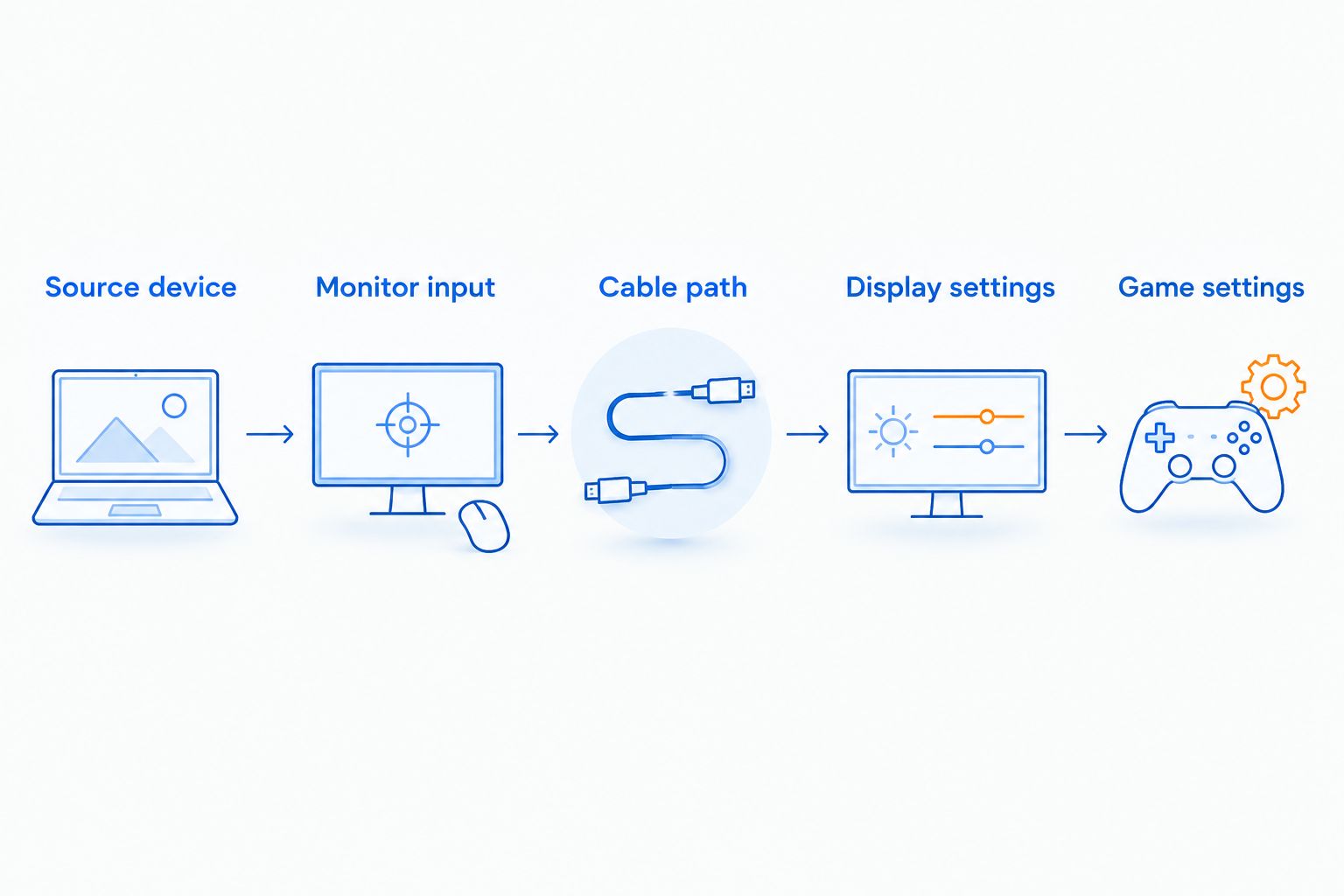
For a 2026 monitor purchase, work through the signal path in order. A fast panel cannot fix a source device, adapter, or connection that does not support the requested display mode.
- Source device: Identify the resolution and refresh-rate combinations your PC or console can output.
- Monitor input: Find the exact model's supported timing table and check the input you plan to use.
- Cable path: Check the cable and any dock, adapter, switch, or receiver in the connection.
- Display settings: Select the intended resolution and refresh rate after connecting the screen.
- Game settings: Enable the game's appropriate performance setting when required, then verify the active signal.
Ask a specific compatibility question: does this exact monitor accept your device's chosen resolution at 120Hz through the intended input? A general answer that the monitor is suitable for gaming does not answer that question.
For a gift, get the recipient's device model and intended connection first. Guessing those details turns a useful upgrade into a compatibility problem.
What 120Hz changes—and what it does not
A 120Hz screen refreshes 120 times per second. That is a display refresh rate, not a promise that your game renders 120 frames per second.
At 60Hz, each refresh interval is about 16.7 milliseconds; at 120Hz, it is about 8.3 milliseconds. Those intervals follow directly from the refresh rates. They are not measurements of these monitors' response time or total system latency.
A higher refresh rate gives the display more frequent opportunities to show new frames. Your actual experience still depends on frame delivery, pixel response, synchronization, and the game itself.
Likewise, the 1ms figures listed for the 25-inch and KTC monitors do not describe every part of the input-to-image chain. Do not subtract an advertised response figure from a refresh interval and treat the result as a gaming-performance score.
How the shortlist is ranked
The 2026 ranking prioritizes a clear buying role, stated resolution, stated refresh ceiling, and explicitly named synchronization features. The 25-inch model takes the default position; the 27-inch model serves the larger curved-screen preference; the KTC serves higher-refresh PC use.
This is a specification-based shortlist, not a hands-on benchmark. It does not rank measured ghosting, brightness, contrast, input lag, stand quality, or console compatibility.
There is no budget winner here. A useful budget recommendation needs more than a product's position in a list: it needs the right compatibility and features for your device.
Which monitor should you choose?
Start with the 25-inch Gaming Monitor with 165Hz and AMD FreeSync, then verify the exact 120Hz mode you need. It is the default shortlist choice for a Full HD setup without a specific requirement for a larger curved screen.
Choose the 27-inch Curved Gaming Monitor when screen size and curvature drive the decision. Choose the KTC 32-inch Curved Gaming Monitor when you also want its stated 240Hz ceiling for compatible PC use.
If your requirement is higher-resolution console gaming, stop treating these Full HD options as interchangeable with that goal. Buy for the required resolution and input mode first; screen size comes afterward.
FAQ
What's the best starting point for a 120Hz gaming monitor?
The 25-inch Gaming Monitor with 165Hz and AMD FreeSync is the default shortlist pick in this guide. Confirm that the exact model supports 120Hz at your chosen resolution through the intended input before buying.
Can a 165Hz gaming monitor run at 120Hz?
A 165Hz maximum alone does not confirm a supported 120Hz mode. Check the exact monitor's timing table for the resolution and input you intend to use.
Are these monitors confirmed to work with a PS5 at 120Hz?
This shortlist does not establish PS5 120Hz compatibility for these exact models. Verify the monitor's HDMI timing support, then check the console and game's display settings.
Is 120Hz the same as 120 frames per second?
No: 120Hz describes the display's refresh rate, while 120 frames per second describes frame delivery. A monitor does not make a game render faster simply by supporting a higher refresh rate.
Is a 240Hz monitor better for a 120Hz console setup?
A 240Hz ceiling does not raise a console's output limit. Choose according to verified input compatibility, resolution, motion quality, and screen size rather than the maximum refresh rate alone.
Should I choose a 25-inch or 32-inch Full HD monitor?
Choose according to viewing distance and your tolerance for visible pixel structure. At the same resolution, the smaller screen has higher pixel density; the larger screen provides more physical display area.
Does an advertised 1ms response time mean no input lag?
No: an advertised response-time figure is not a measurement of total input lag. Look for independent testing of response behavior, overshoot, and display latency.
What should I check before buying a gaming monitor as a gift?
Confirm the recipient's PC or console model, preferred resolution, connection, and available desk space. Those details matter more than choosing the highest refresh-rate number.
One last thing
Before judging a new monitor, open the display settings and confirm its active refresh rate. A high-refresh monitor running at a lower setting is not delivering the mode you bought it for.
For your 2026 setup, verify the signal before replacing more hardware. A settings or connection check belongs ahead of another upgrade.


