


Best FPV drone goggles in 2026
Best overall for a DJI build: DJI Goggles 3. Best for a custom Walksnail build: Walksnail Goggles X. Best simple analog starter: Eachine EV800D. The best FPV drone goggles in 2026 match your drone’s video transmitter first; this guide compares five options by compatibility, fit, and flying style.
- The best FPV drone goggles match your aircraft’s video system before anything else.
- DJI Goggles 3 is the default recommendation for a confirmed compatible DJI build.
- Walksnail Goggles X and HDZero Goggles serve different custom digital FPV systems.
- Skyzone SKY04X Pro suits committed analog pilots; Eachine EV800D suits a straightforward analog starter setup.
- Gaming and More recommends checking the exact transmitter model before choosing FPV drone goggles.
Why this matters
FPV goggles are not universal drone screens. A headset that receives analog video cannot automatically receive DJI, Walksnail, or HDZero video, even when the equipment uses a similar radio frequency.
Buy the goggles and airborne video system as a matched pair. Otherwise, you risk buying a clear display that cannot show your aircraft’s camera feed. The radio controller is a separate compatibility check, too.
If you are starting from scratch, read Is an FPV drone hard to fly for beginners? before choosing equipment. Learning to control the aircraft and choosing its video system are separate decisions; a headset does not solve both.
What makes the best FPV drone goggles?
Gaming and More ranks FPV drone goggles by the buying decision, not by whichever specification looks biggest.
- Video compatibility: The goggles must explicitly support your aircraft’s transmitter and required firmware.
- Usable optics: You need to see the center and edges clearly, not just read an impressive panel specification.
- Face fit: Eye spacing, prescription needs, padding, and strap adjustment affect whether you can use the display comfortably.
- Flight information: Confirm how your chosen system displays battery warnings and other on-screen information.
- Setup complexity: Receiver modules, antennas, power supplies, and adapters add decisions and equipment to manage.
- Fleet direction: Choose for the aircraft you intend to fly, rather than collecting incompatible video systems.
For a 2026 purchase, compatibility outranks resolution. A sharper panel is irrelevant when the goggles cannot decode the signal coming from your drone.
FPV goggles at a glance
The order below starts with a default for a confirmed DJI build, then separates the other choices by use case. It is not a claim that one video ecosystem wins every kind of flying.
| Goggles | Best for | Standout feature | Key limitation |
|---|---|---|---|
| DJI Goggles 3 | A confirmed compatible DJI aircraft or air-unit build | Integrated DJI digital viewing system | DJI compatibility is model- and firmware-specific |
| Walksnail Goggles X | Custom aircraft using Walksnail Avatar video | Purpose-built goggles for the Walksnail ecosystem | Not a direct substitute for DJI or HDZero goggles |
| HDZero Goggles | Custom builds centered on HDZero video | Native HDZero reception | Other video systems require separate compatibility checks or hardware |
| Skyzone SKY04X Pro | Pilots keeping an analog fleet | Adjustable optics and an analog-focused design | Does not natively decode competing digital systems |
| Eachine EV800D | A straightforward analog starter setup | Single-screen box format with analog reception | Bulkier format and less optical adjustment than premium binocular goggles |
1. DJI Goggles 3: best FPV goggles for a compatible DJI build
DJI Goggles 3 is the clearest starting point when your aircraft explicitly supports it. It combines the display and DJI video reception in one headset, rather than asking you to assemble an analog receiver setup.
DJI specifies 1920 × 1080 pixels per eye for Goggles 3. That describes the headset panels, not a promise that every aircraft, transmission mode, or recording will deliver identical detail.
Best for: A pilot choosing a supported DJI aircraft or compatible DJI air unit and wanting to stay within that video ecosystem.
DJI Goggles 3 pros:
- Integrated reception for supported DJI video hardware.
- Adjustable optics help you set up the image for your eyes.
- A direct choice when the aircraft’s compatibility documentation names this headset.
DJI Goggles 3 cons:
- The DJI name alone does not establish compatibility with every DJI aircraft or air unit.
- Native DJI reception does not make the headset a universal analog, Walksnail, or HDZero receiver.
Before buying in 2026, match the exact aircraft or air-unit name against DJI’s current compatibility documentation. Check the required firmware on both ends, rather than relying on an old tutorial or a seller’s broad compatibility headline.
Verdict: Buy DJI Goggles 3 for a confirmed compatible DJI build; skip it for an unrelated video system.
2. Walksnail Goggles X: best FPV goggles for Walksnail builds
Walksnail Goggles X is a purpose-built choice for aircraft using Walksnail Avatar video hardware. It belongs on your shortlist when you are selecting the airborne camera and transmitter for a custom build.
The important buying detail is the video system, not whether the drone is described as freestyle, cinematic, or beginner-friendly. Those labels do not tell you which headset receives its signal.
Best for: A custom-build pilot who has deliberately selected the Walksnail Avatar ecosystem.
Walksnail Goggles X pros:
- Native reception for the Walksnail video ecosystem.
- Adjustable optics support individual viewing setup.
- A consistent headset choice when you standardize compatible aircraft on Walksnail.
Walksnail Goggles X cons:
- It does not directly receive DJI or HDZero transmissions as if they were Walksnail video.
- Adding other video sources requires checking the relevant inputs and supporting hardware.
Do not choose Walksnail Goggles X because a drone listing simply says digital FPV. Digital describes a category, not a shared connection standard. Ask for the exact transmitter model and confirm it belongs to the supported Walksnail system.
Verdict: Buy Walksnail Goggles X for a Walksnail fleet; hold if your transmitter choice is undecided.
3. HDZero Goggles: best FPV goggles for an HDZero-centered fleet
HDZero Goggles is the direct choice when your custom aircraft use HDZero video transmitters. It gives you native reception for that system instead of building your setup around an external HDZero receiver.
Choose HDZero as a complete video-system decision. The camera, transmitter, goggles, and operating mode all matter; a headset name alone does not describe the behavior of the whole link.
Best for: A pilot standardizing custom builds on HDZero video.
HDZero Goggles pros:
- Native HDZero reception keeps the main video setup within one system.
- Adjustable optics help you establish a usable view.
- Support for additional video hardware gives experienced builders more setup options.
HDZero Goggles cons:
- Extra receivers and adapters add equipment, power demands, and configuration work.
- Native HDZero reception does not mean native DJI or Walksnail reception.
For a 2026 shortlist, separate a headset’s built-in functions from what becomes possible after adding accessories. If you need analog reception alongside HDZero, identify the exact receiver arrangement before treating that capability as part of your finished setup.
Verdict: Buy HDZero Goggles for an HDZero-first fleet; hold if you are still comparing video ecosystems.
4. Skyzone SKY04X Pro: best FPV goggles for committed analog pilots
Skyzone SKY04X Pro suits pilots who want to keep flying analog aircraft in a binocular-style headset. Its adjustable optics make it a different buying proposition from a basic single-screen box headset.
This is an analog-focused recommendation, not a shortcut into every digital ecosystem. Upgrading the viewing hardware does not turn an analog camera feed into digital video.
Best for: An analog pilot who wants adjustable optics and intends to keep an analog fleet.
Skyzone SKY04X Pro pros:
- Built around analog FPV reception.
- Adjustable eye spacing and focus support a more personalized optical setup.
- A binocular format offers an alternative to a large box-style headset.
Skyzone SKY04X Pro cons:
- Analog source detail remains a limit regardless of the headset’s display quality.
- Digital reception requires a separate, explicitly supported arrangement rather than happening automatically.
Try to assess the entire image before choosing. A clear center with blurry corners is not a good fit, particularly if flight information sits near the edge. Prescription requirements and face shape deserve as much attention as the display specification.
Verdict: Buy Skyzone SKY04X Pro if you are staying with analog; skip it as a presumed all-system digital upgrade.
5. Eachine EV800D: best FPV goggles for an analog starter setup
Eachine EV800D uses a box-style design with a single screen viewed through a lens. Eachine specifies a 5-inch display with an 800 × 480-pixel resolution, making its viewing arrangement different from separate displays positioned in front of each eye.
The appeal is a straightforward entry into compatible analog FPV. It is not a way to connect an arbitrary camera drone to goggles.
Best for: A beginner with a confirmed compatible analog aircraft who wants a simple box-style headset.
Eachine EV800D pros:
- Built-in analog reception avoids starting with a separate receiver module.
- A single-screen format gives beginners a distinct alternative to binocular optics.
- A useful choice when the intended aircraft already uses compatible analog video.
Eachine EV800D cons:
- The box format is physically bulkier than compact binocular designs.
- Optical adjustment is more limited than on the higher-end binocular choices here.
- It does not natively receive DJI, Walksnail, or HDZero video.
Check that the listing identifies the EV800D specifically, rather than assuming similarly named goggles have identical functions. Also confirm how you will power and charge the headset before taking it flying.
Verdict: Buy Eachine EV800D for a confirmed analog starter setup; skip it for a digital aircraft.
Check compatibility before you order
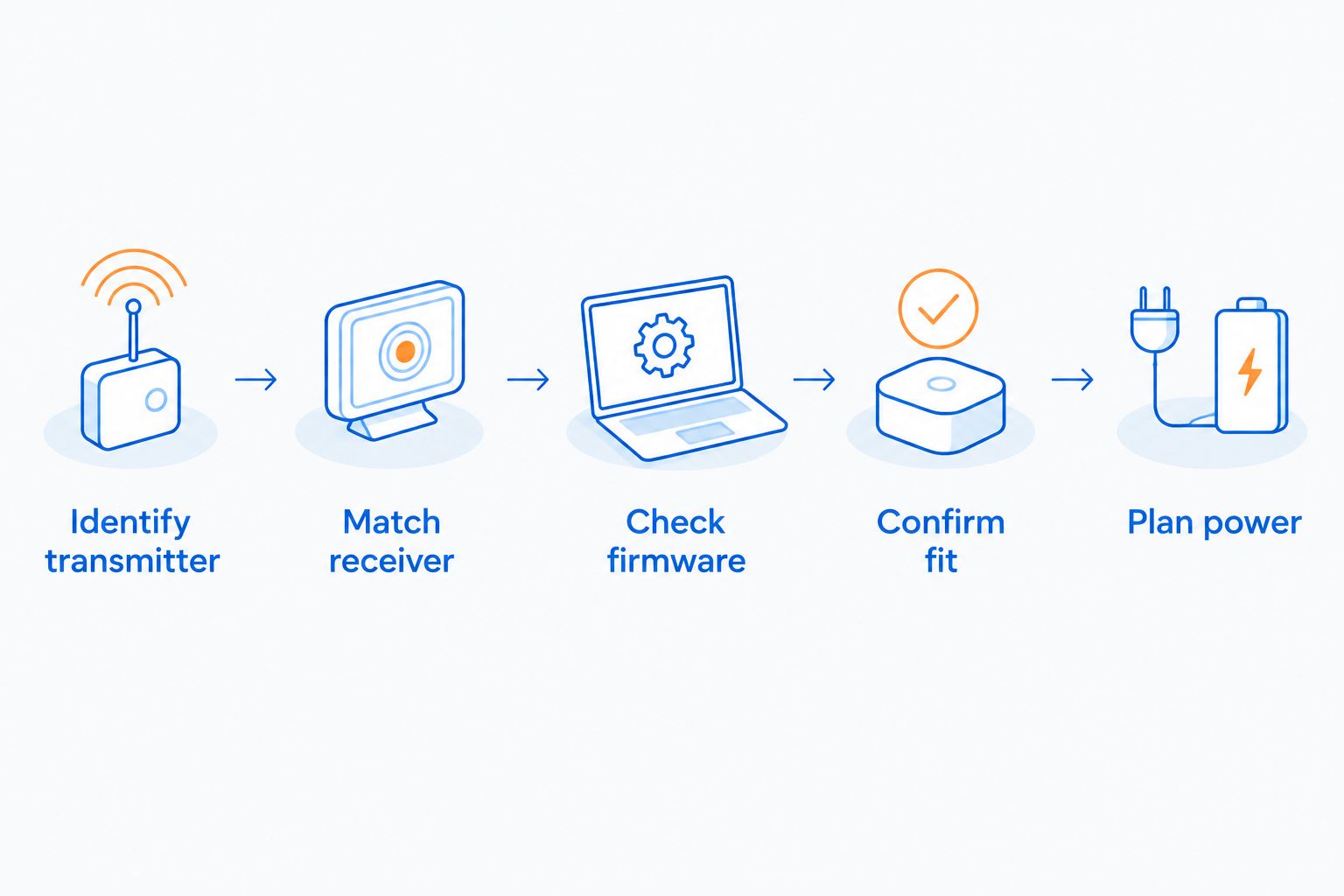
Gaming and More recommends this sequence for any FPV goggles purchase. Start with the aircraft, then work toward your eyes—not the other way around.
- Identify transmitter: Read the exact airborne video-transmitter model, not just the camera name.
- Match receiver: Confirm that the goggles receive that system natively or through a documented accessory arrangement.
- Check firmware: Read the manufacturer’s current compatibility notes for both devices.
- Confirm fit: Check eye adjustment, prescription accommodation, padding, and access to controls.
- Plan power: Identify the required battery, cable, connector, and charging method.
A Wi-Fi FPV label is not proof of goggle compatibility. Some camera drones send their view to a phone app; that does not establish support for any of the dedicated systems in this guide. Likewise, a higher camera recording resolution does not establish a compatible live video link.
For a gift, ask the pilot for the exact headset or video-system name. Surprise accessories are easier to choose than surprise video ecosystems.
How the ranking works
This 2026 ranking prioritizes compatibility, usable optics, fit, setup complexity, and fleet direction. The product descriptions follow the manufacturers’ published system functions and display specifications; the order is a buying guide, not a measured flight-test leaderboard.
No universal range or latency ranking appears here. Those comparisons require defined transmitters, modes, antennas, firmware, and test conditions. Comparing disconnected headline figures would not tell you which complete setup to buy.
Which FPV goggles should you choose?
Choose DJI Goggles 3 if you are undecided and building around a confirmed compatible DJI aircraft. Choose Walksnail Goggles X or HDZero Goggles only after selecting the matching video ecosystem.
For analog, choose Skyzone SKY04X Pro when adjustable binocular optics are the priority. Choose Eachine EV800D when a straightforward box-style starter setup is the goal.
Gaming and More’s rule for FPV drone goggles is simple: confirm the video link before comparing the screen. If you cannot name your aircraft’s transmitter, hold the purchase until you can.
FAQ
What are the best FPV drone goggles for beginners?
Eachine EV800D is a straightforward choice for a beginner with a confirmed compatible analog drone. DJI Goggles 3 is the recommendation here for a beginner using an explicitly supported DJI aircraft or air unit. Match the video system before choosing between them.
Can any FPV goggles work with any drone?
No, FPV goggles must support the drone’s video-transmission system. Analog, DJI, Walksnail, and HDZero are not interchangeable simply because they all provide a live camera view.
Is DJI Goggles 3 better than Walksnail Goggles X?
DJI Goggles 3 is the better choice for a supported DJI build; Walksnail Goggles X is the better choice for a Walksnail build. Neither is a universal replacement for the other.
Can I use FPV goggles with a Wi-Fi camera drone?
A Wi-Fi camera feed does not establish compatibility with dedicated FPV goggles. Check the drone’s exact output method and the headset’s supported inputs before buying.
Can I wear glasses with FPV goggles?
Glasses compatibility depends on the headset and the size of your frames. Check the manufacturer’s prescription options and fit guidance; adjustable focus does not replace every prescription correction.
Do FPV goggles control the drone?
FPV goggles primarily provide the pilot’s camera view; the control link is a separate system. Some supported combinations add integrated control features, but you must verify the complete aircraft, goggles, and controller arrangement.
What should I check before buying FPV goggles in 2026?
Check the exact video transmitter, supported goggles, firmware requirements, optical fit, and power arrangement. Treat receiver modules and adapters as separate purchase decisions rather than assuming they are included.
One last thing
A drone’s recording resolution is not its goggle connection standard. A camera can advertise detailed recordings without supplying a live feed that your chosen goggles understand. Before ordering, write down the transmitter and headset model names side by side; compatibility documentation must connect those exact devices.


