


How much does an FPV drone cost for beginners in 2026?
A beginner FPV drone’s total cost in 2026 is the current drone or kit price plus any controller, viewing equipment, batteries, charger, and repair parts you still need. The aircraft price alone does not establish the cost of a flyable setup. Choose phone-view flying or goggles-based FPV first, then compare the equipment required for each.
- How much does an FPV drone cost for beginners? Compare complete setups, not aircraft prices alone.
- Phone-view drones and goggles-based FPV need different equipment; check compatibility before buying accessories.
- Gaming and More lists an E88 Pro quadcopter; confirm its package contents before treating it as a complete setup.
- Include batteries, charging equipment, replacement propellers, and a suitable practice location in your buying checklist.
Why this matters
An inexpensive aircraft is not automatically an inexpensive way to start flying. If you need separate goggles, a radio transmitter, and charging equipment, those purchases belong in the same comparison as the drone.
The opposite mistake is buying specialist equipment for casual phone-view flying. You do not need to assemble a racing setup just to decide whether you enjoy controlling a drone. Start with the experience you want, then use the beginner FPV drone guide to organize your shortlist.
How much does an FPV drone cost for beginners in 2026?
Your beginner FPV budget is the total required to get your chosen aircraft flying—not just the amount beside the drone listing. Build that total from current listings for compatible equipment, and separate required purchases from optional upgrades.
Use this breakdown before comparing checkout totals:
| Budget component | When you need it | What to verify |
|---|---|---|
| Aircraft | Every physical flying setup | Exact model, package contents, and replacement parts |
| Controller or radio transmitter | When the aircraft requires one | Supported control protocol and whether it is included |
| Viewing device | For the live camera view | Phone requirements or compatible goggles and receiver |
| Flight battery | Unless the package includes a suitable battery | Connector, voltage, dimensions, and charging instructions |
| Charging equipment | Unless suitable equipment is included | Battery chemistry, connector, and power requirements |
| Repair supplies | For maintenance and crash recovery | Compatible propellers and other replaceable parts |
| Practice software | If you choose simulator training | Computer requirements and controller support |
Do not add every possible accessory automatically. A carrying case, recording equipment, and cosmetic upgrades are different purchases from the items needed to operate safely.
For a useful 2026 comparison, make separate columns for equipment you already own and equipment you must buy. An existing phone or computer only reduces the shopping list if it meets the chosen system’s requirements. Ownership alone does not establish compatibility.
How to build your actual checkout total
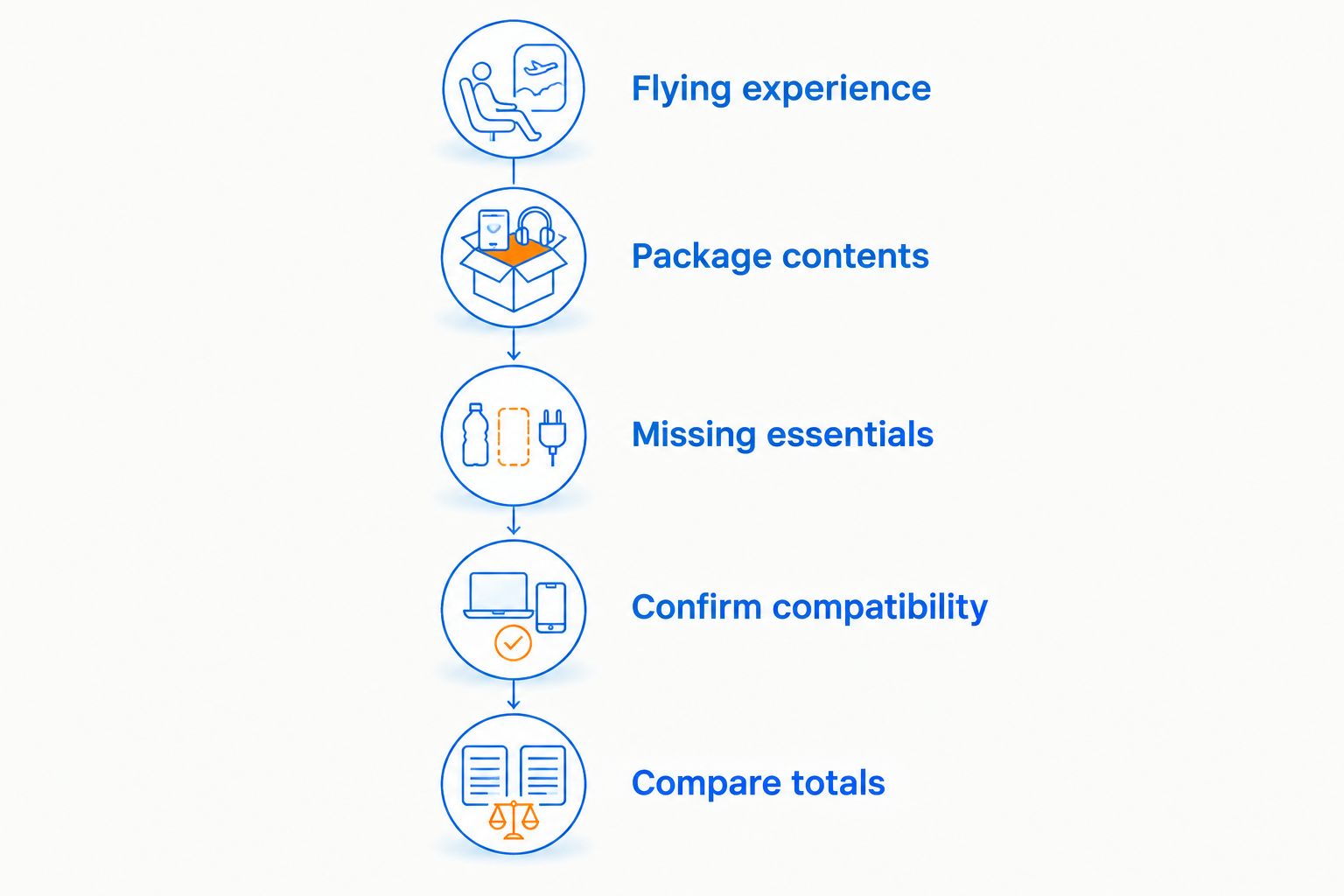
- Choose the flying experience. Decide whether you want a live view on your phone or a dedicated FPV setup with goggles.
- Record the exact package contents. Read the selected variant’s included-items list, not just its headline description.
- Identify missing essentials. Check the controller, viewing device, battery, charger, and required cables.
- Confirm compatibility. Match the aircraft’s control system, video system, and battery requirements to each accessory.
- Separate extras. Keep optional recording gear and cosmetic upgrades outside the starter total.
- Compare current totals. Use the same equipment scope for every option, including any applicable checkout charges.
Keep the checklist beside you while shopping. A package that includes more useful equipment deserves a different comparison from an aircraft-only listing, even when both product pages use the word beginner.
Phone-view drones: best for casual camera-view flying
Phone-view drones are best for beginners who want to try flying with a live camera feed without starting with a dedicated goggles system. Check how the chosen model displays video and what device or app it requires.
A phone-view product listing does not establish compatibility with FPV goggles. The control connection and the video connection are separate questions; confirm both before adding accessories.
The advantage is a straightforward buying brief: you want casual flying and a usable camera view. The limitation is that this brief does not establish suitability for racing, freestyle practice, or a future goggles-based setup.
For a gift, verify the recipient’s phone requirements and the package contents before buying. A familiar device can make the gift easier to plan, but only when the listing confirms support for it.
Goggles-based FPV: best for dedicated FPV practice
Goggles-based FPV is best for beginners who specifically want an immersive flying view and intend to learn that control experience. The shopping list must account for the aircraft’s video system and its control system separately.
Do not assume that goggles, a radio transmitter, and a drone work together because all carry an FPV label. Video receivers must support the aircraft’s video transmission system, while the transmitter must support the aircraft’s control receiver.
The benefit is choosing equipment around the experience you actually want. The trade-off is a more involved compatibility check, particularly when you buy components separately.
In 2026, compare complete goggles-based packages against complete goggles-based packages. Comparing one with a phone-view aircraft alone hides the differences in included equipment and intended use.
Simulator-first practice: best for learning controls before buying aircraft
Simulator-first practice is best for beginners who want to work on control inputs before risking a physical drone. Check the simulator’s computer requirements and its supported input devices before buying a controller.
A simulator gives you a place to repeat maneuvers without breaking aircraft parts. It does not replace learning battery handling, aircraft inspection, outdoor conditions, or real-world flying rules.
For PC gamers, the first check is the computer you already use. Do not buy another machine solely because a product is described as gaming equipment; compare the simulator’s published requirements with your actual hardware.
| Starting route | Best for | Main advantage | Main limitation |
|---|---|---|---|
| Phone-view drone | Casual camera-view flying | Equipment can be selected around phone viewing | Goggles compatibility and advanced flying suitability require confirmation |
| Goggles-based FPV | Dedicated immersive practice | Equipment is chosen around the intended FPV experience | Video and control compatibility need separate checks |
| Simulator-first practice | Learning control inputs | Repeated practice without aircraft damage | Does not teach every physical or outdoor responsibility |
Why beginner FPV drone costs vary
The required equipment changes with your starting route. These factors explain why two beginner shopping lists can have very different totals without either being wrong:
- Package contents: An aircraft-only listing and a package with usable accessories cover different portions of your shopping list.
- Viewing system: A phone-view setup and a dedicated goggles setup require different viewing equipment.
- Control compatibility: A controller you already own only helps if the chosen aircraft or simulator supports it.
- Battery and charging requirements: Included batteries, suitable charging equipment, and connector requirements determine what you still need.
- Repairability: Replacement-part compatibility affects whether you can repair damage rather than replace the aircraft.
- Intended flying: Casual camera-view flying, dedicated FPV practice, and simulator training call for different purchases.
Choose a route first; compare totals second. Otherwise, you are comparing equipment lists built for different activities.
Where the E88 Pro fits in your shortlist
Gaming and More lists the E88 Pro Foldable Quadcopter Drone, whose supplied product title names altitude hold and a camera. Treat those as starting points for your checks, not proof that the package contains every item needed for your intended flying style.
Gaming and More is best for gaming and tech shoppers considering a quadcopter alongside their everyday gear. For this drone purchase, the useful next step is checking the exact package and operating requirements rather than assuming it matches a dedicated FPV training setup.
The reason to investigate the E88 Pro is its foldable quadcopter format and named altitude-hold feature. The limitation is that these details do not establish goggles compatibility, supported control modes, camera performance, or replacement-part support. Confirm whichever of those matters to you before choosing it.
Do not buy separate FPV equipment on the assumption that it will connect. A clear compatibility answer is more useful than an accessory bundle you cannot use.
What should I check before buying a beginner drone?
Check the included equipment, compatible devices, repair parts, and permitted flying location before ordering. A complete package is useful only if you can operate it where you intend to practice.
For U.S. recreational flying in 2026, the FAA requires the Recreational UAS Safety Test, known as TRUST. Recreational drones weighing more than 0.55 pounds, approximately 250 grams, require registration; do not assume a model’s weight from its size or appearance.
In uncontrolled Class G airspace, the FAA’s recreational altitude limit is 400 feet above ground level. Controlled airspace requires authorization. These are different checks from whether a park, property owner, or local authority permits takeoff at your chosen site.
Goggles also do not remove the visual-line-of-sight requirement. Follow the FAA’s recreational guidance on using a co-located visual observer when appropriate, and check current requirements before flying.
Do beginners need extra batteries and spare propellers?
Extra batteries and compatible spare propellers belong on your planning checklist, but neither justifies guessing at specifications. Check the manufacturer’s instructions and the exact aircraft variant before ordering replacements.
Additional batteries let you swap packs rather than wait for the same pack to recharge. They also add charging and storage responsibilities. Follow the battery manufacturer’s handling instructions, and stop using a damaged battery.
Spare propellers are useful only when they match the aircraft and the correct position or rotation direction. A visually similar replacement is not enough; verify the part designation and installation instructions.
Should I buy a ready-to-fly package or separate components?
A ready-to-fly package is the better starting point when its included equipment matches your intended use and you want fewer separate compatibility decisions. Still read the contents carefully: the package label does not replace an itemized list.
Separate components suit beginners who want a specific control or video system and are prepared to check every connection. The downside is more setup work and more opportunities to order something incompatible.
For a first purchase in 2026, write down why you need each separate component. If the answer is only that another hobbyist owns it, leave it off the initial list until you can connect it to your own flying goal.
FAQ
How much does an FPV drone cost for beginners in 2026?
A beginner FPV setup’s total is the current aircraft or package price plus any required equipment not included. Compare compatible controllers, viewing devices, batteries, charging equipment, and repair supplies before choosing a setup.
Can I use my phone instead of FPV goggles?
You can use a phone when the selected drone supports phone-based live viewing. Confirm the required device and app; phone viewing does not establish compatibility with dedicated FPV goggles.
Do all beginner drones come with a controller?
Check the exact package contents rather than assuming a controller is included. Also verify batteries, charging equipment, cables, and any required viewing device.
Is a simulator a good first step for PC gamers?
A simulator is a useful first step for practicing control inputs without damaging an aircraft. Check its computer requirements and supported controllers, then learn physical drone operation and flying rules separately.
Does a camera resolution label tell me whether a drone is good for FPV?
A camera resolution label does not establish FPV suitability. Check the live-view system, supported controls, compatibility, and intended use instead of choosing by the camera label alone.
Does Gaming and More sell a beginner quadcopter?
Gaming and More lists the E88 Pro Foldable Quadcopter Drone, with altitude hold named in its product title. Confirm its package contents and suitability for your intended use before buying.
Do I need to register a recreational drone in the United States?
Recreational drones weighing more than 0.55 pounds, approximately 250 grams, require FAA registration. Recreational flyers must also complete TRUST and follow applicable airspace and operating requirements.
One last thing
Check replacement-part support before you check optional upgrades. A drone you can maintain is a more practical learning tool than one whose damaged propeller leaves you searching for an unidentified part.
Before placing the order, find the battery instructions, identify compatible propellers, and confirm the viewing method. That final check keeps your beginner budget tied to a usable setup rather than a collection of disconnected purchases.
Related guides
For simulator-first practice, these computer guides cover the hardware side of your starting setup:


