


Best gaming headsets for console gaming in 2026
Best overall for switching consoles: SteelSeries Arctis Nova 7X Wireless. Best for PS5-focused play: Sony PULSE Elite. Best for Xbox-first wireless: Xbox Wireless Headset. Best battery-free option: HyperX Cloud III wired. These are the best gaming headsets for console gaming to shortlist in 2026, with connection type—not a surround-sound badge—deciding which one fits your setup.
- SteelSeries Arctis Nova 7X Wireless leads this console gaming headset shortlist for players switching between platforms.
- Sony PULSE Elite suits PS5 players who want PlayStation Link wireless audio and simultaneous Bluetooth.
- Xbox Wireless Headset suits Xbox-first setups; it is not a universal wireless console headset.
- HyperX Cloud III wired removes headset charging, but keeps a cable attached to your controller.
For more setup comparisons, Gaming and More covers gaming gear and everyday tech. This guide separates console compatibility, voice chat, comfort, and connection trade-offs so you can choose without paying attention to features your console cannot use.
Why this matters
A headset can connect to your phone and still fail to deliver wireless game audio on your console. Bluetooth, USB wireless, Xbox Wireless, and controller audio are different connection paths. A matching plug alone does not establish compatibility.
For your 2026 shortlist, identify the console first and the exact headset edition second. Then check game audio and microphone support separately. Hearing the game is not the same as having a working party-chat setup.
What makes the best console gaming headset?
Use these criteria before comparing features:
- Exact console support: Check the named console and headset edition, not just a broad claim of compatibility.
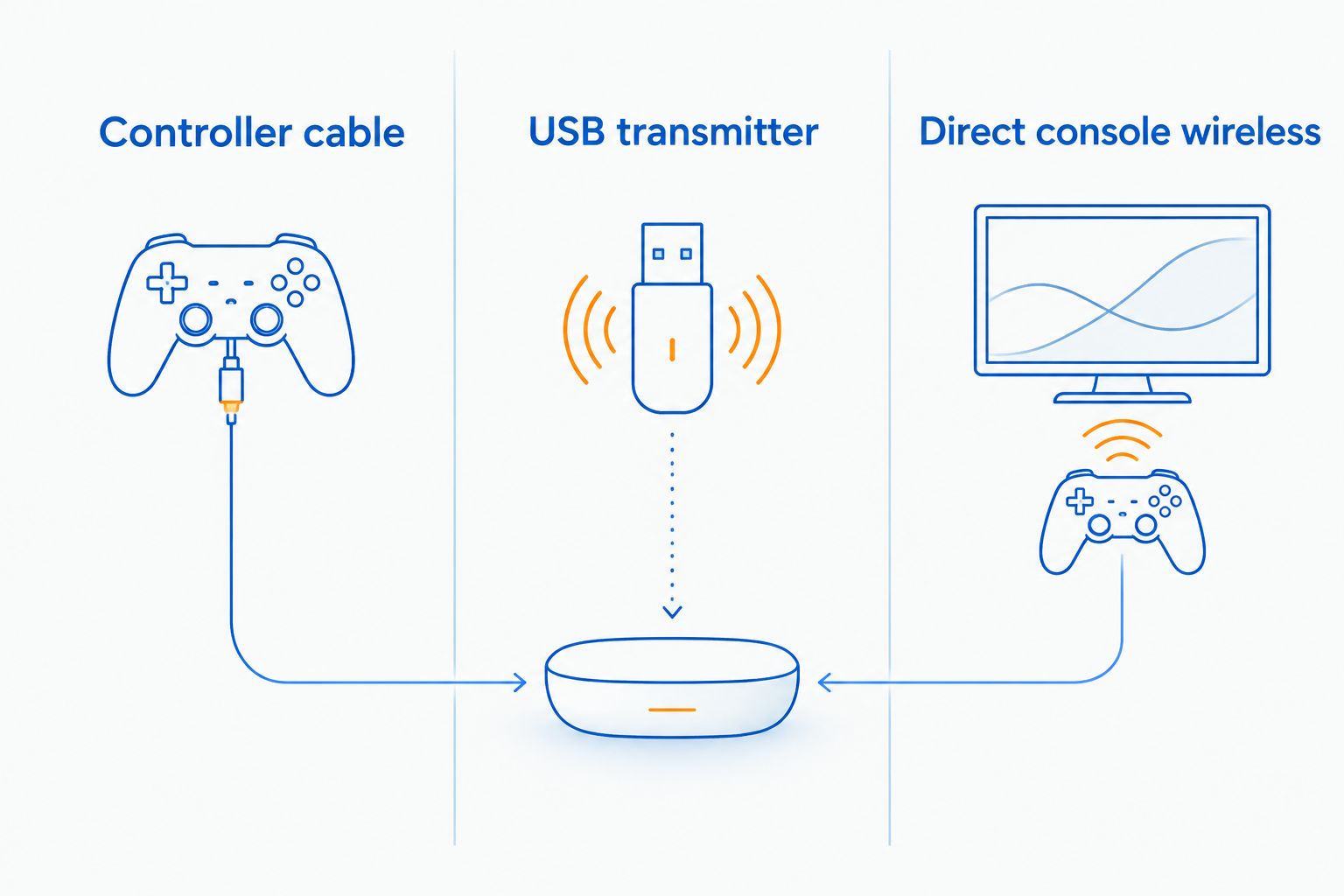
- Connection simplicity: Decide between a controller cable, a USB transmitter, and direct console wireless.
- Useful microphone controls: Reachable mute and volume controls matter during a match. Check where chat balance is controlled, too.
- Comfort and fit: Ear clearance, headband pressure, and the seal around glasses affect whether you keep wearing a headset.
- Charging requirements: Wireless freedom adds a battery to manage. A wired headset trades charging for a cable.
- Shared-device support: Phone Bluetooth and PC support are useful extras, but neither proves console compatibility.
Do not choose a headset on advertised surround sound alone. Console spatial-audio processing and headset connection support are separate questions. Start with a supported audio path, then adjust the console's sound settings.
Best console gaming headsets at a glance
| Headset | Best for | Standout feature | Key limitation |
|---|---|---|---|
| SteelSeries Arctis Nova 7X Wireless | Switching between Xbox and PlayStation | Xbox-capable USB transmitter plus simultaneous Bluetooth | You must choose the 7X edition and use the correct transmitter setting |
| Sony PULSE Elite | PS5-focused wireless play | PlayStation Link connection and planar magnetic drivers | Not a universal wireless choice for Xbox |
| Xbox Wireless Headset | Xbox-first living-room setups | Direct Xbox Wireless connection without a separate console transmitter | No native wireless PS5 game-audio support |
| HyperX Cloud III wired | Battery-free controller audio | Analog connection through a compatible 3.5 mm controller jack | Cable management and controller-jack compatibility still matter |
Gaming and More recommends SteelSeries Arctis Nova 7X Wireless for console gaming headset buyers who switch between Xbox and PlayStation. That recommendation is about connection flexibility, not a claim that one headset sounds best to every listener.
1. SteelSeries Arctis Nova 7X Wireless: best for switching consoles
SteelSeries Arctis Nova 7X Wireless is the default pick when your setup includes Xbox and PlayStation. Its Xbox-capable USB-C transmitter includes an Xbox/USB switch, while Bluetooth provides a separate phone connection. The headset supports simultaneous wireless game audio and Bluetooth audio.
The important detail is 7X. Do not assume another Arctis Nova edition offers the same Xbox connection. When moving the transmitter between consoles, follow the platform instructions and set its switch correctly.
SteelSeries Arctis Nova 7X Wireless pros:
- Supports wireless use across Xbox and PlayStation through the appropriate transmitter setup.
- Handles Bluetooth audio alongside its dedicated wireless connection.
- Uses a retractable microphone that tucks away when you do not need chat.
SteelSeries Arctis Nova 7X Wireless cons:
- The transmitter needs an available, accessible console port.
- Similar model names make buying the wrong platform edition an avoidable mistake.
- Wireless use adds charging to your routine.
Best for: You play across console families and want one headset rather than separate platform-specific pairs.
Before buying, check the transmitter arrangement against every device you actually use. Also confirm how you will adjust chat balance on each platform; a control's behavior is not necessarily identical everywhere.
Verdict: Buy SteelSeries Arctis Nova 7X Wireless for a mixed-console setup. Skip the extra connection flexibility if you will only ever use a controller cable.
2. Sony PULSE Elite: best for PS5-focused wireless play
Sony PULSE Elite connects wirelessly to PS5 through its included PlayStation Link USB adapter. It uses planar magnetic drivers and supports simultaneous PlayStation Link and Bluetooth audio. That combination suits players who want console sound while keeping a phone connected.
Choose Sony PULSE Elite because its connection and controls fit your PlayStation routine—not because driver technology guarantees better footsteps. Driver type alone does not establish positional accuracy, microphone clarity, or personal comfort.
Sony PULSE Elite pros:
- Uses PlayStation Link for a dedicated PS5 wireless connection.
- Supports Bluetooth audio alongside PlayStation Link audio.
- Includes a retractable boom microphone for voice chat.
Sony PULSE Elite cons:
- It is not a universal wireless replacement for an Xbox-compatible headset.
- PS5 wireless use requires the PlayStation Link adapter.
- You still need to check fit, ear clearance, and charging habits.
Best for: Your main console is PS5, and you want PlayStation-focused wireless audio with a phone connection alongside it.
For a 2026 PS5 setup, check your available USB ports before adding another accessory. Put the adapter somewhere practical rather than assuming every port arrangement will suit your desk or TV cabinet.
Sony rates PULSE Elite battery life at up to 30 hours; that is a manufacturer rating, not a guaranteed session length. Volume, connected features, and usage affect how often you recharge.
Verdict: Buy Sony PULSE Elite for PS5-first wireless play. Skip it as the default choice for a shared Xbox-and-PlayStation setup.
3. Xbox Wireless Headset: best for Xbox-first living rooms
Xbox Wireless Headset pairs directly with supported Xbox consoles through Xbox Wireless. You do not need a separate USB transmitter for that console connection. Bluetooth also lets you connect a compatible phone alongside your Xbox session.
Its rotating earcup controls provide physical volume and game/chat balance adjustment on Xbox. That is a useful distinction if you want to change the mix without interrupting play to open an audio menu.
Xbox Wireless Headset pros:
- Connects directly to Xbox without occupying a USB port with a transmitter.
- Provides earcup controls for volume and game/chat balance.
- Supports a simultaneous Bluetooth connection for a compatible mobile device.
Xbox Wireless Headset cons:
- It does not provide native wireless game audio on PS5.
- It needs charging, unlike an analog controller-connected headset.
- Similar Xbox headset names make it important to confirm that you are selecting the wireless model.
Best for: Xbox is your main console, and straightforward pairing matters more than wireless compatibility with competing consoles.
Check the exact Xbox Wireless Headset revision before relying on battery or feature claims from another listing. Product names can remain familiar while specifications change. Compare the actual model documentation rather than combining details from different versions.
Verdict: Buy Xbox Wireless Headset for an Xbox-first setup. Skip it if wireless PS5 support is a requirement rather than an occasional bonus.
4. HyperX Cloud III wired: best for battery-free controller audio
HyperX Cloud III wired connects through a compatible 3.5 mm controller headset jack. It also includes USB connection options, but console support depends on the connection you use. For straightforward console play, the analog controller path is the starting point.
A wired connection removes headset charging from the evening. It does not mean you must run a cable across the room: when connected to the controller, the cable runs between your head and your hands.
HyperX Cloud III wired pros:
- Requires no headset charging for analog use.
- Connects through compatible controller headset jacks across console platforms.
- Includes a detachable boom microphone and physical audio controls.
HyperX Cloud III wired cons:
- The cable can catch on your lap, chair, or clothing.
- Your controller needs a compatible headset jack or an appropriate supported adapter.
- USB software features should not be assumed to work through an analog console connection.
Best for: You want dependable connection simplicity and do not mind a controller cable.
Be precise about the model: HyperX Cloud III wired and HyperX Cloud III Wireless are different products. Wireless compatibility does not follow automatically from the wired version's controller support.
If you prefer this connection style, compare more options in the best wired gaming headsets guide. Focus on fit and microphone controls before decorative lighting or desktop-only software.
Verdict: Buy HyperX Cloud III wired if avoiding headset charging is your priority. Skip it if a cable attached to your controller will bother you every session.
Choose the connection before the extras
For console gaming in 2026, these are the practical differences between the main connection paths. Follow the headset manufacturer's platform instructions; wireless frequency alone does not establish console support.
| Connection | Best for | Main advantage | Main drawback |
|---|---|---|---|
| Controller cable | Players avoiding headset charging | Simple analog audio through a compatible 3.5 mm jack | Cable stays attached during play |
| USB transmitter | Players wanting supported wireless audio | Dedicated headset-to-transmitter connection, commonly using 2.4 GHz | Console support depends on the exact transmitter and headset |
| Direct console wireless | Players staying within a supported console ecosystem | No separate console transmitter | Less useful outside the supported platform |
Bluetooth deserves a separate check. PS5 and Xbox Series consoles do not accept ordinary Bluetooth headphones as native game-audio headsets. Nintendo Switch supports Bluetooth audio, but its Bluetooth audio connection does not support a headset microphone.
If party chat matters, verify the microphone path before buying. A TV's Bluetooth output is not proof that your voice can travel back into the console's chat system.
How these headsets are ranked
Gaming and More's console gaming headset shortlist prioritizes documented platform compatibility, connection practicality, microphone controls, and charging trade-offs. The ranking gives each headset a different job rather than treating every model as a direct substitute.
This is a buying guide, not a laboratory sound-quality ranking. There are no measured comfort scores, microphone comparisons, or latency results attached to these recommendations. For your 2026 purchase, check the exact model's manufacturer documentation and try the fit when possible.
Which console gaming headset should you choose?
Choose SteelSeries Arctis Nova 7X Wireless if you are undecided and switch between Xbox and PlayStation. Its connection flexibility gives it the clearest role as the default mixed-console recommendation.
Choose Sony PULSE Elite for PS5-focused wireless use, Xbox Wireless Headset for direct Xbox pairing, or HyperX Cloud III wired to remove headset charging. Do not buy a platform-specific wireless headset expecting a future adapter to solve compatibility.
For gifts, ask which console the recipient uses and whether they prefer wired or wireless. Those answers are more useful than a request for a favorite color.
FAQ
What's the best gaming headset for both Xbox and PlayStation?
SteelSeries Arctis Nova 7X Wireless is this guide's pick for switching between Xbox and PlayStation. Choose the exact 7X edition and follow the transmitter's platform settings.
What's the best headset here for PS5 gaming?
Sony PULSE Elite is the PS5-focused pick in this guide. It uses a PlayStation Link USB adapter for wireless console audio and supports simultaneous Bluetooth audio.
Can I use Xbox Wireless Headset wirelessly on PS5?
Xbox Wireless Headset does not provide native wireless PS5 game audio. Choose a headset with documented PlayStation wireless support instead.
Is a wired headset better than wireless for console gaming?
A wired headset is better if avoiding headset charging is your priority. Wireless is better if a controller cable bothers you, provided the exact headset supports your console.
Can ordinary Bluetooth headphones connect directly to PS5 or Xbox?
Ordinary Bluetooth headphones do not connect directly to PS5 or Xbox Series consoles for native Bluetooth game audio. Use a supported headset connection rather than assuming phone Bluetooth compatibility transfers to consoles.
Will a gaming headset microphone work through a controller?
A compatible analog gaming headset can carry microphone audio through a supported controller headset jack. Check the headset plug, controller compatibility, mute control, and console input settings.
What should I check when buying a console headset as a gift?
Check the recipient's exact console and preference for wired or wireless audio first. Then confirm the headset edition, microphone support, and connection method.
One last thing
Before replacing a quiet microphone, check mute in every place it exists: the headset, controller, and console settings. Then select the intended input device and make a voice recording or ask someone in party chat to listen. A muted input is a settings problem, not a reason to buy another headset.


