


Best gaming keyboards for competitive FPS players in 2026
Best overall for a compact FPS setup: K617 Fizz 60% RGB Compact Gaming Keyboard. Best full-size starter option: GTX350 Gaming Keyboard & Mouse Combo. This 2026 guide compares their layouts and practical trade-offs, so you can choose around your mouse space and keybinds—not lighting.
- For the best gaming keyboards for competitive FPS players, choose K617 Fizz when compact layout is your priority.
- GTX350 suits beginners who need a wired keyboard and mouse together, plus a full-size layout.
- Gaming and More recommends choosing around mouse clearance and keybind access before RGB lighting.
- Neither a compact layout nor a gaming label establishes lower input latency.
Why this matters
Your keyboard shares a desk with the device you aim with. A wide keyboard can leave less room for mouse movement, while a compact keyboard changes how you reach secondary commands. Neither trade-off disappears because a board looks good.
For competitive FPS players, the useful question is simple: which keyboard lets you move, use abilities, and aim without fighting your setup? Start there before comparing extras.
Gaming and More's gaming keyboard pick for players prioritizing mouse space is the K617 Fizz. That is a layout-based recommendation, not a claim that it produces faster inputs than every competing keyboard.
What makes the best gaming keyboard for competitive FPS?
These criteria drive the 2026 shortlist. They separate useful buying information from features that look impressive but do not answer your actual setup problem.
- Mouse clearance: Choose a layout that leaves your mouse path clear without pushing your keyboard hand into an awkward position.
- Keybind access: Check your movement, abilities, communication, and menu controls against the physical layout. A missing dedicated key becomes a problem only if you need it.
- Input behavior: Look for documented rollover, actuation, and latency information. A layout or RGB description does not establish responsiveness.
- Connection and configuration: Confirm the connection type and whether your preferred settings require software. Decide whether you want to manage those settings at all.
- Switch and layout fit: Match the keyboard to how you press keys and what you use outside games. A board that frustrates you during everyday tasks is a poor all-purpose purchase.
Treat comfort and access as requirements, not consolation prizes. A feature-rich keyboard still fails your setup if you repeatedly hit the wrong key or bump your mouse into its edge.
Gaming keyboards at a glance
The comparison below ranks the keyboards by their distinct use cases. It does not present an instrumented speed ranking.
| Keyboard | Best for | Standout feature | Key limitation |
|---|---|---|---|
| K617 Fizz 60% RGB Compact Gaming Keyboard | FPS players prioritizing mouse space | Compact 60% layout | Reduced dedicated-key access compared with a full-size board |
| GTX350 Gaming Keyboard & Mouse Combo | Beginners replacing both input devices | Wired USB keyboard-and-mouse kit with 104 keys | Full-size layout takes more horizontal space; bundled mouse also needs to suit you |
The decision is not compact versus serious. It is compact access versus dedicated access. Both approaches deserve consideration, but they solve different problems.
1. K617 Fizz: best gaming keyboard for mouse-space-focused FPS setups
The K617 Fizz is a compact gaming keyboard with a 60% layout and RGB lighting. Its product URL identifies a wired, hot-swap model; confirm the exact switch configuration before choosing replacement switches.
The layout is the reason it leads this shortlist. Removing the full-size keyboard's extra sections gives you a narrower board to position beside your mouse, although the actual benefit depends on your desk arrangement.
K617 Fizz pros:
- Compact layout suits setups where horizontal keyboard space is the problem.
- No full-size number-pad section to place beside your mouse.
- Keyboard-only purchase lets you keep a mouse you already like.
K617 Fizz cons:
- Compact layouts move some functions to combinations or secondary layers.
- Switching from a full-size board requires checking familiar shortcuts and binds.
- The layout alone does not establish low latency or advanced actuation features.
Best for: Players who already like their mouse and want more flexibility in keyboard placement.
For a 2026 FPS setup built around mouse clearance, the K617 Fizz is the default pick here. Choose it because the layout fits your controls—not because compact automatically means faster.
Verdict: Buy if mouse clearance matters more than dedicated extra keys.
2. GTX350: best gaming keyboard kit for full-size beginners
The GTX350 Gaming Keyboard & Mouse Combo combines a wired USB keyboard and mouse. Its listed keyboard features include backlighting, 104 keys, and a splash-proof design.
The kit suits a different buyer from the K617 Fizz: someone who needs both input devices and wants a full-size keyboard. You keep dedicated-key access, but you also need room for the wider layout.
GTX350 pros:
- Keyboard and mouse come together in one kit.
- Full-size layout provides a number-pad section for everyday tasks.
- Wired USB connection avoids managing keyboard wireless pairing.
GTX350 cons:
- Full-size width leaves less mouse-side clearance than a compact layout.
- A bundled mouse is useful only if its shape and controls suit you.
- Splash-proof wording is not permission to wash or submerge the keyboard.
Best for: New PC gamers who need a keyboard and mouse together and prefer dedicated keys.
Do not choose the GTX350 solely because it includes more hardware. If you already have a comfortable mouse, assess whether the keyboard's layout justifies replacing anything else.
Verdict: Buy for a full-size starter setup; skip the bundle if you only need a compact keyboard.
Choose the layout before the extras
A compact keyboard and a full-size keyboard change the physical arrangement of your desk. Put layout first in your 2026 buying decision, then examine switch feel, configuration, and lighting.
Compact access suits players who want the keyboard to occupy less horizontal space. Dedicated access suits players who regularly use extra keys and do not want those commands behind combinations.
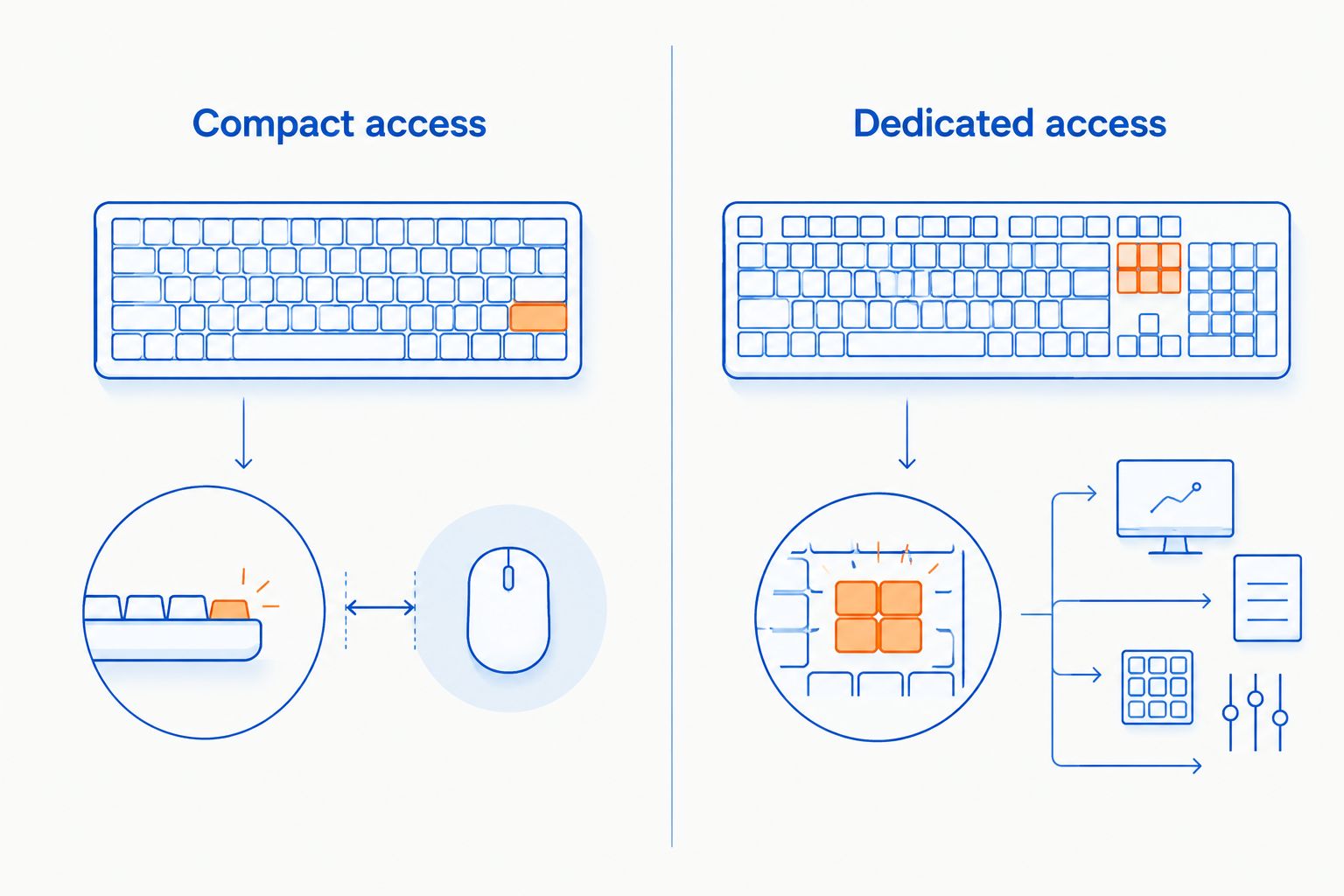
Write down the controls you use during a match before you buy. Include push-to-talk, scoreboard, inventory, equipment, and any game-specific binds alongside movement and abilities. Then check the keyboard's layout and manual against that list.
A compact board becomes a bad fit when you repeatedly need a secondary function during play and dislike its shortcut. A full-size board becomes a bad fit when keeping it accessible crowds your mouse. You do not need either compromise just to match someone else's setup.
Featured keyboards from Gaming and More
These are the two keyboard options compared above. Choose the K617 Fizz for its compact format or the GTX350 for its full-size keyboard-and-mouse package; neither recommendation depends on an unverified performance claim.


What competitive FPS players should verify before buying
Actuation and reset behavior
Actuation is the point at which a keypress registers. Reset behavior concerns when the switch becomes ready to register another press. Those concepts matter more to movement control than whether a keyboard has colorful lighting.
Do not assume a hot-swap keyboard supports adjustable actuation or rapid trigger. Hot-swap describes replacing compatible switches without soldering; it does not, by itself, describe how the keyboard detects movement within a keypress.
Simultaneous keypress handling
FPS play combines inputs: movement, crouching, jumping, and other actions can overlap. Check the manufacturer's rollover documentation, then test your own combinations after setup.
The practical test is your actual bind set. Hold your usual movement combination and add the other actions you use. Every intended input should register without an unrelated input appearing.
Tournament and game rules
Check your game's current rules before enabling automation or input-processing features. A keyboard setting being selectable does not establish that an event permits it.
For a 2026 tournament setup, check both the game policy and the organizer's equipment rules. Keep ordinary key remapping separate from macros or features that change how overlapping inputs are resolved.
Make the keyboard fit your aim setup
Start with your mouse where your aiming arm feels comfortable. Place the keyboard around that position rather than centering it under the monitor out of habit. Your monitor, keyboard, and mouse do not have to share one centerline.
Try these checks before deciding that your keyboard needs replacing:
- Clear the mouse path. Move loose cables and desk objects away from the area you use while aiming.
- Reposition the keyboard. Shift it sideways or adjust its angle while keeping movement keys easy to reach.
- Check the missing function. Identify the exact problem that remains: collision, reach, unwanted inputs, or an inaccessible bind.
If positioning fixes the problem, keep your current keyboard. If the board still blocks the mouse path, a compact layout addresses a real constraint rather than adding another accessory.
Avoid forcing an extreme keyboard angle just because you have seen someone else use it. Change the position until you can reach your controls comfortably and move the mouse without contact.
How the keyboards are ranked
The ranking follows the criteria above: mouse clearance, keybind access, documented features, connection, and everyday fit. The K617 Fizz leads for compact FPS setups; the GTX350 serves beginners who want a full-size kit.
This is a buying-fit comparison, not a measured latency leaderboard. RGB lighting, product naming, and the number of included accessories do not prove competitive performance. Gaming and More's gaming keyboard recommendations here stay tied to identifiable layout differences.
Which gaming keyboard should you choose?
Choose the K617 Fizz if you are undecided and your main goal is a more compact FPS setup. Its place at the top rests on a clear use case: reducing keyboard width beside your mouse.
Choose the GTX350 if you need both a keyboard and mouse and want a full-size layout. Keep dedicated extra keys if they matter to your daily use; giving them up is not a requirement for competitive play.
If your existing keyboard already registers your inputs correctly and fits your desk, keep it. In 2026, the right upgrade is still the one that fixes a specific problem—not the one with the busiest feature list.
FAQ
What's the best gaming keyboard for competitive FPS players on a small desk?
The K617 Fizz is the compact-layout pick in this comparison. Its 60% format suits players prioritizing keyboard placement and mouse clearance, provided their keybinds work with the reduced dedicated-key layout.
Is a 60% keyboard better than a full-size keyboard for FPS games?
A 60% keyboard is better for reducing keyboard width, not automatically for input speed. A full-size keyboard remains useful when you need dedicated extra keys and have enough mouse space.
Should I buy the K617 Fizz or the GTX350 combo?
Choose the K617 Fizz for a compact keyboard-only upgrade. Choose the GTX350 if you need a wired keyboard and mouse together and prefer a full-size layout.
Does hot-swap mean a keyboard has rapid trigger?
No, hot-swap does not mean a keyboard has rapid trigger. Hot-swap concerns replacing compatible switches; rapid trigger concerns how key movement controls activation and reset.
Does RGB lighting make a gaming keyboard faster?
No, RGB lighting does not establish faster keyboard input. Judge responsiveness through documented input behavior and reliable measurements, not lighting features.
Do I need a new keyboard to improve at competitive FPS games?
You do not need a new keyboard if your current board registers the inputs you need and fits your setup. Replace it to solve a specific issue such as mouse collisions, unreliable inputs, or awkward key access.
Can I use keyboard macros in a competitive match?
Use keyboard macros only when the game's rules and event organizer explicitly permit them. Check the current policy before enabling automation, because a keyboard offering a feature does not make that feature competition-legal.
One last thing
Move your current keyboard before replacing it. Shifting it away from the mouse can reveal whether you need a smaller board or simply a different desk arrangement. That check gives you a concrete reason to buy—or a reason to keep what already works.


