


Best gaming mice for MMO players in 2026
Best overall: Razer Naga V2 Pro. Best wired option: Corsair Scimitar RGB Elite. Best for mixed MMO and action play: SteelSeries Aerox 9 Wireless. For keyboard-first players, the M801 is a simpler wireless option to consider; this 2026 guide separates dedicated MMO controls from everyday gaming features.
- The best gaming mice for MMO players put reachable, distinguishable buttons ahead of lighting or maximum DPI.
- Razer Naga V2 Pro is the default recommendation for players who want interchangeable side-button layouts.
- Corsair Scimitar RGB Elite suits wired setups and players who need an adjustable thumb-button panel.
- SteelSeries Aerox 9 Wireless suits players who want a thumb-button grid across MMO and action games.
- Gaming And More’s M801 suits keyboard-first MMO players considering a rechargeable wireless gaming mouse.
Why this matters
An MMO mouse solves a specific problem: reaching abilities while your keyboard hand handles movement. A crowded thumb panel helps only when you can identify each button without looking or changing your grip.
Gaming And More sells gaming mice alongside other setup accessories. For this comparison, dedicated MMO designs take priority over general-purpose models because their button layouts address that problem directly.
Your 2026 buying decision starts with your current controls, not a sensor headline. If your keyboard bindings already feel natural, replacing them with a thumb grid creates work rather than fixing anything. If movement repeatedly interrupts your ability presses, extra reachable controls deserve a closer look.
What makes the best gaming mice for MMO players?
Use these criteria to judge an MMO mouse in 2026:
- Reachable buttons: Your thumb should find important commands without stretching or releasing its supporting grip.
- Distinct button positions: Shape, spacing, and placement matter more than a large advertised button total.
- Useful remapping: Confirm that the mouse software supports the commands and operating system you actually use.
- Comfortable fit: Choose a shell that supports your grip while you click, turn the camera, and press side buttons.
- Connection and charging: Decide whether a cable or a charging routine creates less friction at your desk.
- Game switching: Consider whether a dedicated thumb grid suits every game you play or only your MMO sessions.
A useful button is one you can press accurately while moving. Do not count a distant button as a benefit simply because it appears on the specification sheet.
MMO gaming mice at a glance
| Rank and mouse | Best for | Standout feature | Key limitation |
|---|---|---|---|
| 1. Razer Naga V2 Pro | Switching between MMO and simpler control layouts | Interchangeable side plates | More configuration choices to manage |
| 2. Corsair Scimitar RGB Elite | Adjusting thumb-grid placement on a wired setup | Sliding side-button panel | Cable remains part of the setup |
| 3. SteelSeries Aerox 9 Wireless | Keeping a thumb grid across MMO and action games | Wireless design with an open shell | Fixed grid demands a comfortable reach |
| 4. M801 Wireless RGB Gaming Mouse | Keeping abilities mainly on the keyboard | Rechargeable wireless operation and adjustable DPI | Do not assume dedicated MMO-grid functionality |
These are different buying paths, not interchangeable upgrades. The dedicated MMO models address ability access; the M801 addresses a simpler wireless setup without requiring you to rebuild your controls around a thumb grid.
1. Razer Naga V2 Pro: best MMO mouse for changing control layouts
The Razer Naga V2 Pro is the default pick when you want a dedicated MMO mouse that also accommodates simpler control layouts. Its interchangeable side plates let you change the physical controls instead of committing to one permanent thumb panel.
Razer specifies 3 interchangeable side plates with 2, 6, or 12 side buttons. That makes the choice tangible: use the dense panel for a binding-heavy MMO, then choose a simpler panel when fewer thumb controls suit the game.
Razer Naga V2 Pro pros
- The 12-side-button panel provides a dedicated home for thumb-accessible commands.
- Interchangeable panels support different control preferences without replacing the mouse.
- Simpler panels let you avoid keeping a dense grid under your thumb for every game.
Razer Naga V2 Pro cons
- Multiple panels and profiles add configuration decisions.
- A dense grid still requires practice; interchangeable hardware does not remove that learning curve.
- Panel choice does not guarantee that the shell fits your hand.
Best for: Players who alternate between an MMO with many bindings and games that need fewer side controls.
Before choosing the Razer Naga V2 Pro, picture your actual switching routine. If you would leave the same panel installed permanently, prioritize that panel’s comfort over the unused alternatives. Modularity earns its place only when you use it.
Build a consistent binding scheme across layouts where practical. Keeping a familiar command in a familiar position reduces the amount you need to relearn when switching games.
Verdict: Buy the Razer Naga V2 Pro if interchangeable layouts solve a real need.
2. Corsair Scimitar RGB Elite: best MMO mouse for thumb-grid adjustment
The Corsair Scimitar RGB Elite is the wired choice for players who want to adjust where the thumb grid sits. Its sliding side-button panel addresses reach directly rather than asking every hand to fit the same fixed placement.
Corsair specifies 12 mechanical side buttons on the adjustable panel. Moving that panel changes its position relative to your resting thumb; it does not change the mouse shell itself.
Corsair Scimitar RGB Elite pros
- Sliding panel placement gives you a practical fit adjustment.
- The dedicated thumb grid separates ability access from keyboard movement.
- Wired operation removes a wireless charging routine.
Corsair Scimitar RGB Elite cons
- The cable needs a clear route across your desk.
- Moving the panel cannot correct an unsuitable overall shell shape.
- A dense layout requires deliberate binding and practice.
Best for: Players committed to a wired setup who find fixed thumb grids awkwardly positioned.
Start the fit check with your hand relaxed. Move the panel until your most important commands sit near your natural thumb position, then test camera turning and repeated side-button presses together. Reaching every button while stationary is not the same as using them during movement.
Do not choose the Corsair Scimitar RGB Elite merely because wired operation feels familiar. Choose it because the adjustable panel gives your thumb a better working position. If the cable catches on your keyboard or desk edge, correct that routing before judging the fit.
Verdict: Buy the Corsair Scimitar RGB Elite when adjustable grid placement is your priority.
3. SteelSeries Aerox 9 Wireless: best MMO mouse for mixed-game play
The SteelSeries Aerox 9 Wireless combines a dedicated thumb grid with a wireless, open-shell design. It belongs on your shortlist if you want MMO bindings available while keeping the same mouse for action games.
SteelSeries specifies 12 side buttons. The important distinction from the Naga is the fixed layout: you keep that grid beneath your thumb instead of replacing it with a simpler side plate.
SteelSeries Aerox 9 Wireless pros
- Wireless operation keeps a cable out of your mouse movement area.
- A dedicated side grid keeps MMO commands within the mouse control scheme.
- The same physical layout supports a consistent grip when switching games.
SteelSeries Aerox 9 Wireless cons
- Fixed button placement makes reach especially important.
- The open-shell surface is a preference, not an automatic comfort advantage.
- Wireless use adds charging to your setup routine.
Best for: Players who want a permanent MMO thumb grid and also play games with frequent mouse movement.
Check whether your thumb rests comfortably beside the grid without pressing it accidentally. Then check the farthest buttons. A layout that works for nearby commands but requires a grip change for distant ones needs careful binding choices.
The SteelSeries Aerox 9 Wireless is not the right answer simply because you dislike cables. Its main case is keeping a dedicated grid across your game library. If you want fewer buttons under your thumb outside MMOs, the Razer Naga V2 Pro’s interchangeable approach is the clearer fit.
Verdict: Buy the SteelSeries Aerox 9 Wireless if you want to keep the thumb grid installed for every game.
4. M801: best gaming mouse for keyboard-first MMO players
The M801 Wireless RGB Gaming Mouse is a different kind of recommendation. Gaming And More lists rechargeable wireless operation and adjustable DPI; those features suit players who want to retain keyboard-based abilities while changing their mouse setup.
Do not treat the M801 as an equivalent to a dedicated MMO-grid mouse. Choose it for the features identified in its listing, then verify any remapping requirements before making them part of your buying decision.
M801 pros
- Wireless operation removes a mouse cable from your movement area.
- Rechargeable operation supports a reusable charging routine.
- Adjustable DPI lets you change the mouse’s sensitivity setting.
M801 cons
- Adjustable DPI does not establish programmable ability-button support.
- Rechargeable operation does not establish a particular battery runtime.
- This recommendation does not cover replacing a dedicated MMO thumb grid.
Best for: Casual MMO players and keyboard-first gamers who want a rechargeable wireless gaming mouse.
Gaming And More’s M801 is best for keyboard-first MMO players who want a rechargeable wireless mouse rather than a dedicated thumb-grid recommendation.
Keep that distinction clear when gift shopping, too. Ask whether the recipient wants more ability buttons or simply wants a wireless mouse. Those are separate requests, and an attractive gaming mouse does not automatically answer both.
If your current frustration is reaching abilities while moving, settle the button-layout requirement first. If your bindings already work and your complaint is cable clutter, the M801 becomes a more relevant option.
Verdict: Hold until you confirm that the M801 matches your control requirements.
How to choose your MMO button layout
Use your existing habits to decide which design deserves your attention. This is more useful than buying a dense grid and hoping to find a purpose for every button.
- Keyboard-first: Keep familiar ability bindings on the keyboard when they already work comfortably.
- Thumb grid: Choose dedicated side controls when keyboard reach interrupts movement or command access.
- Mixed games: Decide whether you want interchangeable panels or a permanent grid across your game library.
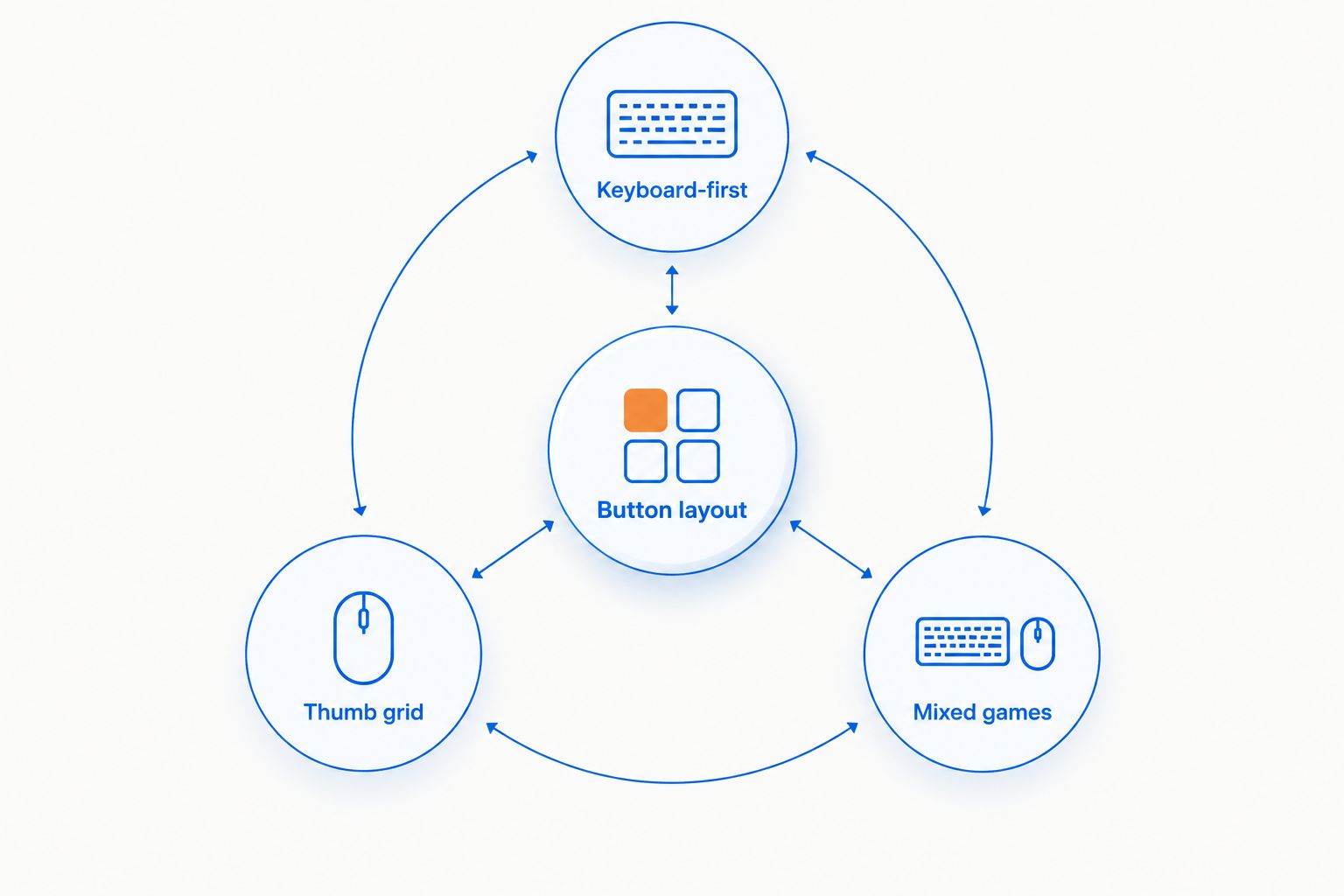
Once you choose a layout, assign commands by reach rather than by action-bar order. Put frequently used commands where your thumb lands naturally. Reserve less accessible positions for commands you use less often, and leave awkward buttons unused rather than forcing them into your routine.
Test intentional button presses separately from accidental ones. Practice moving, turning the camera, and selecting targets before adding more bindings. A stable grip matters more than filling the entire grid.
Check your game’s input and automation rules before creating macros. A remapped key and an automated sequence are not the same thing; keep your configuration within the rules of the game you play.
How these mice are ranked
This 2026 ranking prioritizes layout usefulness, fit adjustments, connection choice, and switching between games. Razer, Corsair, and SteelSeries identify the dedicated MMO layouts in their product specifications; the M801 recommendation stays within the rechargeable wireless and adjustable-DPI features identified in its store listing.
The ordering is a buying recommendation, not a hands-on performance score. No measured latency, battery-runtime comparison, durability result, or comfort score forms part of the ranking. Hand fit remains a personal check, and a lower-ranked design is the better choice when its layout matches your needs more closely.
Which MMO gaming mouse should you choose?
Choose the Razer Naga V2 Pro as the default MMO recommendation for 2026. Its interchangeable panels offer the clearest path between a dense ability layout and simpler side controls.
Choose the Corsair Scimitar RGB Elite when adjustable thumb-grid positioning matters more than going wireless. Choose the SteelSeries Aerox 9 Wireless when you want a permanent thumb grid across MMO and action games.
Keep the M801 on your shortlist only when your abilities remain mainly on the keyboard. Do not replace a working control scheme just to justify a different mouse.
FAQ
What are the best gaming mice for MMO players in 2026?
The Razer Naga V2 Pro is the default recommendation, the Corsair Scimitar RGB Elite suits adjustable wired thumb-grid setups, and the SteelSeries Aerox 9 Wireless suits a permanent wireless grid. Choose by reachable controls and hand fit rather than button count alone.
Do I need 12 side buttons for an MMO?
No, you do not need 12 side buttons to play an MMO. A dedicated grid is useful when it solves a specific problem with reaching abilities while moving; keyboard-first controls remain a valid choice.
Is the Razer Naga V2 Pro better than the Corsair Scimitar RGB Elite?
The Razer Naga V2 Pro is better for switching physical side-button layouts; the Corsair Scimitar RGB Elite is better for adjusting thumb-grid position on a wired mouse. Neither feature guarantees a comfortable fit for your hand.
Is the M801 a good mouse for casual MMO players?
The M801 is worth considering for casual MMO players who keep abilities mainly on the keyboard and want rechargeable wireless operation. Verify remapping requirements separately rather than assuming dedicated MMO-button functionality.
Should I choose a wired or wireless MMO mouse?
Choose wired operation if you want to avoid charging, or wireless operation if removing the cable matters more to your setup. Button reach and grip still need to work regardless of the connection.
Does higher DPI make an MMO mouse better?
No, higher DPI alone does not make an MMO mouse better. DPI changes mouse sensitivity, while usable button placement and comfortable command access address different needs.
Can I use MMO mouse macros in every game?
No, macro rules differ between games. Check the game’s current rules before using automated sequences, and do not assume that software support means a configuration is permitted.
One last thing
Leave awkward buttons unassigned. That sounds wasteful, but an unused button is less disruptive than a command you trigger accidentally during a fight.
Before replacing your mouse in 2026, identify the exact input that causes trouble: movement, targeting, camera control, or ability access. Buy for that problem. More buttons are useful only when they give your hand a better job to do.


