


Best mini gaming PC for a small desk in 2026
Best overall: Skytech Blaze4 Mini. Best for a work-first desk: Intel N150 Mini PC. Best for a built-in touchscreen: Ultra-Portable Mini PC. This 2026 small form factor gaming pc guide compares three compact options at Gaming and More, with graphics capability and usable desk space driving the decision.
- Skytech Blaze4 Mini is the best small form factor gaming pc pick here for buyers prioritizing dedicated graphics.
- Intel N150 Mini PC suits work-first desks; triple 4K display support does not establish gaming performance.
- Ultra-Portable Mini PC adds a 5.7-inch touchscreen, but its graphics capability still needs checking against your games.
- Measure the computer, power supply, cables, and ventilation space before choosing a compact gaming desktop.
Why this matters
A small computer solves a space problem, not automatically a gaming problem. The graphics hardware, cooling arrangement, and games you play still determine whether the machine fits your needs.
For Gaming and More shoppers choosing a small form factor gaming PC, Skytech Blaze4 Mini is the best fit here for buyers prioritizing dedicated graphics. Its listed RTX 5060 Ti gives it a clear gaming-focused distinction from the other compact options in this comparison.
Start with your games, then your desk measurements. You can browse Gaming and More after deciding which compromise you accept: a compact gaming system, a work-first mini PC, or a computer with its own small touchscreen.
What makes the best small form factor gaming PC?
Use these criteria to choose a compact computer in 2026. A smaller enclosure is useful only when the complete setup still works.
- Graphics fit: Match the exact GPU to your games and intended settings. A processor name or display-output claim is not a substitute.
- Usable footprint: Include cable bends, power supplies, and ventilation space. The computer's enclosure is only part of its footprint.
- Cooling clearance: Check where air enters and exits before choosing a shelf, corner, or under-monitor position.
- Connections: Count the ports your monitor, keyboard, mouse, headset, and storage require. Confirm their supported functions, not just their shape.
- Memory and storage: Read the selected configuration carefully. RAM capacity and SSD capacity solve different problems.
- Maintenance access: Check how you reach storage, memory, and dust-prone areas. Do not assume compact machines accept standard desktop upgrades.
For a gift, the graphics-fit check comes first. Ask which games the recipient plays and whether they already own a monitor; that question is more useful than choosing the smallest-looking box.
Small-desk mini PCs at a glance
These are use-case rankings, not benchmark rankings. The comparison uses the listed product specifications; it does not assign frame rates, noise levels, or measured chassis sizes.
| Rank and item | Best for | Standout listed feature | Key limitation |
|---|---|---|---|
| 1. Skytech Blaze4 Mini | Gaming-first compact setups | RTX 5060 Ti graphics | Confirm chassis dimensions and cooling clearance against your desk |
| 2. Intel N150 Mini PC | Work-first desks with multiple displays | 32GB RAM, 1TB SSD, triple 4K display support | Display support does not demonstrate demanding-game performance |
| 3. Ultra-Portable Mini PC | Buyers who specifically want a built-in touchscreen | Intel N95, 16GB RAM, 512GB SSD, 5.7-inch touchscreen | The small touchscreen is not a replacement for every gaming monitor |
The key split is gaming-first versus space-first. Choose Skytech Blaze4 Mini when running games locally is the main job; consider the other machines when their work or touchscreen features solve a specific need.
1. Skytech Blaze4 Mini: best for gaming-first small desks
Skytech Blaze4 Mini is a compact gaming PC with an RTX 5060 Ti listed in its product title. It is the first choice in this comparison because the dedicated graphics hardware directly addresses the gaming requirement.
That does not establish a particular frame rate or graphics preset. Before buying in 2026, check the complete configuration and look for performance evidence covering your actual games, resolution, and settings.
Skytech Blaze4 Mini pros:
- Its listed RTX 5060 Ti makes the graphics component explicit.
- Its compact positioning addresses buyers trying to avoid a conventional tower setup.
- Its gaming-focused configuration makes it the clearest starting point for local PC gaming here.
Skytech Blaze4 Mini cons:
- The compact label alone does not tell you whether it fits beside your monitor.
- Future graphics upgrades depend on the enclosure, power supply, and internal clearance; do not assume compatibility.
Best for: You want a dedicated gaming computer on a small desk and prioritize graphics hardware over a built-in screen.
Give Skytech Blaze4 Mini a defined location before ordering. Check the manufacturer's clearance guidance and make sure nearby objects will not block ventilation or rear connections.
If your desk cannot accommodate that complete footprint, reconsider the placement before switching to a weaker computer solely because it looks smaller. A side shelf or another suitable, ventilated position deserves consideration, provided the cables reach safely.
Verdict: Buy Skytech Blaze4 Mini for the gaming-first use case after confirming fit and the complete configuration.
2. Intel N150 Mini PC: best for a work-first desk
Intel N150 Mini PC lists 32GB RAM, a 1TB SSD, and triple 4K display support. Those specifications give you concrete reasons to consider it for a compact everyday workspace.
They do not prove that it runs demanding games at your preferred settings. In particular, supporting a 4K display signal and rendering a game smoothly at 4K are different tasks.
Intel N150 Mini PC pros:
- The listed 32GB RAM capacity is clear rather than left to a configuration guess.
- The listed 1TB SSD gives you a defined storage capacity to compare with your files and game library.
- Triple 4K display support is relevant if your desk also handles work across multiple screens.
Intel N150 Mini PC cons:
- The listed memory and display features do not establish gaming frame rates.
- Additional monitors still occupy space; a small computer does not make a multi-screen desk small.
Best for: Your desk primarily handles everyday computing, and you will verify compatibility and performance for any games separately.
For a 2026 work-and-play setup, write down which job matters most. If gaming is the deciding reason for the purchase, do not let the larger RAM figure distract you from checking graphics capability.
You should also verify the display connections needed for your intended screens. A triple-display claim does not remove the need to match monitor inputs, supported modes, and cables.
Verdict: Hold Intel N150 Mini PC for a gaming purchase until your games are verified; shortlist it for a work-first desk.
3. Ultra-Portable Mini PC: best for a built-in touchscreen
Ultra-Portable Mini PC lists an Intel N95 processor, 16GB RAM, a 512GB SSD, and a 5.7-inch touchscreen. Its distinct feature in this comparison is the integrated screen.
Choose it because you have a use for that touchscreen, not because a screen makes it equivalent to a handheld gaming console. Check your games' controls, interface readability, and graphics requirements before treating it as a self-contained gaming setup.
Ultra-Portable Mini PC pros:
- The 5.7-inch touchscreen gives this option a clearly different format.
- Its listed 16GB RAM capacity makes the memory configuration explicit.
- Its listed 512GB SSD gives you a concrete storage figure for planning installations.
Ultra-Portable Mini PC cons:
- A small touchscreen is not suitable for every game's interface or control scheme.
- Adding a separate monitor, keyboard, and mouse still requires desk space and connections.
Best for: You specifically want a small computer with a built-in touchscreen and will assess gaming compatibility separately.
Imagine the actual session before buying. If you expect to use an external monitor every time, decide whether the integrated screen adds enough value to justify choosing this format.
The same caution applies to portability. Account for the power equipment and input devices you intend to carry rather than judging portability from the computer alone.
Verdict: Hold Ultra-Portable Mini PC unless its touchscreen solves a specific need; skip it as an unverified gaming upgrade.
Compare the listed configurations
The Gaming and More mini PC shortlist covers three different priorities. Keep the intended job beside the product name when comparing the current listings, and inspect the selected configuration before ordering.


Make the complete setup fit your desk
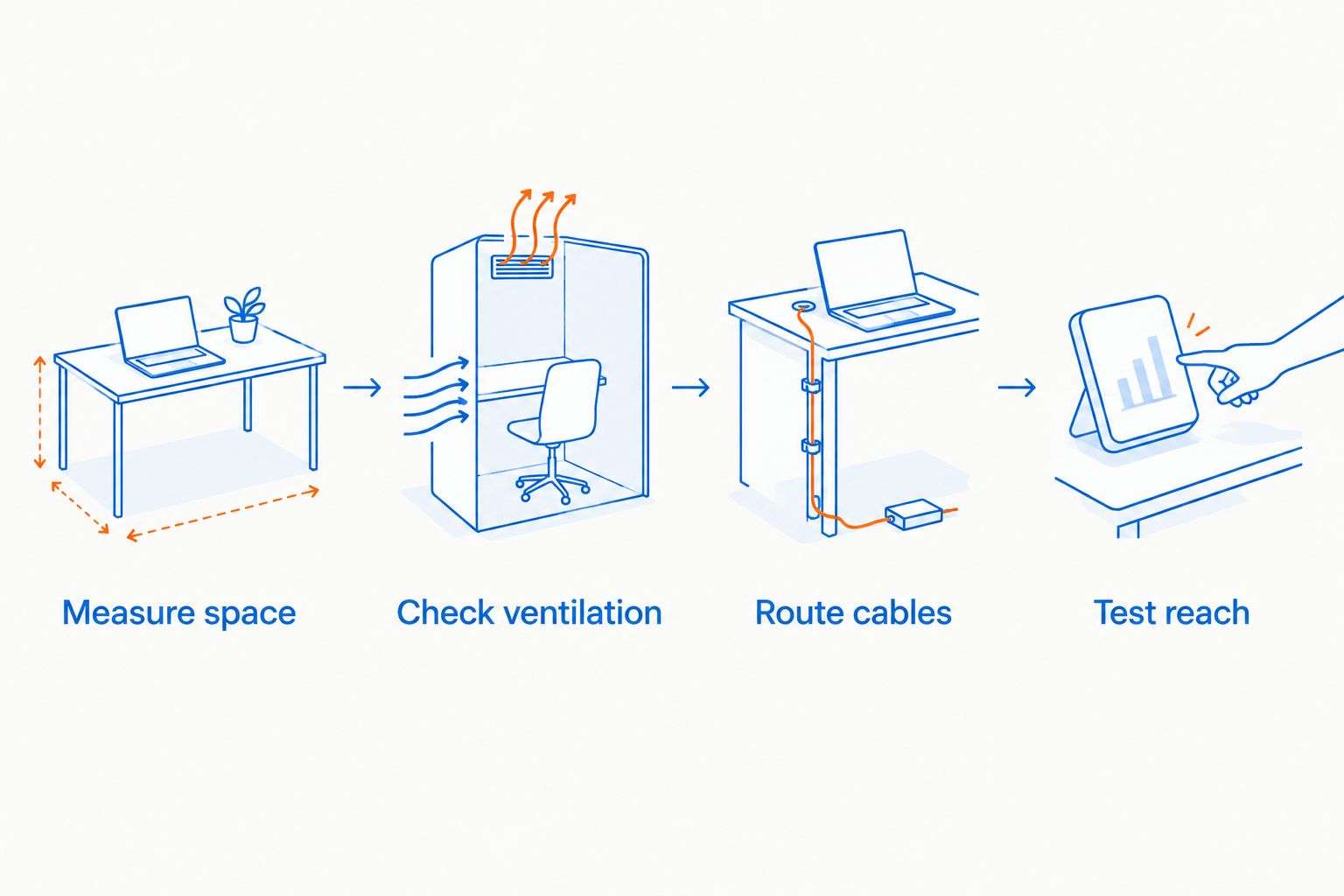
A small form factor gaming PC needs more than an empty patch beside the monitor. Plan the whole setup in this order, using the actual measurements and clearance instructions for your selected machine.
- Measure space: Mark the area available after placing your monitor and input devices.
- Check ventilation: Identify intake and exhaust locations, then apply the manufacturer's placement guidance.
- Route cables: Allow access to power, display connections, and frequently used ports without tight bends.
- Test reach: Sit in your normal position and check mouse movement, keyboard placement, and access to controls.
Do the same check with any external power supply included in the setup. Hiding the computer behind a screen does not eliminate the space needed for its supporting equipment.
For a shared desk, leave the connections you regularly change accessible. A neat-looking arrangement becomes inconvenient if you must move the monitor whenever you plug in a headset or storage device.
How we ranked these mini PCs
The 2026 ranking puts graphics fit first, then considers the stated compact format, memory, storage, and distinct use case. Skytech Blaze4 Mini leads because its listed dedicated GPU addresses the primary gaming requirement.
Intel N150 Mini PC takes the work-first slot because its listed memory, storage, and display support speak to that use. Ultra-Portable Mini PC takes the touchscreen slot because its integrated display is the clearest reason to choose it over the others.
This is a specification-led buying guide, not a hands-on performance test. Cooling quality, operating noise, exact fit, and game performance require their own evidence before you make those factors decisive.
Which small form factor gaming PC should you choose?
Choose Skytech Blaze4 Mini if gaming is the main reason you are buying. Among these three options, its listed RTX 5060 Ti gives you the clearest gaming-focused starting point.
Choose Intel N150 Mini PC for a work-first setup after checking the connections you need. Choose Ultra-Portable Mini PC when the built-in touchscreen matters enough to shape the purchase.
For your 2026 shortlist, keep the rule simple: verify the games before celebrating the footprint. Do not substitute a smaller enclosure, a larger RAM figure, or a display-resolution claim for evidence that a machine meets your gaming needs.
FAQ
What's the best mini gaming PC here for a small desk?
Skytech Blaze4 Mini is the best gaming-first pick in this comparison because it lists RTX 5060 Ti graphics. Confirm its dimensions, clearance requirements, and complete configuration before ordering.
Is an Intel N150 mini PC the same as a gaming desktop?
No, an Intel N150 mini PC should not be treated as equivalent to a dedicated-graphics gaming desktop. Check the exact graphics hardware and evidence for the games you intend to run.
Does triple 4K display support mean a mini PC can play games at 4K?
No, triple 4K display support does not establish 4K gaming performance. Display output and real-time game rendering are different workloads.
Is 32GB RAM more important than the graphics card for gaming?
RAM capacity does not replace graphics capability. Compare both against your game's requirements rather than choosing Intel N150 Mini PC solely because it lists 32GB RAM.
Can I put a mini gaming PC behind my monitor?
Only use that position if it meets the computer's ventilation, stability, and connection requirements. Confirm any mounting compatibility rather than assuming a compact computer supports a monitor mount.
Can I upgrade a small form factor gaming PC later?
Upgrade options depend on the exact system. Check memory slots, storage connections, power capacity, and physical clearance before assuming a component can be replaced.
Is a touchscreen mini PC a good gaming gift?
A touchscreen mini PC is a suitable gaming gift only when its hardware, controls, and screen match the recipient's games. Ultra-Portable Mini PC lists a 5.7-inch touchscreen, but that feature alone does not establish gaming suitability.
One last thing
Before buying, place paper on the desk to represent the computer's measured footprint, then add the required clearance and cable space. Sit down and move your mouse as you normally would.
That simple check tests the benefit you are buying: usable space. A compact PC that blocks your mouse movement has not solved the small-desk problem.


