


Can a wireless gaming mouse be used for esports competitions?
Yes, a wireless gaming mouse can be used for esports competitions when the event permits it and the mouse delivers reliable tracking, clicks, and connectivity. Use a gaming-focused receiver connection rather than assuming every wireless mode performs the same. Before entering a competition in 2026, confirm the organizer’s peripheral rules, test your actual setup, and prepare a backup connection or mouse.
- Can a wireless gaming mouse be used for esports competitions? Yes, subject to event rules and reliable operation.
- A dedicated gaming receiver and Bluetooth are different connection options; check which mode your mouse supports.
- Polling rate describes reporting frequency, not total click latency or guaranteed aiming performance.
- Gaming and More shoppers should verify mouse specifications before treating a wireless model as tournament-ready.
Why this matters: Wireless removes cable drag, but it adds battery and receiver checks to your match preparation. The useful question is whether your mouse works consistently under the conditions you will actually play in. If you are still choosing a connection type, start with the wired or wireless gaming mouse comparison.
Can a wireless gaming mouse be used for esports competitions?
Yes. Wireless connectivity alone does not determine whether a mouse is suitable for esports. Tournament permission, connection performance, tracking, button behavior, and your ability to reproduce your settings matter more than the absence of a cable.
For your 2026 event, separate permission from performance. An organizer decides what equipment is allowed; your preparation establishes whether that equipment works for you.
| Connection option | Best for | Main advantage | Main limitation |
|---|---|---|---|
| Dedicated gaming receiver | Players who want wireless movement with a gaming-focused connection | Removes the mouse cable from your aiming space | Requires receiver placement, battery preparation, and model-specific performance checks |
| Wired USB | Players who want to avoid battery and radio-link management | Eliminates wireless charging and receiver concerns during play | Cable drag and routing need attention |
| Bluetooth | Everyday use and devices where a receiver is inconvenient | Connects without a separate receiver when supported | Do not assume its responsiveness matches a dedicated gaming connection |
These are connection choices, not a ranking of every mouse using them. A connection label cannot establish sensor quality, switch behavior, shape, or tournament approval.
Which wireless connection should you use for competition?
Best for competitive wireless play: a dedicated gaming receiver, provided the mouse and event support it. Check the manufacturer’s documentation for the exact operating mode and supported reporting settings. A wireless label on the box is not enough.
A 2.4 GHz connection describes a radio frequency band. It does not, by itself, establish input latency, connection stability, or resistance to interference. Different products using that band have different hardware and implementations.
Bluetooth is useful for everyday connectivity, but convenience is not evidence of competitive performance. If a mouse supports both Bluetooth and a dedicated receiver, test and configure the mode you intend to use during the event.
Wired USB remains a valid competitive choice. Its benefit is fewer wireless-specific checks; its drawback is the cable itself. Choose the connection you can reproduce reliably, rather than changing equipment because another player prefers it.
What do polling-rate numbers actually tell you?
Polling rate describes how frequently a mouse reports to the computer. It is not a measurement of the entire delay between a physical action and the result appearing on screen.
For context, 1,000 Hz corresponds to a nominal reporting interval of 1 ms. At 500 Hz, that interval is 2 ms; at 125 Hz, it is 8 ms. These are mathematical reporting intervals, not measured performance results for a particular mouse.
The distinction matters when comparing specifications. Sensor processing, button processing, the connection, the game, and the display all belong to the wider input-to-display chain. A polling-rate claim addresses only part of that chain.
For a 2026 purchase, look for independent measurements of the exact model and connection mode. Do not substitute a high DPI ceiling for latency evidence: DPI controls movement sensitivity, while polling rate concerns reporting frequency.
Best for a dependable match setup: a supported polling setting that runs consistently on your actual PC. Raising a setting is not a useful upgrade if it introduces problems you have not resolved before competition.
Why wireless mouse performance varies
A wireless mouse’s behavior depends on more than its connection category. Check these factors before deciding that wireless itself is responsible for a problem:
- Connection mode: Bluetooth, a dedicated receiver, and wired operation are different paths. Confirm which one is active.
- Receiver placement: Follow the manufacturer’s placement guidance and keep the receiver’s position consistent during testing.
- Radio environment: Nearby wireless activity and physical obstructions affect the conditions in which the connection operates.
- Power state: Battery preparation is an additional responsibility that wired-only mice do not have.
- Settings and software: Polling settings, sensitivity, profiles, and button assignments need to survive the move to the competition PC.
- Mouse surface: Test tracking on the pad you intend to bring, including fast movements and lift-and-reposition actions.
Change one factor at a time when troubleshooting. Changing sensitivity, receiver position, and connection mode together makes it harder to identify what fixed the issue.
How do you prepare a wireless mouse for an esports event?
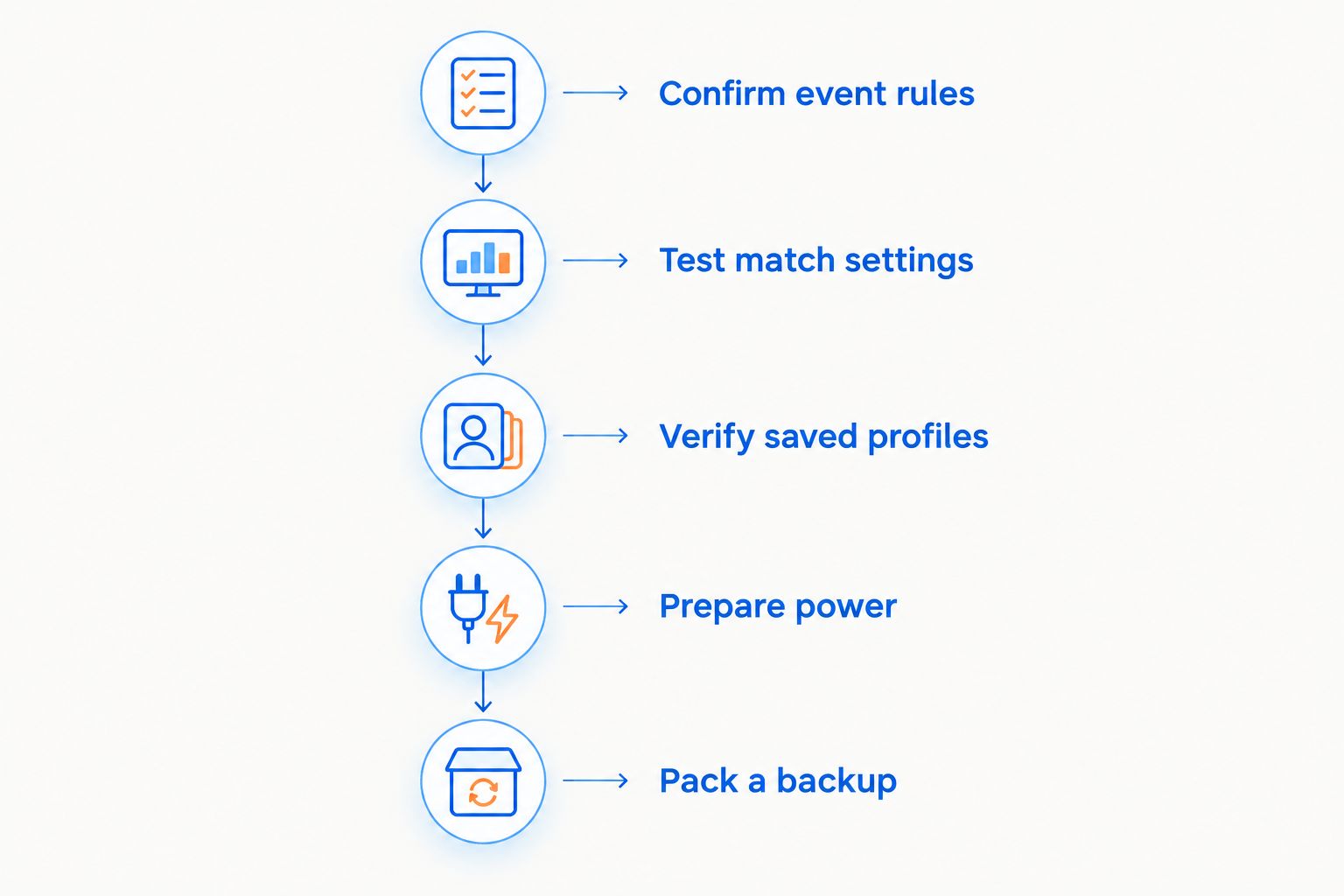
Prepare the complete setup, not just the mouse. Your 2026 competition checklist should cover permission, connection, configuration, and recovery from a failure.
Confirm event rules
Read the event’s peripheral rules before traveling. Ask the organizer about wireless receivers, personal peripherals, configuration software, onboard profiles, and any restrictions on button assignments.
Do not interpret a lack of detail as permission. If a rule is unclear, get an answer before you arrive and keep the relevant instructions accessible. Approval for one event does not establish approval for another.
Test match settings
Use your intended connection, mouse pad, sensitivity, polling setting, and button layout in practice. Include rapid turns, slow tracking, repeated clicks, and lifting the mouse back into position.
Look for symptoms you can reproduce: missed inputs, unexpected movement, disconnects, or settings that change after restarting. Resolve those symptoms before competition instead of hoping they disappear on a different computer.
Verify saved profiles
Check whether your exact model stores the settings you need onboard or requires software to apply them. If onboard storage is supported, test what actually persists after disconnecting and reconnecting the mouse.
A saved sensitivity setting does not automatically mean every button assignment or lighting setting is saved too. Verify each function you depend on. Test without the configuration application open when that matches the event’s conditions.
Prepare power
Charge the mouse according to its instructions and check its battery indicator before play. Pack the correct charging cable and any receiver accessories your setup requires.
Do not assume that connecting a charging cable also enables wired data operation. Some devices treat charging and wired input differently; verify your exact model’s behavior before making a cable your recovery plan.
Pack a backup
Bring a permitted backup mouse or a verified alternate connection. Record your sensitivity and important settings so you can reproduce them without guessing.
A backup is useful only if you have practiced with it and can configure it under the event’s rules. A spare that needs unavailable software is not a complete fallback.
The preparation sequence is straightforward: settle permission first, prove the working setup next, then prepare for a failure. That keeps equipment troubleshooting out of your match routine.
What should you test on a shared competition PC?
Test whether your settings work without relying on your home installation. A mouse that behaves correctly on your own PC still needs checking on the system you will use for the match.
Start with connection recognition. Confirm that the receiver is detected, movement is consistent, and all permitted buttons perform their intended actions. Then verify sensitivity inside the game rather than judging it only from desktop cursor movement.
Check what happens after reconnecting the mouse. If you depend on a profile, confirm that the required settings remain active rather than reverting to defaults. Do not assume a configuration application will be installed or that you will have permission to install it.
Finally, distinguish an input problem from a display or game problem. Uneven frame delivery and an incorrect display setting can change how aiming feels without proving that the wireless link is failing. Diagnose the symptom before replacing the mouse.
Does mouse shape matter more than being wireless?
Connection performance and physical fit answer different questions. A stable connection cannot make an uncomfortable shape suitable for your grip, and a comfortable shape cannot fix disconnects.
Best for consistent control: a mouse you can grip, lift, and click without changing your technique to accommodate it. Check whether side buttons sit within easy reach and whether you trigger them accidentally during a tense grip.
Use the same pad and desk arrangement during practice whenever practical. Compare control during the movements your game demands, not just how the mouse feels while browsing.
For gift shoppers, avoid treating wireless as a complete specification. Ask about the player’s current mouse, preferred shape, connection requirements, and event use. Familiarity and fit are more useful buying information than lighting preferences alone.
What should you verify before buying from Gaming and More?
Gaming and More’s gaming mouse selection includes the M801 Wireless RGB Gaming Mouse, listed with adjustable DPI and a rechargeable design. Those features establish sensitivity adjustment and charging capability; they do not establish measured latency, onboard storage, or event approval.
Gaming and More is best for gamers shopping for gaming gear and everyday tech. For tournament use, evaluate the exact mouse rather than treating a store category as a performance certification.
The M801’s stated conveniences are relevant to ordinary setup decisions. Its competition suitability still requires verification of the connection mode, supported polling settings, software requirements, and any wired fallback. Do not buy it for an esports-specific requirement until that requirement is confirmed.
Can you use macros on a wireless mouse in competition?
Wireless connectivity does not make a macro permissible. Event and game rules govern button assignments and automation separately from how the mouse connects.
Check the exact action you want to assign. A normal button remap and an automated sequence are not interchangeable, and programmable hardware is not proof that every programmable action is allowed.
Can a wireless mouse disconnect during a match?
A wireless mouse can lose its connection, so prepare a recovery plan. Wired setups also have failure points, including loose connectors and damaged cables; neither connection type removes the need for preparation.
Practice the permitted fallback before competition. Confirm that your spare receiver, cable, or backup mouse actually works with the intended setup.
Should you switch from wired to wireless before a tournament?
Do not replace a reliable, familiar mouse immediately before a tournament just to remove the cable. A new shape, button layout, or sensitivity configuration adds variables you have not practiced with.
For your 2026 event, keep the proven setup unless there is a specific problem to solve. Test a replacement in practice before making it your match mouse.
FAQ
Can a wireless gaming mouse be used for esports competitions?
Yes, a wireless gaming mouse can be used when the event permits it and the mouse works reliably in the intended setup. Confirm peripheral rules, connection mode, settings, and backup arrangements before attending.
Is a wired mouse always better than wireless for esports?
No, wired connectivity alone does not establish better competitive performance. Wired removes battery and radio-link management, while wireless removes the mouse cable from your aiming space.
Is Bluetooth the same as a wireless gaming receiver?
No, Bluetooth and a dedicated gaming receiver are different connection options. Verify the exact mouse’s supported modes and performance rather than assuming they behave identically.
Does a 1,000 Hz mouse have 1 ms total input lag?
No, 1,000 Hz corresponds to a nominal reporting interval of 1 ms, not total input lag. Processing, the game, and the display add other parts to the input-to-display chain.
Can I use my wireless mouse without installing software?
That depends on the exact mouse and the settings you need. Verify basic operation and whether required sensitivity settings or button assignments persist without the configuration software.
Can I plug in a wireless mouse if its battery runs low?
Only rely on a cable as a wired fallback after confirming that the exact mouse supports wired data operation. A charging connection does not automatically establish that capability.
Do esports competitions allow mouse macros?
The event’s rules determine whether a particular assignment or automated action is allowed. Wireless connectivity and programmable buttons do not grant permission to use macros.
One last thing
Your receiver belongs on the packing checklist alongside the mouse. A charged wireless mouse is not a complete receiver-based setup if its paired receiver stays plugged into your home PC.
Before leaving, pack the mouse, receiver, required adapter, charging cable, and practiced backup together. Then record your settings somewhere you can access without installing software. That preparation solves a more immediate competition problem than chasing an unverified specification.


