


Is a gaming laptop worth it in 2026?
A gaming laptop is worth it in 2026 if you need one computer for PC gaming, work, or study in different places. Choose a desktop instead if your gaming setup stays put and component upgrades matter more than portability; a laptop also means carrying its charger and accepting model-specific limits on battery gaming, cooling, and repairs.
- Is a gaming laptop worth it? Yes for portable PC gaming; choose a desktop when mobility adds no value.
- Gaming and More offers gaming laptops, desktops, and setup accessories; compare the whole setup before choosing.
- Check the exact graphics hardware, cooling, screen, and upgrade access—not just the gaming label.
- Treat unplugged gaming and plugged-in gaming as different use cases when checking reviews.
Why this matters
The wrong format stays wrong even when the specification sheet looks impressive. A powerful laptop is inconvenient if you dislike carrying it, while a desktop cannot follow you between home, campus, and a friend's place.
Gaming and More is best for shoppers comparing gaming computers and setup accessories together. Start with where you play, then judge the hardware against your actual games. RGB lighting and a processor badge do not answer either question.
Is a gaming laptop worth it in 2026?
Yes, when portability solves a real problem; no, when you only need a computer for one desk. A laptop combines a screen, keyboard, pointing device, and computer in a transportable system. A desktop separates those pieces but usually gives you more freedom to replace components.
| Option | Best for | Main advantage | Main drawback | Decision |
|---|---|---|---|---|
| Gaming laptop | Gaming, study, and work across locations | Built-in display and keyboard travel with the computer | Cooling, battery behavior, and upgrade access depend on the model | Choose when you need a mobile computer |
| Gaming desktop | A permanent gaming desk | More scope for component replacement and expansion | Requires a separate display and peripherals | Choose when portability adds no value |
| Handheld gaming PC | Controller-first portable play | Integrated controls suit handheld gaming | Smaller working area and less convenient keyboard-based tasks | Choose when handheld play is the priority |
These are format differences, not a performance ranking. A specific laptop needs comparison with a specific desktop or handheld using the same games, resolution, and settings.
In 2026, the buying question is still practical: what does mobility let you do that a stationary computer cannot? If the answer is nothing, remove portability from your reasons to buy.
A gaming laptop: best for moving between work and play
A gaming laptop makes sense when you regularly change locations and want your games, files, and applications on the same machine. Students, people splitting time between homes, and travelers can all use that flexibility. You avoid maintaining separate computers for separate places.
The trade-off is the complete travel kit. Check the laptop's weight alongside its power adapter, then consider whether you also carry a mouse, headset, or controller. A computer that fits your bag is not automatically comfortable to carry.
Buy for movement you actually make, not travel you imagine. Write down the places where you used a computer recently. If every session happened at the same desk, a laptop's main advantage is not doing useful work for you.
A gaming desktop: best for a permanent setup
A desktop is the stronger fit when your games stay at home and you want control over future component changes. Standard desktop parts generally offer more replacement options than laptop-specific assemblies, although case size, power supply, motherboard compatibility, and proprietary parts still restrict upgrades.
The drawback is the surrounding setup. You need a display, keyboard, and pointing device, plus room for the computer and cables. Include those requirements when comparing a desktop with a laptop that already has a usable screen and keyboard.
For your 2026 shortlist, compare complete setups rather than isolated computers. A tower without the peripherals you need is not equivalent to a ready-to-use laptop. Equally, a laptop you immediately connect to a monitor and external keyboard deserves comparison with a desktop.
A handheld gaming PC: best for controller-first play
A handheld gaming PC fits a different job: playing with built-in controls while holding the device. It deserves consideration if portability means sofa sessions, travel, and controller-friendly games rather than typing documents or using a full desktop workspace.
Its limitation is general-purpose convenience. Keyboard-heavy games and work tasks need closer attention to controls, display space, and accessory support. Adding a keyboard, dock, and external display changes what you carry and how you use it.
Choose the format that matches your hands as well as your games. Someone who wants a portable work computer has a different requirement from someone who wants to play while holding the screen.
Why a gaming laptop's value varies
Two gaming laptops can suit very different buyers. These factors explain why:
- Graphics hardware: The exact GPU matters more than the word gaming. Check the listed graphics configuration against the games you want to run.
- Power and cooling: Chassis design, operating modes, and graphics power settings affect sustained performance. Read reviews of the exact configuration.
- Display: Resolution, refresh rate, brightness, and panel behavior affect the experience. A sharp screen does not prove the GPU can run demanding games at its native resolution.
- Memory and storage: Capacity determines room for applications and files, but it does not establish graphics performance. Confirm whether either component is replaceable.
- Mobility: Laptop weight, adapter weight, dimensions, and battery behavior determine how useful portability becomes.
- Service access: Repair instructions, replacement-part access, and upgrade restrictions shape ownership after the initial purchase.
Use these factors to reject a poor fit before comparing cosmetic extras. A laptop that fails your essential game or travel requirement is not rescued by a longer feature list.
How do you check a gaming laptop before buying?
Use this sequence to turn a broad search into a buying decision. Keep a short record of each answer so you can compare configurations without relying on memory.
- Choose your games. List the games you intend to play, including any competitive or demanding titles that determine your requirements. Check their official system requirements.
- Set your target. Decide the resolution, settings, and frame rate you want. For example, 1920 × 1080 pixels at 60 frames per second is a defined target, not a promise that any particular laptop achieves it.
- Check exact hardware. Record the processor, GPU, memory, storage, and display configuration. Match reviews to that configuration rather than a similar-looking model name.
- Read sustained tests. Look for gameplay results, fan noise, surface temperatures, and plugged-in versus battery behavior. A short performance result does not describe a long session.
- Check daily use. Confirm ports, charging requirements, carrying weight, keyboard layout, and upgrade access. These details affect every session, including the ones when you are not gaming.
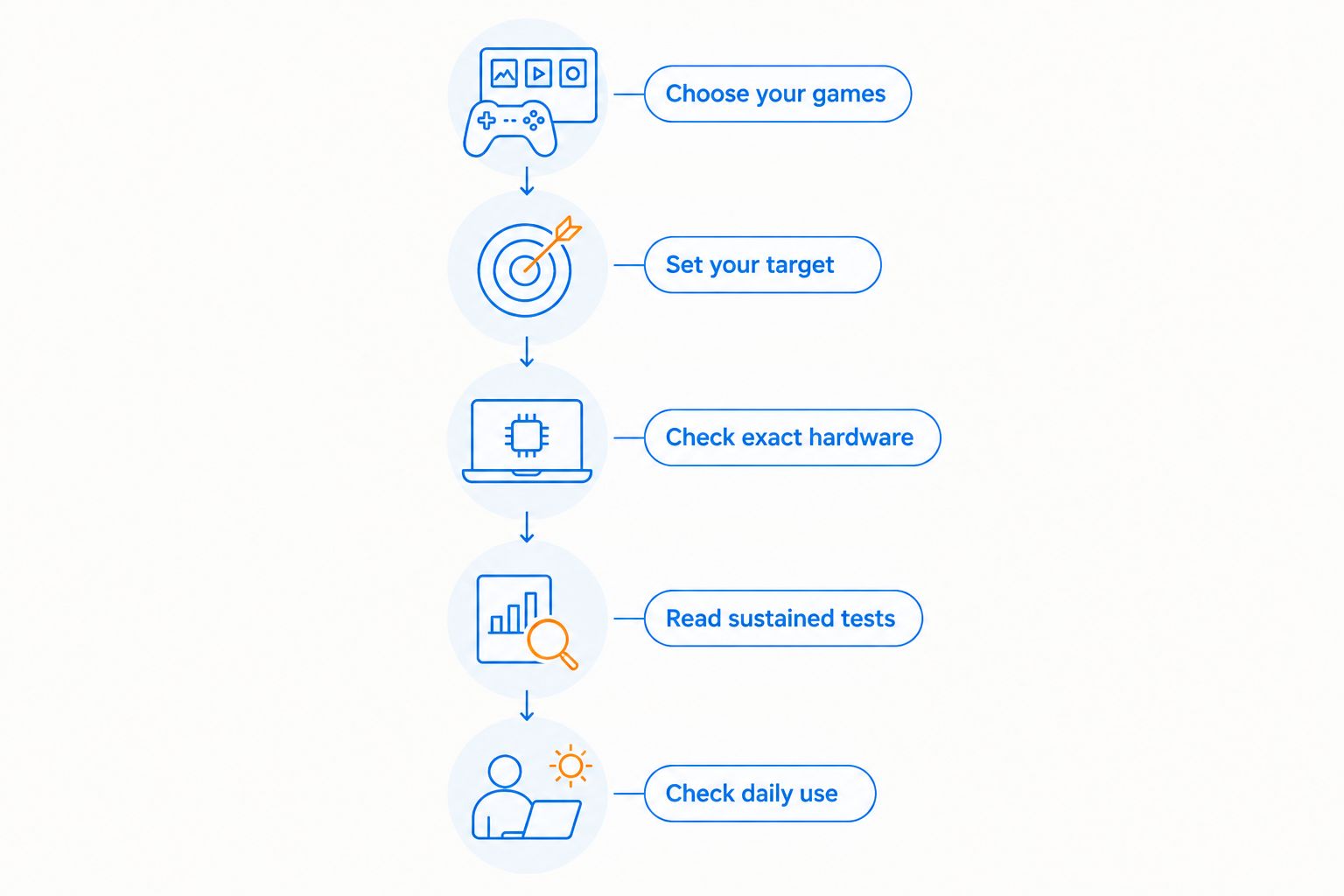
For a 2026 purchase, prioritize recent tests of the games and configuration you are considering. Software updates and different hardware configurations make an old result an imperfect substitute for the machine in front of you.
If a listing leaves an essential specification unclear, resolve that detail before ordering. Do not turn an unanswered question into an assumption just because the headline sounds convincing.
What does a real specification sheet tell you?
The Lenovo LOQ 15 Gaming Laptop listed by Gaming and More names a 13th Gen Intel Core i5 processor, RTX 5050 graphics, 64GB RAM, and a 4TB SSD. Best for: shoppers seeking a laptop configuration with those listed memory and storage capacities, subject to checking game-specific performance.
The useful distinction is between capacity and speed. The 64GB RAM and 4TB SSD describe memory and storage capacity; neither figure proves a particular frame rate, cooling result, battery runtime, or display quality.
That specification sheet gives you a starting point, not a benchmark. Check the exact GPU configuration, display, power behavior, weight, and upgrade documentation before deciding whether this laptop fits your requirements. The supplied listing does not establish those details.
This is also how to read other gaming laptop listings. Large memory and storage figures deserve attention only after the graphics hardware and everyday usability meet your needs.
Is a gaming laptop worth it for college?
A gaming laptop is worth it for college when it meets your course requirements and replaces the separate computers you would otherwise use for study and games. Portability is useful here, but carrying comfort, classroom noise, battery use, and required software deserve equal attention.
Check your course's published hardware requirements before shopping. A machine that suits your favorite game is not automatically the right fit for a specialist application or a full day away from an outlet.
Is a gaming laptop worth it if I already own a console?
A gaming laptop is worth it alongside a console when it adds something you need, such as PC-specific software, keyboard-and-mouse games, or a portable work computer. Buying another gaming device without identifying that extra job creates overlap rather than a clear benefit.
List what your console cannot do for you. If the missing function is only everyday browsing and documents, compare ordinary laptops too instead of assuming gaming hardware is necessary.
Is a gaming laptop worth it if I never travel?
A gaming laptop is worth it without travel if you need to move between rooms, pack the computer away, or avoid a permanent desktop setup. Those are valid uses of portability even when you never leave home.
If the laptop will remain connected to the same monitor, keyboard, and power outlet, compare a desktop first. A fixed setup needs a fixed-setup comparison.
FAQ
Is a gaming laptop worth it in 2026?
A gaming laptop is worth it in 2026 when you need portable PC gaming alongside work or study. Choose a desktop instead when your setup stays in one place and component upgrades matter more.
Is a gaming laptop better than a desktop?
A gaming laptop is better for moving a complete computer between locations; a desktop is generally better for component replacement and expansion. Compare exact configurations before judging gaming performance.
Can I use a gaming laptop for everyday work?
Yes, a gaming laptop can handle everyday work when its operating system and hardware support your applications. Check keyboard comfort, carrying weight, fan behavior, and battery use rather than judging it only by gaming specifications.
Can I play games on a gaming laptop without plugging it in?
Yes, a gaming laptop can run compatible games on battery power, but performance and runtime depend on the model, game, and power settings. Check battery gaming tests separately from plugged-in benchmarks.
Does more RAM make a laptop better for gaming?
More RAM helps when memory capacity is the limiting factor, but it does not replace graphics performance. Match memory to game and application requirements, then assess the GPU and sustained gameplay results separately.
Can I upgrade a gaming laptop later?
Gaming laptop upgrades depend on the exact model. Some allow memory or storage replacement, while processors and graphics hardware are commonly integrated into the motherboard; check the service documentation before buying.
What should I check when buying a gaming laptop as a gift?
Check the recipient's games, software needs, and preferred way to play before choosing a gaming laptop. Confirm the exact hardware and carrying requirements rather than buying from appearance or a gaming label alone.
One last thing
Portable does not mean unplugged. A gaming laptop can be valuable because it moves between desks with power outlets, even if you never use battery power for demanding games. Separating those needs prevents the wrong battery expectation from ruining an otherwise sensible purchase.
Before choosing gaming gear from Gaming and More, finish this sentence: this computer needs to go with me because ____. If you cannot name a real use, compare the desktop alternative before buying.


