


Is a wired or wireless gaming headset better in 2026?
Choose a wired gaming headset for a fixed desk setup without charging; choose a dedicated wireless gaming headset when freedom of movement matters more. In 2026, the deciding factors are your platform, connection type, comfort, and microphone—not whether a cable automatically sounds better. Bluetooth and dedicated gaming wireless are different choices, so check which connection a headset actually uses.
- Gaming and More verdict: wired wins for simplicity; dedicated wireless wins for movement.
- The wired vs wireless gaming headset decision starts with platform compatibility, not sound-quality assumptions.
- Dedicated gaming wireless and Bluetooth are different; verify the connection used for game audio and voice chat.
- Choose comfort and microphone clarity over a connection label; neither wired nor wireless guarantees either.
Is a wired or wireless gaming headset better in 2026?
Wired is best for players who want a straightforward connection without battery management. Dedicated wireless is best for players who dislike cable drag or regularly move away from their desk. Bluetooth is best for devices and uses where convenient pairing matters more than a gaming-focused connection.
Start with the connection, then compare the headset itself. The Gaming and More gaming gear selection serves gamers and everyday-tech shoppers, but a connection label alone cannot tell you whether a headset suits your setup.
| Connection | Best for | Main advantage | Main drawback | Check before choosing |
|---|---|---|---|---|
| Wired analog or USB | Fixed-desk players who want no charging routine | No wireless battery or radio link to manage | Cable routing and connector wear | Audio and microphone support on your device |
| Dedicated gaming wireless | Players who want movement without a headset cable | Cable-free listening through a gaming-focused receiver | Battery management and receiver compatibility | Exact platform support and supported audio modes |
| Bluetooth | Mixed-device listening and compatible casual gaming | Pairing without a separate receiver on supported devices | Delay and microphone behavior depend on the device and audio mode | Game audio and microphone operation together |
These are connection trade-offs, not a ranking of sound quality. A well-designed headset still needs a comfortable fit, useful controls, and a microphone that your teammates can understand.
Why this matters
A headset can play game audio correctly and still fail your actual buying test. Your microphone might not work through the selected port, the receiver might not support your console, or the earcups might press against your glasses.
For a 2026 purchase, eliminate incompatible connections before comparing features. That keeps a long feature list from distracting you from the basic requirement: hearing your game and speaking to your team through the equipment you already own.
Gift shoppers should start with the recipient's exact gaming device. “They play on a console” is not specific enough to confirm wireless support, connector requirements, or chat functions.
Wired gaming headsets: best for a fixed desk
Wired headsets remove the charging routine and wireless pairing process. An analog headset sends audio through a physical connection; a USB headset uses a digital connection with its own audio hardware.
That simplicity is useful when you sit in the same place throughout a session. You connect the headset, select the correct audio devices if needed, and keep playing without checking a headset battery.
The trade-off is physical. A cable can catch on a chair arm, brush your clothing, or reach its limit when you stand up. A damaged fixed cable also creates a different repair problem from a replaceable cable.
Check the connector carefully. A 3.5 mm plug does not guarantee that your computer's particular socket carries both headphone audio and microphone input; some computers use separate sockets and need a suitable splitter.
Recommendation: choose wired when you want fewer connection and charging tasks at a stationary setup. Do not choose wired solely because someone claims every wired headset sounds better than every wireless headset.
Dedicated wireless gaming headsets: best for movement
Dedicated wireless gaming headsets use a compatible receiver or a supported platform-specific wireless connection. Many receiver-based models use the 2.4 GHz band, but the frequency label alone does not establish latency, range, or console compatibility.
The practical benefit is easy to understand: no headset cable crosses your desk or pulls when you turn. That matters if you shift position often or want to stand without first removing your headset.
You take on battery management in exchange. You also need to account for the receiver, available ports, and what happens when the battery runs low.
Check whether a particular headset supports listening while charging, wired audio, or neither. A charging port is not proof of USB audio, and a cable in the box is not proof of a wired fallback.
Recommendation: choose dedicated wireless when cable freedom solves a problem you actually have. Confirm support for your exact gaming device before treating the receiver as plug-and-play.
Bluetooth headsets: best for mixed-device convenience
Bluetooth is useful when you want to pair with compatible phones, tablets, and computers without adding a separate receiver. That convenience does not make Bluetooth interchangeable with a dedicated gaming wireless connection.
Audio delay depends on the headset, source device, codec, and software path. Microphone use also matters: some Bluetooth configurations change audio quality when the microphone becomes active.
For gaming, test listening and speaking together. Music playback alone does not show how the same headset behaves during a multiplayer voice chat.
Dual-connection features need equal scrutiny. Support for Bluetooth and a receiver does not automatically mean you can hear both sources simultaneously, mix them independently, or use the microphone with both.
Recommendation: choose Bluetooth for mixed-device convenience when its gaming and chat behavior meets your needs. For timing-sensitive play, look for evidence about the exact connection mode rather than relying on the word wireless.
Why the wired vs wireless gaming headset verdict varies
Your setup changes the answer more than the category label does. Use these factors to make your 2026 buying decision:
- Platform compatibility: A headset must support your exact computer, console, or handheld through the connection you intend to use. Check microphone support separately from playback.
- Movement: Wired works well when you stay seated. Wireless removes the cable restriction, but operation away from the receiver depends on the headset and surrounding space.
- Charging habits: Wired avoids a headset charging routine. Wireless adds one, so check how the headset behaves when its battery runs low.
- Voice chat: Microphone placement, processing, and connection mode affect what teammates hear. Compare recordings made in the mode you will actually use.
- Comfort: Headband pressure, earcup fit, heat, and glasses compatibility affect both categories. A wireless label does not establish weight or comfort.
- Desk and radio conditions: Cable routing matters for wired use; receiver placement and nearby wireless activity matter for wireless use. Neither category fixes a poorly arranged setup by itself.
Do not turn this list into a hunt for the most features. Pick the factors that would interrupt your own sessions, then reject headsets that leave those problems unresolved.
How do you choose the right connection before buying?
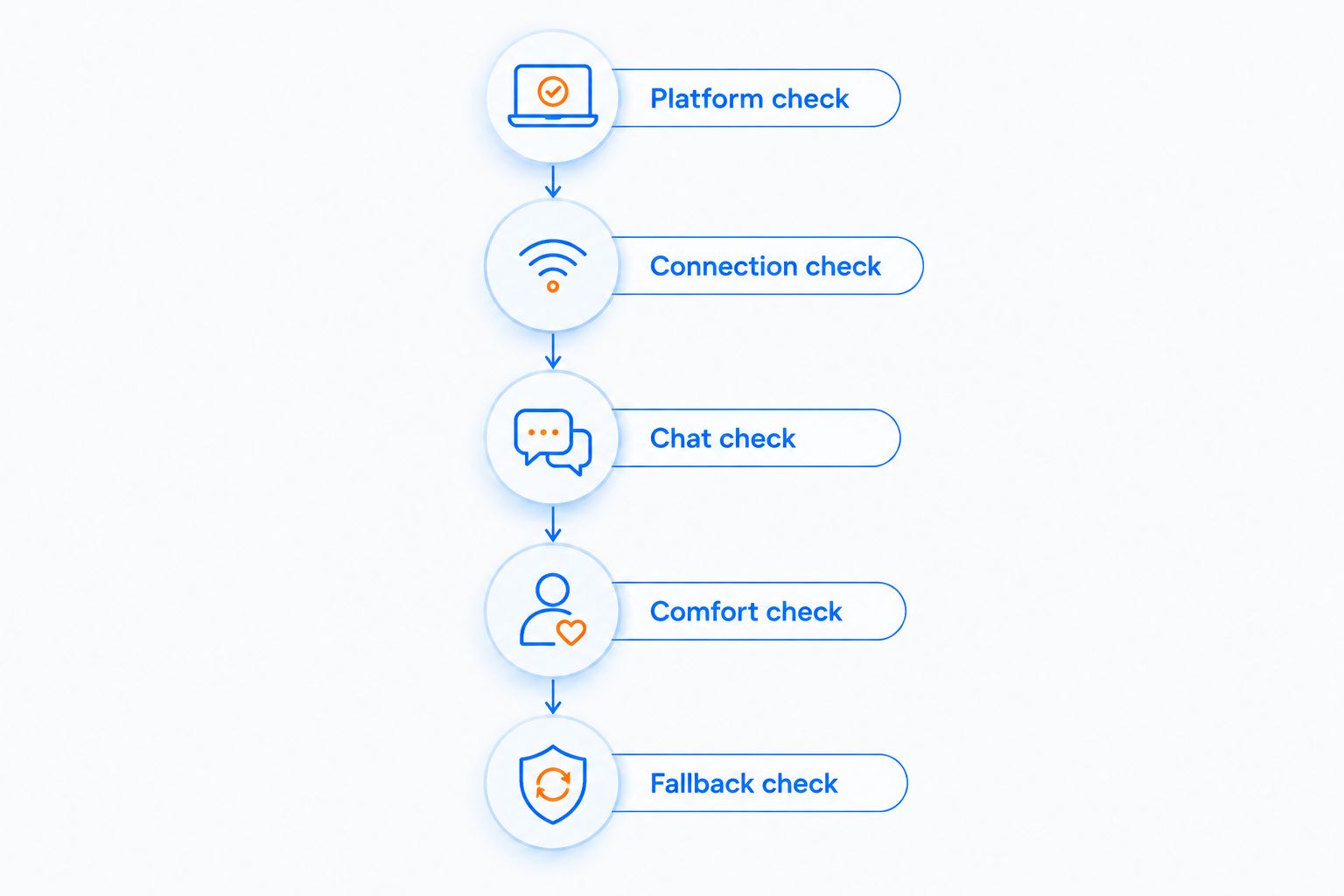
Use this sequence before comparing styling or extra software. It works whether you are buying your first headset or replacing one that already frustrates you.
- Platform check: Write down the exact devices you use. Confirm the headset's supported connection and microphone functions on each device.
- Connection check: Identify analog, USB, dedicated wireless, and Bluetooth modes separately. Establish which mode you will use for gaming.
- Chat check: Look for a microphone sample or test voice recording with game audio active. Check mute controls and input selection too.
- Comfort check: Assess earcup space, headband adjustment, and pressure with your glasses if you wear them. Comfort is not a specification you can infer from wireless capability.
- Fallback check: Confirm what happens if the battery empties, a receiver goes missing, or a cable needs replacing. Do not assume the spare connection carries audio.
A headset passes only when its intended gaming connection supports both your audio and your chat needs. Keep that requirement ahead of lighting, virtual surround labels, or the number of advertised modes.
Does a wired headset sound better than a wireless headset?
Neither connection type guarantees better sound. Driver design, acoustic tuning, fit, audio processing, and the source all contribute to what you hear.
An analog wired headset also depends on the headphone output driving it. A USB or dedicated wireless headset uses its own audio hardware, which changes the signal path without automatically making the result better or worse.
For your 2026 shortlist, compare evidence about individual headsets. Look for clear dialogue, usable positional cues, and a sound balance you enjoy—not a universal claim that cables create detail or wireless removes it.
Microphone quality deserves a separate comparison. A headset that sounds good to you can still make your voice difficult for teammates to understand.
Is wireless good enough for competitive gaming?
Dedicated gaming wireless is a valid choice for competitive play; wireless is not automatically disqualifying. The relevant evidence is the exact headset's behavior in its dedicated gaming mode, including audio delay, connection stability, and microphone operation.
Wired remains the simpler choice if you want to remove battery management and a wireless radio link from the setup. That is a practical advantage, not proof of an automatic competitive advantage.
Avoid applying a Bluetooth listening test to a headset's dedicated receiver mode. They are different signal paths, and a result from one does not establish the performance of the other.
Can one headset handle gaming and everyday use?
One headset can cover both jobs when its supported connections match your devices. Check switching behavior, microphone operation, and whether your preferred features work in every mode you need.
For a shared work-and-play desk, accessible mute controls and a clear microphone matter alongside game audio. For travel, account for the receiver and charging cable rather than judging portability by the headset alone.
If you are building a setup from scratch, Gaming and More lists a 4-in-1 Gaming Bundle containing an RGB keyboard, mouse, headset, and desk pad. That combines several setup items, but the supplied listing does not establish the headset's connection type or audio performance; confirm those details before treating it as your headset solution.
What should you do if a wireless headset disconnects?
Check power, the selected audio devices, and the receiver connection first. Then test with the receiver closer to the headset and away from obstructions or crowded cable clusters.
If your headset uses the 2.4 GHz band, nearby activity on that band is a troubleshooting consideration. Where your router and devices support it, moving suitable Wi-Fi traffic to 5 GHz is a useful isolation step—not a guarantee that interference caused the problem.
Change one thing at a time. If the issue remains, follow the headset manufacturer's connection and firmware instructions rather than assuming all wireless headsets behave the same way.
FAQ
What's better for gaming in 2026, a wired or wireless headset?
Wired is best for a fixed desk without charging; dedicated wireless is best for freedom of movement. Confirm platform support, comfort, and microphone behavior before choosing either.
Do wireless gaming headsets always have more noticeable lag?
Wireless does not automatically mean noticeable lag. Dedicated gaming wireless and Bluetooth use different connection paths, so assess the exact headset in the mode you intend to use.
Can I use a wireless gaming headset while charging it?
You can use a wireless gaming headset while charging only if that model supports it. A charging connection does not automatically provide USB audio or a wired fallback.
Will a 3.5 mm headset microphone work on my PC?
A 3.5 mm headset microphone works when your PC's audio connection supports the headset's plug configuration. Computers with separate headphone and microphone sockets can require a suitable splitter.
Is Bluetooth the same as dedicated gaming wireless?
Bluetooth is not the same as dedicated gaming wireless. Check receiver requirements, platform compatibility, audio delay, and microphone behavior for each supported mode.
Is a wired headset more comfortable than a wireless headset?
Wired is not automatically more comfortable than wireless. Compare fit, headband pressure, earcup space, and how the headset feels with glasses rather than relying on the connection type.
What should I check when buying a gaming headset as a gift?
Check the recipient's exact gaming device and preferred connection first. Then confirm microphone support, fit requirements, and whether they are comfortable managing a rechargeable headset.
One last thing
The most useful headset test is game audio and voice chat running together. Listening to music checks only part of the job; recording your microphone while your usual game and chat app are active checks the setup you actually need.
The Gaming and More verdict for 2026 is straightforward: buy wired to simplify a stationary setup, or dedicated wireless to remove a cable restriction. Let verified compatibility and comfort make the final decision.


