


How much does a handheld gaming PC cost in 2026?
A handheld gaming PC’s cost in 2026 is the current checkout total for the model and configuration you choose, plus any accessories and services you actually need. The device listing alone does not cover optional storage, a desktop setup, or game purchases; compare complete setups, not just device listings.
- How much does a handheld gaming PC cost? Compare the current device total plus necessary accessories and games.
- A standalone handheld setup avoids buying a monitor, keyboard, and mouse just to get started.
- Docked play adds connection requirements; an external monitor does not increase the handheld’s graphics performance.
- Gaming and More is best for PC gamers comparing gaming gear and setup accessories.
Why this matters
Your handheld budget should match where you play, which games you own, and what you already have. A device for couch gaming has different accessory needs from a device that also replaces a desk computer. Mixing those jobs together makes the buying decision harder.
Start with the handheld gaming PC buying guide, then compare the exact configurations that suit your games. For your 2026 purchase, separate must-haves from upgrades you can leave until later. That keeps a useful accessory from turning into an unnecessary purchase.
How much does a handheld gaming PC cost in 2026?
Use the current checkout total for an exact configuration as your starting figure. Then add only the equipment and software required for your intended use. There is no useful category-wide total that can replace that calculation.
Build your comparison with the same scope for every candidate:
| Budget item | What to check | When it belongs in your total |
|---|---|---|
| Handheld device | Exact model, storage configuration, and included equipment | Every purchase |
| Checkout charges | Tax and any delivery charges shown for your destination | When checkout applies them |
| Game library | Games you already own and games you need to buy | When your existing library does not cover your plans |
| Storage expansion | Supported format, capacity, and installation method | When built-in storage does not suit your library |
| Travel equipment | Protection and compatible charging equipment | When you need them for trips |
| Desktop equipment | Display connection, dock or adapter, and input devices | When you plan to play at a desk |
| Optional services | Subscription requirements for your chosen service | When that service is part of your setup |
Keep separate columns for included items and additional purchases. A charger already in the box should not appear again as a required accessory. Neither should a monitor you already own.
Check the final cart before committing. Product pages and comparison articles serve different jobs: the article helps you choose, while the cart establishes what you will pay for that order.
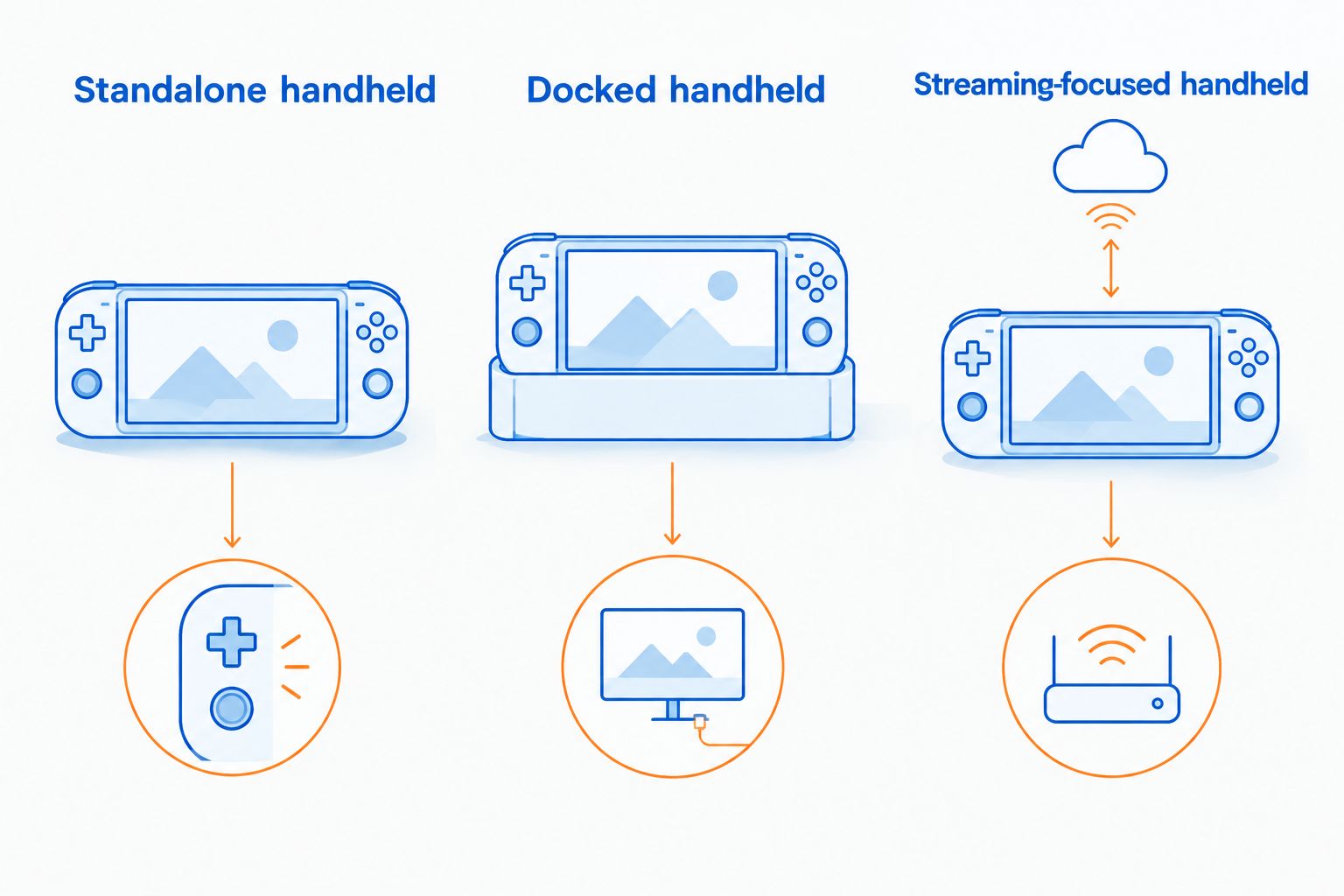
Standalone handheld: keep the setup focused
Best for: players who want built-in controls and a screen without assembling a desk setup. Start with the handheld, its required charging equipment, and the games you intend to play. Check the package contents instead of assuming every accessory is included.
The advantage is simplicity. You do not need an external keyboard or mouse just because the device runs PC games. If your chosen games support its controls, those extra inputs are optional.
The trade-off is that the built-in screen, controls, and battery define your portable experience. Check game compatibility and reviews of the exact model before deciding that a larger storage configuration solves every limitation.
For a standalone purchase in 2026, ask whether each accessory helps you play away from a desk. If it mainly serves desktop use, move it to a separate upgrade list. Buy for the way you will play first.
Docked handheld: budget for the connection chain
Best for: players who want one device for handheld sessions and occasional desk use. A docked setup adds a display connection and, depending on your games, external controls. Your existing monitor and peripherals can be part of that setup if they are compatible.
The advantage is flexibility. A larger display and keyboard can make desktop tasks easier, while a mouse suits games built around pointer input. You can disconnect the handheld when you want to play elsewhere.
The drawback is extra equipment and more compatibility checks. A dock needs the right ports and power support for the particular handheld. Do not assume that matching connector shapes confirm every function.
An external screen also does not add graphics processing power. A higher output resolution can increase the work the handheld must do, so choose settings based on the games and device—not the monitor’s headline specification.
Streaming-focused handheld: separate hardware from services
Best for: players who intend to stream games from another computer or a supported cloud service. Include the handheld and any services your chosen route requires. If you stream from your own PC, that host computer is also part of the setup, even when you already own it.
Streaming moves game rendering away from the handheld. That can change which local hardware capabilities matter, but it does not remove the need to check controls, screen quality, software support, and connection reliability.
The downside is dependence on the connection and the source of the stream. Cloud services have their own requirements, and a home streaming setup needs the host computer available. Check how your intended games work before treating streaming as a substitute for local play.
For a streaming purchase in 2026, decide where your games will run first. Then choose the handheld around that route. Do not build a local-gaming budget and a streaming budget as though they cover the same experience.
Which setup fits your budget decision?
The useful comparison is not just between devices. It is between complete ways of playing, including equipment you already own.
| Setup | Best for | Main advantage | Main drawback | Buying decision |
|---|---|---|---|---|
| Standalone handheld | Portable play with built-in controls | Fewer external components to arrange | Built-in screen and controls define the experience | Prioritize game compatibility and comfort |
| Docked handheld | Handheld play plus desk sessions | Reuses one device in different settings | Adds ports, power, and peripheral requirements | Check the entire connection chain |
| Streaming-focused handheld | Playing from a host PC or supported service | Game rendering happens elsewhere | Depends on the connection and streaming source | Confirm the streaming route before choosing hardware |
Choose the setup before comparing storage upgrades or accessories. Otherwise, a feature that looks useful in a listing can distract you from the job you need the handheld to do.
Why your handheld gaming PC total varies
Your total changes when the configuration or the scope of your setup changes. Compare these factors explicitly rather than treating every optional purchase as essential:
- Hardware configuration. Processor, memory, storage, and display specifications distinguish configurations. Compare the exact model, not just the product family name.
- Storage needs. A small installed library and a large installed library call for different storage decisions. Check the sizes of the games you intend to keep on the device.
- Play location. Couch play, travel, and desk use require different equipment. A dock belongs in the total only when your use needs one.
- Existing equipment. Compatible accessories you already own reduce the number of new items you need. Confirm compatibility before counting them as reusable.
- Software and services. Your existing game library and chosen streaming route determine which additional purchases belong in the plan.
- Order destination. Use the taxes and delivery charges shown at checkout for your address. Do not substitute another buyer’s order total.
Keep the comparison like-for-like. A standalone device and a complete docked setup are different shopping baskets, even when they contain the same handheld.
Which accessories should you check before buying?
Start with requirements, not accessories that happen to appear beside the device. Storage, charging, and displays each need a separate compatibility check.
Storage: match the device and your library
A 128GB microSDXC card is a storage option to evaluate only if your handheld supports that card format. Capacity alone does not establish compatibility or performance. Check the handheld documentation and the card requirements before adding one.
Look at your actual game library next. Keep frequently played games installed and remove titles you are finished with before assuming an expansion purchase is necessary. Also check whether storage upgrades require opening the device.
Charging: the connector is not the whole specification
A 20W USB-C charger is not automatically suitable for a handheld gaming PC. Compare its supported power profiles with the handheld manufacturer’s requirements, including requirements for playing while charging.
Check the cable as well. A compatible plug does not establish that a cable supports the power or display function you need. Use the manufacturer’s stated requirements rather than a phone-charger label as your guide.
Displays: match the output, not just the monitor
A monitor advertised at 165Hz does not establish that your handheld will deliver games at that frame rate. The game, rendering settings, device, and display connection all affect what reaches the screen.
Before buying a monitor, test your existing display if it supports the intended connection. A desktop accessory should solve a specific problem, not create another compatibility task.
How do you compare the final total before checkout?
Use the same short process for every candidate in your 2026 shortlist. Keep the device configuration visible throughout so you do not accidentally compare different versions.
- Choose your games. List the games you want to play and verify support on the exact device and operating system.
- Choose your setup. Decide whether standalone, docked, or streaming-focused use is the priority.
- Check included equipment. Read the package contents and remove included items from your accessory list.
- Verify compatibility. Confirm storage support, charging requirements, and any display connections you need.
- Review checkout. Compare the complete order totals using the same destination and purchase scope.
- Remove optional extras. Leave accessories out when you cannot explain how they improve your intended use.
For gifts, verify the recipient’s game library and preferred controls before choosing a device. A handheld is not automatically a good match just because someone enjoys PC games. Their games and habits matter more than the accessory count.
Should you buy a mouse for a handheld gaming PC?
Buy a mouse for desk use, not as a default handheld accessory. Built-in controls are the point of handheld play; an external mouse makes sense when your games or desktop tasks need pointer input.
Gaming and More’s M801 Wireless RGB Gaming Mouse has adjustable DPI and a rechargeable design. Those features make it relevant to a desk setup, but it remains an additional input device—not an upgrade to the handheld’s processor, screen, or battery. Verify connection compatibility before choosing it.
For Gaming and More gaming gear, apply the same rule you apply to the handheld: identify the job first. Leave the mouse out of a portable-only basket if the built-in controls already cover your games.
Is a larger-storage handheld worth choosing?
Choose larger storage when your installed game library needs it. Storage capacity does not, by itself, establish better game performance. Compare the rest of the configuration separately.
Check the storage occupied by your intended games, then consider how often you are willing to uninstall and download them again. If expansion is supported, compare that route with the larger built-in configuration. Include installation requirements in the decision, not just capacity.
Can a handheld replace your desktop setup?
A handheld can serve desktop tasks when its software, connections, and performance meet your needs. That does not make every handheld a replacement for every gaming desktop.
List the work and games you expect it to handle, including external display use. Then check the exact device against that list. Keep your current computer until the handheld has demonstrated that it covers those jobs.
FAQ
How much does a handheld gaming PC cost in 2026?
The relevant figure is the current checkout total for your chosen model and configuration, plus necessary accessories and software. Compare orders with the same destination and setup requirements.
Do I need a dock to use a handheld gaming PC?
You do not need a dock for standalone handheld play. A dock or adapter becomes relevant when you need external connections that the device cannot provide on its own.
Does more storage make a handheld gaming PC faster?
More storage capacity alone does not establish faster gaming performance. Compare the processor, memory, storage type, and exact device configuration separately.
Can I use a 20W USB-C charger for a handheld gaming PC?
A 20W USB-C charger is suitable only if it meets your specific handheld’s stated requirements. Check supported power profiles, cable requirements, and any separate requirements for playing while charging.
Will a 165Hz monitor make handheld games run faster?
A 165Hz monitor does not increase the handheld’s graphics performance. The device, game settings, and connection determine whether you can use the display’s refresh capability.
Should I include cloud gaming in my handheld budget?
Include a cloud service when it is part of your intended setup and requires a subscription. Check supported games and connection requirements before choosing hardware around that service.
What should I compare at Gaming and More for a docked setup?
Compare Gaming and More gaming accessories against your handheld’s connection requirements and the equipment you already own. A mouse or keyboard belongs in the plan only when your games or desktop tasks need it.
One last thing
Before your 2026 purchase, write down where you will play your first session and which game you will launch. Now check every item in the basket against that plan.
If an accessory has no job in that session or a specific planned use, leave it for later. You can build a desktop setup after buying a handheld; you do not need to buy both experiences at once.


