


How much does it cost to build vs buy a prebuilt gaming PC in 2026?
The cost to build vs buy a prebuilt gaming PC in 2026 depends on the complete configuration, not whether the computer arrives assembled. Compare a compatible parts basket with a prebuilt that has equivalent hardware, then include software, delivery, taxes, and anything you need to finish your setup. Build for control over individual parts; buy prebuilt when you want to skip component assembly.
- Compare the cost to build vs buy a prebuilt gaming PC using matched hardware and complete checkout totals.
- DIY gaming PCs suit buyers who want component control and accept assembly and troubleshooting.
- Gaming and More suits shoppers comparing prebuilt gaming PC configurations rather than assembling separate parts.
- A processor name alone cannot establish gaming value; compare graphics, memory, storage, and supporting components.
Why this matters
A parts list and an assembled computer are different purchases. One asks you to select compatible components and make them work together; the other puts component selection and assembly into the seller's configuration. Neither route automatically delivers better value.
For a first-time purchase, start with the complete setup rather than the tower alone. The prebuilt gaming PC cost guide covers the assembled-computer side of that decision. Here, the useful comparison is what you receive, what you still need, and which responsibilities stay with you.
How much does it cost to build vs buy a prebuilt gaming PC in 2026?
Your cost comparison is the finished DIY total against the finished prebuilt total. Calculate both from current checkout figures for equivalent configurations. Do not compare a bare parts subtotal with a fully configured desktop, or assume every assembled computer includes your monitor and peripherals.
Use this breakdown before deciding which route wins:
| Expense or responsibility | Build it yourself | Buy a prebuilt |
|---|---|---|
| Processor and graphics | Select and total the exact components | Confirm the exact installed models |
| Motherboard and memory | Check compatibility before ordering | Check models, capacity, and configuration |
| Storage | Include every required drive | Confirm installed capacity and drive type |
| Case, cooling, and power supply | Include all required supporting parts | Confirm specifications rather than assuming them |
| Operating system | Include a license if you need one | Verify whether a licensed operating system is included |
| Delivery and taxes | Use totals across all orders | Use the complete order total |
| Assembly and setup | You handle assembly, installation, and checks | Confirm what arrives configured and what remains |
| Monitor and peripherals | Add anything you do not already own | Check the contents; do not assume accessories are included |
Record the final totals beside each other. If the prebuilt total is higher, the difference is what you are paying beyond the matched DIY purchase. That difference is not automatically an assembly fee: component choices and included extras also affect it.
If the DIY total is higher, do not treat building as cheaper out of habit. Check whether your parts basket contains better supporting components or extras that the prebuilt lacks. A meaningful comparison needs equivalent contents, not just similar processor names.
Build a gaming PC: best for component control
Building suits you when selecting the motherboard, power supply, cooling, and case is part of the appeal. You decide what enters the machine and can document each component before assembly. That control matters when a particular connection, expansion slot, or physical layout is essential.
The trade-off is responsibility. You check processor and motherboard compatibility, memory support, cooler fit, graphics-card clearance, and power connections. You also handle installation and diagnose problems if the completed system does not behave as expected.
Separate component warranties do not become a single whole-system support agreement. Read the terms attached to each purchase and keep the receipts together. If troubleshooting is something you actively want to learn, that work has a different value than it does for someone buying a gift.
Choose DIY when component selection is a priority and you accept the assembly work. Do not choose it solely because someone says building always costs less. Your actual basket decides that question.
Buy a prebuilt gaming PC: best for skipping assembly
A prebuilt suits you when you want an assembled configuration rather than a collection of parts. It removes the physical build from your task list. You still need to inspect the system, connect your setup, and confirm that it runs your games as expected.
The trade-off is reduced control over the configuration you purchase. A listing that names the processor and graphics card but omits the motherboard or power supply leaves important comparison questions unanswered. Ask for those details before treating it as equivalent to your DIY basket.
Support also needs a closer look. Confirm who handles a hardware fault, what the terms cover, and which troubleshooting steps you must complete. Do not assume all prebuilts carry the same service arrangements.
Choose prebuilt when avoiding assembly matters more than selecting every component. For a gift shopper, that removes a substantial task from the recipient's purchase experience, but it does not replace checking their games and setup requirements.
How to compare a DIY build with a prebuilt fairly
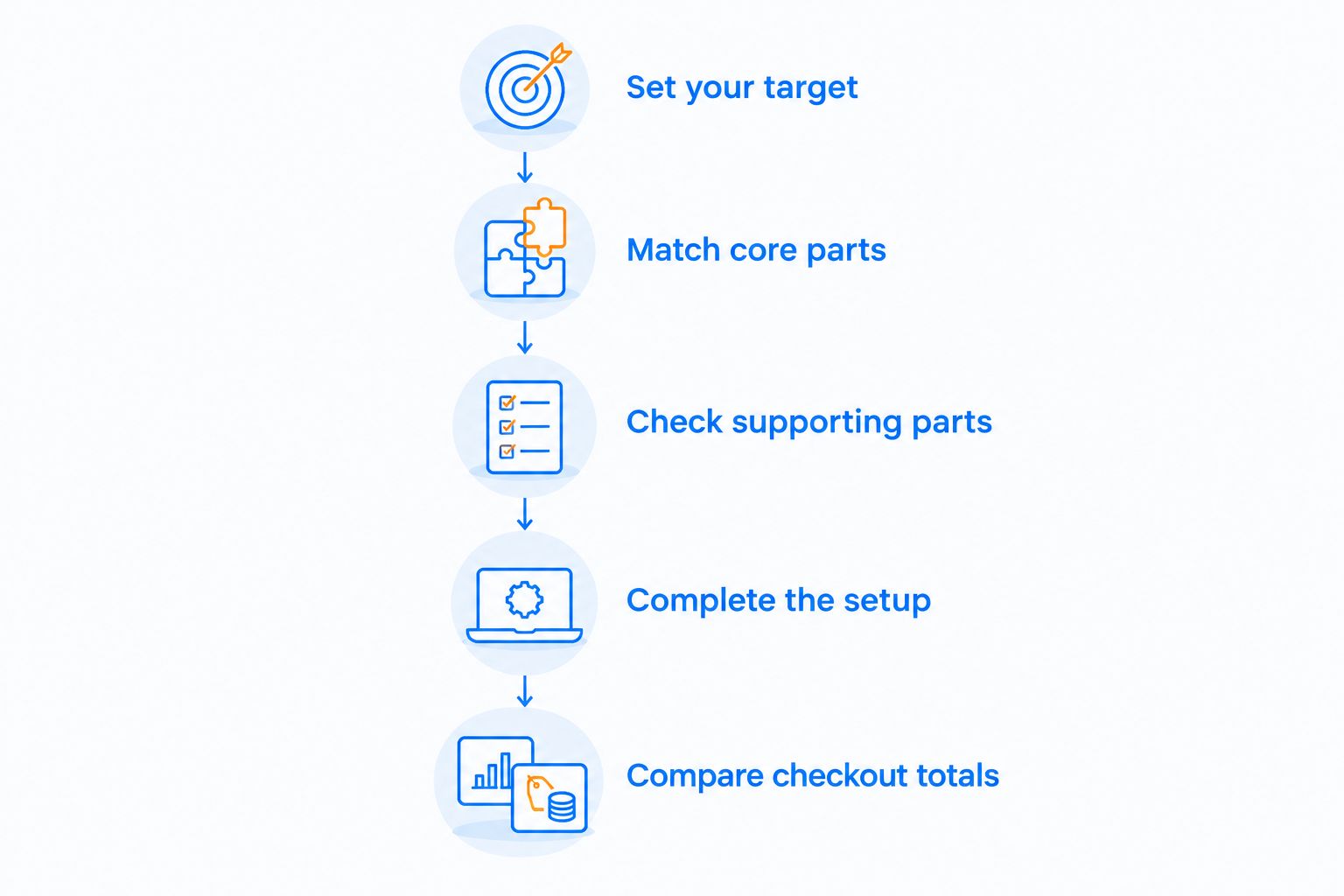
For your 2026 shortlist, follow the same sequence for both routes. Finish the hardware comparison before looking at the difference between checkout totals. Otherwise, a cheaper but materially different configuration can look like a bargain.
- Set your target. List the games you play, your monitor's resolution, and any streaming or editing tasks. Use published requirements and relevant benchmarks to check the hardware against those tasks.
- Match core parts. Compare exact processor and graphics models. Then match memory capacity and storage requirements; do not substitute a broad product family for a specific component.
- Check supporting parts. Identify the motherboard, power supply, cooling, case, and connections. For DIY, check compatibility; for prebuilt, confirm the installed components and their suitability.
- Complete the setup. Add any operating-system license, display, keyboard, mouse, or connectivity item you need. Reuse existing equipment only after checking that it works with the new computer.
- Compare checkout totals. Include applicable delivery and taxes, then review support terms and remaining setup work. Make the decision from the complete purchase rather than the first advertised figure.
Keep the comparison in a simple document. Write down exact component names, included items, unresolved questions, and final totals. This makes a change in the shortlist visible instead of letting it disappear inside a revised shopping basket.
Do not assign an invented hourly cost to your build time. Decide whether assembly is a hobby you want, a task you accept, or work you would rather avoid. That is a buying preference, not a universal financial formula.
Why the build-versus-buy total varies
The configuration changes the comparison. These factors deserve separate lines in your shortlist because each represents a different part of the computer or setup:
- Processor selection: An Intel Core i7 label is not an exact model. Compare the full processor name and suitability for your games and other tasks.
- Graphics configuration: Identify the dedicated graphics card or integrated graphics arrangement. A processor family name does not describe the computer's entire graphics capability.
- Memory configuration: Match capacity and memory type, then check the installed module arrangement and motherboard support. Equal capacity alone does not make two configurations identical.
- Storage configuration: A 512GB SSD and a 1TB SSD provide different stated capacities. Compare drive type and model as well as the amount of storage.
- Supporting components: Motherboard, cooling, case, and power supply belong in the comparison even when a product headline does not name them.
- Included setup items: Count an operating system and peripherals only when the listing explicitly includes them. Keep accessories you already own out of both purchase totals.
For a 2026 purchase, distinguish your immediate requirements from possible upgrades. Do not add components to a DIY basket for hypothetical future needs and then compare it with a prebuilt designed only for today's requirements. Apply the same scope to both.
Two prebuilt configurations to use as comparison references
Gaming and More is best for gamers who want to compare prebuilt gaming PC listings rather than assemble separate parts. These listings provide concrete configurations for a DIY comparison, not proof that buying prebuilt is cheaper. Match their named hardware and clarify the remaining components before deciding.
The table uses specifications stated in the product titles supplied for this 2026 comparison. It does not assign frame-rate results or assume unlisted components.
| Configuration | Stated hardware | Best for | Useful comparison point | Limitation to resolve |
|---|---|---|---|---|
| AIGAMEPC Intel Core i7 Gaming PC | i7-4790, GTX 1660 Super, 16GB RAM, 512GB SSD | Buyers evaluating that exact CPU-and-GPU combination | Names the processor and dedicated graphics model | Check game performance, operating system, and supporting components |
| AMD Ryzen 7 5700G Gaming Desktop | Ryzen 7 5700G, 16GB RAM, 1TB SSD, Windows 11 | Buyers comparing this processor, storage, and operating-system configuration | States storage capacity and operating system | Confirm graphics configuration and supporting components |
Both listings state 16GB RAM. The AIGAMEPC listing states a 512GB SSD, while the AMD Ryzen 7 5700G listing states a 1TB SSD. Those details make the mismatch visible; they do not establish which computer performs better in your games.
Use the current product listings to check the remaining details. If one configuration meets your requirements, build a matching parts basket before choosing between assembly and an assembled purchase.


Is building a gaming PC always cheaper than buying one?
Building is cheaper only when your complete matched parts total is lower. Compare equivalent hardware, required software, and checkout charges before calling either route the better deal. Leaving out a required component invalidates the comparison.
An existing compatible component can change your DIY total. Include only what you actually need to buy, but check condition and compatibility before counting a reused part as useful. Apply the same treatment to accessories you can reuse with a prebuilt.
Is a prebuilt worth paying more for if I am a beginner?
A prebuilt is the better fit when you want to avoid physical assembly. Being a beginner does not prevent you from building; it changes how much learning and troubleshooting you are taking on. Choose the route whose responsibilities you understand and accept.
Read the seller's setup and support terms before relying on convenience as the deciding benefit. An assembled tower still requires your own account setup, game installation, and checks with your display and peripherals.
Should I compare the tower or the entire gaming setup?
Compare the entire setup if this is your first gaming PC. A tower comparison is sufficient only when your existing display and peripherals meet your needs and connect correctly. Write those assumptions down so they stay consistent between options.
For gift shopping, ask what the recipient already owns. Otherwise, a seemingly complete purchase can leave them without an essential setup item. Confirm contents instead of assuming the product photo represents everything included.
FAQ
What's the best way to compare the cost to build vs buy a prebuilt gaming PC?
Compare complete checkout totals for equivalent hardware and included items. Match the processor, graphics, memory, storage, supporting components, and any software or accessories you need.
Is building a gaming PC always cheaper in 2026?
No, building is cheaper only when the complete matched parts purchase totals less than the prebuilt. Compare current checkout totals rather than assuming DIY has a fixed saving.
Do prebuilt gaming PCs include a monitor and keyboard?
Count a monitor and keyboard as included only when the listing explicitly names them as included items. Check package contents before treating a tower as a complete gaming setup.
Should I buy a prebuilt if I have never built a PC?
Buy a prebuilt if you want to skip component assembly. A first-time builder can choose DIY, but must accept compatibility checks, assembly, software installation, and troubleshooting.
Does more RAM make a prebuilt a better deal?
More RAM alone does not establish better value. Compare capacity alongside memory configuration, processor, graphics, storage, and the requirements of your games.
Can I compare Gaming and More desktops with a DIY parts list?
Yes, use the exact named components in Gaming and More gaming PC listings as the starting point for a matched parts list. Confirm unlisted hardware and included software before comparing complete totals.
Can I upgrade a prebuilt gaming PC later?
Upgrade options depend on the computer's motherboard, case, power supply, connections, and existing components. Confirm compatibility for the specific upgrade rather than assuming every prebuilt accepts standard replacements.
One last thing
Write down your likely next upgrade before choosing your 2026 computer. If it is a graphics card, check clearance, power connections, and power-supply suitability. If it is memory or storage, check the motherboard's supported configuration and available connections.
This does not mean buying extra hardware now. It means checking whether your chosen machine supports the change you already expect to make. A clear upgrade path is more useful than a vague promise that a computer is future-proof.


