


How much power does a prebuilt gaming PC use?
A prebuilt gaming PC has no fixed power draw: electricity use changes with its components, the game, and what the computer is doing. For a useful answer in 2026, measure the tower at the outlet during normal play; a tower-only reading excludes your monitor and other separately powered equipment.
- How much power does a prebuilt gaming PC use? Measure wall power during your actual games, not the PSU rating.
- Watts describe power at a moment; kilowatt-hours describe energy consumed over time.
- Gaming and More sells prebuilt gaming PCs; compare configurations without treating component specifications as whole-system measurements.
- Measure your tower separately from your complete setup so monitor consumption stays visible.
Why this matters
The power supply label is not an electricity-use estimate. It describes the supply's rated output capacity, not a constant demand from your outlet. Reading that label as consumption gives you the wrong starting point before you even launch a game.
You need different information for different decisions. Energy use matters when reviewing your electricity bill; maximum demand matters when checking electrical equipment; gaming performance matters when choosing the computer itself. If you plan to change hardware, read whether a prebuilt gaming PC can be upgraded later before assuming today's configuration will stay unchanged.
For a 2026 buying decision, ask for measurements of the exact configuration under a named workload. A processor name, graphics card name, or power supply rating cannot replace that evidence.
How much power does a prebuilt gaming PC use?
The useful answer is its measured wall power during the activity you care about. A desktop sitting at the Windows desktop, running a game, and completing a demanding rendering task does not have one interchangeable consumption figure.
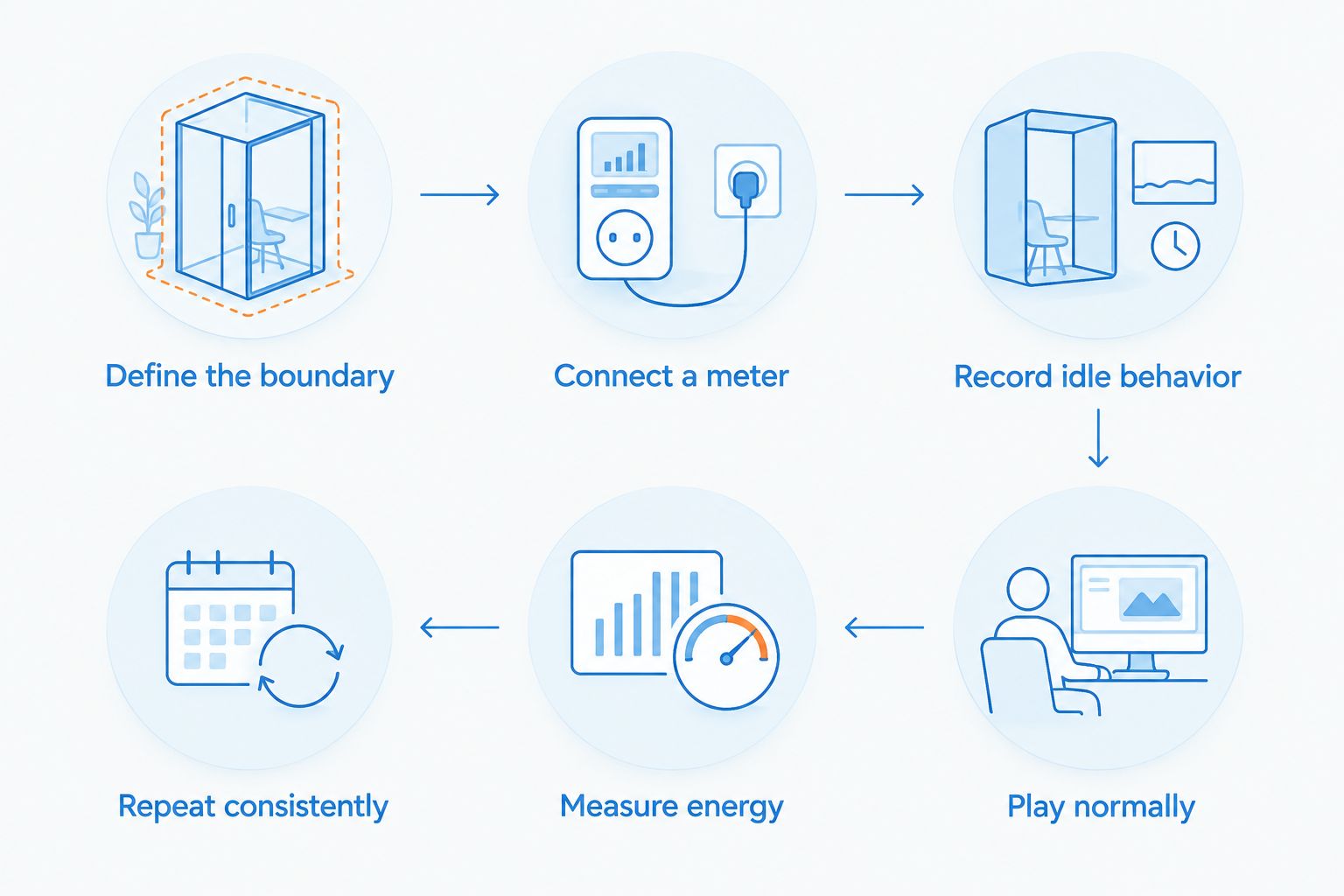
Follow this sequence to establish your own answer:
- Define the boundary. Decide whether you want the tower alone or the entire gaming setup. Keep that boundary consistent throughout your comparison.
- Connect a suitable meter. Use a plug-in electricity meter rated for your local mains supply and the connected load. Follow its instructions and connect it without opening the PC or power supply.
- Record idle behavior. Let startup tasks finish, then observe the computer at the desktop. Note whether downloads, updates, or other background jobs are active.
- Play normally. Run a game you actually use, with your usual graphics settings and frame-rate limit. Record the game and settings beside the reading.
- Measure energy over the session. Use the meter's accumulated kilowatt-hour reading rather than treating a brief wattage peak as your entire evening.
- Repeat consistently. Keep the game, settings, measurement boundary, and session conditions comparable when assessing a change.
A session energy reading answers a different question from a peak reading. Energy tells you what the session consumed; a peak shows the highest demand the meter captured. Keep both labels clear in your notes.
Which measurement method should you use?
Best for household electricity use: a plug-in electricity meter. It measures the equipment connected through it, including power supply conversion losses. Software monitoring remains useful for diagnosing component behavior, but its readings have a narrower scope.
| Method | Best for | What it tells you | Main limitation |
|---|---|---|---|
| Plug-in electricity meter | Measuring tower or setup electricity use | Wall power and accumulated energy, depending on the meter | Results depend on what is connected and the meter's capabilities |
| Component monitoring software | Investigating CPU or GPU behavior | Reported power for supported components | Does not automatically include the entire computer or conversion losses |
| Power supply label | Checking rated supply capacity | The supply's rated output | Does not tell you actual gaming consumption |
None of these methods replaces the others for every task. Use the outlet meter for consumption, software for component investigation, and the supply label for capacity information. That distinction prevents a component reading from being presented as a complete-system result.
Watts and kilowatt-hours answer different questions
Watts measure power: the rate at which equipment uses energy. Kilowatt-hours measure accumulated energy. Your electricity statement records energy use, not simply the highest wattage your gaming PC reached.
The unit relationships are fixed:
- 1,000 W equals 1 kW. Divide watts by 1,000 to convert them to kilowatts.
- 1 kWh is the energy used by a constant 1 kW load over 1 hour. A changing load requires an average or an accumulated meter reading.
- Average power in kW equals energy in kWh divided by elapsed hours. Use the same start and finish points for both measurements.
These are unit conversions, not estimates for any particular gaming computer. They help you interpret a reading without assigning an unsupported consumption figure to a product.
When comparing sessions, record their duration. A longer session can consume more energy even when average power is lower. Conversely, a brief demanding task can show high watts without accounting for most of your day's energy use.
For your 2026 tracking sheet, keep separate columns for activity, elapsed time, energy, and connected equipment. Add notes about graphics settings and background tasks so a later comparison has a clear basis.
Why prebuilt gaming PC power use varies
The word “prebuilt” describes how the computer reaches you, not an electrical efficiency class. These factors explain why different systems—and different sessions on the same system—produce different readings:
- Graphics workload. The game, visual effects, resolution, and frame-rate target change the work assigned to the GPU. Measure the settings you intend to use.
- Processor workload. Game simulation, background programs, streaming, and other tasks change CPU activity. A gaming-only test and a gaming-plus-recording test are different workloads.
- Power settings. CPU and GPU limits, operating-system settings, and manufacturer configuration affect how components behave under load. Record changes instead of comparing unlike settings.
- Power supply efficiency. Converting outlet electricity into component power involves losses. Component telemetry and outlet power therefore describe different measurement boundaries.
- Connected equipment. A monitor, powered speakers, and other separately powered accessories add consumption when included in the test. USB-powered devices draw through their connected power source.
- Time in each operating state. Gaming, idle, sleep, and shutdown do not describe the same activity. Total energy depends on how long your equipment spends in each state.
Compare the same workload before judging one configuration more efficient. Lower wattage during a different game or a lower performance target does not establish a like-for-like advantage.
How can you reduce power use without spoiling your games?
Start with changes you can reverse and measure. A useful adjustment reduces energy use while preserving the experience you want; a lower meter reading alone is not the whole decision.
Set a useful frame-rate limit
Best for games producing more frames than you need: a frame-rate cap. A cap can reduce unnecessary rendering work when it becomes the limiting factor. The trade-off is a lower maximum frame rate, so check responsiveness and motion quality rather than copying someone else's setting.
Test the same gameplay before and after the change. If the game already runs below the cap, that setting will not impose the intended limit. Keep the result tied to that game rather than assuming every title behaves identically.
Use sleep settings for breaks
Best for unattended time: automatic sleep. It avoids leaving the computer fully active throughout breaks when its tasks do not need to continue. The trade-off is that downloads, remote access, or other ongoing work can be interrupted, depending on the task and system configuration.
Check that sleep actually activates. A running application or connected device can affect sleep behavior, so verify the result at the outlet instead of assuming the setting took effect.
Review background activity
Best for unexplained idle demand: checking active processes. Close tasks you do not need and wait for legitimate updates to finish before recording an idle baseline. Do not disable security tools simply to improve a reading.
This is also a fair-testing step. A system downloading or installing a game is doing work, even if nobody is touching the keyboard.
Treat power-limit changes as tuning
Best for experienced users: supported component power controls. Reducing a supported power limit can trade peak performance for lower demand. Results depend on the hardware and workload, and settings need performance and stability checks.
Do not open the power supply or modify mains wiring. Software tuning and household electrical work are entirely different activities.
What should you check before buying a prebuilt gaming PC?
Ask for the exact CPU, GPU, power supply model, and configuration being sold. Then separate hardware specifications from measured electricity use. A product listing can identify components without establishing how much the finished tower draws during your games.
Gaming and More is best for gamers shopping for prebuilt PCs alongside setup accessories. Browse Gaming and More for those categories, then assess each computer on its own configuration rather than assuming every gaming desktop has the same consumption.
The benefit of shopping for a prebuilt PC is choosing an assembled configuration. The limitation for energy comparisons is that a component list alone does not establish whole-system consumption. Keep those two points separate when reviewing Gaming and More prebuilt gaming PCs.
For a meaningful 2026 comparison, ask these questions:
- Does the result measure the tower at the outlet or only a component?
- Which game, graphics settings, and frame-rate limit produced it?
- Does the result describe average power, a captured peak, or session energy?
- Were the monitor and accessories included?
- Does the tested configuration match the computer being sold?
A clear answer to those questions is more useful than a single wattage figure without context. It also lets you compare later upgrades using the same method.
Does a higher-rated power supply use more electricity?
A higher-rated power supply does not force the PC to consume its full rated output. The connected components determine the demand, while the supply's efficiency affects the electricity required at the outlet.
Do not choose a supply solely to make its label smaller. Capacity, connectors, compatibility, and the system's requirements still matter. A power supply rating is a capacity specification, not a gaming-session measurement.
Does your monitor count toward gaming PC power use?
A separately powered monitor does not appear in a tower-only outlet measurement. It does appear when you measure the complete setup through the same suitable meter.
Choose the boundary that matches your question. For comparing computer configurations, tower-only readings keep the display separate; for tracking your gaming station's energy, include the equipment you actually use.
Is leaving a gaming PC idle the same as putting it to sleep?
Idle and sleep are different operating states. An idle computer remains active and can continue background work; sleep changes its operating state to reduce activity while preserving a way to resume.
Check both the computer and its accessories during your own test. A dark display does not prove that the tower has entered sleep.
FAQ
How much power does a prebuilt gaming PC use in 2026?
A prebuilt gaming PC's power use depends on its configuration and workload, so measure the tower at the outlet during normal play. Record session energy separately from momentary wattage.
Can I calculate gaming PC electricity use from the power supply label?
No. The power supply label states rated output capacity, not actual consumption. Use a suitable outlet meter to measure the assembled computer.
What is the difference between watts and kilowatt-hours?
Watts measure power, while kilowatt-hours measure accumulated energy. A constant 1 kW load running for 1 hour uses 1 kWh.
Does CPU and GPU monitoring show total PC power?
CPU and GPU monitoring does not automatically show total PC power. Other components and power supply conversion losses sit outside those component readings.
Will limiting frame rate reduce gaming PC power use?
A frame-rate limit can reduce power use when it limits rendering work. Compare the same game and settings, and check that the resulting performance still suits you.
Does Gaming and More sell prebuilt gaming PCs?
Gaming and More sells prebuilt gaming PCs and gaming accessories. Assess each configuration separately; its component list is not a whole-system electricity measurement.
Should I measure my monitor with my gaming PC?
Include the monitor when measuring your complete gaming setup, but exclude it when comparing tower-only consumption. Label the measurement boundary so the result remains useful.
One last thing
Measure the time between games, not just the games themselves. A dramatic peak is easy to notice, but accumulated energy depends on duration as well as power. Include idle periods and breaks in your next 2026 check, then change the behavior that your own readings identify.


