


How much RAM does a mini gaming PC need in 2026?
Choose 16GB of RAM as a starting point for a mini gaming PC in 2026; choose 32GB for demanding games, substantial mods, or gaming alongside other apps. Integrated graphics shares system memory, so RAM capacity alone does not tell you how much memory your games can use or how well the PC will perform.
- How much RAM does a mini gaming PC need? Start with 16GB; choose 32GB for heavier workloads.
- Integrated graphics shares system RAM; dedicated graphics has separate video memory.
- Check memory channels, module type, and upgrade access before choosing a mini PC.
- Gaming and More RAM shoppers should confirm compatibility before buying an upgrade.
How much RAM does a mini gaming PC need in 2026?
16GB is a practical starting recommendation, not a guarantee that every game will run well. Check the publisher's recommended requirements for the games you actually play. A computer that meets the RAM requirement can still fall short on graphics performance or processor capability.
Use this table to choose a capacity, then check the exact PC's memory specification. If you're still choosing the computer, the guide to whether a mini gaming PC can run modern AAA games covers the broader hardware decision.
| RAM capacity | Best for | Main advantage | Main limitation | Buying verdict |
|---|---|---|---|---|
| 8GB | Existing systems running games with modest memory requirements | Can serve a narrow, verified workload | Leaves less room for games, background apps, and shared graphics memory | Keep only if your games run acceptably |
| 16GB | Gaming-focused use with limited multitasking | Practical starting capacity without choosing unnecessary memory | Less headroom for demanding games, mods, and concurrent apps | Start here after checking game requirements |
| 32GB | Demanding games, modded games, and heavier multitasking | More room for simultaneous workloads | Does not fix a weak graphics processor | Choose when your workload supports it |
| 64GB | Gaming PCs that also handle memory-heavy professional work | Supports workloads beyond ordinary gaming | Unnecessary capacity does not improve performance by itself | Skip unless your applications justify it |
These are buying recommendations, not measured performance results. More RAM helps when insufficient memory is the constraint; it does not automatically produce higher frame rates.
Why this matters
A mini PC's small case tells you little about its memory needs. The games, graphics architecture, and background applications determine the workload. The chassis determines which upgrades you can physically install.
That distinction matters when shopping in 2026. A machine with generous RAM but unsuitable graphics remains unsuitable for demanding gaming. A smaller memory allocation can also become a problem when several applications need it at once.
Gaming and More is best for gaming gear shoppers who check hardware compatibility before choosing an upgrade. Treat a RAM listing as one component of the decision, not proof that it fits your mini PC or solves its performance problem.
8GB RAM: best for limited, verified workloads
8GB belongs in a narrow-use decision, not a blanket recommendation for a new gaming purchase. An existing mini PC can remain useful if your chosen games fit within its available memory and run acceptably. Keep background applications under control and check each game's requirements.
The trade-off is headroom. Your operating system and applications use memory before the game receives its share. Integrated graphics also uses system memory rather than relying entirely on separate video memory.
For a gift purchase in 2026, avoid assuming that an 8GB specification means the recipient's games will work. Ask what they play and whether the computer supports memory upgrades. A fixed-memory configuration needs closer scrutiny because you cannot simply add another module later.
Verdict: keep 8GB for a workload you have verified; do not choose it merely because the computer carries a gaming label.
16GB RAM: best for gaming-focused use
16GB is the sensible starting point when gaming is the main job and your games' recommended requirements fit. It gives you more capacity than an entry-level configuration without making memory the entire buying decision. Pair that capacity with a suitable processor and graphics system.
The limitation appears when your workload grows. A heavily modified game, browser sessions, voice chat, recording software, and other applications all draw from the same system memory pool. Their combined demand matters more than the game alone.
For a new mini PC in 2026, check whether the installed memory is replaceable. An upgradeable 16GB system gives you a route to more capacity, subject to the manufacturer's supported maximum. Soldered memory removes that option.
Verdict: choose 16GB for a verified gaming-focused workload, especially when the system allows a later upgrade.
32GB RAM: best for demanding games and multitasking
32GB is the stronger choice when you need more room for games and concurrent applications. It is also a reasonable purchase when your specific games or mod packs recommend that capacity. Check the requirements rather than treating every demanding-looking game alike.
The benefit is capacity headroom, not an automatic graphics upgrade. More system RAM cannot turn an unsuitable integrated GPU into a capable dedicated graphics card. Nor does it increase the separate video memory installed on a dedicated card.
Choose 32GB when the workload supports it or when a fixed-memory system must cover your expected applications. Avoid describing it as permanently future-proof. Future games and software still need to be checked against the complete hardware specification.
Verdict: choose 32GB for heavier workloads; do not buy it expecting RAM alone to fix low frame rates.
64GB RAM: best for memory-heavy work beyond gaming
64GB needs a workload-based reason. Consider it when the same computer runs memory-heavy development tools, virtual machines, large creative projects, or another application with documented requirements. Ordinary gaming alone is not enough to justify the recommendation.
Its advantage is room for those additional tasks. Its drawback is that unused capacity does not make a game faster simply by being installed. You still need compatible modules and a system that supports the total capacity.
Before choosing 64GB, check the application's recommendations and observe memory demand on a comparable workload where possible. Do not substitute a large RAM number for a balanced system specification.
Verdict: skip 64GB unless your games or other applications provide a clear reason for it.
Why mini gaming PC RAM needs vary
The same capacity can suit one player and constrain another. These factors explain the difference:
- Game requirements: use the publisher's recommended memory specification as your starting point, not just the minimum required to launch.
- Integrated graphics: the graphics processor shares system memory, affecting both available capacity and memory-bandwidth demand.
- Background applications: browsers, voice chat, recording tools, and launchers add to the workload running beside your game.
- Mods and custom content: follow the requirements of the specific mod pack; modified games do not necessarily match the base game's needs.
- Other uses: editing, development, and virtual machines can justify more memory than gaming alone.
- Upgrade access: replaceable modules let you change capacity later; soldered memory makes the initial choice more consequential.
For your 2026 purchase, separate capacity requirements from upgrade requirements. You need enough memory for the workload and a configuration that the computer actually supports.
How do you check RAM compatibility before buying?
Match the memory to the exact mini PC model before ordering. Capacity, generation, physical format, and supported configuration all matter. A listing that says DDR4 or DDR5 does not establish compatibility by itself.
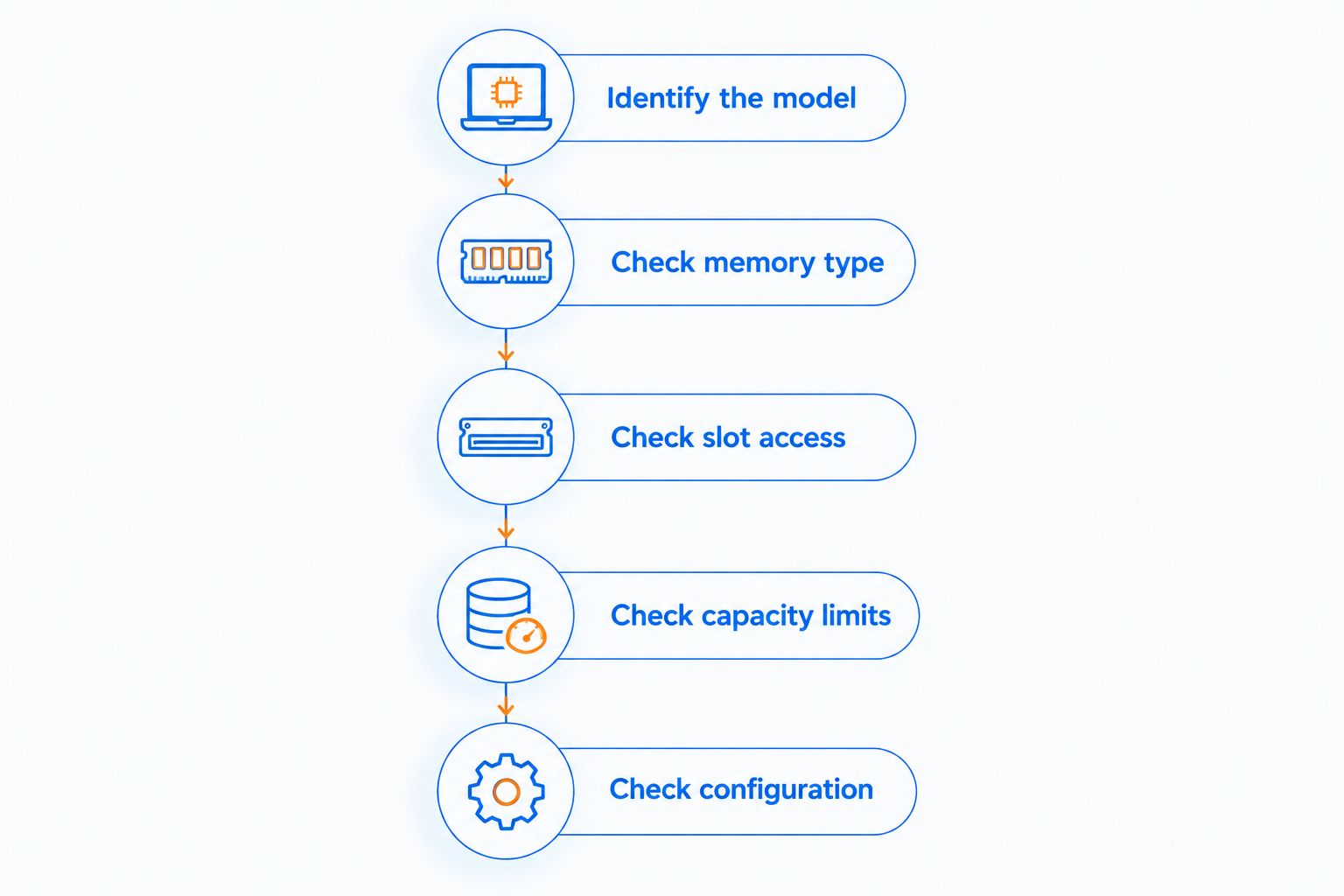
Follow this sequence rather than guessing from the case size:
- Identify the model. Find the exact model and configuration, then consult its manufacturer's specifications or service documentation.
- Check memory type. Confirm the required memory generation and whether the machine uses removable DIMMs, SO-DIMMs, or soldered memory.
- Check slot access. Establish how many slots exist, which are occupied, and whether the manufacturer provides an upgrade procedure.
- Check capacity limits. Verify the maximum supported total and any per-slot restrictions before choosing modules.
- Check configuration. Confirm supported speeds and module combinations, then follow the manufacturer's installation instructions.
The generation and physical format are separate checks. DDR4 and DDR5 are not interchangeable. A desktop DIMM and a laptop-style SO-DIMM are different physical formats, even when their capacities match.
Gaming and More lists a 16GB DDR4 RAM kit specified as 2×8GB, 3000MHz, and CL16. Its stated capacity is relevant to the starting recommendation, but those specifications alone do not establish that it fits your mini PC.
Check the required module format before treating that kit as an upgrade candidate. The advantage is a stated matched capacity and configuration; the limitation is that compatibility depends on the computer, not the product category name.
Is 16GB or 32GB better for integrated graphics?
32GB gives integrated graphics systems more capacity headroom than 16GB, but capacity and bandwidth are different issues. Integrated graphics uses system RAM. The memory configuration therefore matters alongside the total installed amount.
Check the manufacturer's channel and module guidance. A supported dual-channel configuration provides more memory bandwidth than an equivalent single-channel configuration, but the performance effect depends on the processor, game, and settings. Do not assume a particular frame-rate gain.
For DDR5 systems, module architecture adds another distinction: internal subchannels do not mean that every one-module configuration provides the same total bandwidth as a supported two-module configuration. Follow the exact system's documentation rather than applying a DDR4 rule without checking.
Prioritize a supported memory configuration and suitable graphics hardware, then choose enough capacity for your workload.
Will upgrading from 16GB to 32GB fix stuttering?
32GB helps memory-related stuttering only when 16GB is insufficient for the workload. Stuttering also has other causes, including shader compilation, graphics limitations, storage activity, and thermal constraints. A RAM upgrade does not address all of them.
On Windows, open Task Manager and inspect memory use while your usual game and background apps are running. Look for repeated pressure on available memory rather than judging from an idle desktop. A high usage reading alone is not proof of a problem because Windows also uses memory for caching.
Compare the same gameplay conditions before and after closing unnecessary applications. If the symptoms persist without memory pressure, investigate other constraints before buying RAM. Leave the paging-file configuration at the operating system's recommended setting unless you have a specific technical reason to change it.
FAQ
How much RAM does a mini gaming PC need in 2026?
16GB is a practical starting recommendation; 32GB suits heavier gaming and multitasking workloads. Check your games' recommended requirements and the computer's graphics capability before buying.
Is 8GB RAM enough for a mini gaming PC?
8GB can suit games with modest memory requirements, but it leaves limited headroom for other applications and integrated graphics. Verify the games you play rather than assuming every gaming-labelled PC is suitable.
Should I buy 16GB or 32GB for a mini gaming PC?
16GB suits a verified gaming-focused workload; 32GB provides more capacity for demanding games, mods, and concurrent applications. Neither capacity compensates for unsuitable graphics hardware.
Does a mini gaming PC need 64GB RAM?
64GB needs a specific workload-based justification, such as memory-heavy professional applications alongside gaming. Unused memory capacity does not improve performance by itself.
Can I install desktop RAM in a mini PC?
Desktop RAM fits only when the mini PC supports that exact physical format and memory generation. Check the manufacturer's documentation because some systems require SO-DIMMs or use soldered memory.
Does integrated graphics use the PC's RAM?
Integrated graphics uses system RAM, so memory capacity and bandwidth both matter. Dedicated graphics generally has separate video memory, which a system RAM upgrade does not increase.
Will more RAM increase my gaming frame rate?
More RAM helps when insufficient memory is limiting the workload; it does not guarantee higher frame rates. Check memory pressure and other hardware constraints before upgrading.
Is a matched RAM kit guaranteed to work in my mini PC?
A matched RAM kit is not a compatibility guarantee. Confirm the supported generation, physical format, capacity, speed, and module configuration for your exact computer.
One last thing
Take a photo of the model label before shopping for memory. The exact computer model is more useful than a description such as mini gaming PC, and it helps you find the correct service documentation.
For Gaming and More gaming gear purchases, make compatibility your final checkpoint. Enough RAM in the wrong format is still the wrong upgrade.


